 hahwul/a2sv
Escaneo automático de vulnerabilidades SSL


Escaneo automático de vulnerabilidades SSL.
HeartBleed, CCS Injection, SSLv3 POODLE, FREAK... etc
A. Vulnerabilidades compatibles
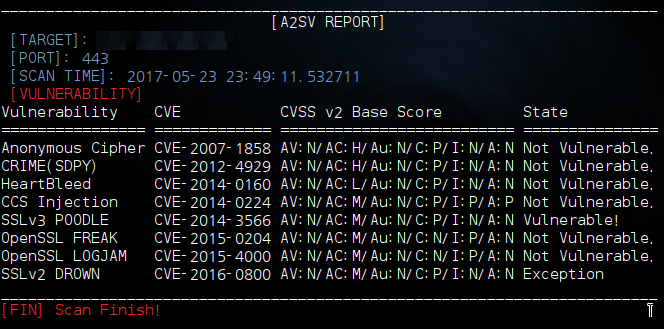
- CVE-2007-1858] Anonymous Cipher
- CVE-2012-4929] CRIME(SPDY)
- CVE-2014-0160] CCS Injection
- CVE-2014-0224] HeartBleed
- CVE-2014-3566] SSLv3 POODLE
- CVE-2015-0204] FREAK Attack
- CVE-2015-4000] LOGJAM Attack
- CVE-2016-0800] SSLv2 DROWN
B. Plan de desarrollo
- PLAN] SSL ACCF
- PLAN] SSL Information Analysis
A. Descargar (clonar) y descomprimir A2SV
$ git clone https://github.com/hahwul/a2sv.git
$ cd a2sv
B. Instalar paquetes de Python / OpenSSL
$ pip install argparse
$ pip install netaddr

$ apt-get install openssl
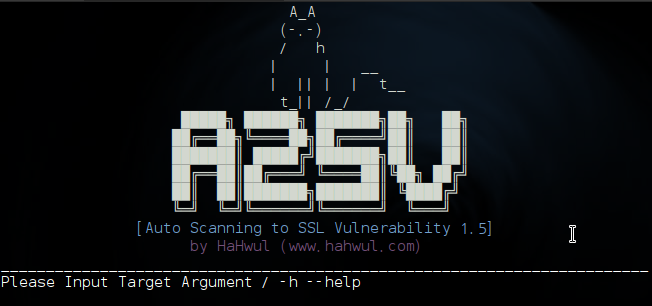
C. Ejecutar A2SV
$ python a2sv.py -h
usage: a2sv [-h] [-t TARGET] [-tf TARGETFILE] [-p PORT] [-m MODULE]
[-d DISPLAY] [-u] [-v]

optional arguments:
  -h, --helpshow this help message and exit
  -t TARGET, --target TARGET
Target URL and IP Address
 $ e.g -t 127.0.0.1
  -tf TARGETFILE, --targetfile TARGETFILE
Target file(list) URL and IP Address
 $ e.g -tf ./target.list
  -p PORT, --port PORT  Custom Port / Default: 443
 $ e.g -p 8080
  -m MODULE, --module MODULE
Check SSL Vuln with one module
[anonymous]: Anonymous Cipher
[crime]: https://raw.githubusercontent.com/hahwul/a2sv/master/Crime(SPDY)
[heart]: https://raw.githubusercontent.com/hahwul/a2sv/master/HeartBleed
[ccs]: CCS Injection
[poodle]: SSLv3 POODLE
[freak]: OpenSSL FREAK
[logjam]: OpenSSL LOGJAM
[drown]: SSLv2 DROWN
  -d DISPLAY, --display DISPLAY
Display output
[Y,y] Show output
[N,n] Hide output
  -o OUT, --out OUT Result write to file
 $ e.g -o /home/yourdir/result.txt
  -u, --update  Update A2SV (GIT)
  -v, --version Show Version
[Escaneo de vulnerabilidad SSL]
$ python a2sv.py -t 127.0.0.1

$ python a2sv.py -t 127.0.0.1 -m heartbleed

$ python a2sv.py -t 127.0.0.1 -d n

$ python a2sv.py -t 127.0.0.1 -p 8111

$ python a2sv.py -tf target_list.txt
[Actualizar A2SV]
$ python a2sv.py -u

$ python a2sv.py --update
La respuesta es muy lenta porque es un proyecto del que no pude ocuparme adecuadamente.
¡Me gusta el café! Soy adicto al café.


- poodle : https://github.com/supersam654/Poodle-Checker

- heartbleed : https://github.com/sensepost/heartbleed-poc

- ccs injection : https://github.com/Tripwire/OpenSSL-CCS-Inject-Test

- freak : https://gist.github.com/martinseener/d50473228719a9554e6a
