
Laboratorios gratuitos prácticos de forense digital para estudiantes y docentes


Para comentarios o para informar sobre su uso de los materiales del curso, comuníquese por correo electrónico a wxu en ubalt punto edu. Su colaboración es sinceramente valorada
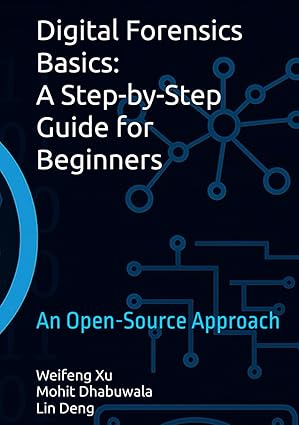
Las diapositivas de PowerPoint están disponibles en las dos primeras secciones de la Tabla de Contenidos.
Los miembros del profesorado son elegibles para una copia de cortesía. Para solicitar el PDF, por favor contácteme desde su dirección de correo electrónico institucional e incluya un enlace a su perfil de profesor o página web universitaria.
Habilidades básicas de informática para informática forense
Informática y Forense Digital (actualizado en oct. 2021)
Por favor cite nuestro artículo:
W. Xu, L. Deng, and D. Xu, "Hacia el diseño de materiales instructivos compartidos de informática forense digital," en Actas de la 46.ª Conferencia Anual Internacional de Software y Aplicaciones Informáticas (COMPSAC 2022), pp. 117-122, julio de 2022. (Presentación en video)
o en BibTeX
@inproceedings{xu2022forensics,
title={Hacia el diseño de materiales instructivos compartidos de informática forense digital},
author={Xu, Weifeng and Deng, Lin, and Xu, Dianxiang},
booktitle={46st Annual International Computer Software and Applications Conference (COMPSAC 2022)},
volume={1},
pages={117--122},
year={2022},
organization={IEEE}
}
La Kali VM personalizada = Kali (2021.4) + herramientas utilizadas para completar la mayoría de los laboratorios listados arriba (excepto el caso de fuga de datos p2p)
El siguiente script instalará las herramientas necesarias para completar la mayoría de los laboratorios listados arriba (excepto el caso de fuga de datos p2p, que tiene su propio script descrito en las PPT). Por favor, háganos saber si necesita que agreguemos más herramientas al script.
Instalar Virtualbox
Instalar Kali 2021.4. Notas: Sugerimos configurar el tamaño del disco de la Kali VM en 80G porque el tamaño de cada imagen de caso de fuga es 30G+
Ejecute un script de instalación de herramientas instrucciones, o simplemente puede seguir los comandos a continuación``` wget https://raw.githubusercontent.com/frankwxu/digital-forensics-lab/main/Help/tool-install-zsh.sh chmod +x tool-install-zsh.sh ./tool-install-zsh.sh
- Herramientas [instaladas](#Tools). Tenga en cuenta que la mayoría de los comandos para herramientas se pueden ejecutar de forma global. Ahora puede omitir la mayoría de los pasos de instalación de herramientas en los PPTs.
### Método 3: Usando un contenedor Docker basado en Ubuntu 22.04 LTS (añadido en 09/23, puede necesitar más pruebas, reporte cualquier problema por favor)
- La máquina host del contenedor Docker es Ubuntu 22.04 LTS.
- El contenedor está construido sobre Ubuntu 22.04 LTS también.
- Todas las herramientas están preinstaladas en el contenedor Ubuntu.
- Puede seguir el tutorial [Docker for Digital Forensic Investigation](https://raw.githubusercontent.com/frankwxu/digital-forensics-lab/main/Help/Docker_4_Digital_Forensics.pptx)
---
### Investigando la Fuga de Datos de NIST
El [estudio de caso](https://github.com/frankwxu/digital-forensics-lab/tree/main/NIST_Data_Leakage_Case) consiste en investigar una imagen que involucra robo de propiedad intelectual. El estudio incluye
- Un caso de estudio grande y complejo creado por NIST. Puede acceder al [Escenario, imágenes DD/Encase](https://cfreds-archive.nist.gov/data_leakage_case/data-leakage-case.html). También puede encontrar las [soluciones](https://cfreds-archive.nist.gov/data_leakage_case/leakage-answers.pdf) en su sitio web.
- 14 laboratorios/temas prácticos en forense digital
**Temas Cubiertos**
| Labs | Topics Covered (Command Line) | Python Version |
| ------ | ---------------------------------------------------------------------------------------------------------------------------- | ---------------------------------------------------------------------------------------- |
| Lab 0 | [Environment Setting Up](https://github.com/frankwxu/digital-forensics-lab/blob/HEAD/NIST_Data_Leakage_Case/NIST_Data_Leakage_00_Env_Setting.pptx) | |
| Lab 1 | [Windows Registry](https://github.com/frankwxu/digital-forensics-lab/blob/HEAD/NIST_Data_Leakage_Case/NIST_Data_Leakage_01_Registry.pptx) | |
| Lab 2 | [Windows Event and XML](https://github.com/frankwxu/digital-forensics-lab/blob/HEAD/NIST_Data_Leakage_Case/NIST_Data_Leakage_02._WinEvt_XML.pptx) | [Python version](https://github.com/frankwxu/digital-forensics-lab/blob/HEAD/NIST_Data_Leakage_Case/NIST_Data_Leakage_02._WinEvt_XML_Python.pptx) |
| Lab 3 | [Web History and SQL](https://github.com/frankwxu/digital-forensics-lab/blob/HEAD/NIST_Data_Leakage_Case/NIST_Data_Leakage_03_WebHistory_SQL.pptx) | [Python version](https://github.com/frankwxu/digital-forensics-lab/blob/HEAD/NIST_Data_Leakage_Case/NIST_Data_Leakage_03_WebHistory_SQL_Python.pptx) |
| Lab 4 | [Email Investigation](https://github.com/frankwxu/digital-forensics-lab/blob/HEAD/NIST_Data_Leakage_Case/NIST_Data_Leakage_04_Email_USB.pptx) | [Python version](https://github.com/frankwxu/digital-forensics-lab/blob/HEAD/NIST_Data_Leakage_Case/NIST_Data_Leakage_04_Email_USB_Python.pptx) |
| Lab 5 | [File Change History and USN Journal](https://github.com/frankwxu/digital-forensics-lab/blob/HEAD/NIST_Data_Leakage_Case/NIST_Data_Leakage_05_USNJournaling.pptx) | |
| Lab 6 | [Network Evidence and shellbag](https://github.com/frankwxu/digital-forensics-lab/blob/HEAD/NIST_Data_Leakage_Case/NIST_Data_Leakage_06_Network_Shellbag_Jumplist.pptx) | |
| Lab 7 | [Network Drive and Cloud](https://github.com/frankwxu/digital-forensics-lab/blob/HEAD/NIST_Data_Leakage_Case/NIST_Data_Leakage_07_NetworkDrive_Cloud.pptx) | |
| Lab 8 | [Master File Table ($MFT) and Log File ($logFile) Analysis](https://github.com/frankwxu/digital-forensics-lab/blob/HEAD/NIST_Data_Leakage_Case/NIST_Data_Leakage_08_CD_$MFT.pptx) | |
| Lab 9 | [Windows Search History](https://github.com/frankwxu/digital-forensics-lab/blob/HEAD/NIST_Data_Leakage_Case/NIST_Data_Leakage_08_CD_$MFT.pptx) | |
| Lab 10 | [Windows Volume Shadow Copy Analysis/SQL database carving](https://github.com/frankwxu/digital-forensics-lab/blob/HEAD/NIST_Data_Leakage_Case/NIST_Data_Leakage_10_Vol_Shadow_Copy.pptx) | |
| Lab 11 | [Recycle Bin and Anti-Forensics](https://github.com/frankwxu/digital-forensics-lab/blob/HEAD/NIST_Data_Leakage_Case/NIST_Data_Leakage_11_RecycleBin_AntiForensics.pptx) | |
| Lab 12 | [Data Carving](https://github.com/frankwxu/digital-forensics-lab/blob/HEAD/NIST_Data_Leakage_Case/NIST_Data_Leakage_12_CD-R_Data_Carving.pptx) | |
| Lab 13 | [Crack Windows Passwords](https://github.com/frankwxu/digital-forensics-lab/blob/HEAD/NIST_Data_Leakage_Case/NIST_Data_Leakage_13_Crack_Win10_Login_Password.pptx) | |
---
### Investigando la Fuga de Datos P2P
El [estudio de caso de fuga de datos P2P](https://github.com/frankwxu/digital-forensics-lab/tree/main/NIST_Data_Leakage_Case) está diseñado para ayudar a los estudiantes a aplicar diversas técnicas forenses para investigar el robo de propiedad intelectual que involucra P2P. El estudio incluye
- Un caso grande y complejo que involucra un cliente uTorrent. El caso es similar al laboratorio de fuga de datos de NIST. Sin embargo, proporciona una línea de tiempo más clara y detallada.
- Evidencia sólida con explicaciones. Cada evidencia asociada con cada actividad se explica junto con la línea de tiempo.
- 10 laboratorios/temas prácticos en forense digital
**Temas Cubiertos**
| Labs | Topics Covered | Size of PPTs |
| ------ | ----------------------------------------------------------------------------------------------------- | ------------ |
| Lab 0 | [Lab Environment Setting Up](https://github.com/frankwxu/digital-forensics-lab/blob/HEAD/P2P_Leakage/Presentation/ID00_Lab_Setup.pptx) | 4M |
| Lab 1 | [Disk Image and Partitions](https://github.com/frankwxu/digital-forensics-lab/blob/HEAD/P2P_Leakage/Presentation/ID01_Disk_Image_and_Partitions.pptx) | 5M |
| Lab 2 | [Windows Registry and File Directory](https://github.com/frankwxu/digital-forensics-lab/blob/HEAD/P2P_Leakage/Presentation/ID02_Registry_and_File_Directory.pptx) | 15M |
| Lab 3 | [MFT Timeline](https://github.com/frankwxu/digital-forensics-lab/blob/HEAD/P2P_Leakage/Presentation/ID03_MFT_Timeline.pptx) | 6M |
| Lab 4 | [USN Journal Timeline](https://github.com/frankwxu/digital-forensics-lab/blob/HEAD/P2P_Leakage/Presentation/ID03_MFT_Timeline.pptx) | 3M |
| Lab 5 | [uTorrent Log File](https://github.com/frankwxu/digital-forensics-lab/blob/HEAD/P2P_Leakage/Presentation/ID05_uTorrent_Log_File.pptx) | 9M |
| Lab 6 | [File Signature](https://github.com/frankwxu/digital-forensics-lab/blob/HEAD/P2P_Leakage/Presentation/ID06_File_Signature.pptx) | 8M |
| Lab 7 | [Emails](https://github.com/frankwxu/digital-forensics-lab/blob/HEAD/P2P_Leakage/Presentation/ID07_Emails.pptx) | 9M |
| Lab 8 | [Web History](https://github.com/frankwxu/digital-forensics-lab/blob/HEAD/P2P_Leakage/Presentation/ID08_Web_History.pptx) | 11M |
| Lab 9 | [Website Analysis](https://github.com/frankwxu/digital-forensics-lab/blob/HEAD/P2P_Leakage/Presentation/ID09_Website_Analysis.pptx) | 2M |
| Lab 10 | [Timeline (Summary)](https://github.com/frankwxu/digital-forensics-lab/blob/HEAD/P2P_Leakage/Presentation/Questions.docx) | 13K |
---
### Investigando la Posesión Ilegal de Imágenes
El [estudio de caso](https://github.com/frankwxu/digital-forensics-lab/tree/main/Illegal_Possession_Images) consiste en investigar la posesión ilegal de imágenes de Rinoceronte. Esta imagen fue contribuida por el Dr. Golden G. Richard III, y se utilizó originalmente en el DFRWS 2005 RODEO CHALLENGE. NIST aloja la [imagen DD USB](https://cfreds-archive.nist.gov/dfrws/Rhino_Hunt.html). También hay una copia de la imagen disponible en el repositorio.
**Temas Cubiertos**
| Labs | Topics Covered | Size of PPTs |
| ----- | --------------------------------------------------------------------------------------------------------------------------------------------- | ------------ |
| Lab 1 | [Review HTTP Analysis using Wireshark (text)](https://github.com/frankwxu/digital-forensics-lab/blob/HEAD/Illegal_Possession_Images/HTTP_Wireshark_Forensics_1_text.pptx) | 3M |
| Lab 2 | [Rhion Possession Investigation 1: File recovering](https://github.com/frankwxu/digital-forensics-lab/blob/HEAD/Illegal_Possession_Images/Rhion_Possession_1_File_Recovering.pptx) | 9M |
| Lab 3 | [Rhion Possession Investigation 2: Steganography](https://github.com/frankwxu/digital-forensics-lab/blob/HEAD/Illegal_Possession_Images/Rhion_Possession_2_Steganography.pptx) | 4M |
| Lab 4 | [Rhion Possession Investigation 3: Extract Evidence from FTP Traffic](https://github.com/frankwxu/digital-forensics-lab/blob/HEAD/Illegal_Possession_Images/Rhion_Possession_3_FTP_Traffic_crackzip.pptx) | 3M |
| Lab 5 | [Rhion Possession Investigation 4: Extract Evidence from HTTP Traffic](https://github.com/frankwxu/digital-forensics-lab/blob/HEAD/Illegal_Possession_Images/Rhion_Possession_4_HTTP_Traffic.pptx) | 5M |
---
### Investigando el Acoso por Correo Electrónico
El [estudio de caso](https://github.com/frankwxu/digital-forensics-lab/tree/main/Email_Harassment) consiste en investigar un correo electrónico de acoso enviado por un estudiante a un miembro de la facultad. El caso está alojado por digitalcorpora.org. Puede acceder a la [descripción del escenario](https://digitalcorpora.org/corpora/scenarios/nitroba-university-harassment-scenario) y al [tráfico de red](http://downloads.digitalcorpora.org/corpora/scenarios/2008-nitroba/nitroba.pcap) desde su sitio web. El repositorio solo proporciona las instrucciones de laboratorio.
**Temas Cubiertos**
| Labs | Topics Covered | Size of PPTs |
| ----- | ---------------------------------------------------------------------------------------------------------------- | ------------ |
| Lab 0 | [Investigating Harassment Email using Wireshark](https://github.com/frankwxu/digital-forensics-lab/blob/HEAD/Email_Harassment/0_Investigate_Harassment_Email_Wireshark.pptx) | 3M |
| Lab 1 | [t-shark Forensic Introduction](https://github.com/frankwxu/digital-forensics-lab/blob/HEAD/Email_Harassment/1_tshark_forensics_Introduction.pptx) | 7M |
| Lab 2 | [Investigating Harassment Email using t-shark](https://github.com/frankwxu/digital-forensics-lab/blob/HEAD/2_Investigate_Harassment_Email_TShark.pptx) | 2M |
---
### Investigando la Transferencia Ilegal de Archivos
El [estudio de caso](https://github.com/frankwxu/digital-forensics-lab/tree/main/Illegal_File_Transferring_Memory_Forensics) tiene como objetivo examinar la memoria de la computadora para reconstruir una línea de tiempo de transferencias de datos no autorizadas. El escenario involucra la transferencia ilícita de archivos confidenciales desde un servidor a un dispositivo USB.
**Temas Cubiertos**
| Labs | Topics Covered | Size of PPTs |
| ------ | -------------------------------------------------------------- | ------------ |
| Lab 0 | [Memory Forensics](https://github.com/frankwxu/digital-forensics-lab/blob/HEAD/Illegal_File_Transferring_Memory_Forensics) | 11M |
| part 1 | Understand the Suspect and Accounts | |
| part 2 | Understand the Suspect’s PC | |
| part 3 | Network Forensics | |
| part 4 | Investigate Command History | |
| part 5 | Investigate Suspect’s USB | |
| part 6 | Investigate Internet Explorer History | |
| part 7 | Investigate File Explorer History | |
| part 8 | Timeline Analysis | |
---
### Investigando un Caso de Hacking
El [estudio de caso](https://github.com/frankwxu/digital-forensics-lab/tree/main/NIST_Hacking_Case), que incluye una imagen de disco proporcionada por [NIST](https://cfreds-archive.nist.gov/Hacking_Case.html), consiste en investigar a un hacker que intercepta el tráfico de Internet dentro del alcance de Puntos de Acceso Inalámbrico.
**Temas Cubiertos**
| Labs | Topics Covered | Size of PPTs |
| ----- | --------------------------------------------------------- | ------------ |
| Lab 0 | [Hacking Case](https://github.com/frankwxu/digital-forensics-lab/blob/HEAD/NIST_Hacking_Case/NIST_Hacking_Case.pptx) | 8M |
---
### Investigando el Ataque del Gusano Morris
El estudio de caso es una investigación del [Ataque del Gusano Morris](https://seedsecuritylabs.org/Labs_20.04/Networking/Morris_Worm/). Estamos utilizando la VM proporcionada por [SeedLab](https://seedsecuritylabs.org/labsetup.html). El objetivo del laboratorio es encontrar toda la evidencia relacionada con el ataque del gusano Morris.
**Temas Cubiertos**
| Labs | Topics Covered | Size of PPTs |
| ----- | ---------------------------------------------------------------------- | ------------ |
| Lab 0 | [Morris Worm Attack](https://github.com/frankwxu/digital-forensics-lab/blob/HEAD/Morris_Worm/Morris_Attack.pptx) | 7M |
| Lab 1 | [Investigating Morris Worm Attack](https://github.com/frankwxu/digital-forensics-lab/blob/HEAD/Morris_Worm/Morris_Forensics.pptx) | 2M |
---
### Investigando el Timbre Eufy
Este estudio de caso examina el análisis forense de un timbre Eufy y el sistema HomeBase utilizando técnicas avanzadas de extracción, incluyendo el método chip-off. El proceso comienza con el desmontaje, chip-off, adquisición de imagen y concluye con el análisis. Se analizan directorios clave, como aquellos que contienen grabaciones de cámara, bases de datos SQLite y varios registros, para extraer evidencia. Este enfoque ayuda a reconstruir líneas de tiempo, identificar evidencia de interacciones del usuario y actividad del sistema, y proporciona información valiosa para investigaciones de seguridad. Tenga en cuenta que este estudio se centra en HomeBase 2, pero la versión más reciente es HomeBase 3.
**Imágenes eMMC**
- [Door Bell eMMC Image](https://drive.google.com/file/d/1H2pHr2IsgaJrRvuJSIa5Cujz5orWR4dy/view?usp=sharing)
**Temas Cubiertos**
| Labs | Topics Covered |
| ----- | ----------------------------------------------------------------------------------------------------- |
| Lab 0 | [Doorbell Introduction](https://github.com/frankwxu/digital-forensics-lab/blob/HEAD/Eufy_Doorbell/PPTs/0_Eufy_Doorbell_Introduction.pptx) |
| Lab 1 | [Doorbell Scenario Simulation](https://github.com/frankwxu/digital-forensics-lab/blob/HEAD/Eufy_Doorbell/PPTs/0_Eufy_Doorbell_Introduction.pptx) |
| Lab 2 | [Doorbell Teardown Chip-off Image Acquisition](https://github.com/frankwxu/digital-forensics-lab/blob/HEAD/Eufy_Doorbell/PPTs/0_Eufy_Doorbell_Introduction.pptx) |
| Lab 3 | [Doorbell Image Analysis and Mounting](https://github.com/frankwxu/digital-forensics-lab/blob/HEAD/Eufy_Doorbell/PPTs/0_Eufy_Doorbell_Introduction.pptx) |
| Lab 4 | [Doorbell Evidence Extraction](https://github.com/frankwxu/digital-forensics-lab/blob/HEAD/Eufy_Doorbell/PPTs/0_Eufy_Doorbell_Introduction.pptx) |
| Lab 5 | [Doorbell p2p Communication Log](https://github.com/frankwxu/digital-forensics-lab/blob/HEAD/Eufy_Doorbell/PPTs/0_Eufy_Doorbell_Introduction.pptx) |
| Lab 6 | [Doorbell Daily(Sec) Logo](https://github.com/frankwxu/digital-forensics-lab/blob/HEAD/Eufy_Doorbell/PPTs/0_Eufy_Doorbell_Introduction.pptxx) |
| Lab 7 | [Doorbell Analysing Camera Directory](https://github.com/frankwxu/digital-forensics-lab/blob/HEAD/Eufy_Doorbell/PPTs/0_Eufy_Doorbell_Introduction.pptx) |
| Lab 8 | [Doorbell Analysing sqliteDirectory](https://github.com/frankwxu/digital-forensics-lab/blob/HEAD/Eufy_Doorbell/PPTs/0_Eufy_Doorbell_Introduction.pptx) |
---
### Investigando el Echo Show 8
El estudio de caso describe el uso de la técnica chip-off para extraer evidencia de un dispositivo Amazon Echo Show. Se producen e insertan diferentes tipos de evidencia en el Echo Show 8 (2da generación). El proceso de investigación incluye la utilización de un enfoque de ingeniería inversa para recuperar la evidencia implantada de la eMMC del dispositivo Echo Show.
**Imágenes eMMC**
- [Echo Show eMMC Image](https://miya.teracloud.jp/share/11d1e631cf6f8456)
- [Echo Show Userdata Partition Image](https://miya.teracloud.jp/share/11d15342aae11912)
**Temas Cubiertos**
| Labs | Topics Covered | Lab Data |
| --------- | ------------------------------------------------------------------------------------------------------------------ | --------------------------------------- |
| Lab 0 | [Echo Show Introduction](https://github.com/frankwxu/digital-forensics-lab/blob/HEAD/Echo_Device/ppts/0_Echo_Show_Introduction.pptx) | |
| Lab 1 | [Echo Show Evidence Planting](https://github.com/frankwxu/digital-forensics-lab/blob/HEAD/Echo_Device/ppts/1_Echo_Show_Evidence_Planting.pptx) | |
| Lab 2 | [Device Teardown and eMMC Chip-off](https://github.com/frankwxu/digital-forensics-lab/blob/HEAD/Echo_Device/ppts/2_Device_Teardown_and_eMMC_Chip-off.pptx) | |
| Lab 3 | [Image Acquisition and Mounting](https://github.com/frankwxu/digital-forensics-lab/blob/HEAD/Echo_Device/ppts/3_Image_Acquisition_and_Mounting.pptx) | |
| Lab 4.1.1 | [Specifications: Device and OS Info](https://github.com/frankwxu/digital-forensics-lab/blob/HEAD/Echo_Device/ppts/4_1_1_Specifications%20_Device_and_OS_Info.pptx) | [link](https://github.com/frankwxu/digital-forensics-lab/blob/HEAD/Echo_Device/lab_data/Lab_4_1_1) |
| Lab 4.1.2 | [Specifications: User info](https://github.com/frankwxu/digital-forensics-lab/blob/HEAD/Echo_Device/ppts/4_1_2_Specifications%20User_info.pptx) | [link](https://github.com/frankwxu/digital-forensics-lab/blob/HEAD/Echo_Device/lab_data/Lab_4_1_2) |
| Lab 4.1.3 | [Specifications: Network Connectivity Info](https://github.com/frankwxu/digital-forensics-lab/blob/HEAD/Echo_Device/ppts/4_1_3_Specifications_Network_Connectivity_Info.pptx) | [link](https://github.com/frankwxu/digital-forensics-lab/blob/HEAD/Echo_Device/lab_data/Lab_4_1_3) |
| Lab 4.2.1 | [Web Activity](https://github.com/frankwxu/digital-forensics-lab/blob/HEAD/Echo_Device/ppts/4_2_1_Web_Activity.pptx) | [link](https://github.com/frankwxu/digital-forensics-lab/blob/HEAD/Echo_Device/lab_data/Lab_4_2_1) |
| Lab 4.2.2 | [Phone Communication](https://github.com/frankwxu/digital-forensics-lab/blob/HEAD/Echo_Device/ppts/4_2_2_Phone_Communication.pptx) | [link](https://github.com/frankwxu/digital-forensics-lab/blob/HEAD/Echo_Device/lab_data/Lab_4_2_2) |
| Lab 4.3.1 | [Multimedia: Photos and related Data](https://github.com/frankwxu/digital-forensics-lab/blob/HEAD/Echo_Device/ppts/4_3_1_Multimedia_Photos_and_Related_Data.pptx) | [link](https://github.com/frankwxu/digital-forensics-lab/blob/HEAD/Echo_Device/lab_data/Lab_4_3_1) |
| Lab 4.3.2 | [Multimedia: Videos and related Data](https://github.com/frankwxu/digital-forensics-lab/blob/HEAD/Echo_Device/ppts/4_3_2_Multimedia_Videos_and_Related_Data.pptx) | [link](https://github.com/frankwxu/digital-forensics-lab/blob/HEAD/Echo_Device/lab_data/Lab_4_3_3) |
| Lab 4.3.3 | [Multimedia: Audio and related Data](https://github.com/frankwxu/digital-forensics-lab/blob/HEAD/Echo_Device/ppts/4_3_3_Multimedia_Audio_and_Related_Data.pptx) | [link](https://github.com/frankwxu/digital-forensics-lab/blob/HEAD/Echo_Device/lab_data/Lab_4_3_3) |
---
### Investigando Android 10
La imagen fue creada por Joshua Hickman y está alojada por [digitalcorpora](https://digitalcorpora.org/corpora/cell-phones/android-10).| Laboratorios | Temas Cubiertos | Tamaño de PPTs |
| --------------- | ------------------------------------------------------------------------------------------------------- | -------------- |
| Lab 0 | [Introducción Pixel 3](https://github.com/frankwxu/digital-forensics-lab/blob/HEAD/Android10/0_Intro_Pixel3_Android10.pptx) | 3M |
| Lab 1 | [Imagen Pixel 3](https://github.com/frankwxu/digital-forensics-lab/blob/HEAD/Android10/1_Pixel3_Image.pptx) | 2M |
| Lab 2 | [Dispositivo Pixel 3](https://github.com/frankwxu/digital-forensics-lab/blob/HEAD/Android10/2_Pixel3_Device_Investigation.pptx) | 4M |
| Lab 3 | [Configuración del Sistema Pixel 3](https://github.com/frankwxu/digital-forensics-lab/blob/HEAD/Android10/3_Pixel3_System_settings.pptx) | 5M |
| Lab 4 | [Resumen: Ciclo de Vida de una App](https://github.com/frankwxu/digital-forensics-lab/blob/HEAD/Android10/4_Overivew_App_Life_Cycle.pptx) | 11M |
| Lab 5.1.1 | [Investigaciones de Apps AOSP: Mensajería](https://github.com/frankwxu/digital-forensics-lab/blob/HEAD/Android10/5_1_1_AOSP_App_Investigations_Messaging.pptx) | 4M |
| Lab 5.1.2 | [Investigaciones de Apps AOSP: Contactos](https://github.com/frankwxu/digital-forensics-lab/blob/HEAD/Android10/5_1_2_AOSP_App_Investigations_Contacts.pptx) | 3M |
| Lab 5.1.3 | [Investigaciones de Apps AOSP: Calendario](https://github.com/frankwxu/digital-forensics-lab/blob/HEAD/Android10/5_2_1_GMS_App_Investigations_Messaging.pptx) | 1M |
| Lab 5.2.1 | [Investigaciones de Apps GMS: Mensajería](https://github.com/frankwxu/digital-forensics-lab/blob/HEAD/Android10/5_2_2_GMS_App_Investigations_Dialer.pptx) | 6M |
| Lab 5.2.2 | [Investigaciones de Apps GMS: Marcador](https://github.com/frankwxu/digital-forensics-lab/blob/HEAD/Android10/5_2_2_GMS_App_Investigations_Dialer.pptx) | 2M |
| Lab 5.2.3 | [Investigaciones de Apps GMS: Mapas](https://github.com/frankwxu/digital-forensics-lab/blob/HEAD/Android10/5_2_3_GMS_App_Investigations_Maps.pptx) | 8M |
| Lab 5.2.4 | [Investigaciones de Apps GMS: Fotos](https://github.com/frankwxu/digital-forensics-lab/blob/HEAD/Android10/5_2_4_GMS_App_Investigations_Photos.pptx) | 6M |
| Lab 5.3.1 | [Investigaciones de Apps de Terceros: Kik](https://github.com/frankwxu/digital-forensics-lab/blob/HEAD/Android10/5_3_1_Third_Party_App_Investigation_kik.pptx) | 4M |
| Lab 5.3.2 | [Investigaciones de Apps de Terceros: textnow](https://github.com/frankwxu/digital-forensics-lab/blob/HEAD/5_3_2_Third_Party_App_Investigation%20_textnow.pptx) | 1M |
| Lab 5.3.3 | [Investigaciones de Apps de Terceros: whatapp](https://github.com/frankwxu/digital-forensics-lab/blob/HEAD/Android10/5_3_3_Third_Party_App_Investigation_whatsapp.pptx) | 3M |
| Lab 6 | [Rooteo del Pixel 3](https://github.com/frankwxu/digital-forensics-lab/blob/HEAD/Android10/6_Pixel3_rooting.pptx) | 5M |
---
### Investigación del iPhone iOS 13.4.1
La imagen fue creada por Joshua Hickman y está alojada en [digitalcorpora](https://digitalcorpora.org/corpora/cell-phones/ios-13).
| Laboratorios | Temas Cubiertos | Tamaño de PPTs |
| ------------ | --------------------------------------------------------------------------- | -------------- |
| Lab 0 | [Introducción iPhone iOS 13](https://github.com/frankwxu/digital-forensics-lab/blob/HEAD/iOS/0_Intro_iPhone_iOS13.pptx) | 5M |
| Lab 1 | [Imagen iOS 13.4.1](https://github.com/frankwxu/digital-forensics-lab/blob/HEAD/iOS/1_iOS_13.4.1_Image.pptx) | 5M |
| Lab 2 | [Investigación del dispositivo iPhone](https://github.com/frankwxu/digital-forensics-lab/blob/HEAD/iOS/2_iPhone_Device_Investigation.pptx) | 3M |
| Lab 3 | [Configuración del Sistema iOS](https://github.com/frankwxu/digital-forensics-lab/blob/HEAD/iOS/3_iOS_System_settings.pptx) | 3M |
| Lab 4 | [Resumen del Ciclo de Vida de la App](https://github.com/frankwxu/digital-forensics-lab/blob/HEAD/iOS/4_Overivew_App_Life_Cycle.pptx) | 2M |
| Lab 5 | [Investigaciones de Mensajes](https://github.com/frankwxu/digital-forensics-lab/blob/HEAD/iOS/5_Messages_Investigations.pptx) | 3M |
| Lab 6 | [Investigaciones de Contactos](https://github.com/frankwxu/digital-forensics-lab/blob/HEAD/iOS/6_Contacts_Investigation.pptx) | 3M |
| Lab 7 | [Investigaciones de Calendario](https://github.com/frankwxu/digital-forensics-lab/blob/HEAD/iOS/7_Calender_Investigation.pptx) | 2M |
| Lab 8 | [Investigaciones de Safari](https://github.com/frankwxu/digital-forensics-lab/blob/HEAD/iOS/8_Safari_Investigation.pptx) | 3M |
| Lab 9 | [Investigaciones de Fotos](https://github.com/frankwxu/digital-forensics-lab/blob/HEAD/iOS/9_Photos_Investigation.pptx) | 7M |
| Lab 10 | [Investigaciones de KnowledgeC](https://github.com/frankwxu/digital-forensics-lab/blob/HEAD/iOS/10_KnowledgeC_Investigation.pptx) | 5M |
| Lab 11 | [Investigaciones de Salud\_](https://github.com/frankwxu/digital-forensics-lab/blob/HEAD/iOS/11_Health_Investigation.pptx) | 5M |
| Lab 12 | [Investigaciones de Ubicación](https://github.com/frankwxu/digital-forensics-lab/blob/HEAD/iOS/12_iOS_Location_Investigation.pptx) | 8M |
| Lab 13 | [Investigaciones de Cellebrite](https://github.com/frankwxu/digital-forensics-lab/blob/HEAD/iOS/13_Cellebrite_Investigation.pptx) | 12M |
| Lab 14 | [Investigaciones de Magnet Axiom](https://github.com/frankwxu/digital-forensics-lab/blob/HEAD/iOS/14_Magnet_Axiom_Investigation.pptx) | 13M |
| Lab 14 | [Investigaciones de Jailbreak](https://github.com/frankwxu/digital-forensics-lab/blob/HEAD/iOS/15_iOS_Jailbreak.pptx) | 6M |
---
### Investigación del Drone DJI
El conjunto de datos incluye archivos lógicos extraídos de un controlador DJI (dispositivo móvil) y una imagen de tarjeta SD utilizada por el dispositivo. El conjunto de datos del Drone fue creado por [VTO Labs](https://www.vtolabs.com/drone-forensics). El laboratorio cubre la investigación de GPS y la recuperación de imágenes en caché. Tenga en cuenta que es un borrador. Mejoraremos el laboratorio más adelante.
| Laboratorios | Temas Cubiertos | Tamaño de PPTs |
| ------------ | ---------------------------------------------------------------------------------------------------------- | -------------- |
| Lab 0 | [DJI Mavic Air Móvil](https://github.com/frankwxu/digital-forensics-lab/blob/HEAD/Drone_DJI_Mavic_Air/00_DJI_Mavic_Air_Mobile.pptx) | 13M |
| Lab 1 | [DJI Mavic Air MicroSD Raw](https://github.com/frankwxu/digital-forensics-lab/blob/HEAD/Drone_DJI_Mavic_Air/01_DJI_Mavic_Air_microSD_raw.pptx) | 2M |
| Lab 2 | [DJI Mavic Air MicroSD Formato Encase](https://github.com/frankwxu/digital-forensics-lab/blob/HEAD/Drone_DJI_Mavic_Air/02_DJI_Mavic_Air_microSD_encase.pptx) | 2M |
---
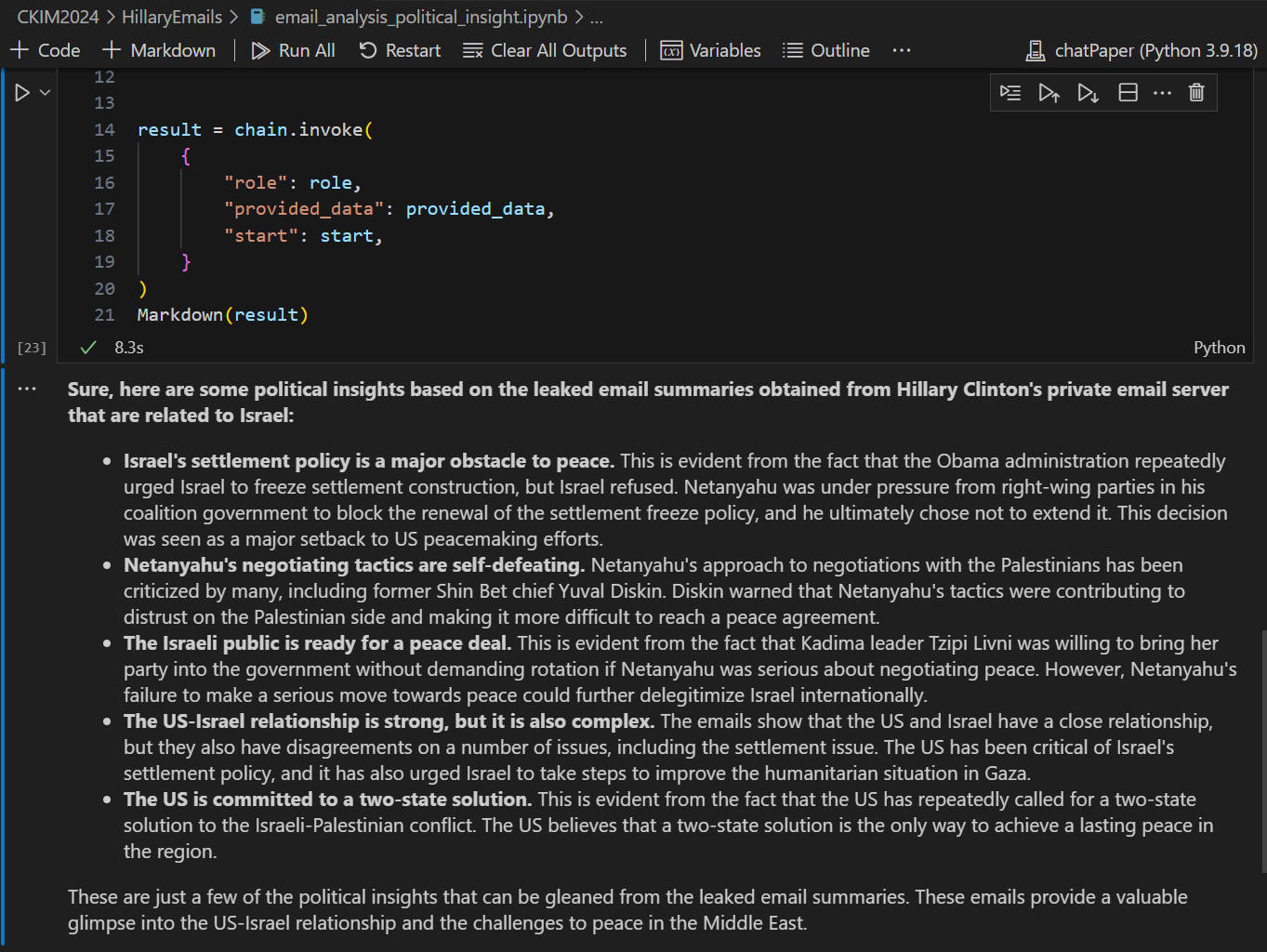
### Análisis de Perspectiva Política Aprovechando LLMs
El caso de estudio demuestra cómo aprovechar los Modelos de Lenguaje de Gran Escala para obtener perspectiva política basada en un conjunto de datos de correos electrónicos. El conjunto de datos que hemos utilizado en el caso de estudio es un conjunto de [correos electrónicos](https://github.com/benhamner/hillary-clinton-emails?tab=readme-ov-file) filtrados obtenidos del servidor de correo electrónico privado de Hillary Clinton.
El contexto de los correos electrónicos filtrados es un capítulo significativo en la historia política reciente de los Estados Unidos, que involucra preguntas sobre transparencia, seguridad y el manejo de información sensible. Durante el mandato de Hillary como Secretaria de Estado de los EE. UU. de 2009 a 2013, Hillary Clinton utilizó un servidor de correo electrónico privado para sus comunicaciones oficiales en lugar del sistema de correo electrónico oficial del Departamento de Estado. Ella declaró que esto se hizo por conveniencia, permitiéndole usar un solo dispositivo para correos electrónicos personales y oficiales.
El conjunto de datos de correos electrónicos filtrados del servidor de correo electrónico privado de Hillary Clinton es una colección completa de comunicaciones que cubre todo su mandato como Secretaria de Estado de 2009 a 2013. Incluye aproximadamente 30,000 correos electrónicos con una amplia gama de temas, desde comunicaciones diplomáticas oficiales hasta correspondencias personales. La publicación y el posterior análisis de estos correos electrónicos han jugado un papel crucial en debates políticos, investigaciones legales y discusiones públicas sobre transparencia y seguridad en las comunicaciones gubernamentales.
Nuestro conjunto de datos: [un conjunto de resúmenes de correos electrónicos](https://github.com/frankwxu/digital-forensics-lab/blob/HEAD/AI4Forensics/CKIM2024/HillaryEmails/results_email_summary.txt). Cada resumen de correo electrónico es una síntesis de un correo generado por Gemini a partir de un correo original en el [conjunto de datos de correos electrónicos filtrados](https://github.com/benhamner/hillary-clinton-emails?tab=readme-ov-file) original. Solo nos interesan los correos electrónicos que contienen la palabra clave "israel".
Nuestros resultados: [Código en Jupyter Notebook](https://github.com/frankwxu/digital-forensics-lab/blob/HEAD/AI4Forensics/CKIM2024/HillaryEmails/email_analysis_political_insight.ipynb).
Aquí hay algunas perspectivas políticas basadas en los resúmenes de correos electrónicos filtrados obtenidos del servidor de correo privado de Hillary Clinton que están relacionados con Israel: <img src="https://assets.kitploit.com/production/public/readmes/4937/0dbe56fcb554fa54546caa76420ea191f263eecbb0a246181488b6516bd9f267.jpg">
---
### Herramientas
| Nombre | Comando | Repositorio | Método de Instalación |
| ------------------------- | ----------------- | ---------------------------------------------------------------- | --------------------- |
| Wine | wine --version | https://source.winehq.org/git/wine.git/ | Personalizado |
| Vinetto | vinetto -h | https://github.com/AtesComp/Vinetto | Personalizado |
| imgclip | imgclip -h | https://github.com/Arthelon/imgclip | apt install |
| RegRipper | rip.pl -h | https://github.com/keydet89/RegRipper3.0 | Script personalizado |
| Windows-Prefetch-Parser | prefetch.py -h | https://github.com/PoorBillionaire/Windows-Prefetch-Parser.git | Personalizado |
| python-evtx | evtx_dump.py -h | https://github.com/williballenthin/python-evtx | apt install |
| libesedb-utils | esedbexport -h | https://github.com/libyal/libesedb | apt install |
| libpff | pffexport -h | https://github.com/libyal/libpff | apt install |
| USN-Record-Carver | usncarve.py -h | https://github.com/PoorBillionaire/USN-Record-Carver | apt install |
| USN-Journal-Parser | usn.py -h | https://github.com/PoorBillionaire/USN-Journal-Parser | apt install |
| time_decode | time_decode.py -h | https://github.com/digitalsleuth/time_decode | Git clone |
| analyzeMFT | analyzeMFT.py -h | https://github.com/dkovar/analyzeMFT | Script personalizado |
| libvshadow | vshadowinfo -h | https://github.com/libyal/libvshadow | Script personalizado |
| INDXParse | INDXParse.py - | | Script personalizado |
| carving sqlite .db | undark -h | https://github.com/inflex/undark.git | Script personalizado |
| stegdetect | stegdetect -V | | Script personalizado |
| stegbreak | stegbreak -V | | Script personalizado |
| stego-toolkit | jphide | | Script personalizado |
| jpsestego-toolkitek | jpseek | | Script personalizado |
| volatility-2 | vol.py -h | https://github.com/volatilityfoundation/volatility.git | Script personalizado |
| liblnk-utils | lnkinfo -h | | apt install |
| JLECmd | | https://f001.backblazeb2.com/file/EricZimmermanTools/JLECmd.zip | Git clone |
| recentfilecache-parser | | https://github.com/prolsen/recentfilecache-parser | |
| LogFileParser | | https://github.com/jschicht/LogFileParser.git | Git clone |
| UsnJrnl2Csv | | ttps://github.com/jschicht/UsnJrnl2Csv.git | Git clone |
- Otras herramientas instaladas mediante apt install
python3-pip, leafpad, terminator, sqlite3, tree, xmlstarlet, libhivex-bin, pasco, libhivex-bin, npm, binwalk, foremost, hashdeep, ewf-tools, nautilus
---
## Contribución
- IP del proyecto
- Dr. Frank Xu (Correo electrónico: fxu at ubalt dot edu)
- Dra. Debra L. Stanley
- Dr. Lin Deng; Universidad de Towson
- Dr. Wenbin Zhang; FIU
- Estudiantes:
- Eric Xu: Universidad de Maryland (LLM para Informática Forense Digital)
- Jeel Khatiwala (Evaluación de la Fiabilidad de la Evidencia Forense Digital Descubierta por LLMs)
- Mohit Dhabuwala (Manual forense de dispositivos móviles de código abierto)
- Daniel Addai ([CTF](https://github.com/frankwxu/digital-forensics-lab-p2))
- Sarfraz Shaikh (Echo Show, Eufy Doorbell)
- Danny Ferreira (iPhone)
- Harleen Kaur: (Parte de Android)
- Malcolm Hayward (Fuga P2P)
- Richard (Max) Wheeless (Caso de hacking)
- Chimezie Onwuegbuchulem (Docker para Informática Forense Digital)
- Etinosa Osawe (IA para Forense - Identificación de IPs con un Modelo de Lenguaje Ajustado)
---
## Historial de Estrellas
<a href="https://www.star-history.com/?repos=frankwxu%2Fdigital-forensics-lab&type=date&legend=top-left">
<picture>
<source media="(prefers-color-scheme: dark)" srcset="https://api.star-history.com/chart?repos=frankwxu/digital-forensics-lab&type=date&theme=dark&legend=top-left&sealed_token=QLG2IoC6rGLOmppzMTNZ6GUua_bQOcXoSDc94I_z0Tql-_Y5LoI_iYQ6VKqdFbNJecrH_ZgiM0pKnUuCZ9QpDTibmDIIuwEaMBMC1TKV4Zk4TpUl4nOrJCQyBtaxArRRs4uOHhtpylhwoxbbpscj__P_VvC7HHMwS-mEfDOZG4MTUIQlX7jtD4BidhAu" />
<source media="(prefers-color-scheme: light)" srcset="https://api.star-history.com/chart?repos=frankwxu/digital-forensics-lab&type=date&legend=top-left&sealed_token=QLG2IoC6rGLOmppzMTNZ6GUua_bQOcXoSDc94I_z0Tql-_Y5LoI_iYQ6VKqdFbNJecrH_ZgiM0pKnUuCZ9QpDTibmDIIuwEaMBMC1TKV4Zk4TpUl4nOrJCQyBtaxArRRs4uOHhtpylhwoxbbpscj__P_VvC7HHMwS-mEfDOZG4MTUIQlX7jtD4BidhAu" />
<img alt="Gráfico del Historial de Estrellas" src="https://api.star-history.com/chart?repos=frankwxu/digital-forensics-lab&type=date&legend=top-left&sealed_token=QLG2IoC6rGLOmppzMTNZ6GUua_bQOcXoSDc94I_z0Tql-_Y5LoI_iYQ6VKqdFbNJecrH_ZgiM0pKnUuCZ9QpDTibmDIIuwEaMBMC1TKV4Zk4TpUl4nOrJCQyBtaxArRRs4uOHhtpylhwoxbbpscj__P_VvC7HHMwS-mEfDOZG4MTUIQlX7jtD4BidhAu" />
</picture>
</a>
Habilidades básicas de redes para informática forense (añadido 17/3/2023. Use Paython Scapy y netfilterqueue librerías.)
Caso práctico de informática forense
Caso práctico de forense móvil/IoT
Repositorio de inteligencia forense
IA para la informática forense
Delitos grupales usando el conjunto de datos del concurso Capture-the-Flag (CTF) 2022 de Cellebrite. Puede solicitar un pdf con las instrucciones del laboratorio si es miembro del profesorado.