
Skip to content
KitploitKITPLOIT
HerramientasBlog
Enviar
HerramientasBlog
Enviar

¡Herramientas de Hacking, PenTest y Ciberseguridad para tu Arsenal de Seguridad!

Kitploit es un directorio de herramientas de hacking, ciberseguridad y pentesting. Descubre las últimas actualizaciones de proyectos para encontrar vulnerabilidades, analizar sistemas, automatizar pruebas y fortalecer tu seguridad.

··Feeds·Contacto·Privacidad·© 2026 Kitploit

Directorio de Herramientas

Categorías

Ver todas las categorías
Loading categories
bluing — Una herramienta de recopilación de inteligencia para hackear Bluetooth | Kitploit
Herramientas/GitHubGitHub/fo-000/bluing
Seguridad AndroidReconocimientoSeguridad BluetoothSeguridad IoTRecopilación de InformaciónSeguridad Inalámbrica
GitHubfo-000/bluing

bluing

Una herramienta de recopilación de inteligencia para hackear Bluetooth

Ver Repositorio
1.0k130hace 3 añosRevisado por Kitploit

Más Populares

Ver todos →

Descubre las herramientas más usadas por nuestra comunidad.

Explora todas las herramientas

Explora nuestra colección de herramientas

Ver todas las herramientas →
Compartir

Bluing

Una herramienta de recopilación de inteligencia para hackear Bluetooth

English · 简体中文

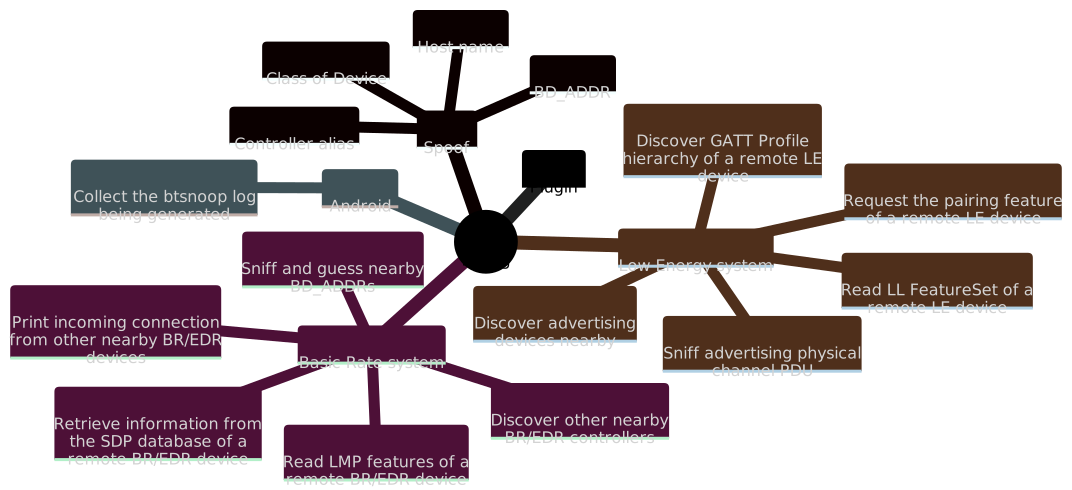
Bluing (anteriormente bluescan) es una herramienta de recopilación de inteligencia Bluetooth Intelligence Gathering escrita principalmente en Python. Puede ayudarnos a espiar la estructura interna de Bluetooth, que es un protocolo complejo, o hackear dispositivos Bluetooth. Estas son las principales características de la herramienta:
Instalación

Bluing depende parcialmente de BlueZ, la pila oficial de protocolos Bluetooth de Linux. Por lo tanto, solo es compatible con Linux. El siguiente comando se utiliza para instalar las dependencias:```sh sudo apt install python3-pip python3-dev libcairo2-dev libgirepository1.0-dev
libbluetooth-dev libdbus-1-dev bluez-tools python3-cairo-dev
rfkill meson patchelf bluez ubertooth adb python-is-python3

root@kitploit:~
Actualmente, bluing se distribuye a través de [PyPI](https://pypi.org/project/bluing/) y **solo es compatible con Python 3.10**. El siguiente es un comando de instalación:```sh
sudo pip3.10 install bluing

Uso

  • Dios dijo: "Haya colorido", y hubo colorido.
  • Quizás desee una breve descripción general del hardware recomendado.
$ bluing --help
root@kitploit:~
An intelligence gathering tool for hacking Bluetooth

Usage:
    bluing [-h | --help]
    bluing (-v | --version)
    bluing [-i <hci>] --clean BD_ADDR
    bluing --flash-micro-bit
    bluing <command> [<args>...]

Arguments:
    BD_ADDR    Bluetooth device address

Options:
    -h, --help           Print this help and quit
    -v, --version        Print version information and quit
    -i <hci>             HCI device
    --clean              Clean cached data of a remote device
    --flash-micro-bit    Download the dedicated firmware to micro:bit(s)

Commands:
    br         Basic Rate system, includes an optional Enhanced Data Rate (EDR) extension
    le         Low Energy system
    android    Android Bluetooth stack
    spoof      Spoof with new local device information
    plugin     Manage plugins

Run `bluing <command> --help` for more information on a command.

br command: Sistema Basic Rate

$ bluing br --help
root@kitploit:~
Usage:
    bluing br [-h | --help]
    bluing br [-i <hci>] [--inquiry-len=<n>] --inquiry
    bluing br [-i <hci>] --sdp BD_ADDR
    bluing br [-i <hci>] --local --sdp
    bluing br [-i <hci>] --lmp-features BD_ADDR
    bluing br [-i <hci>] --local --lmp-features
    bluing br [-i <hci>] --stack BD_ADDR
    bluing br [-i <hci>] --local --stack
    bluing br [-i <hci>] [--inquiry-scan] --mon-incoming-conn
    bluing br --org=<name> --timeout=<sec> --sniff-and-guess-bd-addr

Arguments:
    BD_ADDR    BR/EDR Bluetooth device address

Options:
    -h, --help                   Print this help and quit
    -i <hci>                     HCI device
    --local                      Target a local BR/EDR device instead of a remote one
    --inquiry                    Discover other nearby BR/EDR controllers
    --inquiry-len=<n>            Maximum amount of time (added to --ext-inquiry-len=<n>) 
                                 specified before the Inquiry is halted.
                                     Time = n * 1.28 s
                                     Time range: 1.28 to 61.44 s
                                     Range of n: 0x01 to 0x30 [default: 8]
    --ext-inquiry-len=<n>        Extended_Inquiry_Length measured in number of 
                                 Baseband slots.
                                     Interval Length = n * 0.625 ms (1 Baseband slot)
                                     Time Range: 0 to 40.9 s
                                     Range of n: 0x0000 to 0xFFFF [default: 0]
    --sdp                        Retrieve information from the SDP database of a 
                                 remote BR/EDR device
    --lmp-features               Read LMP features of a remote BR/EDR device
    --stack                      Determine the Bluetooth stack type of a remote BR/EDR device
    --mon-incoming-conn          Print incoming connection from other nearby BR/EDR devices
    --inquiry-scan               Enable the Inquiry Scan
    --sniff-and-guess-bd-addr    Sniff SAPs of BD_ADDRs over the air, then guess the 
                                 address based on the organization name. Need at 
                                 least one Ubertooth device
    --org=<name>                 An organization name in the OUI.txt
    --timeout=<sec>              Timeout in second(s)

--inquiry: Descubrir otros controladores BR/EDR cercanos

$ sudo bluing br --inquiry
root@kitploit:~
[INFO] Discovering other nearby BR/EDR Controllers on hci0 for 10.24 sec

BD_ADDR: B0:C9:52:45:33:13 (GUANGDONG OPPO MOBILE TELECOMMUNICATIONS CORP.,LTD)
Page scan repetition mode: 1 (R1)
Reserved: 0x02
CoD: 0x5a020c
    Service Class: 0b1011010000
        Telephony
        Object Transfer
        Capturing
        Networking
    Major Device Class: 0b00010, Phone
Clock offset: 0x50D5
RSSI: -61
Extended inquiry response: 
    Complete Local Name: old man phone
    Complete List of 16-bit Service Class UUIDs
        0x1105 OBEXObjectPush
        0x110a AudioSource
        0x110c A/V_RemoteControlTarget
        0x110e A/V_RemoteControl
        0x1112 Headset - Audio Gateway (AG)
        0x1115 PANU
        0x1116 NAP
        0x111f HandsfreeAudioGateway
        0x112d SIM_Access
        0x112f Phonebook Access - PSE
        0x1200 PnPInformation
        0x1132 Message Access Server
    Complete List of 32-bit Service Class UUIDs
        None
    Complete List of 128-bit Service Class UUIDs
        A49EAA15-CB06-495C-9F4F-BB80A90CDF00
        00000000-0000-0000-0000-000000000000
... ...


[INFO] Requesting the names of all discovered devices...
B0:C9:52:45:33:13 : old man phone
... ...

--sdp: Recuperar información de la base de datos SDP de un dispositivo BR/EDR remoto

$ sudo bluing br --sdp 34:13:46:23:6A:4D
root@kitploit:~
Scanning ⠋
Number of service records: 18 

Service Record
0x0000: ServiceRecordHandle (uint32)
    0x0001000d
0x0001: ServiceClassIDList (sequence)
    0x1105: OBEXObjectPush
0x0004: ProtocolDescriptorList (sequence)
    0x0100: L2CAP
    0x0003: RFCOMM
        channel: 0x0c
    0x0008: OBEX
0x0005: BrowseGroupList (sequence)
    0x1002: PublicBrowseRoot
0x0009: BluetoothProfileDescriptorList (sequence)
    0x1105: OBEXObjectPush v1.2
0x0100: ServiceName (guess) (text)
    OBEX Object Push 
0x0200: GoepL2CapPsm (guess) (uint16)
	0x1023
0x0303: SupportedFormatsList (guess) (sequence)
    0x01: vCard 2.1
    0x02: vCard 3.0
    0x03: vCal 1.0
    0x04: iCal 2.0
    0xff: Any type of object
... ...

--lmp-features: Leer características LMP de un dispositivo BR/EDR remoto

$ sudo bluing br --lmp-features 6A:8D:99:33:56:AE
root@kitploit:~
Version
    Version:
        Bluetooth Core Specification 5.2 (LMP)
        Bluetooth Core Specification 5.2 (LL)
    Manufacturer name: HiSilicon Technologies CO., LIMITED
    Subversion: 33561 

LMP features
    3 slot packets: True
    5 slot packets: True
    Encryption: True
    Slot offset: True
    Timing accuracy: True
    Role switch: True
    Hold mode: False
    Sniff mode: True
    Previously used: False
    Power control requests: True
    Channel quality driven data rate (CQDDR): True
    ... ...

Extended LMP features
Page 1
    Secure Simple Pairing (Host Support): True
    LE Supported (Host): True
    Simultaneous LE and BR/EDR to Same Device Capable (Host): True
    Secure Connections (Host Support): True
Page 2
    Connectionless Slave Broadcast - Master Operation: False
    Connectionless Slave Broadcast - Slave Operation: False
    Synchronization Train: False
    Synchronization Scan: False
    HCI_Inquiry_Response_Notification event:  True
    ... ...

--mon-incoming-conn: Mostrar conexiones entrantes de otros dispositivos BR/EDR cercanos

$ sudo bluing br --inquiry-scan --mon-incoming-conn
root@kitploit:~
[INFO] Inquiry_Scan_Interval: 4096, 2560.0 ms
       Inquiry_Scan_Window:   4096, 2560.0 ms
[INFO] Inquiry Scan and Page Scan enabled

A0:DE:0F:99:EF:78 incoming
    CoD: 0x5a020c
        Service Class: 0b1011010000
            Telephony
            Object Transfer
            Capturing
            Networking
        Major Device Class: 0b00010, Phone
    link type: 0x01 - ACL
... ...

--sniff-and-guess-bd-addr: Esnifar y adivinar direcciones BD_ADDR cercanas por el aire

$ bluing br --org='Huawei Device Co., Ltd.' --timeout=600 --sniff-and-guess-bd-addr
root@kitploit:~
[INFO] Possible BD_ADDR for ??:??:99:4C:45:C3
        24:A7:99:4C:45:C3

[INFO] Possible BD_ADDR for ??:??:E4:2D:69:EE
        BC:1A:E4:2D:69:EE
        D0:05:E4:2D:69:EE
        30:AA:E4:2D:69:EE

[INFO] Possible BD_ADDR for ??:??:15:60:81:7F
        64:23:15:60:81:7F
        D4:74:15:60:81:7F
... ...

le command: Sistema Low Energy

$ bluing le --help
root@kitploit:~
Usage:
    bluing le [-h | --help]
    bluing le [-i <hci>] [--scan-type=<type>] [--timeout=<sec>] [--sort=<key>] --scan
    bluing le [-i <hci>] --pairing-feature [--timeout=<sec>] [--addr-type=<type>] PEER_ADDR
    bluing le [-i <hci>] --ll-feature-set [--timeout=<sec>] [--addr-type=<type>] PEER_ADDR
    bluing le [-i <hci>] --gatt [--io-cap=<name>] [--addr-type=<type>] PEER_ADDR
    bluing le [-i <hci>] --local --gatt
    bluing le [-i <hci>] --mon-incoming-conn
    bluing le [--device=</dev/tty>] [--channel=<num>] --sniff-adv

Arguments:
    PEER_ADDR    LE Bluetooth device address

Options:
    -h, --help            Print this help and quit
    -i <hci>              HCI device
    --scan                Discover advertising devices nearby
    --scan-type=<type>    The type of scan to perform. active or passive [default: active]
    --sort=<key>          Sort the discovered devices by key, only support RSSI 
                          now [default: rssi]
    --ll-feature-set      Read LL FeatureSet of a remote LE device
    --pairing-feature     Request the pairing feature of a remote LE device
    --timeout=<sec>       Duration of the LE scanning, but may not be precise [default: 10]
    --gatt                Discover GATT Profile hierarchy of a remote LE device
    --io-cap=<name>       Set IO capability of the agent. Available value: 
                              DisplayOnly, DisplayYesNo, KeyboardOnly, NoInputNoOutput, 
                              KeyboardDisplay (KeyboardOnly) [default: NoInputNoOutput]
    --addr-type=<type>    Type of the LE address, public or random
    --sniff-adv           Sniff advertising physical channel PDU. Need at least 
                          one micro:bit (or other supported NRF51 device specified with --device)
    --channel=<num>       LE advertising physical channel, 37, 38 or 39 [default: 37,38,39]
    --device=</dev/tty>   Device to use, comma separated (e.g., /dev/ttyUSB0,/dev/ttyUSB1,/dev/ttyUSB2)
                          Only needed if using NRF51 devices other than micro:bit (e.g., Bluefruit)

--scan: Descubrir dispositivos publicitarios cercanos

$ sudo bluing le --scan
root@kitploit:~
[WARNING] You might want to spoof your LE address before doing an active scan
[INFO] LE active scanning on hci0 for 10 sec
Scanning ⠴

----------------LE Devices Scan Result----------------
Addr:        74:A3:4A:D4:78:55 (ZIMI CORPORATION)
Addr type:   public
Connectable: True
RSSI:        -68 dBm
General Access Profile:
    Flags: 
        LE General Discoverable Mode
        BR/EDR Not Supported
    Service Data - 16-bit UUID: 
        UUID: 0x95FE
        Data: 9055990701b743e34aa3740e00
    Appearance: 0000
    Tx Power Level: 0 dBm (pathloss 68 dBm)
    Complete Local Name: Mesh Mi Switch
... ...

--ll-feature-set: Leer el FeatureSet de LL de un dispositivo LE remoto

$ sudo bluing le --ll-feature-set --addr-type=public 18:D9:8F:77:24:F1
root@kitploit:~
[INFO] Reading LL FeatureSet of 18:D9:8F:77:24:F1 on hci0
Reading ⠼
LE LL Features:
    LE Encryption: True
    Connection Parameters Request Procedure: False
    Extended Reject Indication: False
    Slave-initiated Features Exchange: False
    LE Ping: False
    LE Data Packet Length Extension: True
    LL Privacy: False
    Extended Scanner Filter Policies: False
    LE 2M PHY: False
    Stable Modulation Index - Transmitter: False
    Stable Modulation Index - Receiver: False
    ... ...

--pairing-feature: Solicitar la característica de emparejamiento de un dispositivo LE remoto

$ sudo bluing le --pairing-feature --addr-type=public 18:D9:8F:77:24:F1
root@kitploit:~
[INFO] Requesting pairing feature of 18:D9:8F:77:24:F1 on hci0
Requesting ⠧
Pairing Response
    IO Capability: 0x03 - NoInputNoOutput
    OOB data flag: 0x00 - Not Present
    AuthReq: 0x01
    Maximum Encryption Key Size: 16
Initiator Key Distribution: 0x00
        EncKey:  False
        IdKey:   False
        SignKey: False
        LinkKey: False
        RFU:     0b0000
Responder Key Distribution: 0x01
        EncKey:  True
        IdKey:   False
        SignKey: False
        LinkKey: False
        RFU:     0b0000

--gatt: Descubrir la jerarquía del perfil GATT de un dispositivo LE remoto

$ sudo bluing le --gatt --addr-type=public 18:D9:8F:77:24:F1
root@kitploit:~
Connecting ⠋
Discovering all primary services ⠏
Discovering all characteristics of service 0x0001 ⠹
... ...
Discovering all descriptors of characteristic 0x0002 ⠼
... ...
Reading value of the descriptor 0x0013 ⠴
... ... 

----------------GATT Scan Result---------------- Number of services: 6

Service (0x0100 - 0x0112, 7 characteristics) Declaration Handle: 0x0100 Type: 2800 (Primary Service declaration) Value: 1812 (Human Interface Device) Permissions: Read (no authen/author)

root@kitploit:~
<span style="font-weight: bold; color: #ecc179">Characteristic</span> (2 descriptors)
    <span style="font-weight: bold; color: #ecc179">Declaration</span>
        Handle: 0x010d
        Type:   2803 (Characteristic declaration)
        Value:
            Properties: <span style="font-weight: bold; color: #9fab76">Read, Write Without Response, Write, Notify</span>
            Handle:     <span style="font-weight: bold; color: #9fab76">0x010e</span>
            UUID:       <span style="font-weight: bold; color: #9fab76">2A4D</span> (<span style="font-weight: bold; color: #9fab76">Report</span>)
        Permissions: Read (no authen/author)

    <span style="font-weight: bold; color: #ecc179">Value</span>
        Handle: 0x0302
        Type:   4A02 (Unknown)
        Value:  <span style="font-weight: bold; color: #c35956">Read Not Permitted</span>
        Permissions: Higher layer specific

    <span style="font-weight: bold; color: #ecc179">Descriptor</span>
        Handle: <span style="font-weight: bold; color: #9fab76">0x010f</span>
        Type:   <span style="font-weight: bold; color: #9fab76">2902</span> (<span style="font-weight: bold; color: #ecc179">Client Characteristic    Configuration declaration</span>)
        Value:  <span style="font-weight: bold; color: #9fab76">b'\x00\x00'</span>
        Permissions: Read (no authen/author), Write (higher layer specifies authen/author)

--sniff-adv: Sniff advertising physical channel PDU

$ sudo bluing le --sniff-adv
root@kitploit:~
[INFO] Using micro:bit /dev/ttyACM2 on channel 37
[INFO] Using micro:bit /dev/ttyACM1 on channel 38
[INFO] Using micro:bit /dev/ttyACM0 on channel 39
[INFO] micro:bit 38 < Ready -> Start
[INFO] micro:bit 37 < Ready -> Start
[INFO] micro:bit 39 < Ready -> Start
[38] [ADV_NONCONN_IND]
random AdvA: 28:7A:88:B2:35:0B
[39] [ADV_IND]
public AdvA: A4:E4:72:B1:CB:8D
[37] [SCAN_REQ]
random ScanA: 6A:90:0C:07:3E:14
random AdvA: 7D:9B:A8:5A:F2:81
... ...

android command: Android Bluetooth stack

$ bluing android --help
root@kitploit:~
Usage:
    bluing android [-h | --help]
    bluing android [-t <id>] --collect-btsnoop-log [-o <file>]

Options:
    -h, --help               Display this help and quit
    -t <id>                  Use android device with given transport id. This option 
                             will be ignored when only one device is available
    --collect-btsnoop-log    Collect the btsnoop log being generated to a local file, 
                             default ./btsnoop_hci.log
    -o <file>                Place the output into  [default: ./btsnoop_hci.log]

--collect-btsnoop-log: Collect the btsnoop log being generated

$ bluing android -t 3 --collect-btsnoop-log -o btsnoop_hci.log; file btsnoop_hci.log
root@kitploit:~
btsnoop_hci.log: BTSnoop version 1, HCI UART (H4)

spoof command: Spoof with new local device information

$ bluing spoof --help
root@kitploit:~
Usage:
    bluing spoof [-h | --help]
    bluing spoof [-i <hci>] --bd-addr=<BD_ADDR>
    bluing spoof [-i <hci>] --cls-of-dev=<num>
    bluing spoof --host-name=<name>
    bluing spoof [-i <hci>] --alias=<alias>

Options:
    -h, --help             Print this help and quit
    -i <hci>               HCI device
    --bd-addr=<BD_ADDR>    Spoof with a new BD_ADDR
    --cls-of-dev=<num>     Spoof with a new Class of Device
    --host-name=<name>     Spoof with a new host name
    --alias=<alias>        Spoof with a new alias

--bd-addr=<BD_ADDR>: Spoof with a new BD_ADDR

This feature is currently based on spooftooph, which can be installed by runing sudo apt install spooftooph if you are using it on Kali Linux. However, if you are using this feature on Ubuntu, you will need to manually compile and install spooftooph.

$ sudo bluing spoof --bd-addr=AA:BB:CC:DD:EE:FF
root@kitploit:~
[WARNING] The original HCI device number may have been changed
[INFO] BD_ADDR changed: 11:22:33:44:55:66 -> AA:BB:CC:DD:EE:FF

--cls-of-dev=<num>: Spoof with a new Class of Device

$ sudo bluing spoof --cls-of-dev=0x6c0100
root@kitploit:~
No output when successful

--host-name=<name>: Spoof with a new host name

$ sudo bluing spoof --host-name=Bluing
root@kitploit:~
No output when successful

--alias=<alias>: Spoof with a new controller alias

$ sudo bluing spoof --alias='Bluing Alias'
root@kitploit:~
No output when successful

plugin command: Manage plugins

$ bluing plugin --help
root@kitploit:~
Usage:
    bluing plugin [-h | --help]
    bluing plugin <command> [<args>...]

Options:
    -h, --help    Display this help and quit

Commands:
    list         List installed plugins
    install      Install a plugin
    uninstall    Uninstall a plugin
    run          Run a plugin

Recommended Hardware

Bluetooth adapter

Many features of bluing require access to at least 1 Bluetooth adapter. Although it is possible to use the adapter that comes with the Linux physical machine or make the Linux virtual machine exclusive to an adapter of the host machine, it is still recommended to use an external USB Bluetooth adapter for more stability, such as Parani UD100-G03.

Original micro:bit (optional)

Bluing requires at least 1 original micro:bit when sniffing advertising physical channel PDUs (le --sniff-adv), and it is recommended to use 3 of them at the same time. These micro:bits need to run the dedicated firmware provided by bluing. After connecting the micro:bits to Linux, the pre-built firmware can be flashed by executing the following command:

root@kitploit:~
bluing --flash-micro-bit

While less convenient to use than the micro:bit, but more accessible to purchase, more generic NRF51 adapters can be supported as well. Support has been added for the Adafruit Bluefruit LE Friend and the BLE400 boards. To use these, they will need to be flashed using SWD. This tool does not support flashing these devices. Additionally, the tool cannot automatically identify these devices. Instead the --devices option needs to identify the ports connected to computer.

Ubertooth One (optional)

When sniffing and guessing nearby BD_ADDRs (br --sniff-and-guess-bd-addr), bluing requires an Ubertooth One.

FAQ

rfkill cannot find hci0

The following is the exception message:```txt Exception: Can't find the ID of hci0 in rfkill

root@kitploit:~
Esta excepción puede ser causada por la falta de soporte para las opciones `-r` y `-n` en la versión antigua de rfkill, por ejemplo:
  
<pre>
$ <span style="font-weight: bold; color: #9fab76">cat</span> /etc/os-release | <span style="font-weight: bold; color: #9fab76">head</span> -n 2
NAME="Ubuntu"
VERSION="16.10 (Yakkety Yak)"

$ <span style="font-weight: bold; color: #9fab76">rfkill</span> --version
rfkill 0.5-1ubuntu3 (Ubuntu)
</pre>

En este momento, actualizar rfkill a una versión más nueva puede resolver el problema, como:

<pre>
$ <span style="font-weight: bold; color: #9fab76">cat</span> /etc/os-release | <span style="font-weight: bold; color: #9fab76">head</span> -n 2
PRETTY_NAME="Kali GNU/Linux Rolling"
NAME="Kali GNU/Linux"

$ <span style="font-weight: bold; color: #9fab76">rfkill</span> --version
rfkill from util-linux 2.38.1
</pre>

### El comando de gestión `scanend` falló al ejecutarse

El siguiente es un mensaje de error:```txt
ERROR: Failed to execute management command 'scanend' (code: 11, error: Rejected)

Intenta reiniciar el servicio Bluetooth para resolver el problema:

root@kitploit:~
sudo systemctl restart bluetooth.service
Descargar herramienta

... ...