Respuesta a Incidentes - Buscador rápido de archivos sospechosos

Una herramienta ligera de respuesta a incidentes para la caza de amenazas y el triage forense
FastFinder es una herramienta de respuesta a incidentes potente y ligera diseñada para profesionales de la ciberseguridad que realizan caza de amenazas, análisis forense en vivo y triage de endpoints. Construida para las plataformas Windows y Linux, sobresale en el descubrimiento rápido de archivos sospechosos utilizando múltiples criterios de detección.
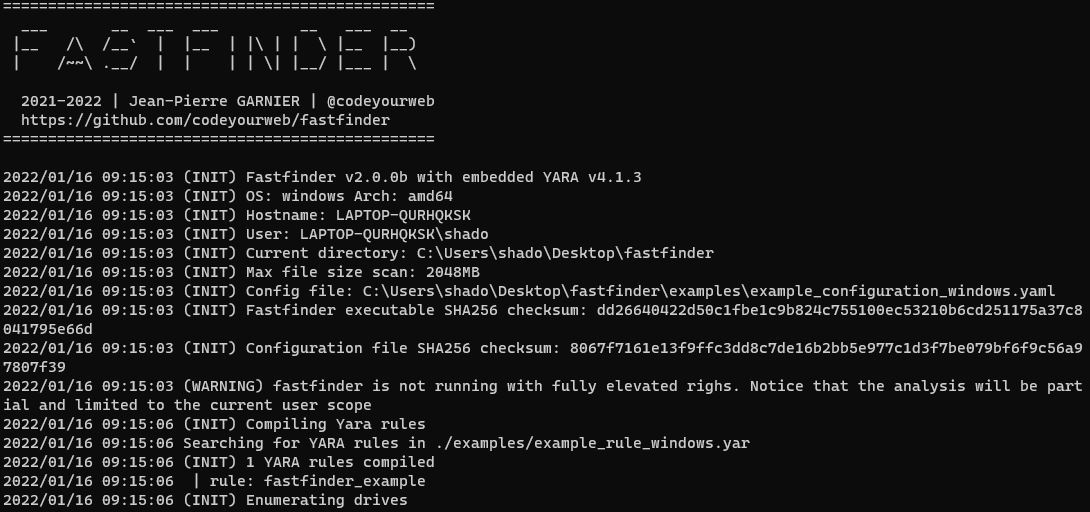
Interfaz de usuario básica
Selección de configuración
Resultados del escaneo y coincidencias
⚠️ Nota: La compilación requiere dependencias CGO y YARA. Consulte las guías específicas de cada plataforma:
La forma más fácil de compilar FastFinder sin instalar dependencias:
# Build binaries for Linux and Windows
cd docker
make build-binaries
# Binaries will be in ./bin/
# - fastfinder-linux-amd64
# - fastfinder-windows-amd64.exe
Ejecute FastFinder dentro de un contenedor Docker privilegiado para escanear volúmenes o sistemas de archivos montados:
# Build the runtime image (includes FastFinder + YARA + editors)
.\docker-helper.ps1 build-runtime
# Run scan with configuration directory
.\docker-helper.ps1 run-runtime -ConfigPath "C:\path\to\config_folder" -ScanPath "C:\data\to\scan"
# Interactive shell mode (no scan, just shell access)
.\docker-helper.ps1 run-runtime -Interactive
fastfinder [OPTIONS]
# Basic scan with configuration file
./fastfinder -c config.yaml
# Continuous monitoring mode
./fastfinder -c config.yaml -t
# Create standalone executable (x64 architecture only)
./fastfinder -c config.yaml -b standalone_scanner.exe
💡 Consejo: FastFinder puede ejecutarse con privilegios de usuario estándar, pero los derechos de administrador proporcionan acceso a todos los archivos del sistema.
Los ejemplos de configuración están disponibles allí. Aquí hay un ejemplo completo de configuración en blanco. No es necesario implementar todos los atributos si no se utiliza todo.
input:
path: [] # match file path AND / OR file name based on simple string
content:
grep: [] # match literal string value inside file content
yara: [] # use yara rule and specify rules path(s) for more complex pattern search (wildcards / regex / conditions)
checksum: [] # parse for md5/sha1/sha256 in file content
options:
contentMatchDependsOnPathMatch: true # if true, paths are a pre-filter for grep (string) searches only. YARA and Checksums are always evaluated.
findInHardDrives: true # enumerate hard drive content
findInRemovableDrives: true # enumerate removable drive content
findInNetworkDrives: true # enumerate network drive content
findInCDRomDrives: true # enumerate physical CD-ROM and mounted iso / vhd...
findInMemory: true # check for results in processes memory
output:
copyMatchingFiles: true # create a copy of every matching file
base64Files: true # base64 matched content before copy
filesCopyPath: '' # empty value will copy matched files in the fastfinder.exe folder
advancedparameters:
yaraRC4Key: '' # yara rules can be (un)/ciphered using the specified RC4 key
maxScanFilesize: 2048 # ignore files up to maxScanFileSize Mb (default: 2048)
cleanMemoryIfFileGreaterThanSize: 512 # clean fastfinder internal memory after heavy file scan (default: 512Mb)
eventforwarding:
enabled: true
buffer_size: 5
flush_time_seconds: 10
file: # save app activity in jsonl files
enabled: true
directory_path: "./event_logs"
rotate_minutes: 1 # Rotate every minute for testing
max_file_size_mb: 1 # Rotate at 1MB for testing
retain_files: 5 # Keep 5 old files
http: # forward app activity with HTTP POST json data
enabled: false
url: "https://your-forwarder-url.com/api/events"
ssl_verify: false
timeout_seconds: 10
headers:
Authorization: "Bearer YOUR_API_KEY"
MY-CUSTOM-HEADER: "My-Header-Value"
retry_count: 3
filters:
event_types:
- "error"
- "warning"
- "alert"
- "info"
Las rutas relativas en la configuración YAML se resuelven en relación con la ubicación del archivo de configuración:
input:
content:
yara:
- "./example_rule_linux.yar" # Looks in same folder as config.yaml
- "./subfolder/custom_rules.yar" # Looks in subfolder relative to config
- "/absolute/path/to/rule.yar" # Absolute paths work as-is
- "https://example.com/rules.yar" # URLs are also supported
Estructura de directorios de ejemplo:
project/
├── config.yaml
├── example_rule_linux.yar # ✅ Found by "./example_rule_linux.yar"
└── rules/
└── custom.yar # ✅ Found by "./rules/custom.yar"
¡Agradecemos las contribuciones! Consulte nuestras pautas de contribución:
git checkout -b feature/amazing-feature)git commit -m 'Add amazing feature')git push origin feature/amazing-feature)# Clone the repository
git clone https://github.com/codeyourweb/fastfinder.git
cd fastfinder
# Install dependencies (see compilation guides)
# Build from source
go build -tags yara_static,gio -a -ldflags '-s -w' .
# Run tests
go test ./...
Este proyecto está bajo la licencia AGPL - consulte el archivo LICENSE para más detalles.
Hecho con ❤️ por la comunidad de ciberseguridad
Creado por Jean-Pierre GARNIER (@codeyourweb) • 2021-2026
| Opción | Descripción | Predeterminado |
|---|
-h, --help | Muestra información de ayuda | |
-c, --configuration <yaml config file> | Ruta del archivo de configuración | |
-b, --build <output executable> | Crea un binario independiente con configuración incrustada (solo arquitectura x64) | |
-r, --root <Path> | Ruta raíz de escaneo (anula la enumeración de unidades) | |
-s, --silent | Modo silencioso - ejecutar sin ninguna ventana o consola visible | |
-v, --verbosity <verbosityLevel> | Nivel de verbosidad de registro (1-5) | 3 |
-t, --triage | Modo de monitoreo continuo | false |