
Ventoy v1.1.17
Una nueva solución USB booteable.
Ventoy





Ventoy es una herramienta de código abierto para crear unidades USB arrancables para archivos ISO/WIM/IMG/VHD(x)/EFI.
Con Ventoy, no necesitas formatear el disco una y otra vez, solo copia los archivos de imagen a la unidad USB e inícialos.
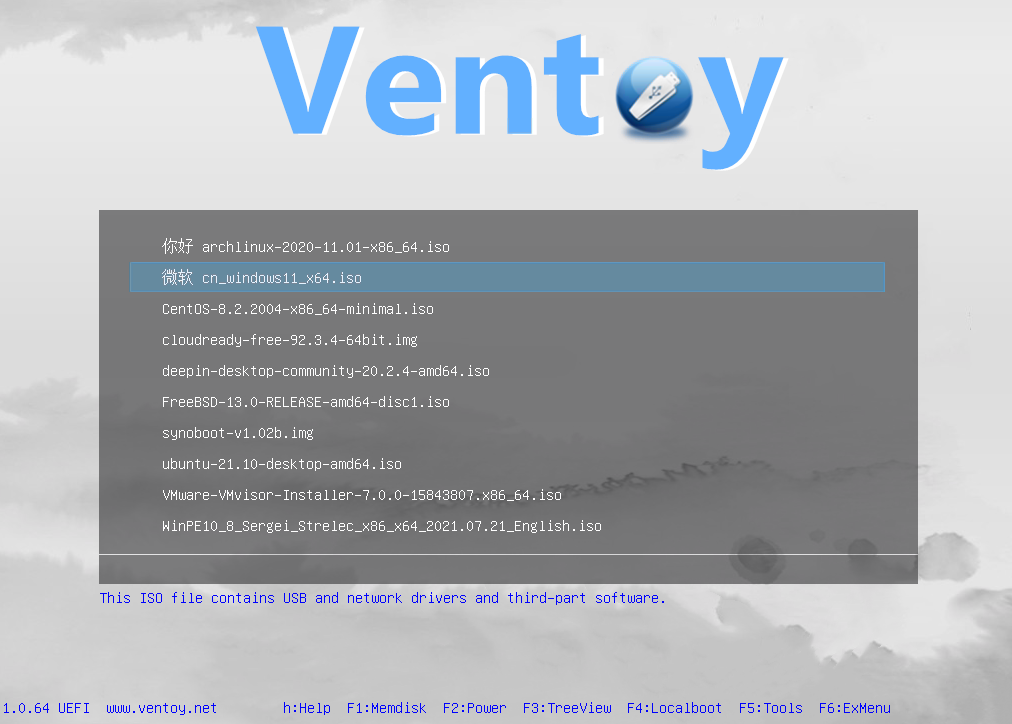
Puedes copiar muchos archivos de imagen a la vez y Ventoy te mostrará un menú de arranque para seleccionarlos.
También puedes explorar archivos ISO/WIM/IMG/VHD(x)/EFI en el disco local e iniciarlos.
x86 Legacy BIOS, IA32 UEFI, x86_64 UEFI, ARM64 UEFI y MIPS64EL UEFI son compatibles de la misma manera.
Tanto el estilo de partición MBR como GPT son compatibles de la misma manera.
La mayoría de los tipos de SO son compatibles (Windows/WinPE/Linux/Unix/ChromeOS/Vmware/Xen...)
Más de 1300 archivos ISO probados (Lista). Se admite el 90%+ de las distribuciones en distrowatch.com (Detalles).
Sitio web oficial: https://www.ventoy.net
SO probados
Windows
Windows 7, Windows 8, Windows 8.1, Windows 10, Windows 11, Windows Server 2012, Windows Server 2012 R2, Windows Server 2016, Windows Server 2019, Windows Server 2022, Windows Server 2025, WinPE
Linux
Debian, Ubuntu, CentOS(6/7/8/9/10), RHEL(6/7/8/9/10), Deepin, Fedora, Rocky Linux, AlmaLinux, EuroLinux(6/7/8/9), openEuler, OpenAnolis, SLES, openSUSE, MX Linux, Manjaro, Linux Mint, Endless OS, Elementary OS, Solus, Linx, Zorin, antiX, PClinuxOS, Arch, ArcoLinux, ArchLabs, BlackArch, Obarun, Artix Linux, Puppy Linux, Tails, Slax, Kali, Mageia, Slackware, Q4OS, Archman, Gentoo, Pentoo, NixOS, Kylin, openKylin, Ubuntu Kylin, KylinSec, Lubuntu, Xubuntu, Kubuntu, Ubuntu MATE, Ubuntu Budgie, Ubuntu Studio, Bluestar, OpenMandriva, ExTiX, Netrunner, ALT Linux, Nitrux, Peppermint, KDE neon, Linux Lite, Parrot OS, Qubes, Pop OS, ROSA, Void Linux, Star Linux, EndeavourOS, MakuluLinux, Voyager, Feren, ArchBang, LXLE, Knoppix, Calculate Linux, Clear Linux, Pure OS, Oracle Linux, Trident, Septor, Porteus, Devuan, GoboLinux, 4MLinux, Simplicity Linux, Zeroshell, Android-x86, netboot.xyz, Slitaz, SuperGrub2Disk, Proxmox VE, Kaspersky Rescue, SystemRescueCD, MemTest86, MemTest86+, MiniTool Partition Wizard, Parted Magic, veket, Sabayon, Scientific, alpine, ClearOS, CloneZilla, Berry Linux, Trisquel, Ataraxia Linux, Minimal Linux Live, BackBox Linux, Emmabuntüs, ESET SysRescue Live,Nova Linux, AV Linux, RoboLinux, NuTyX, IPFire, SELKS, ZStack, Enso Linux, Security Onion, Network Security Toolkit, Absolute Linux, TinyCore, Springdale Linux, Frost Linux, Shark Linux, LinuxFX, Snail Linux, Astra Linux, Namib Linux, Resilient Linux, Virage Linux, Blackweb Security OS, R-DriveImage, O-O.DiskImage, Macrium, ToOpPy LINUX, GNU Guix, YunoHost, foxclone, siduction, Adelie Linux, Elive, Pardus, CDlinux, AcademiX, Austrumi, Zenwalk, Anarchy, DuZeru, BigLinux, OpenMediaVault, Ubuntu DP, Exe GNU/Linux, 3CX Phone System, KANOTIX, Grml, Karoshi, PrimTux, ArchStrike, CAELinux, Cucumber, Fatdog, ForLEx, Hanthana, Kwort, MiniNo, Redcore, Runtu, Asianux, Clu Linux Live, Uruk, OB2D, BlueOnyx, Finnix, HamoniKR, Parabola, LinHES, LinuxConsole, BEE free, Untangle, Pearl, Thinstation, TurnKey, tuxtrans, Neptune, HefftorLinux, GeckoLinux, Mabox Linux, Zentyal, Maui, Reborn OS, SereneLinux , SkyWave Linux, Kaisen Linux, Regata OS, TROM-Jaro, DRBL Linux, Chalet OS, Chapeau, Desa OS, BlankOn, OpenMamba, Frugalware, Kibojoe Linux, Revenge OS, Tsurugi Linux, Drauger OS, Hash Linux, gNewSense, Ikki Boot, SteamOS, Hyperbola, VyOS, EasyNAS, SuperGamer, Live Raizo, Swift Linux, RebeccaBlackOS, Daphile, CRUX, Univention, Ufficio Zero, Rescuezilla, Phoenix OS, Garuda Linux, Mll, NethServer, OSGeoLive, Easy OS, Volumio, FreedomBox, paldo, UBOS, Recalbox, batocera, Lakka, LibreELEC, Pardus Topluluk, Pinguy, KolibriOS, Elastix, Arya, Omoikane, Omarine, Endian Firewall, Hamara, Rocks Cluster, MorpheusArch, Redo, Slackel, SME Server, APODIO, Smoothwall, Dragora, Linspire, Secure-K OS, Peach OSI, Photon, Plamo, SuperX, Bicom, Ploplinux, HP SPP, LliureX, Freespire, DietPi, BOSS, Webconverger, Lunar, TENS, Source Mage, RancherOS, T2, Vine, Pisi, blackPanther, mAid, Acronis, Active.Boot, AOMEI, Boot.Repair, CAINE, DaRT, EasyUEFI, R-Drive, PrimeOS, Avira Rescue System, bitdefender, Checkra1n Linux, Lenovo Diagnostics, Clover, Bliss-OS, Lenovo BIOS Update, Arcabit Rescue Disk, MiyoLinux, TeLOS, Kerio Control, RED OS, OpenWrt, MocaccinoOS, EasyStartup, Pyabr, Refracta, Eset SysRescue, Linpack Xtreme, Archcraft, NHVBOOT, pearOS, SeaTools, Easy Recovery Essentional, iKuai, StorageCraft SCRE, ZFSBootMenu, TROMjaro, BunsenLabs, Todo en Uno, ChallengerOS, Nobara, Holo, CachyOS, Peux OS, Vanilla OS, ShredOS, paladin, Palen1x, dban, ReviOS, HelenOS, XeroLinux, Tiny 11, chimera linux, CuteFish, DragonOs, Rhino Linux, vanilladpup, crystal, IGELOS, MiniOS, gnoppix, PikaOS, UwUntu, Noble, PocketHandyBox, DiskGenius, Commodore, Talos, Shebang Linux, hrmpf, Bazzite, ManualLinux, nyarchlinux, ultramarine, TempleOS, bluefin, Damn Small Linux, Kicksecure, SerentiyOS, AerynOS, ......
Unix
DragonFly, FreeBSD, pfSense, OPNsense, GhostBSD, FreeNAS, TrueNAS, XigmaNAS, FuryBSD, HardenedBSD, MidnightBSD, ClonOS, EmergencyBootKit, helloSystem
ChromeOS
FydeOS, CloudReady, ChromeOS Flex, ThoriumOS
Otros
VMware ESXi, Citrix XenServer, Xen XCP-ng
Informe de imágenes probadas
【Cómo reportar un archivo de imagen probado exitosamente】
Navegador de Ventoy
Con Ventoy, también puedes explorar archivos ISO/WIM/IMG/VHD(x)/EFI en el disco local e iniciarlos. Notas
VentoyPlugson
Un configurador de complementos GUI de Ventoy. VentoyPlugson