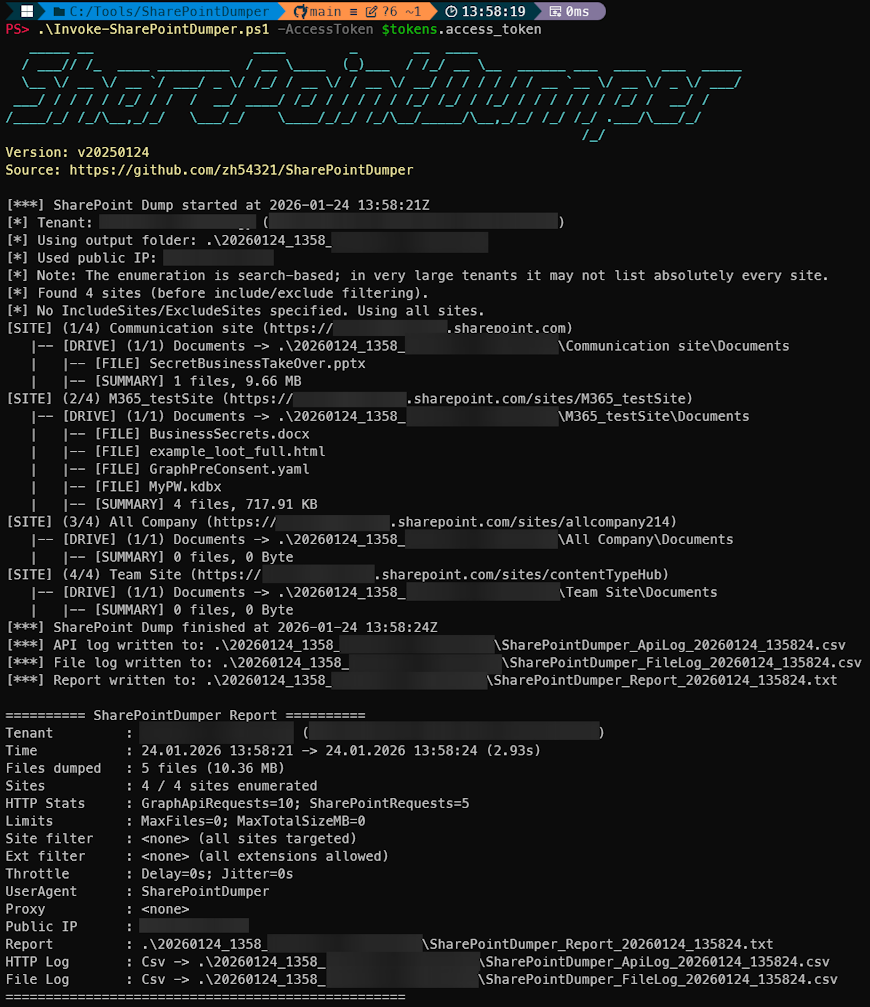
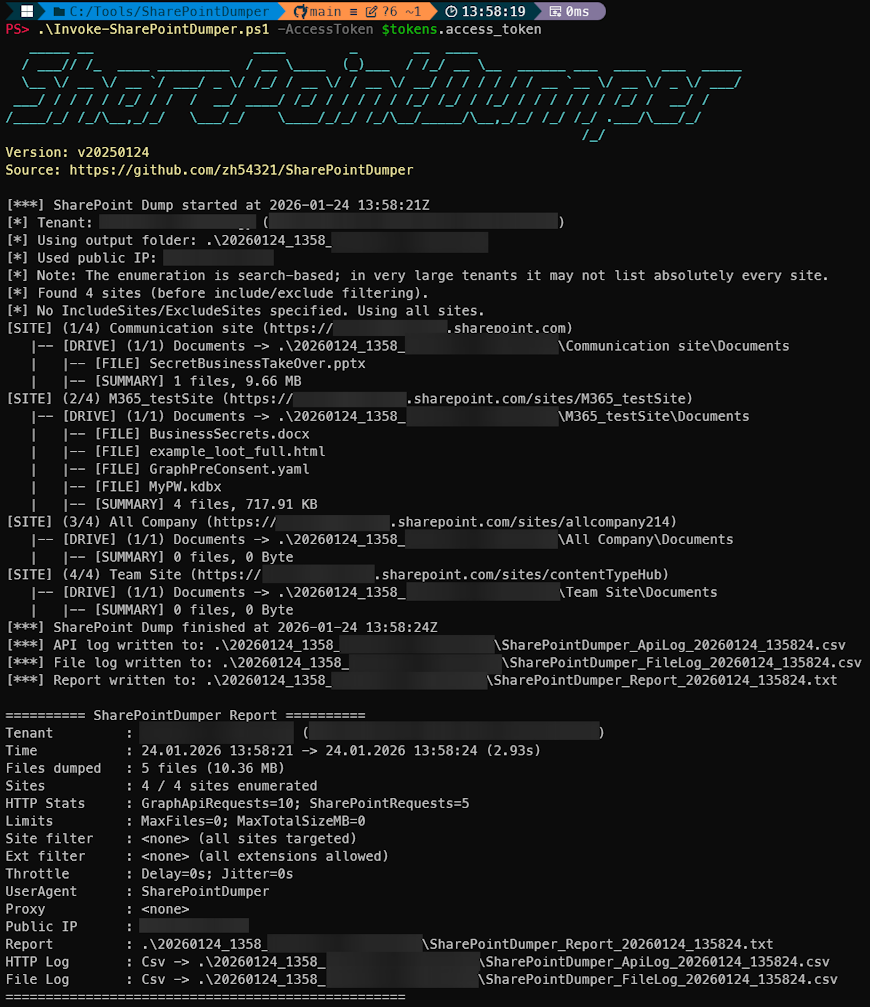
PowerShell SharePoint extraction + auditing tool for red/blue/purple teams. Enumerates all SharePoint sites/drives a user can access via Microsoft Graph, recursively downloads files, and logs every Graph + SharePoint HTTP request for SIEM correlation, detection engineering, and IR testing.
SharePointDumper is a PowerShell-based extraction and auditing utility that enumerates SharePoint sites a user can access via Microsoft Graph and downloads files via SharePoint.
It is designed for SOC / DLP testing, purple teaming, and non-sophisticated red-team assessments, and therefore produces detailed reports including downloaded files and every HTTP request (Graph + SharePoint) for SIEM correlation.
The tool does not perform authentication. Instead, it requires an already obtained OAuth2 access token with the appropriate Microsoft Graph permissions (Sites.Read.All or Sites.ReadWrite.All).
If you need help obtaining such a token, you can use EntraTokenAid (examples included below), which simplifies generating usable access tokens.
Execution:
Example CSV API Log (can be CSV or JSON):

Example File Download Log (can be CSV or JSON)

git clone https://github.com/zh54321/SharePointDumper.git
cd SharePointDumper
SharePointDumper requires a valid Microsoft Graph access token with delegated permissions to enumerate sites and files:
Sites.Read.All orSites.ReadWrite.AllFurthermore, the OAuth client must be allowed to call SharePoint API.
More than 23 Microsoft first-party applications already have pre-consented Sites.Read… permissions. They can download files from SharePoint, and can be used to obtain a valid token without additional tenant configuration.
If possible, use a CAE-enabled access token, which remains valid for up to 24 hours and reduces interruptions during long-running dumps.
You can use EntraTokenAid to obtain a suitable access token via PowerShell
(CAE tokens are requested by default):
# Clone the module
git clone https://github.com/zh54321/EntraTokenAid.git
Import-Module EntraTokenAid/EntraTokenAid.psm1
# Get the the tokens
$tokens = Invoke-Auth -ClientID 'b26aadf8-566f-4478-926f-589f601d9c74' -RedirectUrl 'urn:ietf:wg:oauth:2.0:oob'
# Optional: Store in variable which is compatible with the examples below
$AccessToken = $tokens.access_token
.\Invoke-SharePointDumper.ps1 -AccessToken $accesstoken -UserAgent "Not SharePointDumper"
.\Invoke-SharePointDumper.ps1 -AccessToken $accesstoken -IncludeSites "Finance","Projects"
.\Invoke-SharePointDumper.ps1 -AccessToken $accesstoken -ExcludeSites "HR","Legal"
.\Invoke-SharePointDumper.ps1 -AccessToken $accesstoken -IncludeExtensions pdf,docx
.\Invoke-SharePointDumper.ps1 -AccessToken $accesstoken -ExcludeExtensions jpg,bmp
.\Invoke-SharePointDumper.ps1 -AccessToken $accesstoken -MaxFiles 500
.\Invoke-SharePointDumper.ps1 -AccessToken $accesstoken -MaxTotalSizeMB 100
.\Invoke-SharePointDumper.ps1 -AccessToken $accesstoken -RequestDelaySeconds 2
With jitter:
.\Invoke-SharePointDumper.ps1 -AccessToken $accesstoken -RequestDelaySeconds 2 -Variation 3
.\Invoke-SharePointDumper.ps1 -AccessToken $accesstoken -Resume -OutputFolder .\20251121_1551_MyTenant
In resume mode, -OutputFolder must point to your previous run’s folder.
SharePointDumper can automatically refresh an expired access token (HTTP 401) using a refresh token and EntraTokenAid.
# Mandatory: The module must be imported so the tool can use the Invoke-Refresh command
Import-Module .\EntraTokenAid\EntraTokenAid.psm1
# Optional: Obtain tokens using EntraTokenAid (other methods are also possible)
$tokens = Invoke-Auth -ClientId 'b26aadf8-566f-4478-926f-589f601d9c74' -RedirectUrl 'urn:ietf:wg:oauth:2.0:oob'
# Run SharePointDumper with refresh support
.\Invoke-SharePointDumper.ps1 -AccessToken $tokens.access_token -RefreshToken $tokens.refresh_token -RefreshClientId 'b26aadf8-566f-4478-926f-589f601d9c74'
Note: Token refresh attempts are NOT logged in the API log.
20261115_MySecureTenant/
├── SharePointDumper_Report_20261115_080333.txt
├── SharePointDumper_ApiLog_20261115_080333.csv
├── SharePointDumper_FileLog_20261115_080333.csv
├── Site A/
│ └── Documents/
│ ├── file1.docx
│ └── file2.pdf
└── Site B/
└── Site Assets/
Report_*.txt)ApiLog_*.csv or .json)SharePointDumper_ReportResume_*SharePointDumper_ApiLogResume_*Access Token is invalid or expired.
Access Token is valid, but missing required Microsoft Graph or SharePoint permissions.
SharePointDumper activities are logged in:
/organization, /sites, /drives).Example UAL:

Example Graph Activity Log:

Released under the MIT License.
| App Name | Client ID | FOCI | EntraTokenAid Auth Command |
|---|
| Microsoft Teams | 1fec8e78-bce4-4aaf-ab1b-5451cc387264 | TRUE | $tokens = Invoke-Auth -ClientID '1fec8e78-bce4-4aaf-ab1b-5451cc387264' -RedirectUrl 'https://login.microsoftonline.com/common/oauth2/nativeclient' |
| Outlook Mobile | 27922004-5251-4030-b22d-91ecd9a37ea4 | TRUE | $tokens = Invoke-Auth -ClientID '27922004-5251-4030-b22d-91ecd9a37ea4' -RedirectUrl 'x-msauth-outlook-prod://com.microsoft.Office.Outlook' |
| OneDrive SyncEngine | ab9b8c07-8f02-4f72-87fa-80105867a763 | TRUE | $tokens = Invoke-Auth -ClientID 'ab9b8c07-8f02-4f72-87fa-80105867a763' -RedirectUrl 'https://login.microsoftonline.com/common/oauth2/nativeclient' |
| OneDrive iOS App | af124e86-4e96-495a-b70a-90f90ab96707 | TRUE | $tokens = Invoke-Auth -ClientID 'af124e86-4e96-495a-b70a-90f90ab96707' -RedirectUrl 'ms-onedrive-auth://com.microsoft.skydrive.shareextension' |
| Microsoft Bing Search | cf36b471-5b44-428c-9ce7-313bf84528de | TRUE | $tokens = Invoke-Auth -ClientID 'cf36b471-5b44-428c-9ce7-313bf84528de' -RedirectUrl 'msauth.com.microsoft.bing://auth' |
| OneDrive | b26aadf8-566f-4478-926f-589f601d9c74 | TRUE | $tokens = Invoke-Auth -ClientID 'b26aadf8-566f-4478-926f-589f601d9c74' -RedirectUrl 'urn:ietf:wg:oauth:2.0:oob' |
| SharePoint | d326c1ce-6cc6-4de2-bebc-4591e5e13ef0 | TRUE | $tokens = Invoke-Auth -ClientID 'd326c1ce-6cc6-4de2-bebc-4591e5e13ef0' -RedirectUrl 'msauth://code/ms-sharepoint-auth%3A%2F%2Fcom.microsoft.sharepoint' |
| SharePoint Android | f05ff7c9-f75a-4acd-a3b5-f4b6a870245d | TRUE | $tokens = Invoke-Auth -ClientID 'f05ff7c9-f75a-4acd-a3b5-f4b6a870245d' -RedirectUrl 'msauth://com.microsoft.sharepoint/gSoqzhbCjkyvI%2Fl7kC7IdG7KbPU%3D' |
| OfficeHome | 4765445b-32c6-49b0-83e6-1d93765276ca | FALSE | $tokens = Invoke-Auth -ClientID '4765445b-32c6-49b0-83e6-1d93765276ca' -RedirectUrl 'https://scuprodprv.www.microsoft365.com/spalanding' -Origin 'https://doesnotmatter' |
| SharePoint Online Web Client Extensibility | 08e18876-6177-487e-b8b5-cf950c1e598c | FALSE | $tokens = Invoke-Auth -ClientID '08e18876-6177-487e-b8b5-cf950c1e598c' -RedirectUrl 'https://onedrive.cloud.microsoft/_forms/spfxsinglesignon.aspx' -Origin 'https://doesnotmatter' |
| Microsoft Teams Web Client | 5e3ce6c0-2b1f-4285-8d4b-75ee78787346 | FALSE | $tokens = Invoke-Auth -ClientID '5e3ce6c0-2b1f-4285-8d4b-75ee78787346' -RedirectUrl 'https://teams.cloud.microsoft/convene/townhall' -Origin 'https://doesnotmatter' |
| Portfolios | f53895d3-095d-408f-8e93-8f94b391404e | FALSE | $tokens = Invoke-Auth -ClientID 'f53895d3-095d-408f-8e93-8f94b391404e' -RedirectUrl 'https://project.microsoft.com/msal-redirect2' -Origin 'https://doesnotmatter' |
| Microsoft Remote Assist | fca5a20d-55aa-4395-9c2f-c6147f3c9ffa | FALSE | $tokens = Invoke-Auth -ClientID 'fca5a20d-55aa-4395-9c2f-c6147f3c9ffa' -RedirectUrl 'http://localhost:13824' |
| ProcessSimpleGCC | 38a893b6-d74c-4786-8fe7-bc3b4318e881 | FALSE | $tokens = Invoke-Auth -ClientID '38a893b6-d74c-4786-8fe7-bc3b4318e881' -RedirectUrl 'https://make.gov.powerautomate.us/auth-redirect.html' -Origin 'https://doesnotmatter' |
| WindowsShareExperienceProd | a8759234-4b8b-4d94-8c0a-ee1ab73af270 | FALSE | $tokens = Invoke-Auth -ClientID 'a8759234-4b8b-4d94-8c0a-ee1ab73af270' -RedirectUrl 'ms-appx-web://Microsoft.AAD.BrokerPlugin/a8759234-4b8b-4d94-8c0a-ee1ab73af270' |
| Office voice transcript generator AAD | d2eb9fef-f34c-40ec-b6a3-4bf524065158 | FALSE | $tokens = Invoke-Auth -ClientID 'd2eb9fef-f34c-40ec-b6a3-4bf524065158' -RedirectUrl 'msauth.com.microsoft.Office.TestVoice.TestVoice2://auth' |
| Azure OpenAI Studio | dc807dec-d211-4b3f-bc8a-43b3443c4874 | FALSE | $tokens = Invoke-Auth -ClientID 'dc807dec-d211-4b3f-bc8a-43b3443c4874' -RedirectUrl 'https://dev.oai.azure.com' -Origin 'https://doesnotmatter' |
| Azure AI Studio App | cb2ff863-7f30-4ced-ab89-a00194bcf6d9 | FALSE | $tokens = Invoke-Auth -ClientID 'cb2ff863-7f30-4ced-ab89-a00194bcf6d9' -RedirectUrl 'https://int.ai.azure.com/agents' -Origin 'https://doesnotmatter' |
| Azure Machine Learning Workbench Web App | d7304df8-741f-47d3-9bc2-df0e24e2071f | FALSE | $tokens = Invoke-Auth -ClientID 'd7304df8-741f-47d3-9bc2-df0e24e2071f' -RedirectUrl 'https://dev.ml.azure.com/redirect' -Origin 'https://doesnotmatter' |
| M365ChatClient | c0ab8ce9-e9a0-42e7-b064-33d422df41f1 | FALSE | $tokens = Invoke-Auth -ClientID 'c0ab8ce9-e9a0-42e7-b064-33d422df41f1' -RedirectUrl 'https://fa000000128.resources.office.net/f7024bdc-7caf-4ca8-807d-2908f09640d6/1.0.2412.19011/en-us_web/login.html' -Origin 'https://doesnotmatter' |
| Microsoft Loop App | a187e399-0c36-4b98-8f04-1edc167a0996 | FALSE | $tokens = Invoke-Auth -ClientID 'a187e399-0c36-4b98-8f04-1edc167a0996' -RedirectUrl 'https://hosted.loop.cloud.dev.microsoft/authLanding.html' -Origin 'https://doesnotmatter' |
| Viva Goals | c8423563-e8f6-49f2-924b-90d9f664378a | FALSE | $tokens = Invoke-Auth -ClientID 'c8423563-e8f6-49f2-924b-90d9f664378a' -RedirectUrl 'https://goals-ppe.microsoft.com/aad/consume' -Origin 'https://doesnotmatter' |
| Microsoft Mesh | eea619ad-603a-4b03-a386-860fcc7410d1 | FALSE | $tokens = Invoke-Auth -ClientID 'eea619ad-603a-4b03-a386-860fcc7410d1' -RedirectUrl 'http://localhost:13824' |
| Parameter | Required | Type | Description |
|---|
AccessToken | Yes | String | OAuth2 Access Token. No authentication performed inside the tool. |
OutputFolder | No | String | Directory for the dump. Default: ".". In -Resume mode, must point to an existing previous dump folder. |
UserAgent | No | String | Custom UserAgent for all HTTP requests. Default: SharePointDumper |
Proxy | No | String | Optional HTTP proxy (e.g., http://127.0.0.1:8080). |
IncludeExtensions | No | String[] | Only download these extensions. |
ExcludeExtensions | No | String[] | Skip these extensions (ignored if IncludeExtensions is used). |
IncludeSites | No | String[] | Only process sites matching any of these values. |
ExcludeSites | No | String[] | Skip sites matching any of these values. |
DisableIpLookup | No | Switch | Do not query ifconfig.me for public IP. |
RequestDelaySeconds | No | Double | Base delay before each HTTP request. |
Variation | No | Double | Random jitter added to base delay. |
MaxFiles | No | Int | Maximum number of files to download. Default: no limit. |
MaxTotalSizeMB | No | Double | Maximum total download size. Default: no limit. |
Resume | No | Switch | Skips already-downloaded files. Requires -OutputFolder. |
ApiLogFormat | No | String | Csv (default), Json, or None. |
ApiLogPath | No | String | Custom output path for API log file. |
FileLogFormat | No | String | Csv (default), Json, or None. |
FileLogPath | No | String | Custom output path for file log file. |
LogDownloadTokens | No | Switch | Log full SharePoint download URLs including tempauth tokens (unsafe). Default: tokens are redacted. |
RefreshToken | No | String | OAuth2 refresh token used for automatic access token renewal on HTTP 401. |
RefreshClientId | No | String | Client ID used together with -RefreshToken. |
RefreshTenant | No | String | Tenant authority for the refresh endpoint (default: common). |
