 yosyshq/nextpnr
nextpnr portable FPGA place and route tool

nextpnr -- a portable FPGA place and route tool
===============================================

nextpnr aims to be a vendor neutral, timing driven, FOSS FPGA place and route
tool.

Currently nextpnr supports:
 * Lattice iCE40 devices supported by [Project IceStorm](https://github.com/YosysHQ/icestorm)
 * Lattice ECP5 devices supported by [Project Trellis](https://github.com/YosysHQ/prjtrellis)
 * Lattice Nexus devices supported by [Project Oxide](https://github.com/gatecat/prjoxide)
 * Gowin LittleBee and Aurora V devices supported by [Project Apicula](https://github.com/YosysHQ/apicula)
 * NanoXplore NG-Ultra devices supported by [Project Beyond](https://github.com/YosysHQ-GmbH/prjbeyond-db)
 * Cologne Chip GateMate devices supported by [Project Peppercorn](https://github.com/YosysHQ/prjpeppercorn)
 * *(experimental)* Cyclone V devices supported by [Mistral](https://github.com/Ravenslofty/mistral)
 * *(experimental)* Lattice MachXO2 devices supported by [Project Trellis](https://github.com/YosysHQ/prjtrellis)
 * *(experimental)* Xilinx 7-series devices supported by [Project X-Ray](https://github.com/F4PGA/prjxray)
 * *(experimental)* a "generic" back-end for user-defined architectures

A brief (academic) paper describing the Yosys+nextpnr flow can be found
on [arXiv](https://arxiv.org/abs/1903.10407).

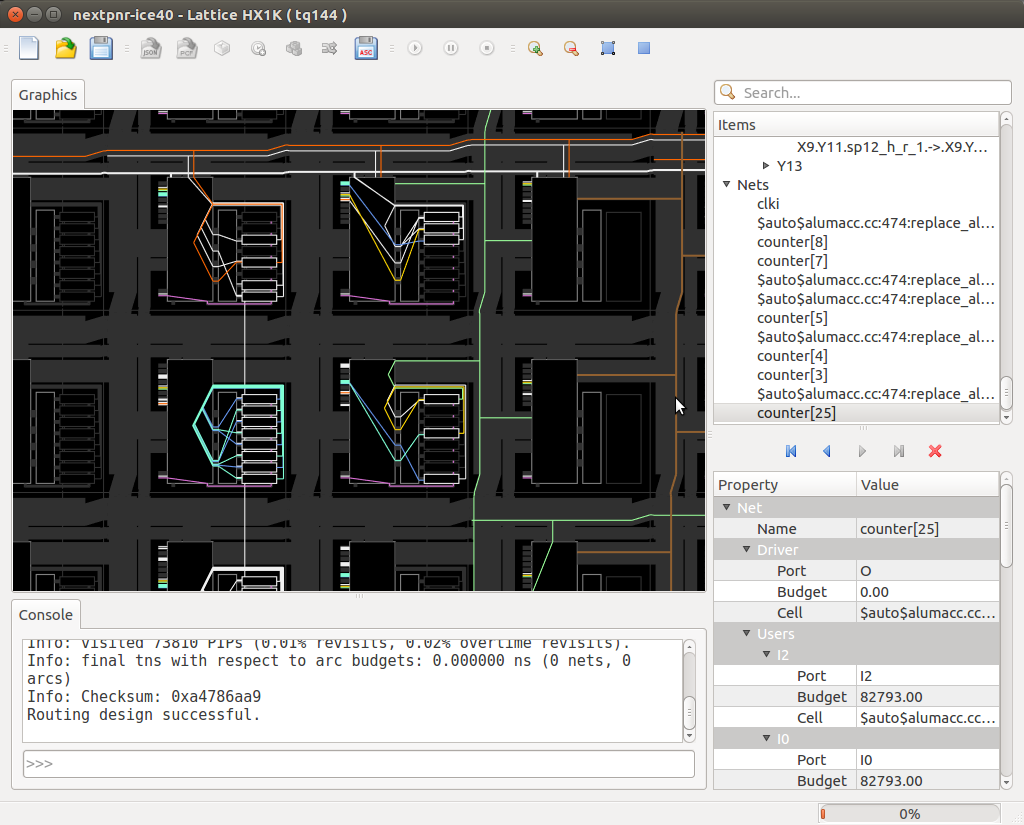
Here is a screenshot of nextpnr for iCE40. Build instructions and
[getting started notes](#getting-started) can be found below.

<img src="https://assets.kitploit.com/production/public/readmes/10385/12bab50b683472060ad2a49530d9b6fe58b2c2b70efd1144b849ff83a8a6e80b.png" width="640"/>

See also:
- [F.A.Q.](https://github.com/yosyshq/nextpnr/blob/main/docs/faq.md)
- [Architecture API](https://github.com/yosyshq/nextpnr/blob/main/docs/archapi.md)


Prerequisites
-------------

The following packages need to be installed for building nextpnr, independent
of the selected architecture:

- CMake 3.25 or later
- Modern C++17 compiler (`clang-format` required for development)
- Python 3.5 or later, including development libraries (`python3-dev` for Ubuntu)
  - Python 3.9 or later is required for `nextpnr-himbaechel`
  - on Windows make sure to install same version as supported by [vcpkg](https://github.com/Microsoft/vcpkg/blob/master/ports/python3/CONTROL)
- Boost libraries (`libboost-dev libboost-filesystem-dev libboost-thread-dev libboost-program-options-dev libboost-iostreams-dev libboost-dev` or `libboost-all-dev` for Ubuntu)
- Eigen3 (`libeigen3-dev` for Ubuntu)
- Yosys is required to synthesise the demo design
- For building on Windows with MSVC, usage of vcpkg is advised for dependency installation.
  - For 32 bit builds: `vcpkg install boost-filesystem boost-program-options boost-thread eigen3`
  - For 64 bit builds: `vcpkg install boost-filesystem:x64-windows boost-program-options:x64-windows boost-thread:x64-windows eigen3:x64-windows`
  - For static builds, add `-static` to each of the package names.  For example, change `eigen3:x64-windows` to `eigen3:x64-windows-static`
  - A copy of Python that matches the version in vcpkg (currently Python 3.6.4).  You can download the [Embeddable Zip File](https://www.python.org/downloads/release/python-364/) and extract it.  You may need to extract `python36.zip` within the embeddable zip file to a new directory called "Lib".
- For building on macOS, brew utility is needed.
  - Install all needed packages `brew install cmake python boost eigen`

Getting started
---------------

First of all, run:

```
git submodule update --init --recursive
```

### nextpnr-ice40

For iCE40 support, install [Project IceStorm](https://github.com/YosysHQ/icestorm) to `/usr/local` or another location, which should be passed as `-DICESTORM_INSTALL_PREFIX=/usr` to CMake. Then build and install `nextpnr-ice40` using the following commands:

```
mkdir -p build && cd build
cmake .. -DARCH=ice40
make -j$(nproc)
sudo make install
```

On Windows, you may specify paths explicitly:

```
cmake . -B build -DARCH=ice40 -DICESTORM_INSTALL_PREFIX=C:/ProgramData/icestorm -DCMAKE_TOOLCHAIN_FILE=C:/vcpkg/scripts/buildsystems/vcpkg.cmake -DVCPKG_TARGET_TRIPLET=x64-windows -G "Visual Studio 15 2017 Win64" -DPython3_EXECUTABLE=C:/Python364/python.exe -DPython3_LIBRARY=C:/vcpkg/packages/python3_x64-windows/lib/python36.lib -DPython3_INCLUDE_DIR=C:/vcpkg/packages/python3_x64-windows/include/python3.6
cmake --build build --config Release
```

To build a static release, change the target triplet from `x64-windows` to `x64-windows-static` and add `-DBUILD_STATIC=ON`.

A simple example that runs on the iCEstick dev board can be found in `ice40/examples/blinky/blinky.*`.
Usage example:

```
cd ice40/examples/blinky
yosys -p 'synth_ice40 -top blinky -json blinky.json' blinky.v               # synthesize into blinky.json
nextpnr-ice40 --hx1k --json blinky.json --pcf blinky.pcf --asc blinky.asc   # run place and route
icepack blinky.asc blinky.bin                                               # generate binary bitstream file
iceprog blinky.bin                                                          # upload design to iCEstick
```

Running nextpnr in GUI mode (see below for instructions on building nextpnr with GUI support):

```
nextpnr-ice40 --json blinky.json --pcf blinky.pcf --asc blinky.asc --gui
```

(Use the toolbar buttons or the Python command console to perform actions
such as pack, place, route, and write output files.)

### nextpnr-ecp5

For ECP5 support, install [Project Trellis](https://github.com/YosysHQ/prjtrellis) to `/usr/local` or another location, which should be passed as `-DTRELLIS_INSTALL_PREFIX=/usr/local` to CMake. Then build and install `nextpnr-ecp5` using the following commands:

```
mkdir -p build && cd build
cmake .. -DARCH=ecp5 -DTRELLIS_INSTALL_PREFIX=/usr/local
make -j$(nproc)
sudo make install
```

 - Examples of the ECP5 flow for a range of boards can be found in the [Project Trellis Examples](https://github.com/YosysHQ/prjtrellis/tree/main/examples).

### nextpnr-nexus

For Nexus support, install [Project Oxide](https://github.com/gatecat/prjoxide) to `$HOME/.cargo` or another location, which should be passed as `-DOXIDE_INSTALL_PREFIX=$HOME/.cargo` to CMake. Then build and install `nextpnr-nexus` using the following commands:

```
mkdir -p build && cd build
cmake .. -DARCH=nexus -DOXIDE_INSTALL_PREFIX=$HOME/.cargo
make -j$(nproc)
sudo make install
```

 - Examples of the Nexus flow for a range of boards can be found in the [Project Oxide Examples](https://github.com/gatecat/prjoxide/tree/main/examples).

### nextpnr-mistral

For Cyclone V support, clone [Mistral](https://github.com/Ravenslofty/mistral/tree/nextpnr-latest) to `$HOME/mistral` or another location and pass this path as `-DMISTRAL_ROOT=$HOME/mistral` to CMake. Then build and install `nextpnr-mistral` using the following commands:

```
mkdir -p build && cd build
cmake .. -DARCH=mistral -DMISTRAL_ROOT=$HOME/mistral
make -j$(nproc)
sudo make install
```

Cyclone V support is currently experimental and has limited testing. The backend is undergoing active API refactoring, and its structure, build requirements, and integration points may change between versions.

### nextpnr-generic

The generic target allows running placement and routing for arbitrary custom architectures.

```
mkdir -p build && cd build
cmake .. -DARCH=generic
make -j$(nproc)
sudo make install
```

An example of how to use the generic flow is in [generic/examples](https://github.com/yosyshq/nextpnr/blob/main/generic/examples). See also the [Generic Architecture docs](https://github.com/yosyshq/nextpnr/blob/main/docs/generic.md).

### nextpnr-himbaechel

The himbaechel target allows running placement and routing for larger architectures that share a common structure.

#### gowin

For Gowin support, install [Project Apicula](https://github.com/YosysHQ/apicula)

```
mkdir -p build && cd build
cmake .. -DARCH="himbaechel" -DHIMBAECHEL_UARCH="gowin"
make -j$(nproc)
sudo make install
```

 - Examples of the Gowin flow for a range of boards can be found in the [Project Apicula Examples](https://github.com/YosysHQ/apicula/tree/master/examples).

#### ng-ultra

For NanoXplore NG-Ultra support, clone [Project Beyond DB](https://github.com/yosyshq-GmbH/prjbeyond-db) repo

```
mkdir -p build && cd build
cmake .. -DARCH="himbaechel" -DHIMBAECHEL_UARCH="ng-ultra" -DHIMBAECHEL_PRJBEYOND_DB=/path/to/prjbeyond-db -DHIMBAECHEL_NGULTRA_DEVICES=ng-ultra
make -j$(nproc)
sudo make install
```

*Please note that binary bitstream creation requires Impulse tool from NanoXplore.*

#### gatemate

For Cologne Chip GateMate support, clone [Project Peppercorn](https://github.com/YosysHQ/prjpeppercorn)

```
mkdir -p build && cd build
cmake .. -DARCH="himbaechel" -DHIMBAECHEL_UARCH="gatemate" -DHIMBAECHEL_PEPPERCORN_PATH=/path/to/prjpeppercorn
make -j$(nproc)
sudo make install
```

### GUI

The nextpnr GUI is not built by default, to reduce the number of dependencies for a standard headless build. To enable it, add `-DBUILD_GUI=ON` to the CMake command line and ensure that Qt5/Qt6 and OpenGL are available:

For Qt6:
 - On Ubuntu 22.04 LTS or later, install `qt6-base-dev`
 - For MSVC vcpkg, install `qt-base` (32-bit) or `qt-base:x64-windows` (64-bit)
 - For Homebrew, install `qt6` and add qt6 in path: `echo 'export PATH="/usr/local/opt/qt/bin:$PATH"' >> ~/.bash_profile`
` - this change is effective in next terminal session, so please re-open terminal window before building

For Qt5:
 - On Ubuntu 22.04 LTS, install `qtbase5-dev qtchooser qt5-qmake qtbase5-dev-tools`
 - On other Ubuntu versions, install `qt5-default`
 - For MSVC vcpkg, install `qt5-base` (32-bit) or `qt5-base:x64-windows` (64-bit)
 - For Homebrew, install `qt5` and add qt5 in path: `echo 'export PATH="/usr/local/opt/qt/bin:$PATH"' >> ~/.bash_profile`
` - this change is effective in next terminal session, so please re-open terminal window before building

### Multiple architectures

To build nextpnr for multiple architectures at once, a semicolon-separated list can be used with `-DARCH`.

```
mkdir -p build && cd build
cmake .. -DARCH="ice40;ecp5"
make -j$(nproc)
sudo make install
```

To build every available stable architecture, use `-DARCH=all`. To include experimental arches (currently nexus), use `-DARCH=all+alpha`.

### Per-microarchitecture Himbächel

To build a single nextpnr-himbachel executable for each of the supported microarchitectures, use `-DHIMBAECHEL_SPLIT`.

```
mkdir -p build && cd build
cmake .. -DARCH="himbaechel" -DHIMBAECHEL_UARCH="gowin;ng-ultra"
make -j$(nproc)
sudo make install
```

In such a build, instead of a single `nextpnr-himbaechel` binary, two binaries `nextpnr-himbaechel-gowin` and `nextpnr-himbaechel-ng-ultra` are built. Although they are installed together, each microarchitecture is completely independent of the other, and only needs its corresponding `.../share/himbaechel/<microarchitecture>/` chip database directory to run. Split build reduces the size of individual distributed artifacts (although the total size increases), and allows co-installation of artifacts of different versions.

Cross-compilation
-----------------

Apart from chip databases, nextpnr requires the `bba` tool to be compiled for the build system. This tool can be compiled as a separate project:

```
cd bba
cmake .
make
```

This will create a `bba-export.cmake` file. Provide the path to this file when cross-building nextpnr by using `-DBBA_IMPORT=/path/to/bba-export.cmake`.

Additional notes for building nextpnr
-------------------------------------

The following runs a debug build of the iCE40 architecture without GUI, without Python support, without the HeAP analytic placer and only HX1K support:

```
mkdir -p build && cd build
cmake .. -DARCH=ice40 -DCMAKE_BUILD_TYPE=Debug -DBUILD_PYTHON=OFF -DICE40_DEVICES=1k
make -j$(nproc)
```

To make static build release for iCE40 architecture use the following:

```
mkdir -p build && cd build
cmake .. -DARCH=ice40 -DBUILD_PYTHON=OFF -DSTATIC_BUILD=ON
make -j$(nproc)
```

The HeAP placer's solver can optionally use OpenMP for a speedup on very large designs. Enable this by passing `-DUSE_OPENMP=yes` to cmake (compiler support may vary).

You can change the location where nextpnr will be installed (this will usually default to `/usr/local`) by using `-DCMAKE_INSTALL_PREFIX=/install/prefix`.

Notes for developers
--------------------

- All code is formatted using `clang-format` according to the style rules in `.clang-format` (LLVM based with
  increased indent widths and brace wraps after classes).
- To automatically format all source code, run `make clangformat`.
- See the wiki for additional documentation on the architecture API.

Recording a movie
-----------------

- To save a movie recording of place-and-route click recording icon in toolbar and select empty directory
  where recording files will be stored and select frames to skip.
- Manually start all PnR operations you wish
- Click on recording icon again to stop recording
- Go to directory containing files and execute `ffmpeg -f image2 -r 1 -i movie_%05d.png -c:v libx264 nextpnr.mp4`

Testing
-------

- To build test binaries as well, use `-DBUILD_TESTS=ON` and after `make` run `make test` to run them, or you can run separate binaries.
- To use code sanitizers use the `cmake` options:
  - `-DSANITIZE_ADDRESS=ON`
  - `-DSANITIZE_MEMORY=ON -DCMAKE_C_COMPILER=clang -DCMAKE_CXX_COMPILER=clang++`
  - `-DSANITIZE_THREAD=ON`
  - `-DSANITIZE_UNDEFINED=ON`
- Running valgrind example `valgrind --leak-check=yes --tool=memcheck ./nextpnr-ice40 --json ice40/blinky.json`
- Running tests with code coverage use `-DBUILD_TESTS=ON -DCOVERAGE` and after `make` run `make ice40-coverage`
- After that open `ice40-coverage/index.html` in your browser to view the coverage report
- Note that `lcov` is needed in order to generate reports

Links and references
--------------------

### Synthesis, simulation, and logic optimization

- [Yosys](https://yosyshq.net/yosys/)
- [Icarus Verilog](http://iverilog.icarus.com/)
- [ABC](https://people.eecs.berkeley.edu/~alanmi/abc/)

### FPGA bitstream documentation (and tools) projects

- [Project IceStorm (Lattice iCE40)](https://github.com/YosysHQ/icestorm)
- [Project Trellis (Lattice ECP5)](https://yosyshq.github.io/prjtrellis-db/)
- [Project X-Ray (Xilinx 7-Series)](https://github.com/F4PGA/prjxray)
- [Project Chibi (Intel MAX-V)](https://github.com/rqou/project-chibi)

### Other FOSS FPGA place and route projects

- [Arachne PNR](https://github.com/cseed/arachne-pnr)
- [VPR/VTR](https://verilogtorouting.org/)
- [SymbiFlow](https://github.com/SymbiFlow/symbiflow-arch-defs)
