
Skip to content
KitploitKITPLOIT
ToolsExploitsBlog
Log in
Submit
ToolsExploitsBlog
Submit

Hacking, PenTest, and Cybersecurity Tools for Your Security Arsenal!

Kitploit is a directory of hacking, cybersecurity, and pentesting tools. Discover the latest project updates to find vulnerabilities, analyze systems, automate testing, and strengthen your security.

FeedsContactPrivacy© 2026 Kitploit

Tool Directory

Categories

View all categories
Loading categories
Tools/GitHubGitHub/yasodginige/autopentester
Penetration Testing FrameworksReconnaissanceVulnerability AnalysisScripting & AutomationPenetration TestingPapers & ResearchRed TeamingAI Security
GitHubyasodginige/autopentester

AutoPentester

This repository contains a tool that can be used for automated pentesting tasks.

View Repository
94191 month agoReviewed by Kitploit
Website

Most Popular

View all →

Discover the most used tools by our community.

Explore all tools

Browse our collection of tools

View all tools →
Share

AutoPentester: An LLM Agent-based Framework for Automated Pentesting

arXiv

Note:

  • If you are using this work for academic purposes, please cite our paper.
  • If you find any incorrect / inappropriate / outdated content, please kindly consider opening an issue or a PR.

Updates

  • AutoPentester now supports claude.
  • This work has been accepted for the IEEE TrustCom 2025.
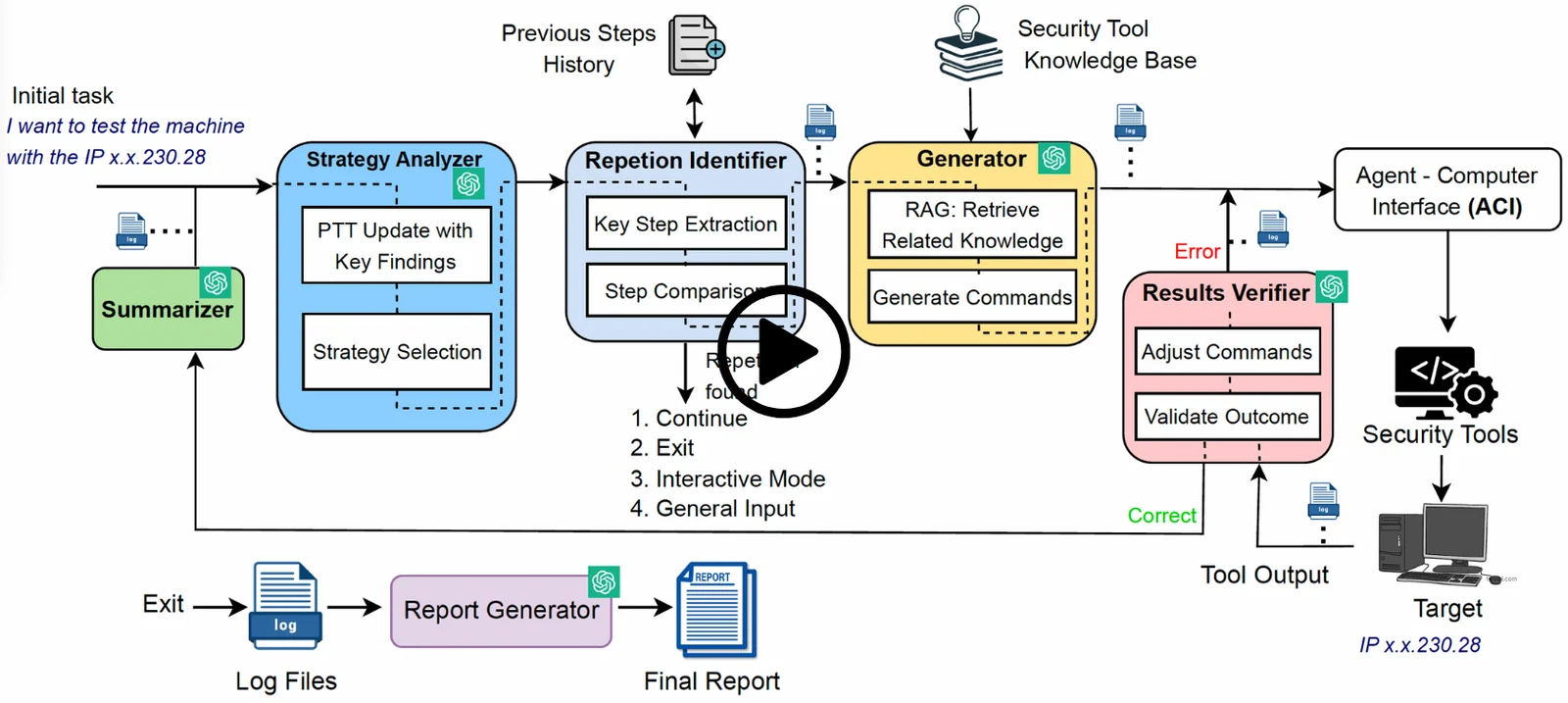
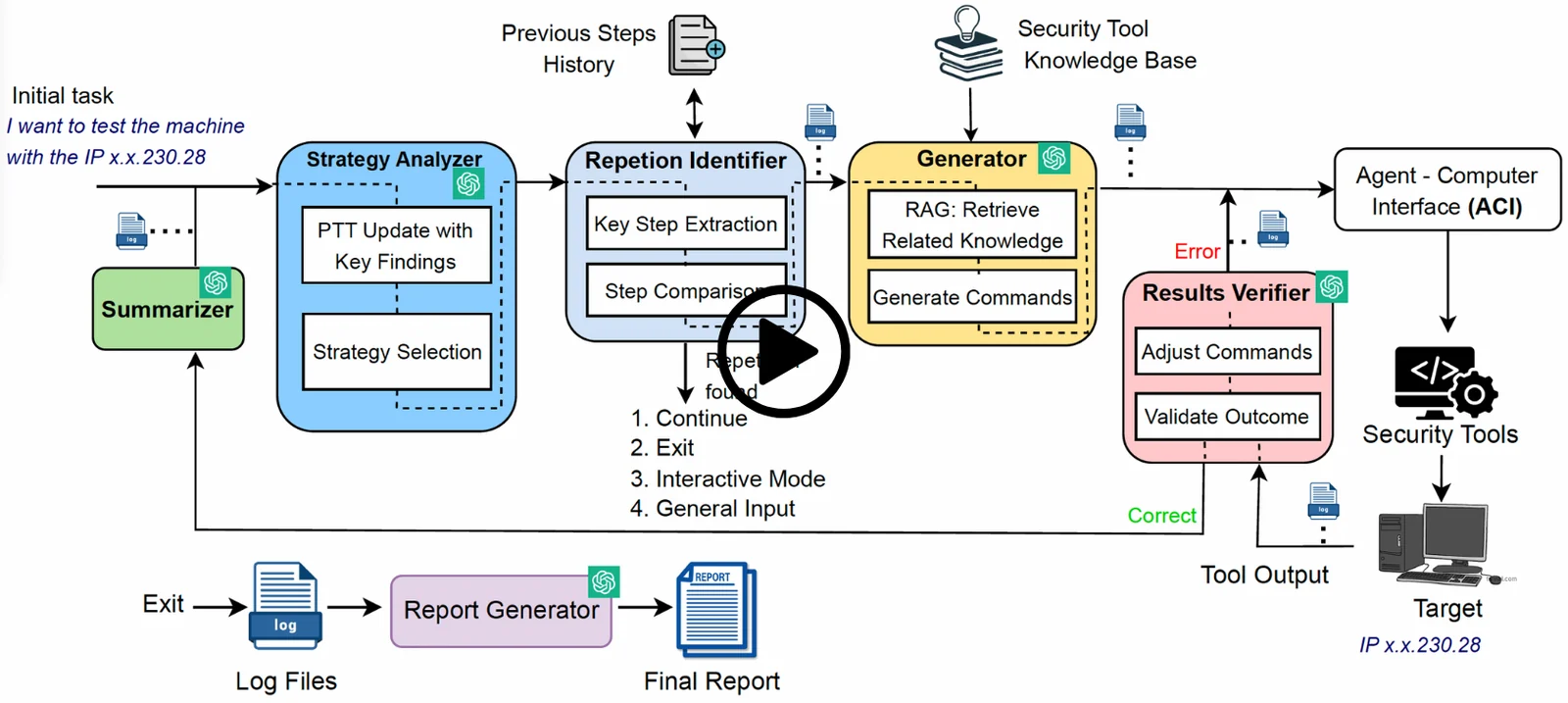
overall architecure

Installation

  1. Create a virtual environment. (python3 -m venv myenv, source myenv/bin/activate)
  2. Clone the project and install the requirements.
    • git clone <repo_url>
    • cd AutoPentester
    • Create a virtual environment with Python pip3 3.12.3. Then install the requirements.txt inside it.
    • pip3 install -r requirements.txt
    • pip3 install -e .
  3. To use OpenAI API
    • Ensure that you have link a payment method to your OpenAI account.
    • export your API key with export OPENAI_API_KEY="<your key here>"
    • optional: override the API endpoint with export OPENAI_BASE_URL="https://your-host/v1"
  4. To use Anthropic Claude models
  • export your API key with export ANTHROPIC_API_KEY="<your key here>"
  1. To use Google Gemini models
    • export your API key with export GEMINI_API_KEY="<your key here>" or export GOOGLE_API_KEY="<your key here>"
    • Gemini is selected per agent in pentestgpt/config/agent_config.py
  2. Configure agent models in pentestgpt/config/agent_config.py
  • Each agent name maps to a provider and model.
  • Supported providers are openai, anthropic, gemini, azure, gpt4all, titan, and rag.
  • Update the file to mix OpenAI and Claude per agent based on your preference.
  1. To run the framework, type autopentester --loggin
  2. You will be asked for the key for the configured provider, and then the IP address.
  3. Do you want to continue from previous session? (y/n) -> Press n
  4. Give a pentesting task. You can use a prompt like "I want to test the machine with the IP (targe_IP)"
  5. Only for the first run, it will take 10 minutes to build the vectorbase of the RAG module at the beginning. Please wait until it starts its process.

Demo

Please find the demonstration video in the following link.

Log files

The processed log files are in the processed_log_files directory. The quantitative results were calculated baseed on these log files.

Survey analysis

The analysis of the survey is in the Survey_analysis directory. Run the analysis.py to plot the graphs.

Citations

If you are using this work for academic purposes, please cite our paper.

@inproceedings{ginige2025autopentester,
  title={Autopentester: An llm agent-based framework for automated pentesting},
  author={Ginige, Yasod and Niroshan, Akila and Jain, Sajal and Seneviratne, Suranga},
  booktitle={2025 IEEE 24th International Conference on Trust, Security and Privacy in Computing and Communications (TrustCom)},
  pages={163--174},
  year={2025},
  organization={IEEE}
}
Download Tool