
Skip to content
KitploitKITPLOIT
ToolsExploitsBlog
Log in
Submit
ToolsExploitsBlog
Submit

Hacking, PenTest, and Cybersecurity Tools for Your Security Arsenal!

Kitploit is a directory of hacking, cybersecurity, and pentesting tools. Discover the latest project updates to find vulnerabilities, analyze systems, automate testing, and strengthen your security.

··Feeds·Contact·Privacy·© 2026 Kitploit

Tool Directory

Categories

View all categories
Loading categories
EnableWindowsLogSettings — Documentation and scripts to properly enable Windows event logs. | Kitploit
Tools/GitHubGitHub/yamato-security/enablewindowslogsettings
Defensive ToolsConfiguration AuditingDigital ForensicsIntrusion DetectionLearning & EducationIncident Response
GitHubyamato-security/enablewindowslogsettings

EnableWindowsLogSettings

Documentation and scripts to properly enable Windows event logs.

Most Popular

View all →

Discover the most used tools by our community.

Explore all tools

Browse our collection of tools

View all tools →
View Repository
71567190 years agoReviewed by Kitploit
Share

Yamato Security Logo

Yamato Security's Windows Event Log Configuration Guide For DFIR And Threat Hunting

[ English ] | [日本語]

This is yet another guide on properly configuring and monitoring Windows event logs with an emphasis on logging for sigma rules.

This is a work in progress, so check back please periodically for updates.

TLDR

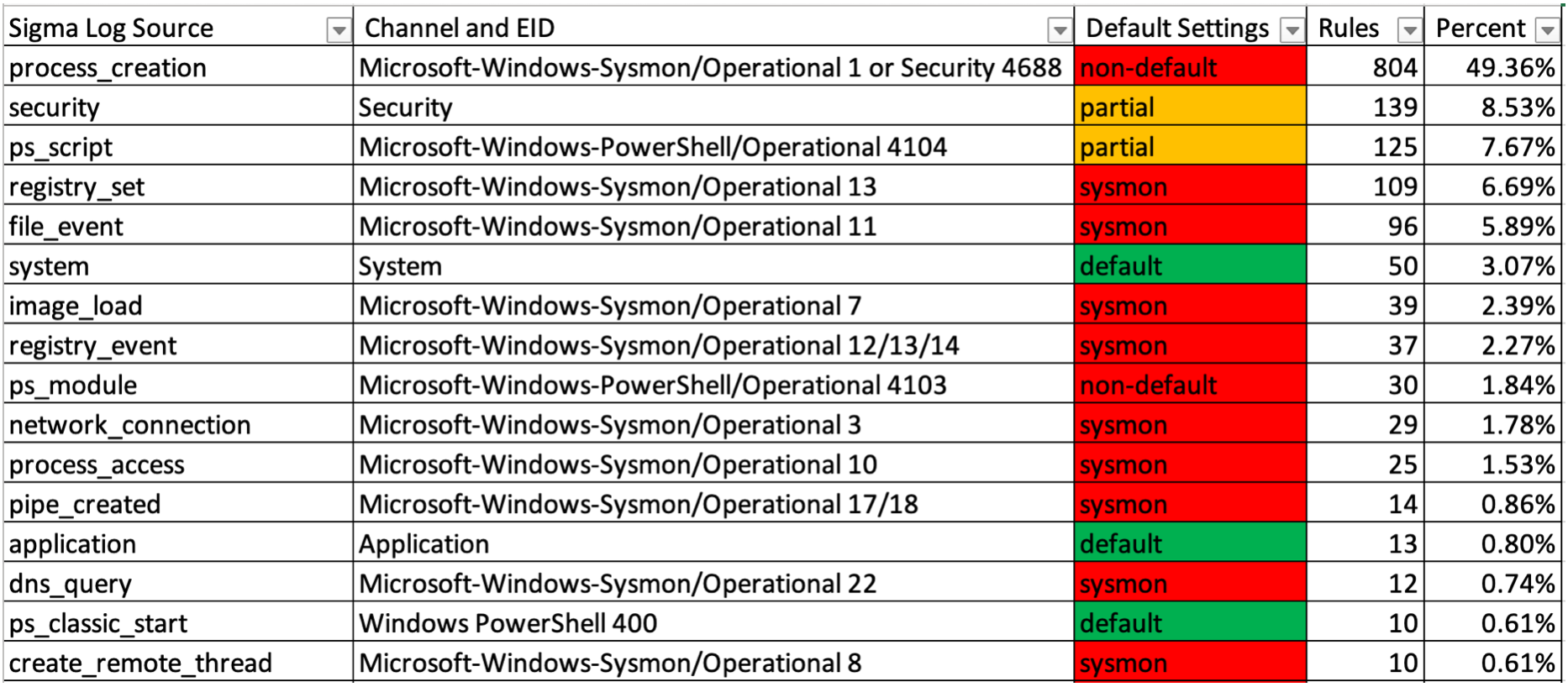
  • You can only use around 10~20% of sigma detection rules with the default Windows audit settings.
  • Even if a Windows log is enabled, by default, the maximum size for logs is between 1~20 MB so there is a good chance that evidence gets quickly overwritten.
  • Enable the proper audit settings with YamatoSecurityConfigureWinEventLogs.bat or WELA (Windows Event Log Auditor) to use up to around 75% of sigma rules and retain logs for as long as you need them.
    • Warning: make sure you customize the script to your needs and test before using in production!
  • Install sysmon to get full coverage. (Highly recommended!)

Companion Projects

  • Hayabusa - sigma-based threat hunting and fast forensics timeline generator for Windows event logs.
  • Hayabusa Rules - detection rules for hayabusa.
  • Hayabusa Sample EVTXs - Sample evtx files to use for testing hayabusa/sigma detection rules.
  • Takajo - Analyzer for hayabusa results.
  • WELA (Windows Event Log Auditor) - A tool for auditing Windows event log settings.

Table of Contents

  • TLDR
  • Companion Projects
  • Table of Contents
  • Author
  • Contributors
  • Acknowledgements
  • Problems with the default Windows log settings
  • Warning: Make changes to your systems at your own risk!
  • Important Windows event logs
    • Sigma's top log sources
      • Top sigma log sources
      • Top Security Event IDs
  • Increasing the maximum file size
    • Option 1: Manually through Event Viewer
    • Option 2: Windows built-in tool
    • Option 3: PowerShell
    • Option 4: Group Policy
  • Configuration script
  • Configuring log settings
    • Sysmon log (1382 sigma rules)
    • Security log (1045 sigma rules (903 process creation rules + 142 other rules))
    • Powershell logs (175 sigma rules)
      • Module logging (30 sigma rules)
        • Enabling module logging
          • Option 1: Enabling through group policy
          • Option 2: Enabling through the registry
      • Script Block Logging (134 sigma rules)
        • Enabling Script Block logging
        • Option 1: Enabling through group policy
        • Option 2: Enabling through the registry
      • Transcription logging
        • Enabling Transcription logging
          • Option 1: Enabling through group policy
          • Option 2: Enabling through the registry
      • References
    • System log (55 sigma rules)
    • Application log (16 sigma rules)
    • Windows Defender Operational log (10 sigma rules)
    • Bits-Client Operational log (6 sigma rules)
    • Firewall log (6 sigma rules)
    • NTLM Operational log (3 sigma rules)
    • Security-Mitigations KernelMode and UserMode logs (2 sigma rules)
    • PrintService logs (2 sigma rules)
      • Admin (1 sigma rule)
      • Operational (1 sigma rule)
    • SMBClient Security log (2 sigma rules)
    • AppLocker logs (1 sigma rule)
    • CodeIntegrity Operational log (1 sigma rule)
    • Diagnosis-Scripted Operational log (1 sigma rule)
    • DriverFrameworks-UserMode Operational log (1 sigma rule)
    • WMI-Activity Operational log (1 sigma rule)
    • TerminalServices-LocalSessionManager Operational log (1 sigma rule)
    • TaskScheduler Operational log (1 sigma rule)

Author

Zach Mathis (@yamatosecurity). As I do more research and testing, I plan on periodically updating this as there is much room for improvement (both in the documentation as well as in creating more detection rules.) PRs are welcome and will gladly add you as a contributor. If you find any errors in this documentation, please let me know and I will fix them as soon as possible.

If you find any of this useful, please give a star on GitHub as it will probably help motivate me to continue updating this.

Contributors

  • DustInDark (hitenkoku): Japanese translation fixes.
  • Fukusuke Takahashi (fukusuket): Japanese translations and fixes.
  • LasseKrache: Pointing out a bug in the batch script.

Acknowledgements

Most of the information comes from Microsoft's Advanced security auditing FAQ, sigma rules, the ACSC Event Logging Guide and my own research/testing. I would like to thank the sigma community in particular for making threat detection open source and free for the benefit of all of the defenders out there.

Problems with the default Windows log settings

Download Tool