

InfraGuard is a Command & Control Redirection Proxy and Manager which protects your Red Team Infrastructure against threat attribution

Red team infrastructure tracker and C2 redirector -- a modern alternative to [RedWarden](https://github.com/mgeeky/RedWarden).
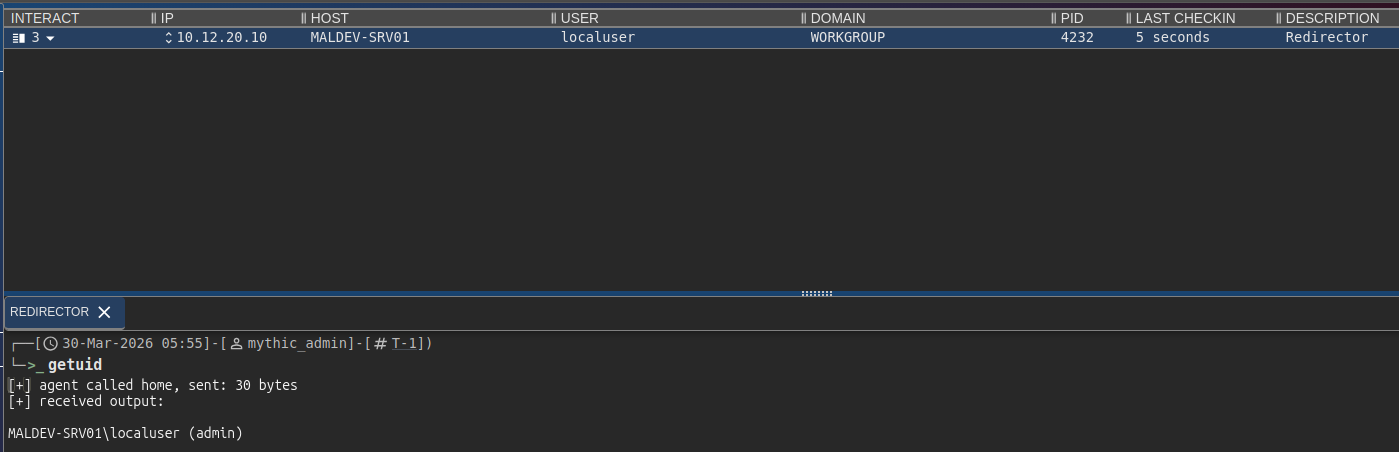
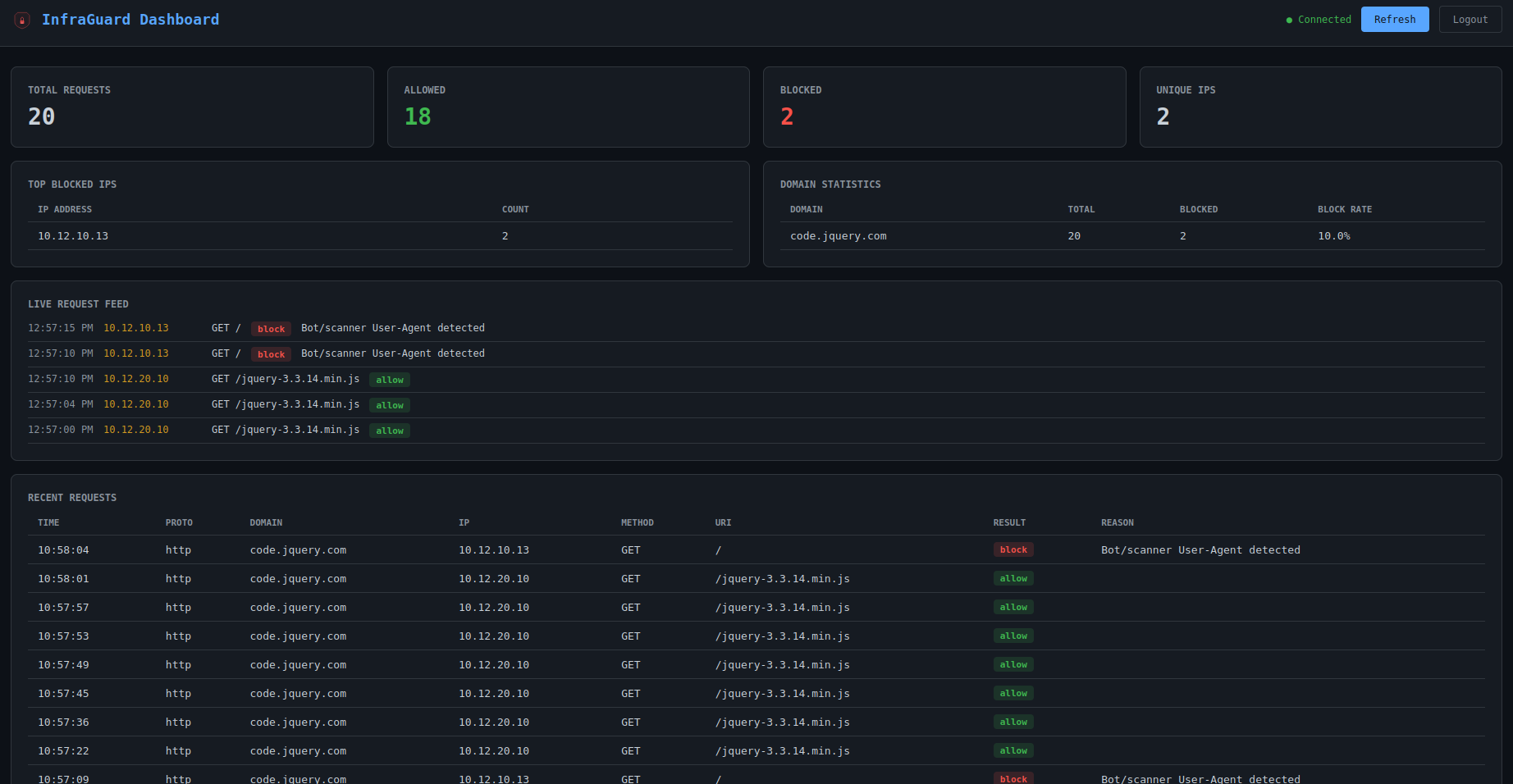
InfraGuard sits between the internet and your C2 teamserver, validating every inbound request against your malleable C2 profile and blocking anything that doesn't conform. Scanners, bots, and blue team probes get redirected to a decoy site while legitimate beacon traffic passes through to your teamserver.
## Architecture
## Features
### Proxying & Listeners
- **Multi-domain proxying** -- proxy multiple domains simultaneously, each with independent C2 profiles, upstreams, and rules
- **Multi-protocol listeners** -- HTTP/HTTPS, HTTP/3 (QUIC), WebSocket, gRPC, DNS, MQTT, and TCP-tunnel listeners running simultaneously with shared IP intelligence and event tracking
- **Circuit breaker** -- per-upstream failure protection with closed/open/half-open states; falls through to the domain's drop action when backends are unreachable
- **Protocol failover** -- automatic failover and failback between listener protocols ranked by priority
### C2 Profile Support
- **C2 profile validation** -- parse and enforce Cobalt Strike, Mythic, Brute Ratel C4, Sliver, Havoc, Nighthawk, and PoshC2 profiles as redirector rules
- **Hot-swappable profiles** -- swap a domain's active C2 profile at runtime from the dashboard without restarting the proxy
- **Profile generation wizard** -- generate new C2 profiles from scratch for all 8 supported types via a guided form, or import and upload existing profiles with automatic type detection and validation
- **AI-assisted profile generation** -- optional Ollama integration provides a chat panel in the dashboard for profile creation help and OPSEC advice
### Filter Pipeline
- **Scoring-based filter pipeline** -- 10 filters each contribute a 0.0--1.0 score; configurable threshold determines block/allow. Filters: JA3, IP, bot, header, DNS, geo, profile, replay, enumeration, sandbox.
- **JA3 TLS fingerprint filtering** -- block Masscan, ZGrab2, Shodan, curl, Python requests, and Nmap at the TLS handshake layer before any HTTP data is exchanged; works via reverse-proxy header or custom asyncio protocol; optional allowlist mode enforces beacon JA3
- **Sandbox and headless browser detection** -- score-accumulation across HTTP signals: HeadlessChrome UA, missing Accept-Language, Chrome without sec-ch-ua, Safe Links and msnbot scanner UAs, non-browser Accept ordering
- **Path enumeration detection** -- per-IP unique URI tracking in a sliding window; blocks dirbuster/ffuf/gobuster before they map URI space
- **DNS subdomain enumeration detection** -- tracks NXDOMAIN responses per client IP; auto-blocks source IPs on threshold breach
- **Anti-bot / anti-crawling** -- 40+ known scanner/bot User-Agent patterns, header anomaly detection
- **Replay protection** -- reject duplicate requests by content hash; hashes persisted to SQLite so protection survives restarts
- **Drop actions** -- redirect, TCP reset, proxy to decoy site, or tarpit (slow-drip response to waste scanner time)
### Intelligence
- **IP intelligence** -- built-in CIDR blocklists for 19 security vendor ranges (Shodan, Censys, Rapid7, etc.), GeoIP filtering, reverse DNS keyword matching
- **Threat intel feeds** -- auto-update blocklists from public sources (abuse.ch, Emerging Threats, Spamhaus DROP, Binary Defense) with configurable refresh interval and disk caching
- **Dynamic IP blocking** -- block IPs outside whitelisted ranges; auto-whitelist IPs after N valid C2 requests
- **Whitelist enrichment** -- whitelisted CIDRs are auto-enriched with ASN, organization, country, and continent data on startup via GeoIP databases
- **Burn detection** -- Certificate Transparency log monitoring via crt.sh, domain reputation self-monitoring via URLhaus/OpenPhish/Google Safe Browsing, and cross-domain analyst detection when a single IP accesses multiple operator domains
- **Burn confidence scoring** -- continuous 0--100 score from 6 weighted signals: JA3 diversity, volume spikes, new ASNs, CT log exposure, reputation hits, and failed auth attempts. Includes recommended actions: monitor, rotate, or immediate burn.
- **Canary token injection** -- tracking pixels, honeypot links, and honeypot forms auto-injected into decoy pages to detect blue team investigation
- **Passive DNS monitoring** -- polls CIRCL PDNS for external resolution of your domains; detects new records, NXDOMAIN spikes, and first-seen exposure
### Payload Delivery
- **Content delivery routes** -- serve payloads, decoys, and static files at specific paths via PwnDrop, Mythic file store, local filesystem, or HTTP proxy backends; optional conditional delivery to serve real content to targets and decoys to scanners
- **Mythic file staging** -- `mythic_file` backend proxies Mythic's `/direct/download/{uuid}` at clean URLs; fixed UUID or proxy mode; access control provided by InfraGuard's filter stack
- **One-time payload tokens** -- tokens issued automatically when a beacon is dynamically whitelisted; atomic single-use SQLite enforcement prevents URL replay by analysts or sandboxes; configurable TTL and max-use count
- **Per-route rate limiting** -- sliding-window per-IP download rate limiter on content routes; exceeding the limit serves the configured scanner decoy or 429
- **Delivery guards** -- environment keying for content routes: require beacon IP, UA allowlist, required header values, forbidden headers; failed checks serve domain drop action, not a raw 403
- **Phishing campaign tokens** -- gate phishing pages behind per-campaign tokens embedded in email links; static token list or HMAC-signed self-validating tokens with configurable TTL
### Resilience
- **Infrastructure rotation** -- one-click blue-green Terraform rotation across 5 cloud providers with pre-flight checks, rollback, and age-encrypted state
- **Rotation scheduling** -- automated rotation policies: fixed interval, burn-triggered, request-count threshold, and staggered rolling
- **Auto-rotation watchdog** -- polls burn score and cert expiry on an interval; auto-rotates when the burn threshold trips or a cert has under N days left, or falls back to alert-only mode with a cost cap
- **Circuit breakers** -- per-upstream failure tracking with HEALTHY / PROBING / TRIPPED states and configurable recovery timeout, surfaced live in the dashboard's Upstreams widget
- **Domain fronting** -- CDN-based C2 routing via SNI/Host header split with CDN header stripping and SSRF protection
- **Dead man's switch** -- operator heartbeat TTL that auto-stops C2 forwarding if the operator fails to check in
- **Purple-team mirror** -- fire-and-forget duplicate of allowed events to a blue-team collector for engagement scoring
- **Shared state backend (Redis)** -- optional cross-node replay cache, dynamic whitelist, beacon session bag, and drop rate-limit so horizontally scaled replicas see the same state
- **Edge proxies** -- Cloudflare Worker and AWS Lambda for domain fronting through CDN infrastructure, edge country blocking, and host rewriting
### Dashboard & Operator Tools
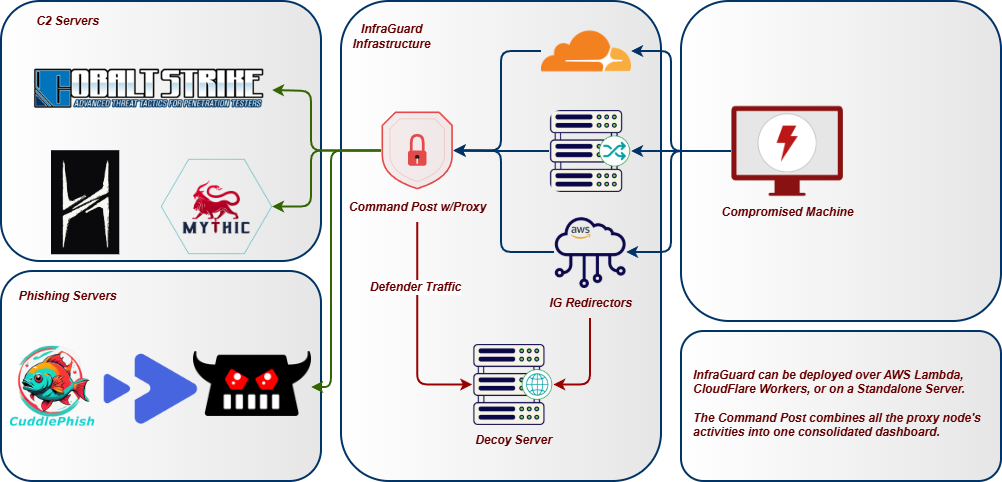
- **Web dashboard** -- real-time SPA with login page, live request feed, domain stats, top blocked IPs, WebSocket event streaming, and inline block/whitelist/unblock actions
- **Decoy page management** -- list, preview, and edit decoy HTML pages directly from the dashboard; per-domain **Canary Overview** (pixel / hidden link / hidden form toggles) and a **Canary Hits** panel that surfaces every scanner or sandbox that pulled a decoy asset
- **Decoy tokens with dedicated callback endpoints** -- injected tracking pixel, hidden link, and hidden form each fire a `canary_hit` event on `/_ig/px|hp|hf?c=<token>`; hits land in the tracking DB with `filter_result=canary_hit` and stream live to the Decoys page and any subscribed alerter plugin
- **Plugins tab** -- lists loaded plugins with runtime `enable / disable` toggles (no restart) and a **Plugin Marketplace** to add any of the 29 built-in plugins with one click; every mutation persists to `config.yaml` and lands as a commit in the config-history repo
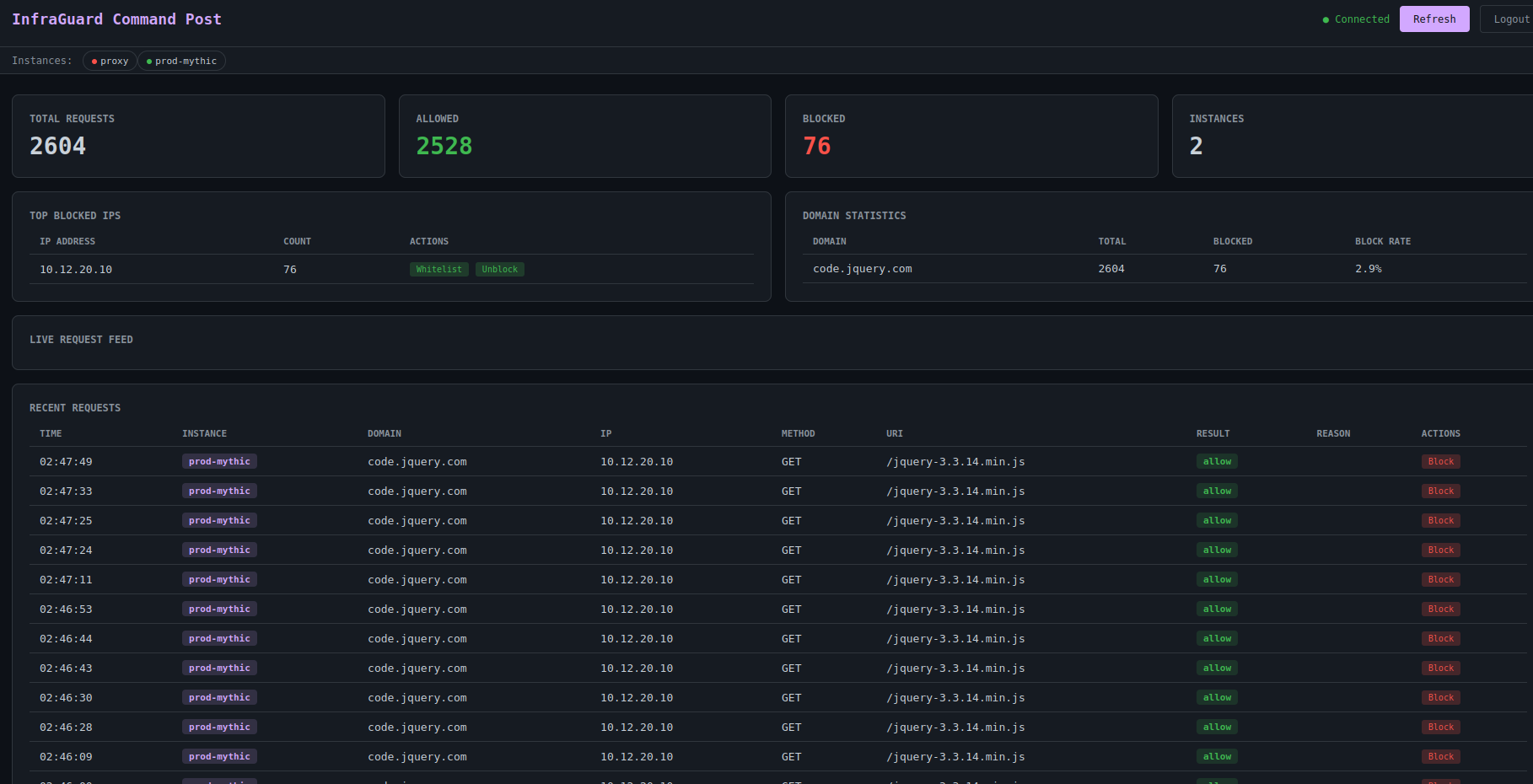
- **Command Post** -- multi-instance aggregation dashboard that merges stats, requests, and live events from multiple InfraGuard nodes into a single view, with a **Fleet Map** (MapLibre) that plots each proxy plus every blocked-source IP at its geolocated lat/lon and a fan-out plugin toggle for cross-instance operations
- **Terminal UI** -- Textual-based TUI with login screen, live API polling, color-coded request log
- **Engagement reports** -- self-contained HTML, JSON, or CSV reports with per-domain breakdowns, filter effectiveness, and operator audit trail
- **Prometheus metrics** -- `/metrics` endpoint exposing request counters, upstream latency histograms, circuit breaker state, feed freshness, active connections, and the `infraguard_active_beacons` gauge the Helm HPA scales on
- **OpenTelemetry** -- opt-in OTLP traces + metrics exporter; observability compose profile stands up an OTEL collector plus Prometheus + auto-provisioned Grafana overview dashboard
- **Kubernetes Helm chart** -- proxy, dashboard, Redis StatefulSet, ServiceMonitor, and HPA on the active-beacon gauge; ships under `deploy/helm/infraguard/`
### Integrations & Plugins
- **SIEM integration** -- built-in plugins for Elasticsearch, Wazuh, and Syslog (CEF/JSON) with batched forwarding
- **Webhook alerts** -- built-in plugins for Discord (embeds), Slack (Block Kit), generic webhook, **PagerDuty** (Events API v2, dedup keyed), and **Telegram** (two-way ops chat: `/status`, `/sessions`, `/kill`, `/ack` from a phone)
- **Detection plugins** -- YARA rules over request bodies, GreyNoise Community lookup, ML bot classifier (logistic regression on JA4 + UA + timing), response canary (canarytokens.org), p0f v3 fingerprinting, JA4/JA4H enrichment, GeoIP enrichment
- **Response manipulators** -- HTML rewriter, payload watermark, signature stripper, JS challenge, cache mimicry, slow tarpit, shadow-block (return 200 to scanners so they never adapt)
- **Phishing.club integration** -- HMAC-signed webhook receiver that ingests phishing events and auto-allowlists clicking target IPs
- **Plugin system** -- event-driven architecture with `on_event` hooks, per-plugin config, and event filtering; every plugin can be toggled or loaded from the dashboard's **Plugins** tab without a restart, and the change persists back to `config.yaml` with a config-history audit commit
### Configuration & Deployment
- **Config encryption** -- age (full-file) and SOPS (per-value) encryption with `.env` file support
- **Config validation** -- CLI diff tool and 20+ security, operational, and TLS validation checks
- **API key management** -- create, revoke, and rotate API keys with per-key rate limits, usage tracking, and quotas
- **Backend config generation** -- generate Nginx, Caddy, or Apache configs with TLS, IP filtering, header checks, aliases, and custom headers
- **Rule ingestion** -- import IP blocklists and User-Agent patterns from existing `.htaccess` and `robots.txt` files
- **Docker deployment** -- Dockerfile + docker-compose with optional Let's Encrypt, GeoIP downloader, PwnDrop payload server, and Ollama AI assistant
- **GeoIP support** -- all three GeoLite2 databases (City, ASN, Country) with Docker auto-download
- **Self-signed TLS fallback** -- auto-generates certificates when configured paths don't exist
- **Environment variable support** -- `.env` file auto-loaded; `${VAR}` syntax works in all config values and keys
- **Configurable health endpoint** -- change the health check path to avoid fingerprinting
- **Structured logging** -- JSON-formatted structured logs via structlog
- **Tracking & persistence** -- SQLite with WAL mode for request logging, statistics, node registry, replay hashes, and payload tokens
## Installation Guide
Check out the [Wiki Page](https://infraguard.whispergate.org/docs/getting-started/installation/) for installation
## CLI Reference
```
infraguard --version Show version
infraguard --help Show help
infraguard run -c config.yaml Start the reverse proxy
infraguard run -c config.yaml --port 8443 Override listen port
infraguard run -c config.yaml --host 0.0.0.0 Override bind address
infraguard dashboard -c config.yaml Start the web dashboard
infraguard dashboard -c config.yaml --port 9090 Override dashboard port
infraguard tui Launch TUI with login screen
infraguard tui --url http://host:8080 --token TOK Auto-connect to dashboard
infraguard tui -c config.yaml Read URL/token from config
infraguard command-post -c command-post.yaml Start multi-instance dashboard
infraguard command-post --instance name:url:token Add instance via CLI (repeatable)
infraguard profile parse <file> Parse and display a C2 profile
infraguard profile parse <file> --format json Output as JSON
infraguard profile parse <file> --type brute_ratel Force profile type
infraguard profile convert <file> -o out.json Convert profile to JSON
# Supported --type values: auto, cobalt_strike, mythic, brute_ratel, sliver, havoc, nighthawk, poshc2
# Auto-detection: .profile = CS, .toml = Havoc, .yaml = PoshC2, .json = auto-detect by keys
infraguard ingest <files...> Ingest .htaccess/robots.txt rules
infraguard ingest <files...> --format blocklist Output as IP blocklist
infraguard ingest <files...> --format json Output as JSON
infraguard ingest <files...> -o banned_ips.txt Write blocklist to file
infraguard generate nginx -c config.yaml Generate Nginx config
infraguard generate caddy -c config.yaml Generate Caddyfile
infraguard generate apache -c config.yaml Generate Apache VirtualHost
infraguard init -o config.yaml Generate starter config
infraguard validate -c config.yaml Validate config file
infraguard simulate-beacon -c config.yaml --domain <d> Run one synthetic beacon
through the loaded filter
pipeline in-process
infraguard drop-preview -c config.yaml --domain <d> Render the drop-action
response without any live
traffic (decoy / redirect
/ tarpit preview)
infraguard events tail -c config.yaml Tail the tracking DB as a
structured event stream
infraguard profile transpile <in> --to <c2> Convert a C2 profile
between formats using the
shared profile IR
infraguard preflight -c config.yaml Adversary-emulation
self-test: DNS, cert,
upstream, decoy dir,
writes a Markdown report
infraguard config set <domains.<d>.upstream> <value> Mutate config from CLI;
writes .bak, atomic file
replace, and commit to the
config-history git repo
infraguard config log Show mutation history
infraguard config revert HEAD~N Roll back N mutations
```
### Generator options
The `generate` command accepts additional flags for operator customization:
| Flag | Description |
|---|---|
| `--listen-port PORT` | Override listen port (default: from config) |
| `--ssl-cert PATH` | Override SSL certificate path |
| `--ssl-key PATH` | Override SSL key path |
| `--redirect-url URL` | Override redirect URL for blocked requests |
| `--default-action redirect\|404` | Action for non-matching requests |
| `--no-ip-filter` | Omit IP allow/deny blocks |
| `--no-header-check` | Omit header validation rules |
| `--alias DOMAIN:ALIAS` | Add server name alias (repeatable) |
| `--header NAME:VALUE` | Add custom response header (repeatable) |
## Command Post (Multi-Instance Dashboard)
When running multiple InfraGuard instances across different VPSes or cloud providers, the Command Post aggregates stats, requests, and live events from all nodes into a single dashboard.
```
┌─────────────────────────────┐
│ Command Post Dashboard │
│ http://localhost:9090 │
└──────────┬──────────────────┘
│ parallel fetch
┌─────┼──────┬──────────┐
▼ ▼ ▼ ▼
IG-1 IG-2 IG-3 ... IG-N
```
### Quick start
```bash
# Via config file
infraguard command-post -c config/command-post.yaml
# Via CLI args
infraguard command-post \
--instance "prod:https://ig1.example.com:8080:TOKEN1" \
--instance "staging:https://ig2.example.com:8080:TOKEN2" \
--port 9090
# Via Docker
docker compose --profile command-post up -d command-post
```
### Configuration
Create `config/command-post.yaml`:
```yaml
instances:
- name: "prod-cs"
url: "https://ig1.example.com:8080"
token: "${IG_PROD_TOKEN}"
- name: "prod-mythic"
url: "https://ig2.example.com:8080"
token: "${IG_MYTHIC_TOKEN}"
- name: "staging"
url: "https://ig3.example.com:8080"
token: "${IG_STAGING_TOKEN}"
port: 9090
# auth_token: "${COMMAND_POST_TOKEN}"
```
### What it shows
- **Merged stats** -- total requests, allowed, blocked summed across all instances
- **Instance health bar** -- green/red status for each connected node
- **Interleaved request log** -- requests from all instances sorted by timestamp, each tagged with its instance name
- **Merged top blocked IPs** -- aggregated across all instances
- **Per-domain stats** -- domains from all instances with recalculated block rates
- **Live event feed** -- multiplexed WebSocket events from all nodes
- **Block/whitelist actions** -- fan out to all instances or a specific one
### API endpoints
| Endpoint | Method | Description |
|---|---|---|
| `/api/instances` | GET | List all instances with health status |
| `/api/stats` | GET | Merged stats from all instances |
| `/api/requests` | GET | Interleaved request log from all instances |
| `/api/intel/whitelist` | POST | Whitelist an IP on all instances |
| `/api/intel/blocklist` | POST | Block an IP on all instances |
| `/api/intel/blocklist` | DELETE | Unblock an IP on all instances |
| `/ws/events` | WS | Multiplexed live events from all instances |
## Docker Deployment
### Quick start
```bash
cp .env.example .env
# Edit .env with your domain, teamserver, and token
docker compose up -d
```
This starts two services:
- **proxy** -- the redirector on ports 443 and 80
- **dashboard** -- the web UI on port 8080
### With Let's Encrypt
```bash
# Set in .env:
# INFRAGUARD_LETSENCRYPT=true
# INFRAGUARD_DOMAIN=cdn.example.com
# [email protected]
# Obtain the initial certificate
docker compose --profile letsencrypt up certbot
# Start the proxy (will use the LE cert)
docker compose up -d proxy dashboard
# Start auto-renewal (checks every 12 hours)
docker compose --profile letsencrypt up -d certbot-renew
```
Requirements for Let's Encrypt:
- Port 80 must be reachable from the internet
- `INFRAGUARD_DOMAIN` must resolve to this host's public IP
- `INFRAGUARD_DOMAIN_EMAIL` must be a valid email address
### With GeoIP databases
```bash
# Download all three GeoLite2 databases (City, ASN, Country)
docker compose --profile geoip up geoip-update
# Then start normally - databases are mounted at /app/geoip/
docker compose up -d proxy dashboard
```
### With PwnDrop (payload delivery)
```bash
# Start PwnDrop alongside the proxy
docker compose --profile pwndrop up -d pwndrop
# Access PwnDrop admin UI at https://localhost:8443
# InfraGuard reaches it internally at http://pwndrop:80
```
Then configure content routes in your config to proxy payload paths to PwnDrop:
```yaml
domains:
cdn.example.com:
content_routes:
- path: "/downloads/*"
backend:
type: "pwndrop"
target: "http://pwndrop:80"
auth_token: "${PWNDROP_TOKEN}"
```
### With Ollama (AI-assisted profile generation)
```bash
# Start the Ollama service
docker compose --profile ollama up -d ollama
# Pull the default model (~5 GB)
docker compose --profile ollama exec ollama ollama pull qwen3:8b
# The dashboard's AI chat panel will connect automatically
```
The dashboard environment variable `INFRAGUARD_OLLAMA_URL` is pre-configured in docker-compose.yml. When Ollama is running, the AI Assistant toggle appears in the dashboard's decoys and profiles page.
### Scaling
```bash
# Run multiple redirector nodes
docker compose up -d --scale proxy-node=3
```
Uncomment the `proxy-node` service in `docker-compose.yml` to enable.
### Volumes
| Volume | Purpose |
|---|---|
| `./config` | Configuration files (mounted read-only) |
| `./examples` | C2 profiles (mounted read-only) |
| `./rules` | Ingested blocklists and rule source files (mounted read-only) |
| `./data` | SQLite database and generated profiles (persisted) |
| `certs` | TLS certificates (shared between proxy and certbot) |
| `geoip` | GeoLite2 databases (populated by `geoip-update` service) |
| `pwndrop-data` | PwnDrop uploaded files and database |
| `ollama-data` | Ollama model weights and configuration |
> On Linux hosts, `chown -R 1000:1000 config/` if you want dashboard-driven mutations
> (drop-action, profile swap, plugin toggle) to persist back to `config.yaml`. The
> container's non-root uid needs write permission on the mount.
## Kubernetes Deployment
Helm chart under `deploy/helm/infraguard/` deploys the proxy, dashboard, Redis
StatefulSet, and an HPA that scales the proxy on the `infraguard_active_beacons`
custom metric (needs `prometheus-adapter` in-cluster). See the wiki's
[Kubernetes Deployment](https://infraguard.whispergate.org/docs/deployment/kubernetes/)
page for the full guide.
```bash
# One-shot install
helm install infraguard deploy/helm/infraguard \
--namespace infraguard --create-namespace \
-f my-values.yaml
# Get the API token the chart minted
kubectl get secret -n infraguard infraguard-secrets \
-o jsonpath='{.data.INFRAGUARD_API_TOKEN}' | base64 -d
```
The chart's probes hit `/health` on the HTTPS listener with `scheme: HTTPS`, so
the container needs a `tls:` block in the config (self-signed fallback is fine).
## Contributions
- Mgeeky - Original Idea ([RedWarden](https://github.com/mgeeky/RedWarden))
- curi0usJack - [.htaccess rules](https://gist.github.com/curi0usJack/971385e8334e189d93a6cb4671238b10)
- Profiles
- threatexpress - [jquery-c2.3.14.profile](https://github.com/threatexpress/malleable-c2/blob/master/jquery-c2.3.14.profile)
- InfinityCurve - [Havoc Profile](https://github.com/whispergate/infraguard/blob/main/examples/kaine.toml)
- C2 Frameworks
- [Cobalt Strike](https://www.cobaltstrike.com/) - Malleable C2 profile support
- [Mythic](https://github.com/its-a-feature/Mythic) - HTTPX profile support + file staging
- [Brute Ratel C4](https://bruteratel.com/) - Server config profile support
- [Sliver](https://github.com/BishopFox/sliver) - HTTP C2 profile support
- [Havoc](https://www.infinitycurve.org/) - TOML profile support
- [Nighthawk](https://nighthawkc2.io/) - JSON listener config support
- [PoshC2](https://github.com/nettitude/PoshC2) - YAML config support
If you would like to contribute to the project, then please create a new branch with the version name and specify the same version name in the pull request. E.g. branch=v1.2.3 | [v1.2.3] Added blah item.
## License
BSD 2-Clause License. See [LICENSE](https://github.com/whispergate/infraguard/blob/main/LICENSE) for details.
Copyright (c) 2026, Whispergate