 wagoodman/dive
A tool for exploring each layer in a docker image


A tool for exploring a Docker image, layer contents, and discovering ways to shrink the size of your Docker/OCI image.
To analyze a Docker image simply run dive with an image tag/id/digest:
dive <your-image-tag>
or you can dive with Docker directly:
alias dive="docker run -ti --rm  -v /var/run/docker.sock:/var/run/docker.sock docker.io/wagoodman/dive"
dive <your-image-tag>

# for example
dive nginx:latest
or if you want to build your image then jump straight into analyzing it:
dive build -t <some-tag> .
Building on macOS (supporting only the Docker container engine):
docker run --rm -it \
      -v /var/run/docker.sock:/var/run/docker.sock \
      -v  "$(pwd)":"$(pwd)" \
      -w "$(pwd)" \
      -v "$HOME/.dive.yaml":"$HOME/.dive.yaml" \
      docker.io/wagoodman/dive:latest build -t <some-tag> .
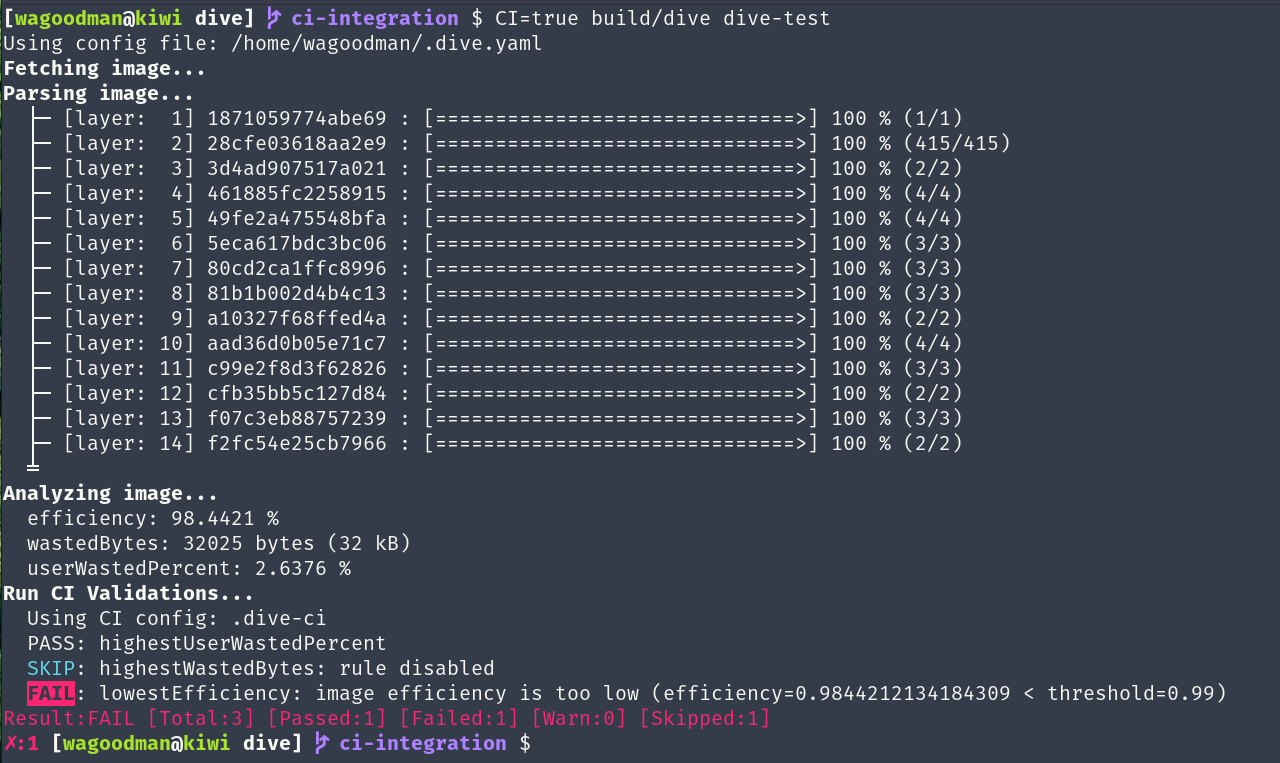
Additionally you can run this in your CI pipeline to ensure you're keeping wasted space to a minimum (this skips the UI):
CI=true dive <your-image>
This is beta quality! Feel free to submit an issue if you want a new feature or find a bug :)
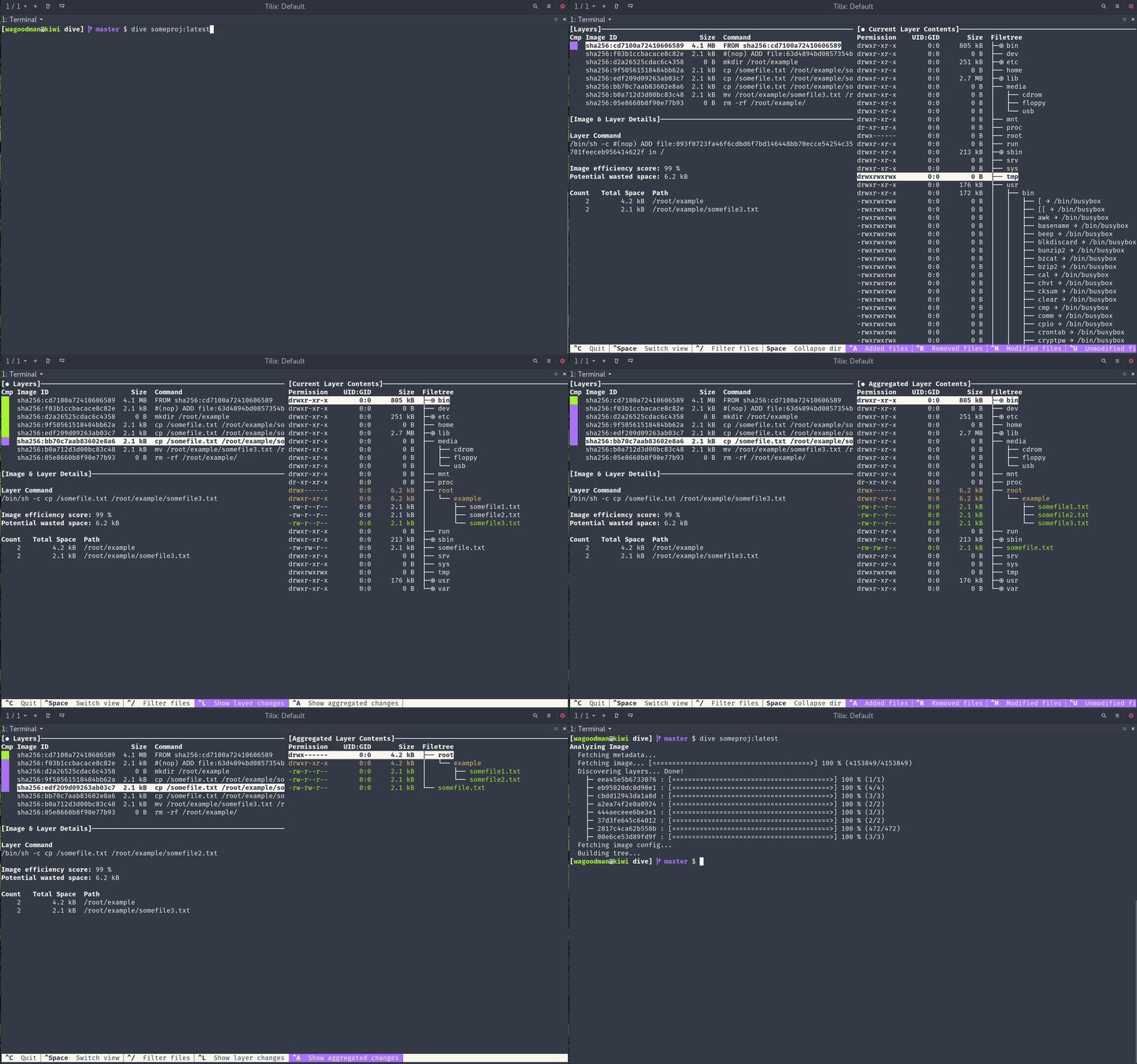
Show Docker image contents broken down by layer
As you select a layer on the left, you are shown the contents of that layer combined with all previous layers on the right. Also, you can fully explore the file tree with the arrow keys.
Indicate what's changed in each layer
Files that have changed, been modified, added, or removed are indicated in the file tree. This can be adjusted to show changes for a specific layer, or aggregated changes up to this layer.
Estimate "image efficiency"
The lower left pane shows basic layer info and an experimental metric that will guess how much wasted space your image contains. This might be from duplicating files across layers, moving files across layers, or not fully removing files. Both a percentage "score" and total wasted file space is provided.
Quick build/analysis cycles
You can build a Docker image and do an immediate analysis with one command:
dive build -t some-tag .
You only need to replace your docker build command with the same dive build
command.
CI Integration
Analyze an image and get a pass/fail result based on the image efficiency and wasted space. Simply set CI=true in the environment when invoking any valid dive command.
Multiple Image Sources and Container Engines Supported
With the --source option, you can select where to fetch the container image from:
dive <your-image> --source <source>
or prefix the image with a <source>:// scheme:
dive <source>://<your-image>
The file based sources also take the <source>:<path> form other anchore tools use (e.g. dive oci-dir:./layout).
For every other source a single colon is read as an image name and tag, so dive docker:dind analyzes the
docker:dind image.
| Source | Reads the image from |
|---|---|
docker | the Docker engine (the default). Images missing locally are pulled through the docker API, with credentials from your docker config. DOCKER_HOST, DOCKER_CONTEXT and the current docker context are honored |
podman | Podman. On linux the local store is read directly (no socket needed, see containers-storage, and a short name like myapp also finds podman's localhost/myapp), falling back to the podman socket. On macOS the running podman machine's API socket is used (found through podman machine inspect); CONTAINER_HOST=unix://... overrides it, ssh connections are refused |
docker-archive | a docker save tarball on disk, or an OCI archive (docker-tar is an alias) |
oci-archive | an OCI image layout tarball on disk |
oci-dir | an OCI image layout directory on disk |
registry | a registry, without a container engine (credentials from your docker config). Registries on private IP addresses are refused, since they would be reached over plain http |
containerd | the containerd daemon (CONTAINERD_NAMESPACE selects the namespace) |
containers-storage | the local podman/buildah store (linux only, see below) |
auto | detect it: files on disk first, then docker, podman, containerd and containers-storage, then a registry pull. The source it picked is reported, since an image no local engine has quietly comes from a registry (Docker Hub for a short name). Only valid for --source, not as a scheme |
For a multi-platform image, --platform picks the variant to analyze (e.g. --platform linux/arm64). A docker save
tarball holds a single platform, dive reports when it doesn't match.
containers-storage support is compiled in only with the containers_image_openpgp build tag, which the linux
release builds (and the docker image) have. Without it the source reports that it isn't available. To build it
yourself: go build -tags containers_image_openpgp,exclude_graphdriver_btrfs ./cmd/dive.
JSON export
--json <path> skips the UI and writes the analysis to a file. Each layer's id is the layer's diff ID (the same value as digestId).
Ubuntu/Debian
Using debs:
DIVE_VERSION=$(curl -sL "https://api.github.com/repos/wagoodman/dive/releases/latest" | grep '"tag_name":' | sed -E 's/.*"v([^"]+)".*/\1/')
curl -fOL "https://github.com/wagoodman/dive/releases/download/v${DIVE_VERSION}/dive_${DIVE_VERSION}_linux_amd64.deb"
sudo apt install ./dive_${DIVE_VERSION}_linux_amd64.deb
Using snap:
sudo snap install docker
sudo snap install dive
sudo snap connect dive:docker-executables docker:docker-executables
sudo snap connect dive:docker-daemon docker:docker-daemon
[!CAUTION] The Snap method is not recommended if you installed Docker via
apt-get, since it might break your existing Docker daemon.
RHEL/Centos
DIVE_VERSION=$(curl -sL "https://api.github.com/repos/wagoodman/dive/releases/latest" | grep '"tag_name":' | sed -E 's/.*"v([^"]+)".*/\1/')
curl -fOL "https://github.com/wagoodman/dive/releases/download/v${DIVE_VERSION}/dive_${DIVE_VERSION}_linux_amd64.rpm"
rpm -i dive_${DIVE_VERSION}_linux_amd64.rpm
Arch Linux
Available in the extra repository and can be installed via pacman:
pacman -S dive
Mac
If you use Homebrew:
brew install dive
If you use MacPorts:
sudo port install dive
Or download the latest Darwin build from the releases page.
Windows
If you use Chocolatey
choco install dive
If you use scoop
scoop install main/dive
If you use winget:
winget install --id wagoodman.dive
