
Skip to content
KitploitKITPLOIT
ToolsBlog
Submit
ToolsBlog
Submit

Hacking, PenTest, and Cybersecurity Tools for Your Security Arsenal!

Kitploit is a directory of hacking, cybersecurity, and pentesting tools. Discover the latest project updates to find vulnerabilities, analyze systems, automate testing, and strengthen your security.

··Feeds·Contact·Privacy·© 2026 Kitploit

Tool Directory

Categories

View all categories
Loading categories
CVE-2023-38829-NETIS-WF2409E_Report — 对NETIS WF2409E路由器进行的一次完整硬件安全分析研究。通过对设备进行拆解分析、调试接口识别、固件提取等工作,记录了硬件分析的全过程、漏洞细节以及相应的安全建议,希望能帮助提高物联网设备的安全性。 | Kitploit
Tools/GitHubGitHub/victorique-123/cve-2023-38829-netis-wf2409e_report
Embedded Systems SecurityIoT SecurityVulnerability AnalysisReverse EngineeringHardware HackingHardware SecurityPapers & ResearchLearning & EducationFirmware Analysis

Most Popular

View all →

Discover the most used tools by our community.

Explore all tools

Browse our collection of tools

View all tools →
Share
GitHubvictorique-123/cve-2023-38829-netis-wf2409e_report

CVE-2023-38829-NETIS-WF2409E_Report

对NETIS WF2409E路由器进行的一次完整硬件安全分析研究。通过对设备进行拆解分析、调试接口识别、固件提取等工作,记录了硬件分析的全过程、漏洞细节以及相应的安全建议,希望能帮助提高物联网设备的安全性。

View Repository
251 year agoNot yet reviewed

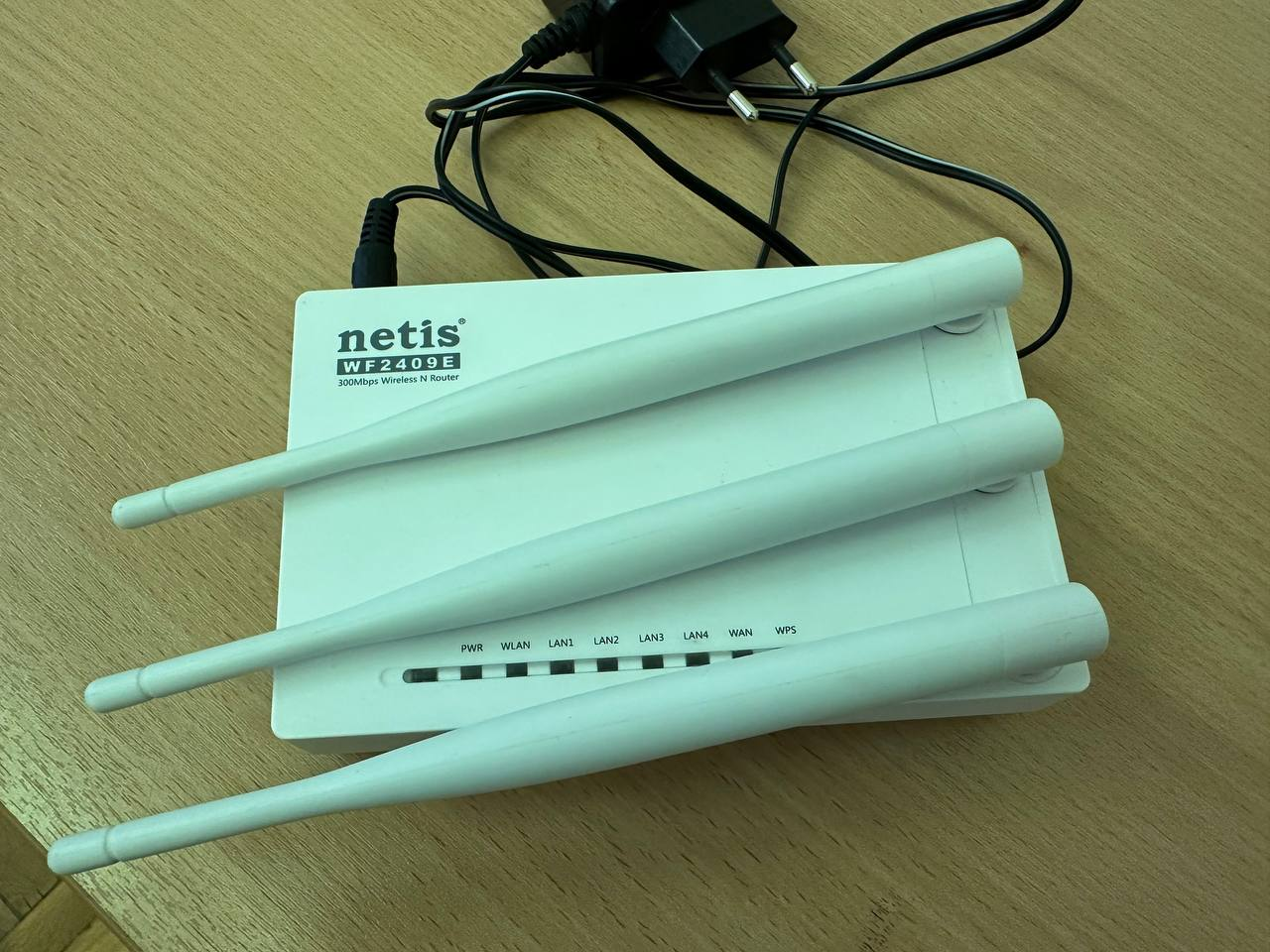
Netis WF2409E Device Report

1. Device Overview

1.1 Main Specifications Table

CategoryParameterDescription
Device InformationModelNetis WF2409E
Type300Mbps Wireless N Router
Power SupplyDC 9V/500mA
Hardware VersionV1.8
PCB VersionPB-7189-M02G-20
Production Date2015-03-23
Country of OriginChina
Network IdentifiersSerial Number2409EEU5B102714 V1.8
MAC AddressW8D398DFB68
Default SSIDnetis_BDFB68
Default Passwordpassword
Management Addresshttp://netis.cc
Hardware InterfacesWAN Port1 (blue RJ45)
LAN Ports4 (black RJ45, LAN1-4)
Antennas3 external antennas
Power ConnectorDC input (PWR)
Function ButtonsDefaultReset to factory settings
WPSProtected WiFi setup

1.2 Functionality Check Table

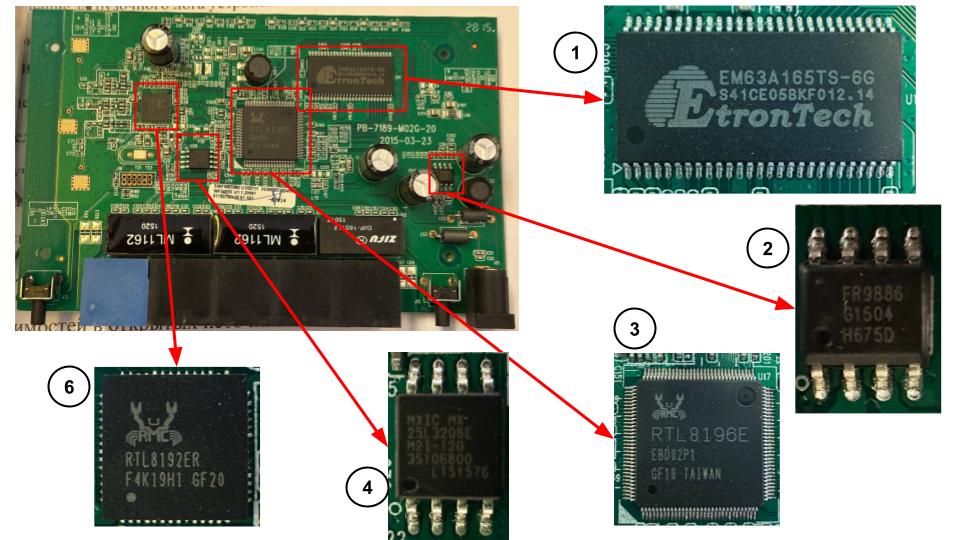
1.3 Main System Components

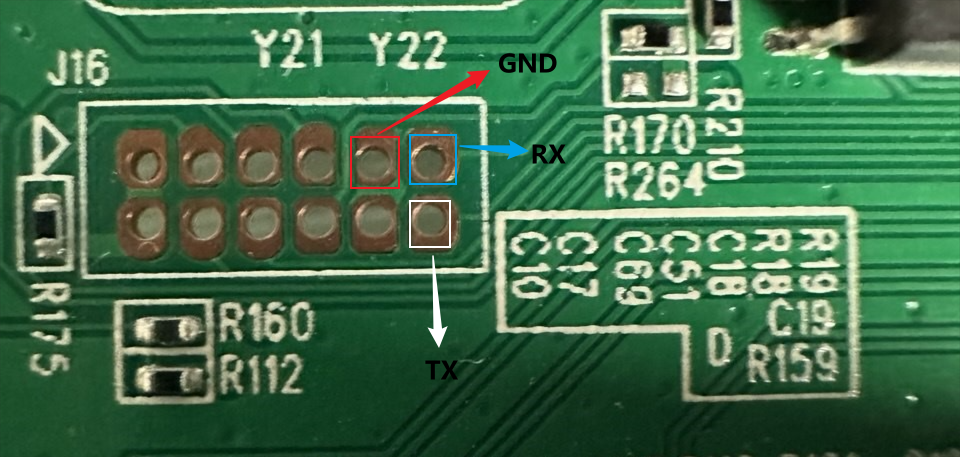
2. Pin Research

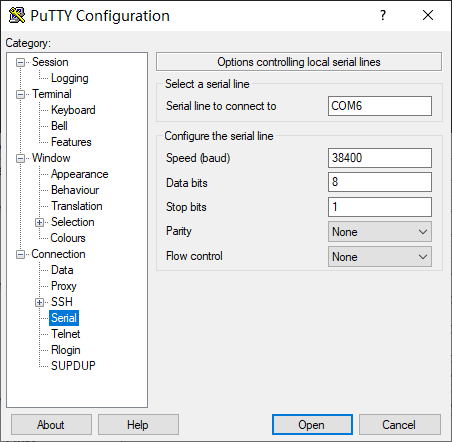
2.1 Connecting to the Device via Serial Port

3. Boot Log, Bootloader and OS Commands

3.1 Boot Log Analysis

Processor Characteristics

ParameterSpecification
Processor ModelRealTek RTL8196E
Architecture16-bit
Clock Frequency380MHz
Compilation Date2014.09.29

Flash Memory Characteristics

Bootloader Information

ParameterDescription
Bootloader TypeRealTek Proprietary Bootloader
Kernel Load Address0x80500000
Start Execution Address0x80003440
Signature Search Range0x10000-0x170000

Default Network Settings

ParameterValue
IP Address192.168.0.1
Subnet Mask255.255.255.0
MAC Address04:8d:38:bd:fb:69
Wireless Interfacewlan0 (including va0-va3, vxd)

System Software Information

ParameterValue
Device Modelnetis WF2419E_RU
Firmware VersionV2.5.40200
Firmware Date2016.09.02
BusyBox Versionv1.00-pre8 (2015.01.23)

Service Status

It is important to note that this device likely does not use U-Boot. Key indicators:

  1. The log starts directly with RealTek boot information: ---RealTek(RTL8196E)at 2014.09.29-19:16+0800 v1.0 [16bit](https://github.com/victorique-123/cve-2023-38829-netis-wf2409e_report/blob/master/380MHz)
  2. No typical U-Boot boot indicators:
  • No U-Boot version information
  • No U-Boot environment variable initialization information
  • No U-Boot command prompt
  1. RTL8196E is a budget router chip from RealTek; many devices based on it use RealTek's proprietary bootloader instead of U-Boot.
  2. Given the small Flash memory capacity (4MB), using a lightweight bootloader is more logical. In fact, no way to enter U-Boot was found.

3.2 Bootloader Analysis

To enter the bootloader, hold the Esc key during boot:

Complete Set of RealTek Bootloader Commands

Example of reading memory:

Bootloader Commands:

<RealTek> FLR 80000000 0 100 #Read from Flash DB 80000000 100 #View memory contents

3.3 Shell Environment Analysis

Basic Shell Commands

Detailed System Directory Structure (/bin — Important Tools)

Key /proc Directory Information

Process List:

3.4 Description of Main Hardware Components

4. Mount Point Information Analysis

4.1 Obtaining Partition Mount Information

4.2 Three main mount points are defined in the system:

  • /dev/mtdblock1 mounted as root directory /
  • none mounted as process filesystem /proc
  • tmpfs mounted as temporary filesystem /var

Detailed Analysis

4.2.1. Root Filesystem

The root filesystem is configured as follows:

  • Device: /dev/mtdblock1
  • Filesystem type: squashfs
  • Mount options: read-only (ro)
  • Purpose: store system files and programs

This indicates the use of MTD flash memory as the medium, with system files protected and space-optimized through read-only and squashfs compression.

4.2.2 Process Filesystem

The process filesystem is configured as follows:

  • Device: none (virtual filesystem)
  • Filesystem type: proc
  • Mount options: read-write (rw)
  • Purpose: provide an interface to access system and process information
4.2.3 Temporary Filesystem

The temporary filesystem is configured as follows:

  • Device: tmpfs (in-memory filesystem)
  • Mount point: /var
  • Size limit: 230 KB
  • Mount options: read-write (rw)
  • Purpose: store temporary files and runtime data
4.2.4 It was found that most commands in the system are missing

5. Firmware Structure and Format

5.1 Obtaining the firmware "netis.bin"

5.2 Performing entropy analysis:

binwalk -E --save netis.bin

5.3 Header analysis:

binwalk netis.bin

5.4 Using the --reM argument for extraction.

And get:

5.5 Analysis result table

OffsetPartition Header
0x12F0
0x32818

6. Filesystem After Firmware Extraction

6.1 Filesystem after extraction:

6.2 Some important documents

6.2.1 etc/passwd:

Using the hash decryption service https://hashes.com/en/decrypt/hash, the root password was successfully recovered as realtek.

6.2.2 web/welcome.htm:

This is the default web interface page

7. Markers, FOFA Fingerprint, Statistics

Searching for devices in FOFA via characteristics in web/welcome.htm:

Search commands: body="./images/logo_netis.png" && body="display:block; height:60px; float:left;"

Access to the device's admin panel may require authentication with a login and password

After successful authentication, you can enter the admin panel

8. Identification Script

First, using the command ~/squashfs-root/web$ find to find available directories, and using Burpsuite to check their accessibility:| | Payload | Code | | Lenth | | ------ | ------------------------------- | ------- | ----- | --------- | | 1 | /cgi-bin | 200 | | 167 | | 2 | /cgi-bin/cgitest.cgi | - | ERROR | - | | 3 | /script | 200 | | 168 | | 4 | /script/init.js | 200 | | 1282 | | 5 | /script/logic.js | 200 | | 65677 | | 6 | /script/menu.js | 200 | | 4976 | | 7 | /script/netcore.js | 200 | | 151935 | | 8 | /script/action.js | 200 | | 182624 | | 9 | /script/debug.js | 200 | | 28570 | | ==10== | ==/version.txt== | ==200== | | ==206== | | ==11== | ==/update.htm== | ==200== | | ==1230== | | 12 | /config | 200 | | 168 | | 13 | /config/language_es.js | 200 | | 79333 | | 14 | /config/language_it.js | 200 | | 76802 | | 15 | /config/language_id.js | 200 | | 74795 | | 16 | /config/language_du.js | 200 | | 78782 | | 17 | /config/language_ma.js | 200 | | 73594 | | 18 | /config/language_po.js | 200 | | 76458 | | 19 | /config/language_tu.js | 200 | | 77747 | | 20 | /config/language_fr.js | 200 | | 78165 | | 21 | /config/language_ro.js | 200 | | 73621 | | 22 | /config/language_cz.js | 200 | | 75968 | | 23 | /config/language_ua.js | 200 | | 98335 | | 24 | /config/language_us.js | 200 | | 84173 | | 25 | /config/config.js | 200 | | 75899 | | 26 | /config/language_ru.js | 200 | | 108998 | | 27 | /config/language_de.js | 200 | | 78674 | | 28 | /config/language_pt.js | 200 | | 77954 | | 29 | /config/language_cn.js | 200 | | 62001 | | 30 | /config/language_tc.js | 200 | | 74268 | | 31 | /system_log.txt | 404 | | 330 | | ==32== | ==/index.htm== | ==200== | | ==4336== | | 33 | /css | 200 | | 167 | | 34 | /css/style.css | 200 | | 5441 | | 35 | /css/netcore.css | 200 | | 11536 | | 36 | /css/welcome.css | 200 | | 6270 | | 37 | /Config.tgz | 404 | | 326 | | 38 | /images | 200 | | 168 | | 39 | /images/first.png | 200 | | 838 | | 40 | /images/icon_no.gif | 200 | | 240 | | 41 | /images/top_right_bg.gif | 200 | | 222 | | 42 | /images/logo_netis.png | 200 | | 7297 | | 43 | /images/icon_jian.gif | 200 | | 239 | | 44 | /images/show_pwd.png | 200 | | 1433 | | 45 | /images/icon_no1.gif | 200 | | 498 | | 46 | /images/nextt.png | 200 | | 1026 | | 47 | /images/lastt.png | 200 | | 845 | | 48 | /images/icon_intro_internet.gif | 200 | | 6994 | | 49 | /images/help_b1.gif | 200 | | 540 | | 50 | /images/high.gif | 200 | | 10846 | | 51 | /images/yandex_en.png | 200 | | 3519 | | 52 | /images/help_b1.jpg | 200 | | 620 | | 53 | /images/back.gif | 200 | | 379 | | 54 | /images/icon_intro_wireless.jpg | 200 | | 3838 | | 55 | /images/icon_jian1.gif | 200 | | 490 | | 56 | /images/left_021.jpg | 200 | | 558 | | 57 | /images/edit.gif | 200 | | 365 | | 58 | /images/pre.png | 200 | | 1029 | | 59 | /images/btn_mobile_setup.jpg | 200 | | 3053 | | 60 | /images/icon_now.gif | 200 | | 242 | | 61 | /images/top_right_bg.jpg | 200 | | 223 | | 62 | /images/bg_intro_bottom.png | 200 | | 3562 | | 63 | /images/favicon.ico | 200 | | 4458 | | 64 | /images/btn_quick_setup.jpg | 200 | | 4353 | | 65 | /images/bg_intro_top.png | 200 | | 3605 | | 66 | /images/mt-link.gif | 200 | | 5823 | | 67 | /images/link.gif | 200 | | 1045 | | 68 | /images/del.gif | 200 | | 313 | | ==69== | ==/images/Makefile== | ==200== | | ==593== | | 70 | /images/icon_jia1.gif | 200 | | 490 | | 71 | /images/blue.jpg | 200 | | 2584 | | 72 | /images/normal.gif | 200 | | 10818 | | 73 | /images/yandex.png | 200 | | 2159 | | 74 | /images/bg_leftmenu.gif | 200 | | 686 | | 75 | /images/icon_jia.gif | 200 | | 252 | | 76 | /images/icon_now1.gif | 200 | | 487 | | ==77== | ==/welcome.htm== | ==200== | | ==30155== | | ==78== | ==/index.html== | ==200== | | ==326== | | 79 | /help | 200 | | 166 | | ==80== | ==/backup.htm== | ==200== | | ==1304== |

Potential locations of information:

After verification, we can find the following information in the file ==/version.txt==:

  • Firmware version
  • Build date
  • Boa server information (obtained from the Server field in the HTTP response header)

Extraction of this information was implemented using a Python script:

9. Vulnerability List with CVSS

9.1 Vulnerability List

Currently, the following vulnerabilities have been found in this device, among which the vulnerability CVE-2023-38829 is a command injection vulnerability existing in the network testing module of the NETIS SYSTEMS Router WF2409E in the ping and traceroute functions. Through the web management interface, malicious commands can be injected into the parameters of these functions, leading to command execution.

9.2 Vulnerability Verification

To verify the presence of this vulnerability, I logged into the router's management panel and tested the vulnerability in the ping and traceroute functions. Here I injected the command cd && ls && cd etc/ && cat passwd, which output the contents of the password file.

Below is the output of the router management panel upon command injection, confirming the presence of the vulnerability.

9.3 CVSS Vulnerability Assessment

CVSS 3.1 analysis of the discovered command injection vulnerabilities:

  1. Base Score Metrics:

    • Attack Vector (AV): Network (N), as remote exploitation is possible
    • Attack Complexity (AC): Low (L), as only sending an HTTP request is required
    • Privileges Required (PR): Low (L), basic user privileges are required (authentication in the device admin interface)
    • User Interaction (UI): None (N), no user action required
    • Scope (S): Changed (C), may affect other devices connected to the router
  2. Impact Metrics:

    • Confidentiality Impact (C): High (H), possible full system access
    • Integrity Impact (I): High (H), possible modification of any system files
    • Availability Impact (A): High (H), possible impact on device operation

  1. Temporal Metrics:
    • Exploit Code Maturity (E): Functional exploit exists (F)
    • Remediation Level (RL): Official fix (O)
    • Report Confidence (RC): Confirmed (C)

Final score: 9.2/10 points, which falls into the "critical" category. CVSS-Vector: AV:N/AC:L/PR:L/UI:N/S:C/C:H/I:H/A:H/E:F/RL:O/RC:C

This high vulnerability score is due to the following reasons:

  • Remote exploitation possible without special conditions
  • Possible to obtain root privileges without authentication
  • Full impact on system security
  • Ease of exploitation

10. Analysis of Weak Vulnerability (BO or CI)

Let's first find files where vulnerabilities may exist: find . -name "*.cgi" ./web/cgi-bin/cgitest.cgi ./bin/cgitest.cgi

I assume that vulnerabilities may appear in CGI programs, so I'll try to analyze the file ./web/cgi-bin/cgitest.cgi using IDA Pro.

First, we need to find places where similar functions are called. Through search, we found the string "killall ping". When analyzing the call location, we can see that the program, after initializing the ping and traceroute functions, calls /bin/network_test.sh

And the vulnerability location is exactly in the network testing module. Good, we need to analyze /bin/network_test.sh.

Analysis of network_test.sh

First, we need to perform a search.

We find the network_test_sh function: ......

Upon detailed analysis of the function, command execution and result saving modules can be found.

In them: Ping command execution: ping -c %d -s %d %s -W %d > %s &

  • Ping parameters:
    • -c: number of pings
    • -s: packet data size (minus 8 bytes)
    • -W: timeout
    • target IP address from configuration

Traceroute command execution: traceroute -I -m %d %s > %s &

  • Traceroute parameters:
    • -I: use ICMP protocol
    • -m: maximum number of hops
    • target IP address from configuration

Detailed vulnerability analysis```

Ситуация с командой ping

loc_4205B8: lw v0, 0x108+var_D4(sp) #прямая загрузка параметров lw a3, 0x108+var_D8(sp) la t9, sprintf #прямой вызов sprintf #отсутствует проверка параметров перед sprintf

root@kitploit:~
## Installation

### Installation via Brew

```bash
brew install node
brew install wget
root@kitploit:~
git clone https://github.com/khast3x/redcloud.git
cd redcloud

Manual Installation

First, clone the repository:

root@kitploit:~
git clone https://github.com/khast3x/redcloud.git
cd redcloud

Then run the dependency installation script:

root@kitploit:~
./setup.sh

Ситуация с командой traceroute

loc_420574: la $t9, sprintf #также прямой вызов sprintf lw $a2, 0x108+var_D0($sp) #также отсутствует проверка параметров

root@kitploit:~
- **WAF Bypass Modules** - modules for bypassing WAF.
- **Protection Bypass** - bypassing protection (e.g., bypassing checks based on session cookies, Referer, User-Agent, certain headers, method-based download checks, Form-data content checks, basic authentication content checks).
- **Payload Encoder** - encoding payload to bypass protection.
- **Payload Patcher** - patching payload to bypass protection.
- **Event Based Bypass** - event-oriented bypass (e.g., for Perl-based protection, etc.).

```shell
git clone https://github.com/epsylon/xsser.git
cd xsser
python xsser.py --help

List of all modules and options:

  • -m or --modules Show all available modules.
  • --see-modules Information about all prepared modules.
root@kitploit:~
git clone https://github.com/epsylon/xsser.git
cd xsser
python xsser.py --weak-links

Syntax, scenarios and examples:

https://xsser.03c8.net

Examples:

  • XSSer (streaming) using a proxy chain: python xsser.py -u http://example.com -g "search=-->" --PhpIds "test" --Fuzz --Coo 'c=1' --Hdr 'User-Agent: Mozilla' --Htc 'text/html' --t 1 -v
  • XSSer (streaming) using Tor (SOCKS): python xsser.py --proxy tor -u http://example.com -g "search=-->" --PhpIds "test" --Fuzz --Coo 'c=1' --Hdr 'User-Agent: Mozilla' --Htc 'text/html' --t 1 -v
  • XSSer (streaming) using HTTPS (SSL): python xsser.py -u https://example.com -g "search=-->" --PhpIds "test" --Fuzz -v

Short-Hand Syntax (demonstration):```

После построения команды происходит прямое выполнение

la $t9, run_by_system jalr $t9 ; run_by_system #прямой вызов system для выполнения команды move $a0, $s1 #отсутствуют проверки безопасности

root@kitploit:~
![](https://assets.kitploit.com/production/public/readmes/21494/1e9088ba6dfbbf334108926751cc5cf1245a23972df7ce3d48d323b46c27c015.png)

The code lacks sufficient validation of input parameters, creating a potential risk of command injection. An attacker can control the transmitted IP parameter to execute shell commands, for example:```
# Нормальный ввод 192.168.0.1

# Примеры вредоносного ввода
192.168.0.1; rm -rf / #удаление файлов
192.168.0.1 & id & #выполнение произвольных команд

11. Exploitation Script

11.1. Script Overview

This script exploits a command injection vulnerability in the device's web interface to remotely execute commands by crafting special HTTP requests. The script performs exploitation using two HTTP POST requests: the first request injects the command, the second retrieves the execution output.

The first packet (netcore_set.cgi) is intended for: injecting and executing the command

The second packet (netcore_get.cgi) is intended for: retrieving the command execution result

11.2 First stage: command injection

  1. Forming the POST request body with the following key parameters:``` { "mode_name": "netcore_set", "tools_type": "2", "tools_ip_url": f"| {command}", # точка инъекции команды "tools_cmd": "1", "net_tools_set": "1" }
root@kitploit:~
2. URL encoding of all parameters
3. Sending POST request to netcore_set.cgi

### 11.3 Second Stage: obtaining results

1. Forming the second POST request:```
	{ "mode_name": "netcore_get",    
	  "noneed": "noneed" }
  1. Sending a request to netcore_get.cgi
  2. Parsing the tools_results field in the response to get the command execution result

11.4 Testing scripts

To test the script, I created a file ceshi on the host and tried to upload it to the device via the script

Success!

In fact, this vulnerability allows full control over the device, since the device uses root access by default

Download Tool
Checked ParameterStatusNote
Power LEDWorkingSteady on when powered
Network LEDsWorkingBlink when connected
WAN Port StatusWorkingNormal network connection
LAN Port StatusWorkingAll 4 ports operational
WiFi FunctionWorkingAntennas intact, signal normal
WPS FunctionWorkingButton responds
Reset FunctionWorkingDefault button works
NoChip ModelManufacturerMain FunctionTechnical SpecificationsNotes
1EM63A165TS-6GEtronTechSystem Memory- Capacity 32 Mbit
- Frequency 166 MHz
- Architecture SDRAM
- Package TSOP-II
- Used for temporary data storage
- Supports main processor computations
2FR9886 61504UnknownPower Management- Package SOIC-8
- Integrated circuit
- DC-DC
- Responsible for voltage regulation
- Provides stable system power
3RTL8196ERealtek/RMCMain Processor- Architecture MIPS
- SoC design
- Made in Taiwan
- System's central processor
- Handles main computations and management
- Integrated network processing
4MX25L3206EMacronixFlash Memory- Capacity 32Mb (4MB)
- Interface SPI
- Package SOIC
- Stores system firmware
- Retains configuration data
5RTL8192ERRealtek/RMCWireless Connectivity- WiFi controller
- Package QFN
- Processes wireless signals
- Supports WiFi functions
ParameterValueHexadecimal Value
Chip ModelMX25L3205D-
Total Capacity4MB0x400000
Block Size64KB0x10000
Sector Size4KB0x1000
Page Size256B0x100
Service NameStatusNote
DHCP ServerRunningNormal
HTTP Server (Boa)RunningAbnormal reboots
IAPPRunningIEEE 802.11f
MiniIGDRunningv1.08.1
mini_upnpdErrorFile not found
telnetdErrorFile not found
ota_init.shErrorFile not found
CommandSyntaxFunction
HELP?Show help
DB/DWDB/DW Read memory bytewise/wordwise
EB/EWEB/EW Write to memory bytewise/wordwise
FLRFLR Read data from Flash to RAM
FLWFLW <dst_ROM><src_RAM>Write data from RAM to Flash
IPCONFIGIPCONFIG Set IP address
LOADADDRLOADADDR Set load address
CMPCMP Compare data in memory
JJ Jump to execution
MDIOR/MDIOWMDIOR/W [data]Read/write PHY registers
PHYR/PHYWPHYR/W [data]Read/write PHY registers (alternative method)
PORT1PORT1Port 1 patch test
AUTOBURNAUTOBURN 0/1Control automatic flashing
Command TypeAvailable Commands
Basic Commands., :, cd, help, exit
Execution Controlbreak, continue, eval, exec
Variable Operationsexport, read, readonly, set, shift
Process Controltimes, trap, wait
Permission Controllogin, newgrp, umask
CategoryToolsFunction
Network Toolsiptables ip6tables brctl ifconfigFirewall configuration, IPv6 firewall, bridge management, network interface configuration
System Managementbusybox ps kill mountCore tool set, process viewing, process management, filesystem mounting
VPN Communicationpppd pptp l2tpd pptpctrlPPP daemon, PPTP client, L2TP daemon, PPTP management
Wireless Managementiwcontrol iwpriv wlanapp.sh wps_init.shWireless control, wireless private commands, wireless application management, WPS initialization
Firewall Scriptsfirewall.sh firewall_ipv6.sh firewall_pptp.shMain firewall, IPv6 firewall, PPTP firewall
DHCP/DNSdhcpc.sh dhcpd.sh dnrdDHCP client, DHCP server, DNS forwarding
Web Serviceboa webs cgitest.cgiWeb server, web management, CGI test
PathInformation TypeDescription
/proc/cpuinfoCPU InformationDetailed processor information
/proc/meminfoMemory InformationSystem memory usage status
/proc/mtdPartition InformationFlash memory partitioning
/proc/net/*Network InformationNetwork interface and connection status
/proc/sys/*System ParametersAdjustable system parameters
/proc/versionVersion InformationKernel version information
ComponentDescriptionTechnical Specifications
RTL8196EMain Processor- MIPS architecture
- SoC design
- Made in Taiwan
- Central processor of the system
- Handles main computations and management
- Built-in network processing functions
EM63A165TS-6GSystem Memory- Capacity 32 Mbit
- Frequency 166 MHz
- SDRAM architecture
- Package TSOP-II
- Temporary system data storage
- Supports main processor computations
MX25L3206EFlash Memory- Capacity 32 Mbit (4 MB)
- SPI interface
- Package SOIC
- Stores system firmware
- Retains configuration data
RTL8192ERWireless Network- WiFi controller
- Package QFN
- Processes wireless signals
- WiFi support
FR9886 61504Power Management- Package SOIC-8
- Integrated circuit
- DC-DC
- Responsible for voltage regulation
- Provides stable system power
FileOffset (decimal)Offset (hexadecimal)DescriptionAdditional Information
netis.bin48480x12F0LZMA compressed dataDictionary size: 8388608 bytes, uncompressed size: 56464 bytes; requires analysis of uncompressed content
netis.bin2068720x32818LZMA compressed dataDictionary size: 8388608 bytes, uncompressed size: 3278684 bytes; contains full Linux 2.6.30 kernel
netis.bin15073280x170000SquashFS filesystemLittle-endian, gzip compression, size: 2628241 bytes
0x170000
PayloadCodeLenth
==10====/version.txt====200====206==
==11====/update.htm====200====1230==
==32====/index.htm====200====4336==
==69====/images/Makefile====200====593==
==77====/welcome.htm====200====30155==
==78====/index.html====200====326==
==80====/backup.htm====200====1304==
Vulnerability IDVulnerability TypeModelVersionReport/Exploit
CVE-2023-42336sensitive information disclosureNetiswf2409e_firmware < 1.0.1.705
wf3409e < v4
https://github.com/adhikara13/CVE/blob/main/netis_WF2409E/Root_Hard_Code.md
CVE-2023-38829remote code executionNetiswf2409e_firmware < 3.6.42541
wf3409e < -
https://github.com/adhikara13/CVE-2023-38829-NETIS-WF2409E