Secure Boot Mitigation Orchestrator Script
Overview
This PowerShell script automates the Secure Boot mitigation steps for CVE-2023-24932, as outlined in the Microsoft Security Guidance. It handles the entire process, including registry updates, reboots, and event log validation, to ensure your system is protected against the BlackLotus UEFI bootkit.
Features
- Fully Automated Orchestration: The script guides you through each step, including multiple reboots, and resumes automatically after each reboot.
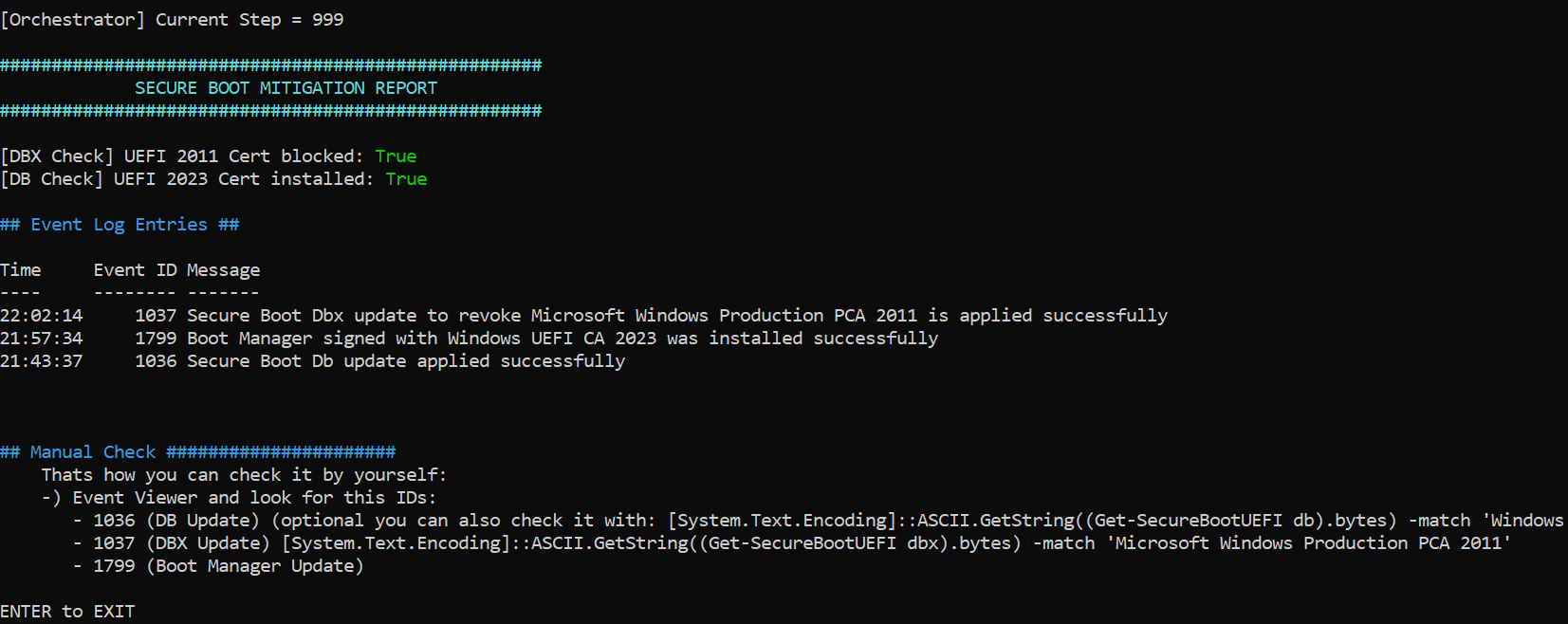
- Event Log Validation: Checks for specific Event IDs (e.g., 1799, 1037) to confirm successful updates.
- BitLocker Awareness: Warns if BitLocker is active and ensures you have the recovery key.
- Hardware Compatibility Checks: Blocks execution on unsupported configurations (e.g., TPM 2.0 on Windows Server 2012/R2).
- Manual Verification Options: Allows manual checks of the Boot Manager signature and Secure Boot databases.
Steps Covered
The script follows the official Microsoft guidance, executing the following steps in sequence:
-
DB-Update (0x40)
- Adds the "Windows UEFI CA 2023" certificate to the Secure Boot database (DB).
- Requires 2 reboots.
-
Boot-Manager Update (0x100)
- Updates the Boot Manager to a version signed with the "Windows UEFI CA 2023" certificate.
- Requires 2 reboots.
-
Manual Verification (Optional)
- Copies the Boot Manager (
bootmgfw.efi) for manual signature verification.
- Checks if the "Windows UEFI CA 2023" certificate is present in the DB.
-
DBX-Update (0x80)
- Adds the "Windows Production PCA 2011" certificate to the Secure Boot Forbidden Signature Database (DBX).
- Blocks older Boot Managers signed with this certificate.
- Requires 2 reboots.
-
SVN-Update (0x200)
- Updates the Secure Boot Secure Version Number (SVN) to prevent rollback attacks.
- Requires 2 reboots.
-
Final Report
- Displays a summary of the Secure Boot configuration and Event Log entries.
Prerequisites
- Windows Version: Windows 10/11, Windows Server 2016/2019/2022, or later.
- Administrator Privileges: The script must be run as an administrator.
- Secure Boot Enabled: Ensure Secure Boot is enabled in your system's UEFI firmware.
- BitLocker Recovery Key: If BitLocker is active, ensure you have the recovery key.
Usage
-
Download the script:
Invoke-WebRequest -Uri "https://raw.githubusercontent.com/helleflo1312/Orchestrated-Powerhell-for-CVE-2023-24932/refs/heads/main/CVE-2023-24932-automation.ps1" -OutFile "CVE-2023-24932-automation.ps1"
-
Run the script as an administrator:
.\CVE-2023-24932-automation.ps1
-
Follow the on-screen prompts. The script will guide you through each step, including reboots.
Hardware Checks:
The Script will check for Hardware Vendors and compatiblity according to Microsoft Security Guidance
Event Log Validation
The script checks for the following Event IDs to confirm successful updates:
- 1036: DB Update (0x40) successful.
- 1799: Boot Manager Update (0x100) successful.
- 1037: DBX Update (0x80) successful.
If an event is not found, the script will display a warning but continue execution. You can manually verify the logs using the Event Viewer.
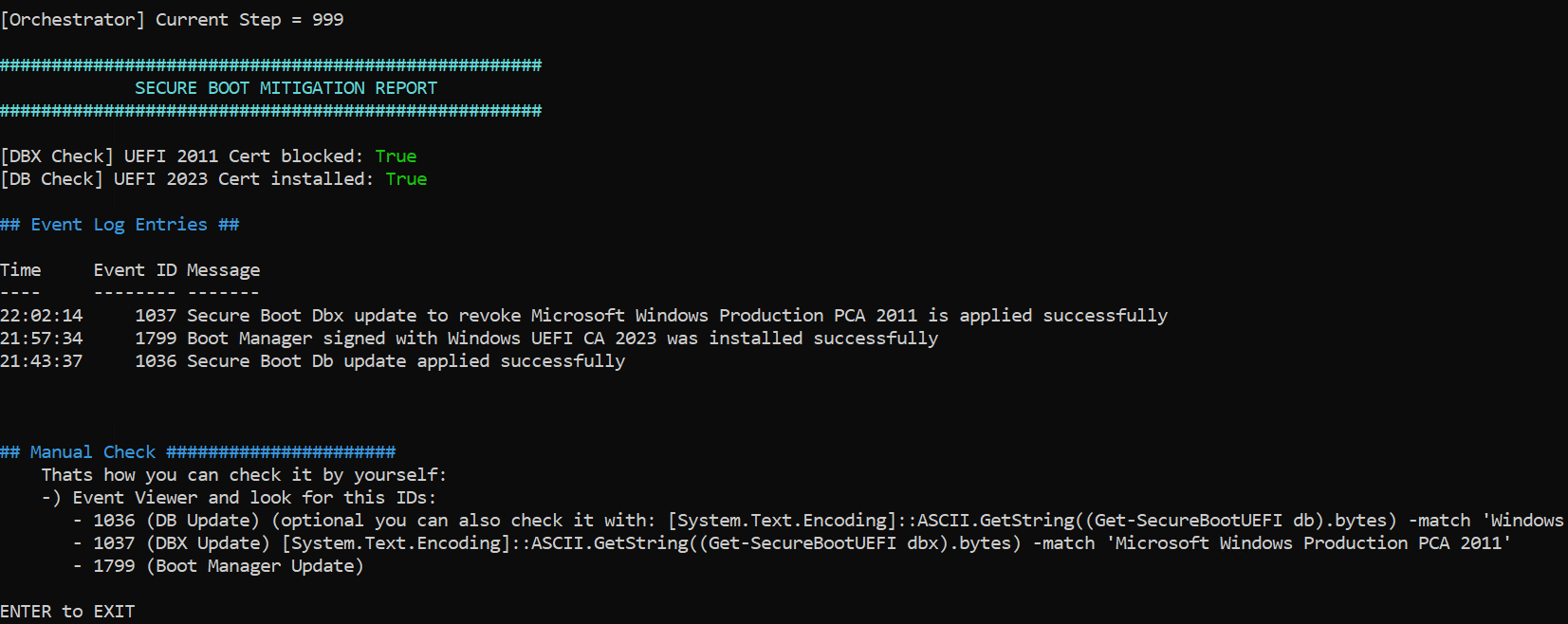
Example after the successful run of this script:
Notes
- Irreversible Changes: Once the DBX update (0x80) is applied, it cannot be reverted without resetting Secure Boot.
- Recovery Media: Ensure you have updated recovery media before applying the DBX update. Older media may not boot after the update.
- Testing: Test the script in a non-production environment before deploying it widely.
Troubleshooting
- Event Log Errors: If the script fails to find the expected Event IDs, check the system logs manually for errors.
- BitLocker Recovery: If the system enters BitLocker recovery mode, use the recovery key to unlock the drive.
- Firmware Issues: Some UEFI firmware may not support the required updates. Contact your hardware vendor for updates.
References
License
This script is provided under the MIT License. Use at your own risk.
Contributing
If you encounter issues or have suggestions for improvement, please open an issue or submit a pull request on GitHub.
Disclaimer
This script is provided as-is, without warranty of any kind. Always test in a non-production environment before deploying to live systems.
 v1ckxy/orchestrated-powershell-for-cve-2023-24932-en
