 usbarmory/gotee-example
GoTEE - example application

The GoTEE framework implements concurrent instantiation of TamaGo based unikernels in privileged and unprivileged modes, interacting with each other through monitor mode and custom system calls.
With these capabilities GoTEE implements a TamaGo based Trusted Execution Environments (TEE), bringing Go memory safety, convenience and capabilities to bare metal execution within ARM TrustZone Secure World or RISC-V Supervisor Execution Environments.
GoTEE can supervise pure Go, Rust or C based freestanding Trusted Applets, implementing the GoTEE API, as well as any operating system capable of running in ARM TrustZone Normal World or RISC-V S-mode such as Linux.
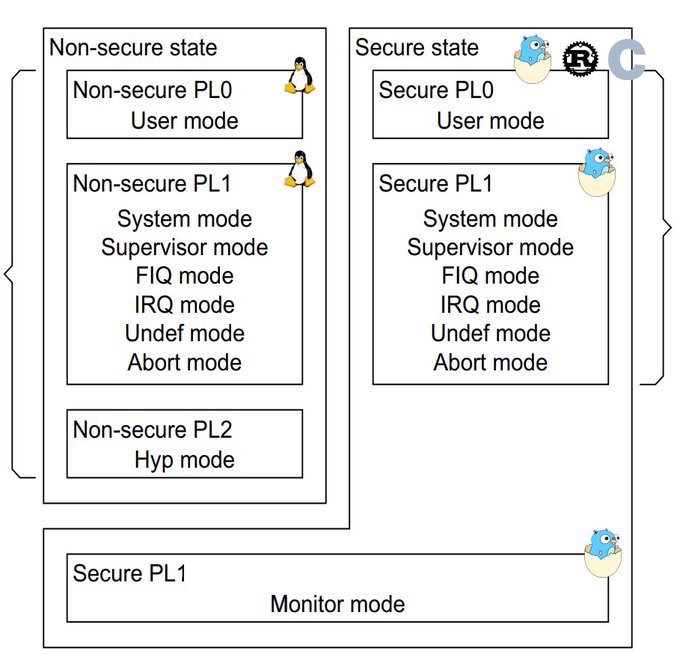
Isolated execution contexts for ARM User mode, TrustZone Normal World or RISC-V Supervisor Mode
API for Trusted OS implementation (Syscall, JSON-RPC and exception handlers)

The main documentation, which includes a tutorial, can be found on the project wiki.
The package API documentation can be found on pkg.go.dev.
The following table summarizes currently supported SoCs and boards.
| SoC | Board | SoC package | Board package |
|---|---|---|---|
| NXP i.MX6ULZ | USB armory Mk II | imx6ul | usbarmory/mk2 |
| NXP i.MX6ULL | MCIMX6ULL-EVK | imx6ul | mx6ullevk |
| SiFive FU540 | QEMU sifive_u | fu540 | qemu/sifive_u |
In TEE nomenclature, the privileged unikernel is commonly referred to as Trusted OS, while the unprivileged one represents a Trusted Applet.
The GoTEE example demonstrate concurrent operation of Go unikernels acting as Trusted OS, Trusted Applet and Main OS.
[!WARNING] The Main OS can be any "rich" OS (e.g. Linux), TamaGo is simply used for a self-contained example. The same applies to the Trusted Applet which can be any bare metal application capable of running in user mode and implementing GoTEE API, such as freestanding C or Rust programs.
A Rust example can be used replacing
trusted_applet_gowithtrusted_applet_rustwhen building.
The example trusted OS/applet combination performs basic testing of concurrent execution of three TamaGo unikernels at different privilege levels:
The Main OS yields back with a monitor call.
The Trusted Applet sleeps for 5 seconds before attempting to read Trusted OS memory, which triggers an exception handled by the supervisor which terminates the Trusted Applet.
The GoTEE syscall interface is implemented for communication between the Trusted OS and Trusted Applet.
When launched on the USB armory Mk II, the example application is reachable via SSH through Ethernet over USB (ECM protocol, supported on Linux and macOS hosts):
$ ssh [email protected]
tamago/arm • TEE security monitor (Secure World system/monitor)

allgptr                                          # memory forensics of applet goroutines
csl                                              # show config security levels (CSL)
csl             <periph> <slave> <hex csl>       # set config security level (CSL)
dbg                                              # show ARM debug permissions
exit, quit                                       # close session
gotee                                            # TrustZone example w/ TamaGo unikernels
help                                             # this help
linux           <uSD|eMMC>                       # boot NonSecure USB armory Debian base image
lockstep        <fault %>                        # tandem applet example w/ fault injection
peek            <hex offset> <size>              # memory display (use with caution)
poke            <hex offset> <hex value>         # memory write   (use with caution)
reboot                                           # reset device
sa                                               # show security access (SA)
sa              <id> <secure|nonsecure>          # set security access (SA)
stack                                            # stack trace of current goroutine
stackall                                         # stack trace of all goroutines

>
The example can be launched with the gotee command which spawns the Main OS
twice to demonstrate behaviour before and after TrustZone restrictions are in
effect using real hardware peripherals.
Additionally the linux command can be used to spawn the
USB armory Debian base image
as Non-secure main OS.
[!NOTE] Only USB armory Debian base image releases >= 20211129 are supported for Non-secure operation.
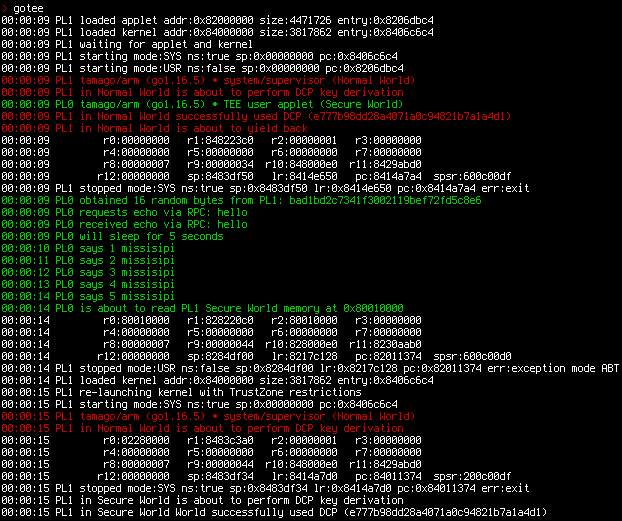
The example can be also executed under QEMU emulation.
[!NOTE] Emulated runs perform partial tests due to lack of full TrustZone/PMP support by QEMU.
