
Skip to content
KitploitKITPLOIT
ToolsBlog
Submit
ToolsBlog
Submit

Hacking, PenTest, and Cybersecurity Tools for Your Security Arsenal!

Kitploit is a directory of hacking, cybersecurity, and pentesting tools. Discover the latest project updates to find vulnerabilities, analyze systems, automate testing, and strengthen your security.

··Feeds·Contact·Privacy·© 2026 Kitploit

Tool Directory

Categories

View all categories
Loading categories
Meerkat — A collection of PowerShell modules designed for artifact gathering and reconnaisance of Windows-based endpoints. | Kitploit
Tools/GitHubGitHub/tonyphipps/meerkat
ReconnaissanceForensicsInformation GatheringDigital ForensicsIncident Response
GitHubtonyphipps/meerkat

Meerkat

A collection of PowerShell modules designed for artifact gathering and reconnaisance of Windows-based endpoints.


View Repository
483851 year agoReviewed by Kitploit

Most Popular

View all →

Discover the most used tools by our community.

Explore all tools

Browse our collection of tools

View all tools →
Share

Meerkat

Meerkat Logo

Meerkat is collection of PowerShell modules designed for artifact gathering and reconnaissance of Windows-based endpoints without requiring a pre-deployed agent. Use cases include incident response triage, threat hunting, baseline monitoring, snapshot comparisons, and more.

Artifacts

Host InfoNet AdaptersProcesses*ServicesFiles
Audit PolicyWindows Firewall RulesDLLs*Local UsersADS
DisksPortsStrings*Local GroupsRecycle Bin
HotfixesARPHandles*Scheduled TasksHosts File
TPMDNSEnvVarsAutorunsCertificates
SoftwareNet RoutesSessionsBitlockerSelect Registry
HardwareSharesDomain InformationDefenderEvent Logs
DriversUSBHistoryEvent Logs MetadataEvents Related to Login Failures
  • Ingest using your SIEM of choice (Check out the SIEM Repository!)

Index

  • Quick Start
  • Usage
  • Analysis
  • Troubleshooting
  • Screenshots
  • Similar Projects

Quick Start

Requirements

  • Requires Powershell 5.0 or above on the "scanning" device.
  • Requires Powershell 3.0 or higher on target systems. You can make this further backward compatible to PowerShell 2.0 by replacing instances of "Get-CIMinstance" with "Get-WMIObject"
  • Requires WinRM access.

Install with Git

In a Command or PowerShell console, type the following...

root@kitploit:~
git clone "https://github.com/TonyPhipps/Meerkat" "C:\Program Files\WindowsPowerShell\Modules\Meerkat"

To update...

root@kitploit:~
cd C:\Program Files\WindowsPowerShell\Modules\Meerkat
git pull

Install with PowerShell

Copy/paste this into a PowerShell console

root@kitploit:~
$Modules = "C:\Program Files\WindowsPowerShell\Modules\"
New-Item -ItemType Directory $Modules\Meerkat\ -force
Invoke-WebRequest https://github.com/TonyPhipps/Meerkat/archive/master.zip -OutFile $Modules\master.zip
Expand-Archive $Modules\master.zip -DestinationPath $Modules
Copy-Item $Modules\Meerkat-master\* $Modules\Meerkat\ -Force -Recurse
Remove-Item  $Modules\Meerkat-master -Recurse -Force

To update, simply run the same block of commands again.

Functions can also be used by opening the .psm1 file and copy-pasting its entire contents into a PowerSell console.

Run Meerkat

This command will output results to C:\Users\YourName\Meerkat\

root@kitploit:~
Invoke-Meerkat

NOTE: The following modules will not return results if not ran with Administrative privileges

  • AuditPolicy
  • Drivers
  • EventsLoginFailures
  • Hotfixes
  • RegistryMRU
  • Registry
  • Processes
  • RecycleBin

Analysis

Analysis methodologies and techniques are provided in the Wiki pages.

Troubleshooting

Installing a Powershell Module

If your system does not automatically load modules in your user profile, you may need to import the module manually.

root@kitploit:~
Import-Module C:\Program Files\WindowsPowerShell\Modules\Meerkat\Meerkat.psm1

It is recommended that the following approach be taken to assist in locating where the actual issue resides.

TEST 1 – DOES MEERKAT WORK LOCALLY?

  • Test Meerkat against the local system
    • Invoke-Meerkat

TEST 2 – DOES REMOTE SCANNING WORK?

Note: Perform this test with an account that has local admin rights on the target system.

  • Test Meerkat against a remote Windows system
    • Invoke-Meerkat -Computer RemoteName

TEST 3 – CAN YOU CREATE THE SCHEDULE TASK AND MSA?

  • Remove any existing Scheduled Tasks related to Meerkat
  • Remove any MSA’s related to Meerkat
  • Configure the Schedule-Meerkat.ps1 file, then run it.

TEST 4 – DOES MEERKAT-TASK.PS1 WORK?

Note: Perform this test with an account that has local admin rights on the target system.

  • Configure the Meerkat-Task.ps1 file with # OPTION 1 (local host)
  • Run the script manually.

TEST 5 – DOES THE SCHEDULED TASK AND THE MSA WORK?

  • Run the Meerkat-Task.ps1 script via Scheduled Tasks.

If this fails:

  • Ensure WinRM is enabled on remote host
  • Ensure the MSA has local admin rights on remote host

TEST 6 – DOES THE MEERKAT-TASK.PS1 WORK REMOTELY?

  • Configure the Meerkat-Daily-Task.ps1 file with # OPTION 3 (remote host, Daily)
    • Specify a remote host in hosts.txt
    • Run the script manually with an account with local admin on the remote system.

TEST 7 – DOES THE MSA HAVE PROPER PERMISSIONS ON REMOTE HOSTS?

  • Configure the Meerkat-Task.ps1 file with # OPTION 3 (remote host, Daily)
    • Specify a remote host in hosts.txt
    • Run the Meerkat-Task.ps1 script via Scheduled Tasks.

TEST 8 – DOES EVERYTHING NOW WORK?

  • Configure the Meerkat-Task.ps1 file with # OPTION 2 (fully automated domain scan)
    • Run the script manually with an account with local admin on the remote system.
    • Run the Meerkat-Task.ps1 script via Scheduled Tasks.

Adding a New Module

  • Create the new .psm1 file, preferrably from copying an existing module with similar enough logic and using it as a starting point.
    • Update the module name
    • Using find and replace, replace all instances of the template's name
    • Update the Synopsis, Description, Parameters, Examples, and Notes sections
    • Replace the process{} logic with the new logic. Ensure it returns an array of matching PowerShell objects.
    • Save the module with an appropriate name.
  • Add the new module name to Meerkat.psd1. This can be done manually or by running /Utilities/Generate-ModuleManifest.ps1
  • Add the new module to the table in this README.md
    • Add to the Artifacts table.
  • Add the new module to Invoke-Meerkat.psm1
    • Add to the Paramater m/mod/modules, including both the ValidateSet and the $Modules array itself.
    • In begin{}, add to $ModuleCommandArray
    • In begin{}, add to if ($All) {} code block
    • If the module takes more than a few seconds, also add to if ($Quick) { code block. This prevents it from running when the user invokes -Fast

Screenshots

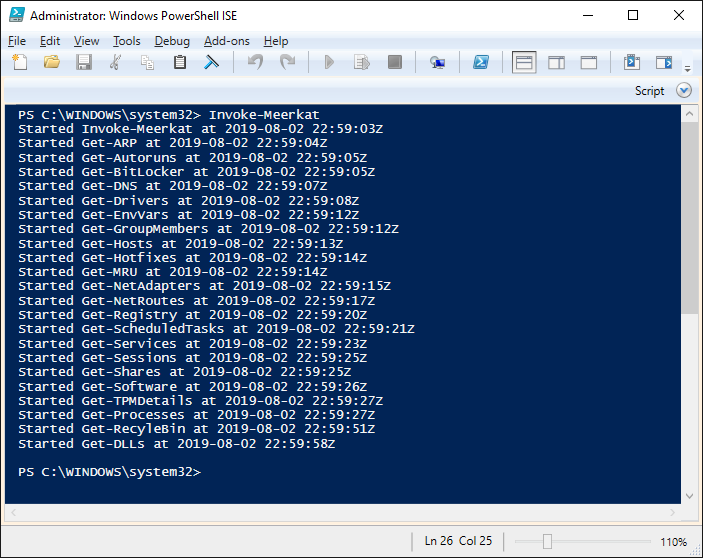
Output of Command "Invoke-Meerkat"

Output of Command "Invoke-Meerkat"

Output Files

Output Files

Similar Projects

  • https://github.com/travisfoley/dfirtriage
  • https://github.com/Invoke-IR/PowerForensics
  • https://github.com/PowerShellMafia/CimSweep
  • https://www.crowdstrike.com/resources/community-tools/crowdresponse/
  • https://github.com/gfoss/PSRecon/
  • https://github.com/n3l5/irCRpull
  • https://github.com/davehull/Kansa/
  • https://github.com/WiredPulse/PoSh-R2
  • https://github.com/google/grr
  • https://github.com/diogo-fernan/ir-rescue
  • https://github.com/SekoiaLab/Fastir_Collector
  • https://github.com/AlmCo/Panorama
  • https://github.com/certsocietegenerale/FIR
  • https://github.com/securycore/Get-Baseline
  • https://github.com/Infocyte/PSHunt
  • https://github.com/giMini/NOAH
  • https://github.com/A-mIn3/WINspect
  • https://learn.duffandphelps.com/kape
  • https://www.brimorlabs.com/tools/

What makes Meerkat stand out?

  • Lightweight. Fits on a floppy disk!
  • Very little footprint/impact on targets.
  • Leverages Powershell & WMI/CIM.
  • Coding style encourages proper code review, learning, and "borrowing."
  • No DLLs or compiled components.
  • Standardized output - defaults to .csv, and can easily support json, xml, etc.
Download Tool
Events Related to User/Group Management
Event Logs Metadata