
 target/strelka
Real-time, container-based file scanning at enterprise scale


[Releases][release] | [Documentation][wiki] | [Pull Requests][pr] | [Issues][issues]
[![GitHub release][img-version-badge]][repo] [![Build Status][img-actions-badge]][actions-ci] [![Pull Requests][img-pr-badge]][pr] [![Slack][img-slack-badge]][slack] [![License][img-license-badge]][license]
Strelka is a real-time, container-based file scanning system used for threat hunting, threat detection, and incident response. Originally based on the design established by Lockheed Martin's Laika BOSS and similar projects (see: related projects), Strelka's purpose is to perform file extraction and metadata collection at enterprise scale.
Strelka differs from its sibling projects in a few significant ways:
Strelka is a modular data scanning platform, allowing users or systems to submit files for the purpose of analyzing, extracting, and reporting file content and metadata. Coupled with a SIEM, Strelka is able to aggregate, alert, and provide analysts with the capability to better understand their environment without having to perform direct data gathering or time-consuming file analysis.
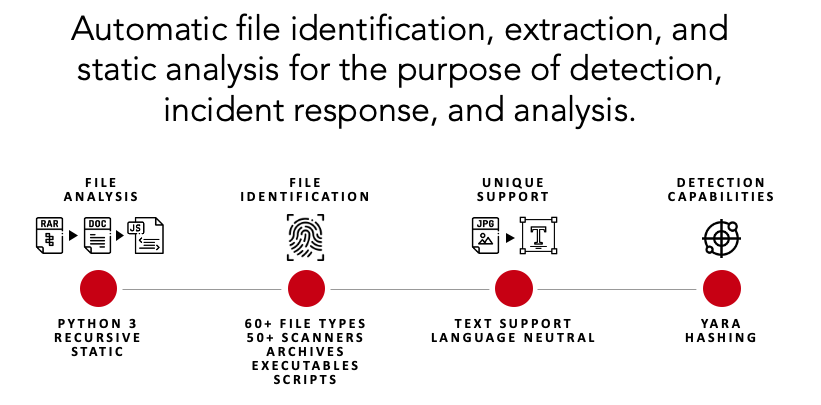
Running a file through Strelka is simple. In this section, Strelka capabilities of extraction and analysis are demonstrated for a one-off analysis.
Please review the documentation for details on how to properly build and deploy Strelka in an enterprise environment.
# Ubuntu 23.04
sudo apt install -y wget git docker docker-compose golang jq && \
sudo usermod -aG docker $USER && \
newgrp docker
git clone https://github.com/target/strelka.git && \
cd strelka
rm configs/python/backend/yara/rules.yara && \
git clone https://github.com/Yara-Rules/rules.git configs/python/backend/yara/rules/ && \
echo 'include "./rules/index.yar"' > configs/python/backend/yara/rules.yara
Note: You can skip the go build process and use the Strelka UI at http://0.0.0.0:9980 to analyze files.
docker compose -f build/docker-compose-no-build.yaml up -d && \
go build github.com/target/strelka/src/go/cmd/strelka-oneshot
Note: You can skip the go build process and use the Strelka UI at http://0.0.0.0:9980 to analyze files.
docker compose -f build/docker-compose.yaml build && \
docker compose -f build/docker-compose.yaml up -d && \
go build github.com/target/strelka/src/go/cmd/strelka-oneshot
Use any malware sample, or other file you'd like Strelka to analyze.
wget https://github.com/ytisf/theZoo/raw/master/malware/Binaries/Win32.Emotet/Win32.Emotet.zip -P samples/
./strelka-oneshot -f samples/Win32.Emotet.zip -l - | jq
The following output has been edited for brevity.
{
  "file": {
    "depth": 0,
    "flavors": {
      "mime": ["application/zip"],
      "yara": ["encrypted_zip", "zip_file"]
    },
    "scanners": [
      "ScanEncryptedZip",
      "ScanEntropy",
      "ScanFooter",
      "ScanHash",
      "ScanHeader",
      "ScanYara",
      "ScanZip"
    ]
  },
  "scan": {
    "encrypted_zip": {
      "cracked_password": "infected",
      "elapsed": 0.114269,
      "total": {"extracted": 1, "files": 1}
    }
  }
}
{
  "file": {
    "depth": 1,
    "flavors": {
      "mime": ["application/x-dosexec"],
      "yara": ["mz_file"]
    },
    "name": "29D6161522C7F7F21B35401907C702BDDB05ED47.bin",
    "scanners": [
      "ScanEntropy",
      "ScanFooter",
      "ScanHash",
      "ScanHeader",
      "ScanPe",
      "ScanYara"
    ]
  },
  "scan": {
    "pe": {
      "address_of_entry_point": 5168,
      "base_of_code": 4096,
      "base_of_data": 32768,
      "checksum": 47465,
      "compile_time": "2015-03-31T08:53:51",
      "elapsed": 0.013076,
      "file_alignment": 4096,
      "file_info": {
        "company_name": "In CSS3",
        "file_description": "Note: In CSS3, the text-decoration property is a shorthand property for text-decoration-line, text-decoration-color, and text-decoration-style, but this is currently.",
        "file_version": "1.00.0065",
        "fixed": {"operating_systems": ["WINDOWS32"]},
        "internal_name": "Callstb",
        "original_filename": "NOFAstb.exe",
        "product_name": "Goodreads",
        "product_version": "1.00.0065",
        "var": {"character_set": "Unicode", "language": "U.S. English"}
      }
    },
    "yara": {
      "elapsed": 0.068918,
      "matches": [
        "SEH__vba",
        "SEH_Init",
        "Big_Numbers1",
        "IsPE32",
        "IsWindowsGUI",
        "HasOverlay",
        "HasRichSignature",
        "Microsoft_Visual_Basic_v50v60",
        "Microsoft_Visual_Basic_v50",
        "Microsoft_Visual_Basic_v50_v60",
        "Microsoft_Visual_Basic_v50_additional",
        "Microsoft_Visual_Basic_v50v60_additional"
      ],
      "tags": [
        "AntiDebug",
        "SEH",
        "Tactic_DefensiveEvasion",
        "Technique_AntiDebugging",
        "SubTechnique_SEH",
        "PECheck",
        "PEiD"
      ]
    }
  }
}
If Strelka was deployed and ingesting files in your environment, you might be collecting these events in your SIEM. With this analysis, you could write a rule that looks for events matching the suspicious yara tags, alerting you to a potentially malicious file.
scan.yara.tags:("Technique_AntiDebugging" && "SubTechnique_SEH")
Strelka's UI is available when you build the provided containers. This web interface allows you to upload files to Strelka and capture the events, which are stored locally.
Navigate to http://localhost:9980/ and use the login strelka/strelka.
