 sims718718/unifiedthreathunting
Documents a structured, repeatable threat hunting methodology covering triggers, SMART hypotheses, feasibility gates, scoping, hunt plans, and outcome reporting for security teams.

As Lead Threat Hunter, I was tasked with building a Threat Hunt Program from scratch. This involved plenty of thought about what threat hunting actually is and how to translate it into meaningful results. Many hours went into reading various methodologies around threat hunting, detection engineering, Cyber Threat Intelligence (CTI), forensics, and even experience from my time in the United States Air Force. However, through building a program, I realized I needed one process, a Unified Threat Hunting Process. I developed this process to provide a structured and defined way to hunt and ultimately to deliver meaningful outcomes for the organization.
graph LR
    Z[Step 0: Environment Context] --> A[Triggering Event]
    A --> B[Hypothesis Development]
    B --> C[Initial Assessment]
    C --> D[Feasibility Assessment]
    D --> E[Define Scope & Objectives]
    E --> F[Formalize Hunt Plan]
    F --> G[Execute Hunt]
    G --> H[Document Outcomes]
    H --> I[Report & Iterate]
    I --> A
Threat hunting is the proactive search for threats that bypassed your controls. That definition is settled; how to run it as a program is not. This process is a synthesis, and the table is the honest accounting of it:
| Source | What it contributes here |
|---|---|
| Sqrrl / Hunting Maturity Model (Bianco) | The core loop and the maturity ladder used in Maturity & Metrics |
| TaHiTI | The trigger as the true starting point, and handover to adjacent processes at close |
| PEAK | Hunt typing (hypothesis / baseline / model-assisted) and the outcome-focused "act with knowledge" close |
| AIMOD2 | The assumed breach premise and the typed outcome categories |
| OTHF | Operational framing for running hunts as a repeatable team function |
| This process adds | Step 0 Environment Context · a hard feasibility GO / NO-GO / CONDITIONAL gate · Jira Epic/Story/Task with typed outcomes · a rubric-gated hypothesis and a specified detection handoff |
The differentiators are the last row. Everything else is standing on other people's work, cited in References.
There are various methods described for conducting hunt operations: structured, unstructured, TTP-focused, intel-focused, data-driven, and so on. While this Unified Threat Hunting Process may seem structured, that doesn't mean your hypothesis can't be driven by data in an unstructured manner. This process aims to incorporate various types of threat hunting, allowing a modular approach. We would use all of these techniques to ensure we are thoroughly testing our hypothesis.
The goal is a modular approach to threat hunting where there is no one-size-fits-all. Use all the techniques at your disposal.
In practice, the hunt type you choose depends on where you are starting in the DAIKI chain (Data → Information → Knowledge → Insight):
| Hunt Type | Starting Point | Characteristics |
|---|---|---|
| Exploratory (EDA) | Raw data | Baselining, understanding data shape, no prior hypothesis |
| Hypothesis-Based (HBO) | Situational awareness | Testing credible attack scenarios based on team knowledge |
| Threat-Informed (TIO) | Actionable CTI | Intelligence-driven, known actor or TTP focus |
| Purple Operations (DPO) | Red team insight | Joint offensive/defensive validation |
Following data science principles, regardless of the hunting type, you should aim to explore and understand the data sources relevant to your hunt. The /Data_Analysis folder in this repo contains supporting techniques and notebooks for that exploration phase.
Addtionally, Threat Intelligence whether a starting point or not, is engrained into the entire process to help drive operations.Threat Intelligence
Note: While you typically want to focus on behaviors or TTPs, IoCs have their merit if they are truly actionable and timely. While hunting IoCs across an environment is not really threat hunting, they can still provide useful information and another starting point. They can be a part of the hunt cycle, but not the entire hunt itself.
Before any hunt begins, capture the environment so every downstream artifact (queries, field names, scoping decisions) is tailored to where you actually work rather than written generically. I added this as an explicit step because I kept seeing hunt plans that referenced data sources nobody had, or queries written in the wrong dialect entirely. A few minutes here saves hours later.
At a minimum, document:
| Context | Why It Matters |
|---|---|
| SIEM / Data Platform | Splunk SPL, KQL, Elastic DSL, and Chronicle each shape every query you write |
| EDR Platform | CrowdStrike, SentinelOne, Defender for Endpoint each use different telemetry field names |
| Environment Type | On-prem, cloud-native (AWS/Azure/GCP), or hybrid changes which logs even exist |
| Industry Vertical | Drives which threat actors are realistically relevant |
| Log Retention Windows | Determines what time ranges are actually feasible to query |
| Hunt Maturity Level | First-time hunters need scaffolding; experienced teams want a skeleton |
Document this as an Environment Profile block at the top of the Epic. If you are moving fast, the absolute minimum is SIEM platform and environment type, anything less and your queries will be generic.
Hunting across multiple organizations? (MSSP/MDR, federated subsidiaries, or a shared SIEM platform.) Keep one profile per tenant in a
tenants/<id>/profile.yamlregistry and have each Epic referencetenant: <id>instead of embedding the profile. Before feasibility, check authorization: a tenant with no RoE/contract coverage, or a planned action outside itsallowed_actions, is NOT AUTHORIZED and stops there. Single-org teams can skip this. See Multi-Tenant Operation.
Borrowing from the TaHiTI framework, threat hunting begins with a triggering event. These events justify the initiation of a hunt. According to TaHiTI, triggers can include:
For our organization, we use these along with a few additional triggers such as direct requirements from stakeholders and vulnerability disclosures affecting the environment.
Some frameworks begin the threat hunt with the initial Hypothesis (step 2 here), but I ask: how do you come to that hypothesis in the first place?
There is likely a triggering event that leads to the initial hypothesis. Just as Isaac Newton watched an apple fall before wondering what force pulled it down, that apple was the triggering event that led to a hypothesis about gravity. Similarly, we should have a trigger before we even get to a hypothesis.
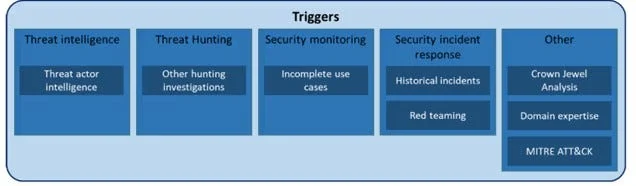
Hunting Triggers (Source: Targeted Hunting Integrating Threat Intelligence (TaHiTI))
Next, and maybe the most important step, is building a hunt hypothesis. This step, while critical, can also be the most ambiguous. Your hypothesis can either lead you to gold or down a never-ending rabbit hole.
