 shellkraft/ledger
An aggressor script that tracks operational changes made during a red team engagement. Gives you a full audit trail of what was changed and what still needs to be cleaned up.

Ledger is a Cobalt Strike aggressor script that tracks every operational change made during an engagement. Every service you enable, firewall rule you punch through, account you create, or registry key you touch gets logged with a risk score, operator attribution, and cleanup status. At the end of the engagement you have a complete audit trail of what was changed and what still needs to be cleaned up.
Red team engagements leave artifacts. Services get enabled, accounts get created, firewall rules get opened, registry keys get modified. Without a structured log these are easy to forget — especially across long engagements or when multiple operators are working simultaneously.
Ledger gives you a running journal with:
ledger.cna to your Cobalt Strike scripts directory.ledger.cna.dirty alias is now available in every Beacon console.All commands run from a Beacon console using the dirty alias.
dirty <CATEGORY> <command> [comment] [score]
comment and score are optional. If omitted, sensible defaults are used based on the category.
dirty RPC "sql-enablerpc lon-db-1 lon-db-2"
dirty DEFENDER "add-exclusion C:\windows\temp" "Payload staging" 8
dirty GROUP "net group 'Domain Admins' svc_backup /add /domain"
dirty USER "net user backdoor P@ssw0rd! /add"
dirty SCHEDULED_TASK "schtasks /create /tn updater /tr C:\temp\beacon.exe /sc onlogon"

dirty exec <CATEGORY> <command> [comment] [score]
Logs the change and immediately executes the command on the beacon — one step instead of two.
dirty exec RPC "sql-enablerpc lon-db-1 lon-db-2"
dirty exec USER "net user backdoor P@ssw0rd! /add"
dirty exec DEFENDER "sc config WinDefend start= disabled"
dirty exec FIREWALL "netsh advfirewall set allprofiles state off"
Limitations of dirty exec
dirty exec uses brun internally, which executes a binary directly without a cmd.exe /c wrapper. This means:
net, sc, reg, nltest, whoami, ipconfig, etc.sleep, cd, ls, pwd, download, upload, execute-assembly, inject, etc. For those, run the Beacon command normally and use dirty <CATEGORY> <command> separately to log it.cmd.exe: dir, echo, set, type, pipes (|), redirects (>), etc. Log those manually with dirty CATEGORY "shell <command>"..cna files will not dispatch correctly through dirty exec.dirty show
dirty show DEFENDER
dirty show DESKTOP-ABC123
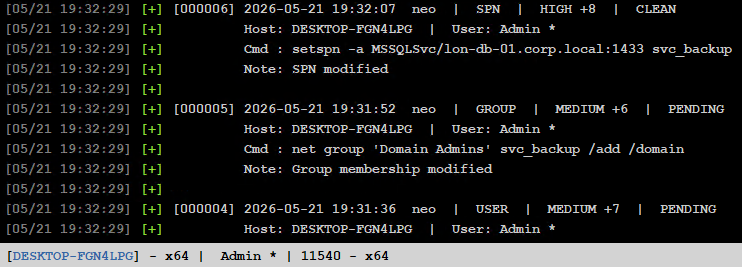
Shows all logged entries. The optional filter matches against command, comment, category, hostname, and username.
dirty score
Shows a per-host risk summary with aggregate score, pending cleanup count, and a visual bar. Hosts are sorted highest score first.
dirty clean <id>
dirty clean all
dirty clean host <hostname>
Hostname matching is case-insensitive and supports partial matches — DESKTOP matches DESKTOP-FGN4LPG.
dirty export text
dirty export json
dirty export text DEFENDER
dirty export json DESKTOP-ABC
Exports are written to the directory containing ledger.cna and include a host score summary at the top followed by the full change log. The Ledger menu bar buttons trigger unfiltered exports directly.
dirty help
| Category | Default Score | Default Comment |
|---|---|---|
| REGISTRY | 2 | Registry modified |
| FIREWALL | 3 | Firewall rule modified |
| SERVICE | 3 | Service configuration changed |
| RPC | 4 | Changes in RPC made |
| WINRM | 4 | WinRM enabled |
| SMB | 4 | SMB signing changed |
| DCOM | 4 | DCOM enabled |
| RDP | 5 | RDP enabled |
| SCHEDULED_TASK | 5 | Scheduled task created |
| DEFENDER | 6 | Defender configuration changed |
| GROUP | 6 | Group membership modified |
| USER | 7 | User account modified |
| ACL | 8 | ACL modified |
| SPN | 8 | SPN modified |
| DOMAIN_ADMIN | 9 | Domain admin group modified |
| TRUST | 9 | Trust relationship modified |
Any unlisted category is accepted with a default score of 3.
Per entry
| Label | Score |
|---|---|
| LOW | < 5 |
| MEDIUM | 5 – 7 |
| HIGH | 8+ |
Aggregate (per host)
| Label | Score |
|---|---|
| LOW | < 5 |
| MEDIUM | 5 – 9 |
| HIGH | 10 – 14 |
| CRITICAL | 15+ |
When a beacon goes dead with uncleaned ledger entries still pending, Ledger fires a red warning to the Cobalt Strike Event Log visible to all connected operators:

The warning fires once per beacon and resets automatically if the beacon recovers and checks in again. Linked (child) beacons and beacons explicitly killed by an operator are excluded. Warning timing scales with the beacon's sleep setting — a 60s sleep triggers after ~2 minutes, a 5m sleep after ~10 minutes.
LEDGER EXPORT -- 2026-05-21 19:50:34

HOST SCORE SUMMARY
================================================================================
Host  Risk  Score  Pending  Bar
--------------------------------------------------------------------------------
DESKTOP-RLP4KBJ (sally *)  CRITICAL  +21  2 pend  [##########]
DESKTOP-FGN4LPG (Admin)  CRITICAL  +18  0 pend  [#########]
================================================================================

CHANGE LOG
================================================================================

[000002] 2026-05-21 19:22:56 | neo | GROUP | MEDIUM +6 | CLEANED
  Host          : DESKTOP-FGN4LPG
  User          : Admin
  Process       : HTTP Listener_x64.exe (PID 4716)
  Command       : net group 'Domain Admins' svc_backup /add /domain
  Comment       : Added svc_backup to Domain Admins for lateral movement
