 seemoo-lab/polypyus
Binary-only firmware historian that learns to locate functions in raw binaries by extracting known functions from similar binaries, enabling fast function matching without disassembly for embedded firmware analysis.



Polypyus learns to locate functions in raw binaries by extracting known functions from similar binaries. Thus, it is a firmware historian. Polypyus works without disassembling these binaries, which is an advantage for binaries that are complex to disassemble and where common tools miss functions. In addition, the binary-only approach makes it very fast and run within a few seconds. However, this approach requires the binaries to be for the same architecture and have similar compiler options.
Polypyus integrates into the workflow of existing tools like Ghidra, IDA, BinDiff, and Diaphora. For example, it can import previously annotated functions and learn from these, and also export found functions to be imported into IDA. Since Polypyus uses rather strict thresholds, it only found correct matches in our experiments. While this leads to fewer results than in existing tools, it is a good entry point for loading these matches into IDA to improve its auto analysis results and then run BinDiff on top.
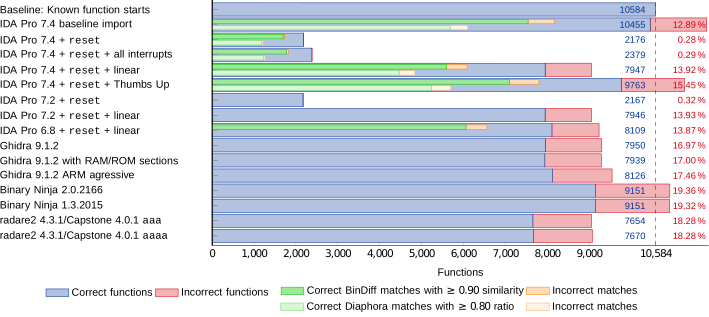
When working on raw firmware binaries, namely various Broadcom and Cypress Bluetooth firmware versions, we found that IDA auto analysis often identified function starts incorrectly. In IDA Pro 6.8 the auto analysis is a bit more aggressive, leading to more results but also more false positives. Overall, IDA Pro 7.2 was more pessimistic, but missed a lot of functions. This led to only a few BinDiff matches between our firmwares in IDA Pro 6.8 and no useful matches at all in IDA Pro 7.2.
Interestingly, BinDiff often failed to identify functions that, except from branches, were byte-identical. Note that Polypyus searches exactly for these byte-identical functions. We assume that BinDiff fails at these functions due to a different call graph produced by missing functions and false positives. Sometimes, these functions were already recognized by IDA, but often, IDA did either not recognize these as code or not mark them as function. Note that Diaphora has similar problems, as it exports functions identified by IDA before further processing them. The following shows a benchmark on the CYW20735B1 Bluetooth firmware binary that compares various disassemblers and how the disassembler failures result in follow-up diffing issues.
Moreover, while we found that Amnesia finds many functions, it also finds many false positives. However, many functions have a similar stack frame setup in the beginning. Thus, Polypyus has an option to learn common function starts from the annotated input binaries and apply this to other binaries to identify functions without matching their name. This optional step is only applied to the regions in which no functions were previously located, this way the common function starts method and the main function finding do not conflict.
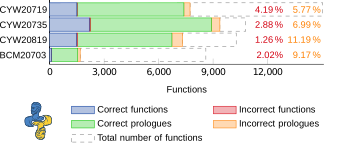
Since these matchers work on the raw binary, they do not depend on a disassembler. This also has one important drawback: if there were different compiler options or a different target architecture, Polypyus will not detect similar functions. Moreover, while the identified matches are very reliable, the function start identification is a bit less reliable, so use the latter with care. In the following, you can see that the Cypress evaluation kits are very similar to each other, but the MacBook firmware is very different.
Polypyus creates fuzzy binary matchers by comparing common functions in a collection of annotated firmware binaries.
Currently, the following annotations are supported:
patch.elf file, which is a special ELF file containing only symbol definitions..symdefs file as it is produced by most ARM compilers..csv file with a format documented in the firmware folder.These annotations contain the address, size, and name of known functions. The more commonalities the input binaries in the history collection have, the better for Polypyus performance and results. Given several slightly different functions, Polypyus creates very good matchers.
Polypyus requires Python 3 >= 3.6. We advise the use of a virtualenv for the following installation. Clone this repository and in this folder run:
pip install .
After the installation the following commands are available:
polypyus-guipolypyus-cliPolypyus is available through a graphical and a command-line interface.
Both, the GUI polypyus-gui and the CLI polypyus-cli, take these arguments during invocation:
  --verbose is the verbosity level. By default, it shows warnings -v shows info -vv show debug information.
  --project sets the location of the project file. This is either a file path or ":memory:".
  --help    Show help message.
The project option facilitates you to store your work for different contexts in different files and also reopen them again.
The general GUI workflow goes from the left-hand side of the window to the right.
First, binaries are added to the history. Then, symbol annotations to the entries
in the history follow.
Afterward, target binaries can be added.
For the matching, hit Create matchers from history. Once the matchers are created, single targets
can be selected, or all targets can be matched by selecting batch match.
Finally, the findings can be exported to a .csv file.
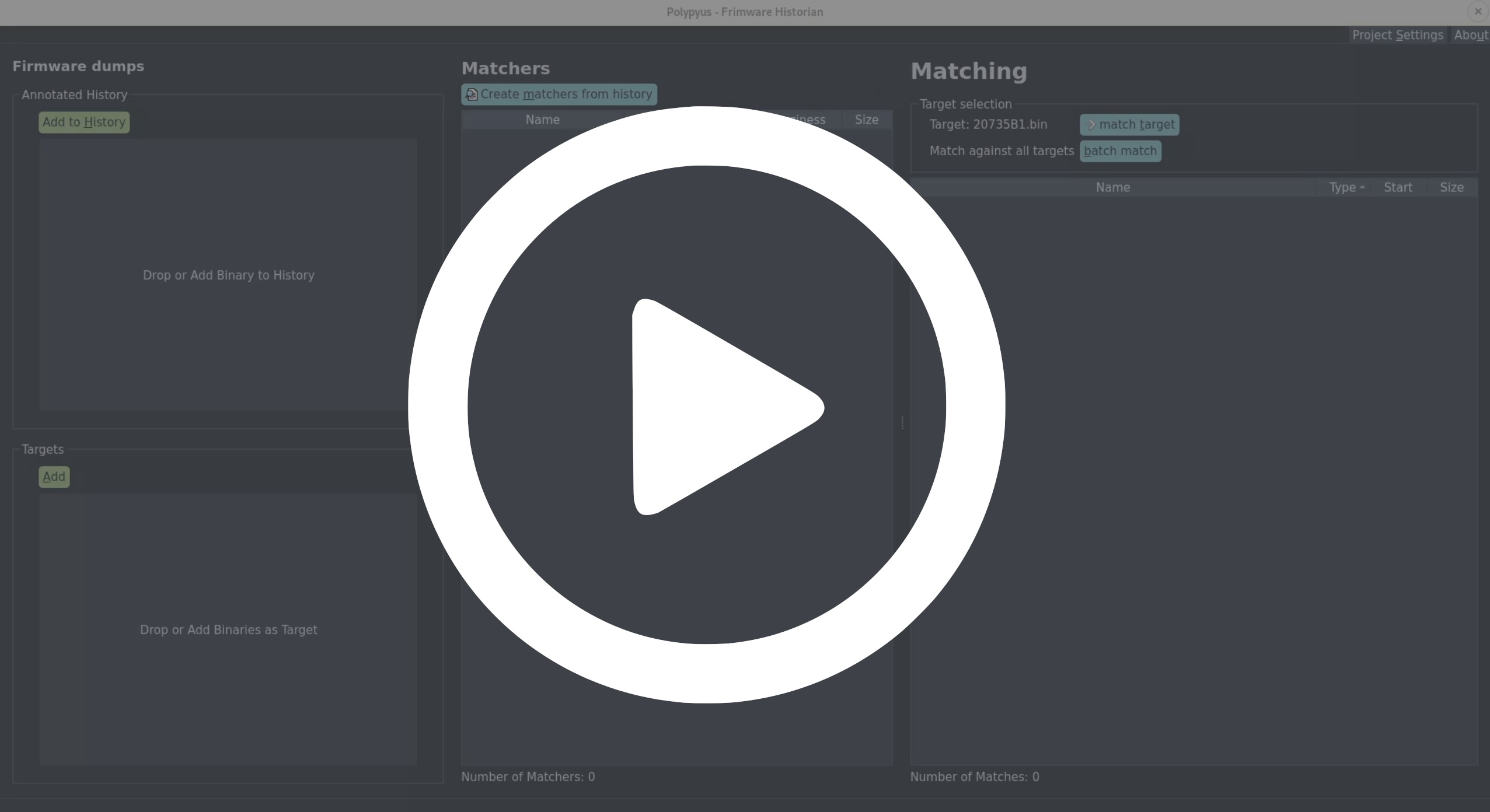
In the following you can see a demo video where Polypyus only takes a few seconds to learn from two input binaries, annotate them, create matchers, and apply matches to a new binary.
The upside to using the CLI is its ability to be automated. As of now, the output format of the CLI is subject to change. However, here is an example of calling it:
polypyus-cli --history firmware/history/20819-A1.bin --annotation firmware/history/20819-A1_patch.elf --history firmware/history/20735B1.bin --annotation firmware/history/20735B1_patch.elf --project test.sqlite
polypyus-cli --target firmware/history/20739B1.bin --project test.sqlite
The first command creates test.sqlite as a new project file and imports 20819-A1.bin and 20735B1.bin
with their respective patch.elf files.
The second invocation reuses the same project file and matches against the binary 20739B1.bin.
For each command, the number of --history and --annotation needs to match.
These two commands could also be combined into one by adding the --target argument to the first command.
A paper that explains the internals was published at the Workshop on Binary Analysis Research (BAR) 2021 with the title Polypyus - The Firmware Historian. Some more details are also contained in Jan's Master thesis final presentation, which covers the issues encountered when working with conventional binary diffing approaches in ARM Thumb2 mode, and how the alternate binary-only approach works.
