

A modular, skill-based autonomous Security Operations Center (SOC) agent that monitors OpenSearch/Elasticsearch data, builds RAG-based behavioral memory, and validates real-time anomalies using LLMs.
A modular, skill-based autonomous Security Operations Center (SOC) agent that monitors OpenSearch/Elasticsearch data, builds RAG-based behavioral memory, and validates real-time anomalies using LLMs.
logic.py (Python) + instruction.md (LLM guidance)StateGraph; conversation and chat working memory checkpointed to SQLite via SqliteSaverdata/conversations.db; the scheduler/CLI runtime now uses the same checkpoint-backed model via data/runtime_memory.dbContext budgeting notes:
llm.max_tokens: 16384 in config.yaml.max_context_chars budget of 4000 characters.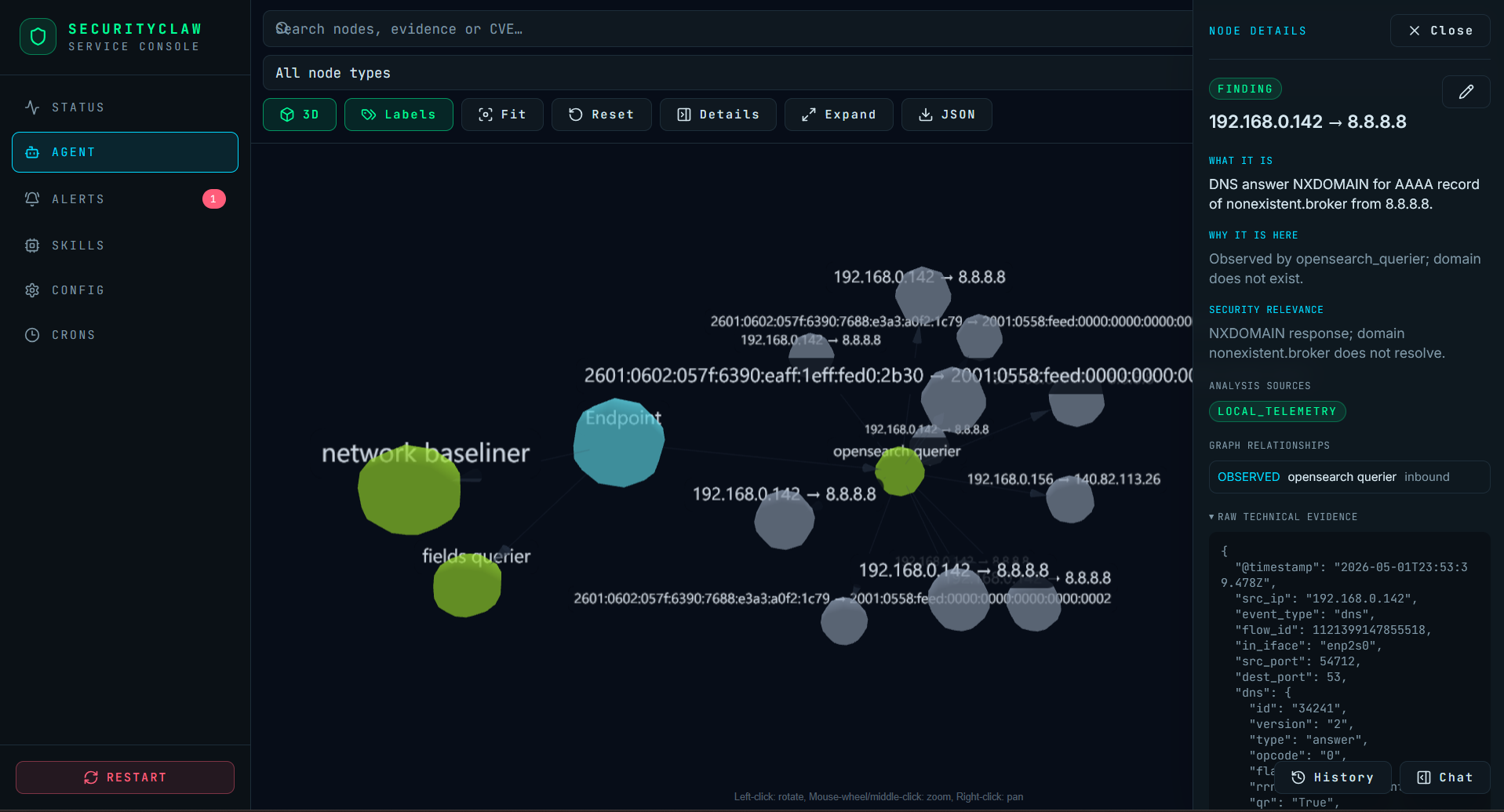
python --version)The current example configuration in config.yaml.example uses:
qwen2.5:7b-instruct-q4_K_M for chat/reasoningnomic-embed-text:latest as the lightweight local auxiliary model for embeddings referenced by the sample configQuick setup:
curl -fsSL https://ollama.com/install.sh | sh
ollama serve
ollama pull qwen2.5:7b-instruct-q4_K_M
ollama pull nomic-embed-text:latest
Step 1a: Clone the repository
git clone https://github.com/SecurityClaw/SecurityClaw.git
cd SecurityClaw
Step 1b: Create a Python virtual environment
# Using venv (built-in)
python3.11 -m venv .venv

# Or using virtualenv (if installed)
virtualenv .venv
Step 1c: Activate the virtual environment
# On Linux/macOS
source .venv/bin/activate

# On Windows (PowerShell)
.venv\Scripts\Activate.ps1

# On Windows (Command Prompt)
.venv\Scripts\activate.bat
Step 1d: Install Python dependencies
pip install -r requirements.txt

# Or using Pipenv (if you prefer):
pipenv install --dev
Verify installation:
python -c "import main; import core; print('✓ Dependencies OK')"
.venv/bin/python main.py onboard
The wizard will guide you through:
config.yaml and .envSee ONBOARDING.md for detailed walkthrough.
.venv/bin/python main.py service
Launches both the background scheduler and the web API server:
http://localhost:5173 (React frontend with hot reload)http://localhost:7799 (FastAPI REST service)For API-only mode (no scheduler):
SECURITYCLAW_API_ONLY=1 .venv/bin/python main.py service
For pure CLI/background agent operation without the web interface:
.venv/bin/python main.py run                    # Start scheduler loop (anomaly watcher + memory builder)
.venv/bin/python main.py dispatch <skill>      # Fire a skill once (e.g., threat_analyst)
.venv/bin/python main.py chat                  # Interactive terminal-based chat with routing
.venv/bin/python main.py status                # Print compact agent memory snapshot
.venv/bin/python main.py list-skills           # Show loaded skills and intervals
If you want to develop the React frontend locally:
.venv/bin/python main.py web-dev               # Start Vite dev server on :5173
# In a second terminal:
.venv/bin/python main.py service               # Start backend API on :7799
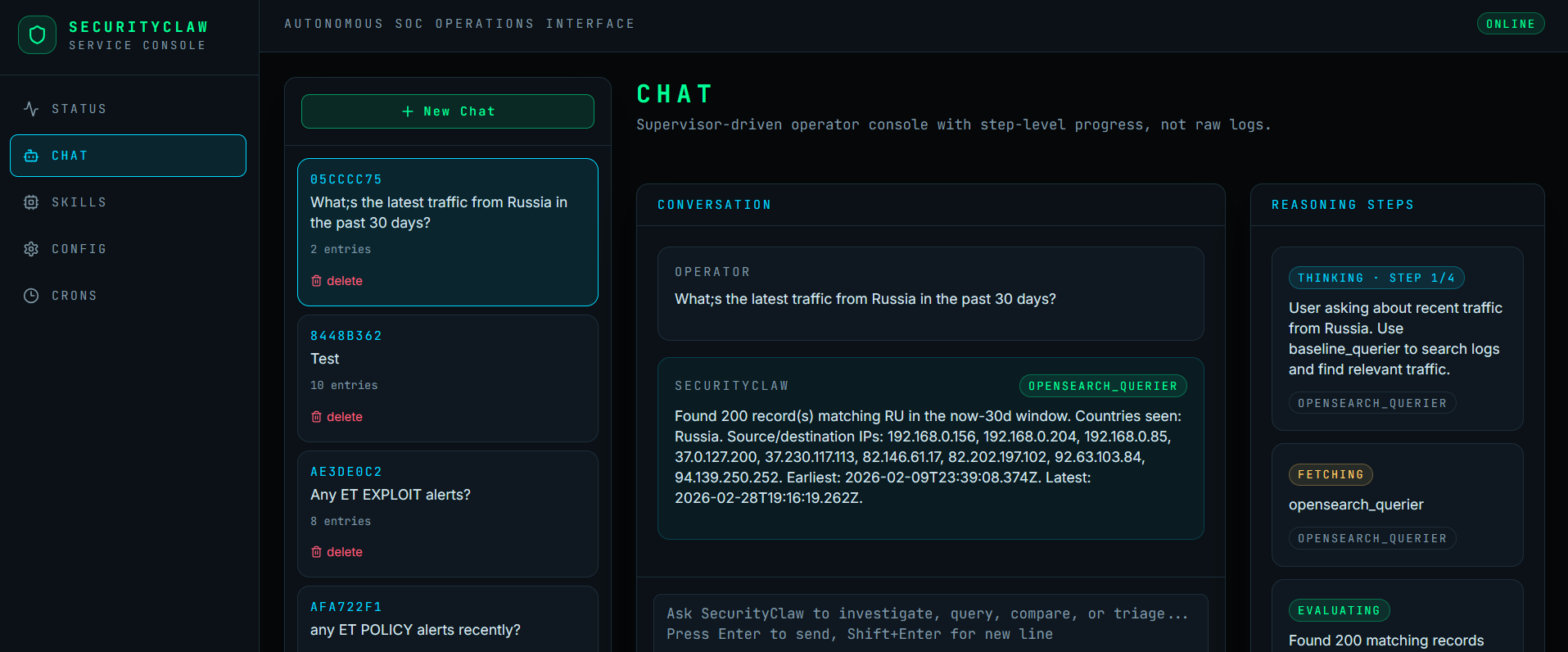
The React web UI provides:
config.yaml and .env through the UISecurityClaw's chat orchestration is moving toward a capability-first contract model:
SecurityClaw/
├── config.yaml                 # Central DB/LLM/RAG configuration
├── .env                        # Secrets (master credentials)
├── main.py                     # CLI entrypoint
│
├── core/
│   ├── config.py              # YAML + env loader
│   ├── memory.py              # Structured memory helpers for file/state/checkpoint-backed runtimes
│   ├── runner.py              # Conductor (skill discovery, scheduling)
│   ├── scheduler.py           # APScheduler wrapper
│   ├── skill_loader.py        # Dynamic skill discovery
│   ├── db_connector.py        # OpenSearch/ES abstraction
│   ├── llm_provider.py        # Ollama provider
│   ├── rag_engine.py          # Embedding store & retrieval
│   └── chat_router/           # API-only: LangGraph StateGraph orchestrator
│
├── skills/
│   ├── network_baseliner/     # 6h: Aggregate logs → RAG vectors
│   ├── fields_baseliner/      # 1h: Catalog field schemas and aggregate example values into fields RAG
│   ├── anomaly_triage/        # Manual: Poll AD findings → enrich → escalate
│   ├── threat_analyst/        # Manual: RAG reasoning → verdict
│   ├── opensearch_querier/    # Manual: Execute database queries
│   ├── forensic_examiner/     # Manual: Build incident timelines
│   ├── baseline_querier/      # Manual: Search behavioral baselines
│   ├── fields_querier/        # Manual: Query field schema catalog
│   └── geoip_lookup/          # Cron (Tue/Fri 2 AM UTC): Maintain MaxMind DB
│
├── data/
│   ├── conversations.db       # SQLite — LangGraph checkpoint store (conversation + chat memory)
│   ├── runtime_memory.db      # SQLite — LangGraph checkpoint store (scheduler + CLI runtime memory)
│   └── geoip/                 # MaxMind GeoLite2 database files
│
├── web/
│   ├── api/
│   │   ├── server.py          # FastAPI REST service with SSE streaming
│   │   └── service.py         # SecurityClawService lifecycle (scheduler + cleanup)
│   ├── src/                   # React frontend source
│   ├── dist/                  # Built frontend (generated by `web-build`)
│   ├── package.json           # Frontend dependencies
│   └── vite.config.js         # Vite bundler config
│
├── tests/
│   ├── conftest.py            # Shared fixtures
│   ├── mock_opensearch.py     # In-memory DB (cosine kNN)
│   ├── mock_llm.py            # Deterministic LLM (keyword-dispatched)
│   ├── data_generator.py      # Synthetic network logs & anomalies
│   └── test_*.py              # Offline tests + coverage
│
├── requirements.txt / Pipfile  # Dependencies
└── ONBOARDING.md              # Interactive setup guide
Purpose: Build baseline of "normal" network behavior.
Logic:
Output: Baseline vectors used by ThreatAnalyst for context.
Purpose: Poll anomaly detection findings and escalate high-confidence anomalies.
Publication note: This skill is in active validation. Convert to scheduled by adding schedule_interval_seconds: 60 to instruction.md.
Logic:
Output: Escalated findings in memory, waiting for ThreatAnalyst analysis.
Purpose: Analyze escalated findings using RAG context; issue verdict.
Publication note: This skill is in active validation. Convert to scheduled by adding schedule_interval_seconds: 300 to instruction.md.
Logic:
Output: Verdicts with confidence, MITRE tactic mapping, recommended actions.
Purpose: Maintain a local MaxMind GeoLite2-City database and answer direct IP geolocation questions.
Logic:
Output: Deterministic geolocation fields from the local MaxMind DB.
Legend:
agent:
  name: SecurityClaw
  version: "1.0.0"
  skills_dir: skills
  log_level: INFO

scheduler:
  heartbeat_interval_seconds: 60
  memory_build_interval_hours: 6

db:
  provider: opensearch          # or: elasticsearch
  host: localhost
  port: 9200
  use_ssl: false
  verify_certs: false
  username: ""                  # Loaded from .env
  password: ""                  # Loaded from .env
  # Index configuration (configured during onboarding)
  logs_index: securityclaw-logs          # Where to scan for network logs
  anomaly_index: securityclaw-anomalies  # Where AD findings are stored
  vector_index: securityclaw-vectors     # RAG embedding store

llm:
  provider: ollama
  ollama_base_url: http://localhost:11434
  ollama_model: qwen2.5:7b-instruct-q4_K_M
  ollama_embed_model: nomic-embed-text:latest

rag:
  embedding_model: all-MiniLM-L6-v2
  top_k: 5
  similarity_threshold: 0.65

anomaly:
  detector_id: default-detector
  poll_interval_seconds: 60
  severity_threshold: 0.7
  max_findings_per_poll: 50

geoip:
  enabled: true
  db_path: data/geoip/GeoLite2-City.mmdb
  edition_id: GeoLite2-City
  update_interval_days: 7
  download_url: https://download.maxmind.com/app/geoip_download
  timeout_seconds: 60
  license_key: ""               # Loaded from .env via MAXMIND_LICENSE_KEY
SecurityClaw works with three indices:
Flow:
logs_index → generates summaries → stores embeddings in vector_indexanomaly_index for new findings → escalates to memoryvector_index → issues verdictDuring onboarding, you can use any index names/patterns your environment provides (e.g., if your logs are in filebeat-networking-*, use that instead of securityclaw-logs).
OPENSEARCH_USERNAME=<your-opensearch-username>
OPENSEARCH_PASSWORD=<your-opensearch-password>
OLLAMA_BASE_URL=http://localhost:11434
# Interactive setup
.venv/bin/python main.py onboard

# Start web interface + backend API + scheduler
.venv/bin/python main.py service

# Run the CLI agent (blocks; press Ctrl+C to stop)
.venv/bin/python main.py run

# Interactive chat in CLI
.venv/bin/python main.py chat

# Fire one skill immediately
.venv/bin/python main.py dispatch anomaly_triage
.venv/bin/python main.py dispatch network_baseliner
.venv/bin/python main.py dispatch threat_analyst

# View working memory
.venv/bin/python main.py status

# List skills and intervals
.venv/bin/python main.py list-skills

# Set logging level
.venv/bin/python main.py --log-level DEBUG run
The web interface provides a modern chat-based UI for interacting with SecurityClaw skills and viewing reasoning steps.
# Activate virtual environment first
source .venv/bin/activate  # or: .venv\Scripts\activate on Windows

# Start the web server + backend API + scheduler
python main.py service
Expected output:
[INFO] Starting web server and API...
[INFO] Frontend available at: http://localhost:3000
[INFO] API backend available at: http://localhost:5000/api
[INFO] Scheduler running in background
[INFO] Press Ctrl+C to stop
Chat Interface (http://localhost:3000)
API Endpoints (http://localhost:5000/api)
GET /api/status — Agent status and memory summaryPOST /api/chat/stream — Stream chat responsesGET /api/conversations — List conversation historyDELETE /api/conversations/{id} — Delete a conversationGET /api/skills — List available skillsPOST /api/skills/{name}/dispatch — Manually trigger a skillGET /api/config (read-only) — View masked configurationLocal access (single machine):
Remote access (from another machine):
Find the server's IP address:
hostname -I        # Linux
ipconfig            # Windows
ifconfig            # macOS
Access from remote machine (replace SERVER_IP with actual IP):
http://SERVER_IP:3000
If you only want the API without opening a browser:
# Start server
python main.py service &

# In another terminal, query the API
curl http://localhost:5000/api/status

# Or use the CLI in the main terminal
python main.py dispatch threat_analyst
"Port 3000 already in use"
# Kill the process using port 3000
lsof -ti:3000 | xargs kill -9     # Linux/macOS
netstat -ano | findstr :3000       # Windows
"Cannot connect to API"
curl http://localhost:5000/api/status"Chat not responding"
python main.py --log-level DEBUG serviceAll tests are offline by default (mock DB + mock LLM) and now emit coverage reports via pytest-cov.
# Run the full suite with coverage
.venv/bin/python -m pytest

# Run a specific test file
.venv/bin/python -m pytest tests/test_rag.py -v

# Optional HTML coverage report
.venv/bin/python -m pytest --cov-report=html
Coverage XML is written to coverage.xml for CI/reporting.
Current publication-prep baseline: the full suite is measured automatically, but aggregate coverage is still dragged down by in-progress modules and provider-specific adapters. Treat the report as a measurement tool, not as a claim that every skill is publication-hardened.
Redundant supervisor routing tests were consolidated to keep the publication suite smaller and easier to maintain.
skills/my_skill/
├── logic.py          # Python
└── instruction.md    # LLM guidance
logic.py:
"""
skills/my_skill/logic.py

Context dict keys:
  - db        → BaseDBConnector
  - llm       → BaseLLMProvider
  - memory    → StateBackedMemory (in-memory) or CheckpointBackedMemory (SQLite-backed)
  - config    → Config
  - skills    → dict of loaded Skill objects
"""
from pathlib import Path

SKILL_NAME = "my_skill"
INSTRUCTION_PATH = Path(__file__).parent / "instruction.md"

def run(context: dict) -> dict:
    """
    Main entry point. Called by Runner on schedule.

    Return a dict with status, results, etc.
    """
    db = context.get("db")
    llm = context.get("llm")
    memory = context.get("memory")
    config = context.get("config")

    # Your logic here
    memory.add_finding("Found something interesting")

    return {
        "status": "ok",
        "findings": 5,
    }
instruction.md:
---
schedule_interval_seconds: 300
---

# My Skill

You are a security analyst specializing in [X].

When given anomalies, your job is to:
1. [Step 1]
2. [Step 2]

Respond in JSON format with:
```json
{
  "verdict": "...",
  "confidence": ...,
  "reasoning": "..."
}
---

## Extending SecurityClaw

### Add a New Skill

1. Create `skills/my_skill/` directory
2. Write `logic.py` with `run(context)` function
3. Write `instruction.md` with LLM guidance and optional `schedule_interval_seconds`
4. Restart agent or run `.venv/bin/python main.py dispatch my_skill` to test

### Add a DB Backend

1. Subclass `BaseDBConnector` in `core/db_connector.py`
2. Set `db.provider: my_db` in `config.yaml`
3. Update `build_db_connector()` factory to instantiate your class

### Add an LLM Backend

1. Subclass `BaseLLMProvider` in `core/llm_provider.py`
2. Set `llm.provider: my_llm` in `config.yaml`
3. Update `build_llm_provider()` factory to instantiate your class

---

## Troubleshooting

**"Module 'X' not found"**
```bash
.venv/bin/pip install -r requirements.txt
"Cannot connect to OpenSearch"
curl -u admin:admin http://localhost:9200"Cannot connect to Ollama"
ollama serveollama pull qwen2.5:7b-instruct-q4_K_M && ollama pull nomic-embed-text:latest"Skill not loading"
/skills/<name>/logic.py existsrun(context) function signature.venv/bin/python main.py --log-level DEBUG run"No findings detected"
tests/conftest.py for example synthetic datacurl http://localhost:9200/_cat/indices?vContributions welcome! Areas for enhancement:
For issues, questions, or feature requests, open an issue or contact the SecurityClaw team.
config.yaml, .env, data/conversations.db, and data/runtime_memory.db are intended to stay local.
Use config.yaml.example as the public template.
Run a quick scan before publishing:
git grep -nEI '(password|api[-]?key|BEGIN [A-Z ]*PRIVATE KEY|sk-)' -- . git log --all -G 'password|api[-]?key|sk-' --oneline
| Principle | Implementation |
|---|
| Skill Modularity | Each skill is a folder with logic.py (entrypoint) and instruction.md (LLM system prompt) |
| Auto-Discovery | Runner scans /skills and dynamically loads all valid skills |
| LangGraph Orchestration | chat_router runs a StateGraph (DECIDE→EXECUTE→EVALUATE loop) compiled with SqliteSaver; state includes chat memory, skill results, and conversation history |
| Stateful Memory | Chat orchestration uses LangGraph state checkpointed at data/conversations.db; the scheduler and CLI runtime use the same bounded structured memory model checkpointed at data/runtime_memory.db |
| Scheduled Execution | APScheduler fires skills at intervals; intervals defined in skill instruction.md front-matter |
| Provider Agnostic | Abstract BaseDBConnector and BaseLLMProvider allow swapping vendors via config |
| RAG Context | Embeddings stored in vector index; retrieved during LLM analysis for behavioral context |
| Testability | Mock DB, LLM, and data generators enable repeatable offline tests with coverage reporting |
| Skill | Status | Notes |
|---|
| chat_router | Stable | Powers web interface and API |
| network_baseliner | Stable | Builds behavioral baselines from logs |
| fields_baseliner | Stable | Catalogs OpenSearch field schemas and aggregated example values |
| anomaly_triage | In-Progress | Manual skill; enable scheduling in instruction.md |
| threat_analyst | In-Progress | Manual skill; enable scheduling in instruction.md |
| opensearch_querier | Stable | Single point of contact for DB queries |
| forensic_examiner | In-Progress | Timeline reconstruction; active development |
| baseline_querier | In-Progress | Search behavioral baselines; not publication-hardened |
| fields_querier | Stable | Search field schema catalog |
| geoip_lookup | Stable | MaxMind GeoLite2 maintenance and lookups |
| Index | Purpose | Used By | Example |
|---|
| logs_index | Historical network logs for baseline building | NetworkBaseliner (6h cycle) | securityclaw-logs, logs-*, filebeat-* |
| anomaly_index | Anomaly Detection results (findings) | AnomalyWatcher (1m cycle) | securityclaw-anomalies, .opendistro-anomaly-results* |
| vector_index | RAG embeddings (normal behavior baseline) | ThreatAnalyst (5m cycle) | securityclaw-vectors |
| Layer | Tests | Notes |
|---|
| Config | (via conftest) | YAML + env loading |
| Scheduler | 13 | Job registration, dispatch, intervals, cron expressions |
| DB Abstraction | 20 | Search, kNN, anomaly findings, bulk indexing |
| LLM Abstraction | 11 | Embedding, chat, canned responses |
| RAG Engine | 15 | Store, retrieve, context building, category filters |
| Skill Loader | 14 | Discovery, instruction loading, interval parsing |
| Skills | active coverage | Stable orchestration paths are covered; in-progress skills remain under active validation |
| Data Generator | 24 | Synthetic logs, anomalies, baseline chunks, embeddings |
