
Skip to content
KitploitKITPLOIT
ToolsExploitsBlog
Log in
Submit
ToolsExploitsBlog
Submit

Hacking, PenTest, and Cybersecurity Tools for Your Security Arsenal!

Kitploit is a directory of hacking, cybersecurity, and pentesting tools. Discover the latest project updates to find vulnerabilities, analyze systems, automate testing, and strengthen your security.

··Feeds·Contact·Privacy·© 2026 Kitploit

Tool Directory

Categories

View all categories
Loading categories
cve-2013-3900-winverifytrust-mitigation — PowerShell remediation for CVE-2013-3900 (WinVerifyTrust) / Tenable Plugin 166555 using EnableCertPaddingCheck. | Kitploit
Tools/GitHubGitHub/sdimitri05/cve-2013-3900-winverifytrust-mitigation
Vulnerability AnalysisScripting & AutomationConfiguration AuditingIncident Response
GitHubsdimitri05/cve-2013-3900-winverifytrust-mitigation

cve-2013-3900-winverifytrust-mitigation

PowerShell remediation for CVE-2013-3900 (WinVerifyTrust) / Tenable Plugin 166555 using EnableCertPaddingCheck.

View Repository
137 months agoNot yet reviewed

Most Popular

View all →

Discover the most used tools by our community.

Explore all tools

Browse our collection of tools

View all tools →
Share

CVE-2013-3900 Mitigation (WinVerifyTrust / EnableCertPaddingCheck)

This repository contains a PowerShell remediation + verification script that addresses Tenable/Nessus finding:

  • Plugin ID: 166555
  • Name: WinVerifyTrust Signature Validation CVE-2013-3900 Mitigation (EnableCertPaddingCheck)

The script enforces the WinVerifyTrust certificate padding check by setting:

  • EnableCertPaddingCheck (DWORD) = 1

On 64-bit systems, scanners require the value to be set in both the native registry path and the Wow6432Node (32-bit view) registry path.


Why this matters

CVE-2013-3900 relates to how Windows validates Authenticode signatures using WinVerifyTrust.
If certificate padding checks aren’t enforced, certain crafted signatures may be treated as valid in unsafe scenarios, and vulnerability scanners will flag the host as non-compliant.
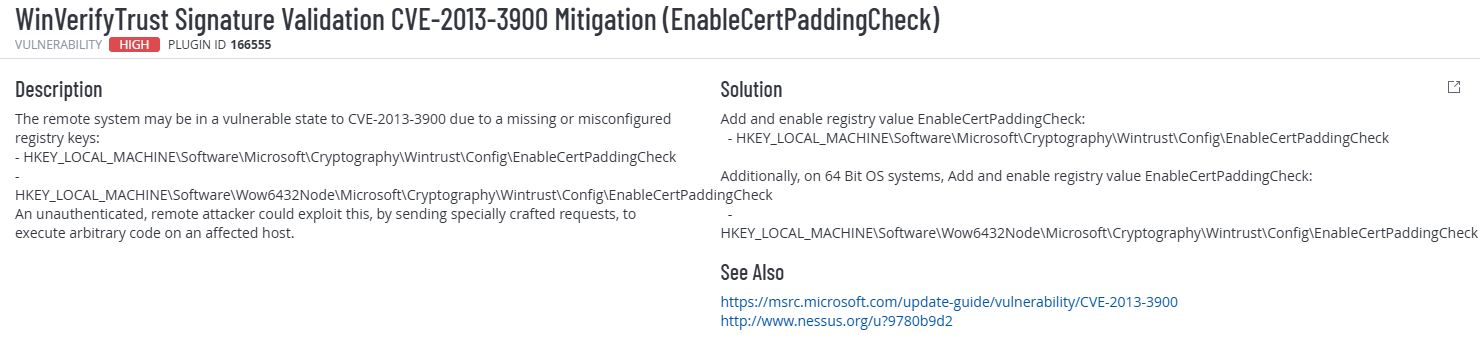
Tenable Plugin Details

Plugin Details


Environment

  • Target: Windows 11 VM (x64)
  • PowerShell Version: 5.1
  • Scan Type: Tenable / Nessus
  • Privileges Required: Administrator

What the script does

✅ Ensures it is run as Administrator
✅ Detects if the OS is 64-bit
✅ Ensures required registry keys exist
✅ Sets EnableCertPaddingCheck to:

  • 1 when $secureEnvironment = $true (secure / recommended)
  • 0 when $secureEnvironment = $false (insecure / lab/testing)

✅ Prints a clear Before/After table and compliance result

Script location:

scripts/Set-WinVerifyTrustCertPadding.ps1


Registry paths used

The script applies the setting to:

  • HKLM:\Software\Microsoft\Cryptography\Wintrust\Config
  • HKLM:\Software\Wow6432Node\Microsoft\Cryptography\Wintrust\Config (64-bit OS)

Value enforced:

  • EnableCertPaddingCheck (DWORD)

Usage

  1. Open PowerShell as Administrator
  2. (Optional) Edit the toggle inside the script:
    • $secureEnvironment = $true → enforce mitigation (recommended)
    • $secureEnvironment = $false → disable mitigation (lab/testing only)
  3. Run:
.\scripts\Set-WinVerifyTrustCertPadding.ps1

Technical Validation

The script verifies the configuration by:

  • Reading both registry paths
  • Comparing current value vs desired value
  • Printing a compliance table (Before → After)
  • Returning exit code 0 on success

Evidence (Before vs After)

Before Remediation (Scan 5)

High severity finding present (Plugin 166555 – CVE-2013-3900).
Total findings: 5
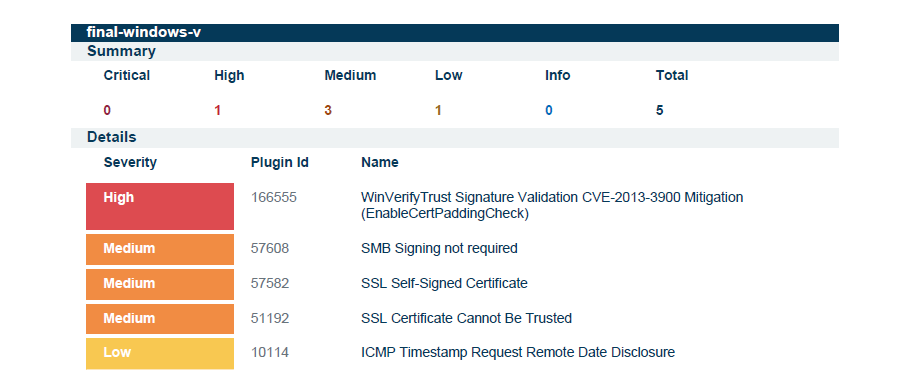
Before Scan


After Remediation (Scan 6)

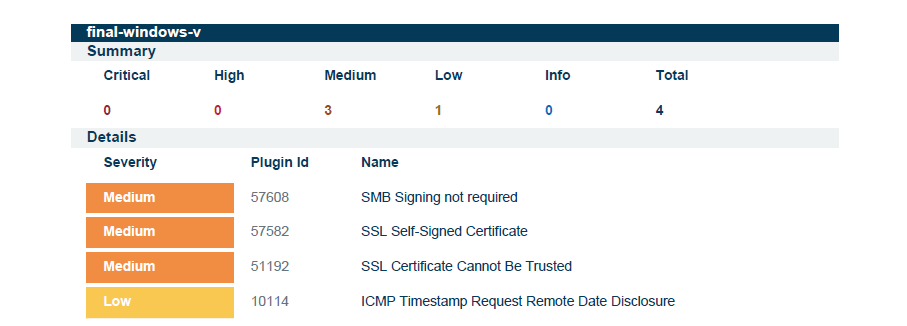
High severity finding removed.
Total findings reduced: 5 → 4
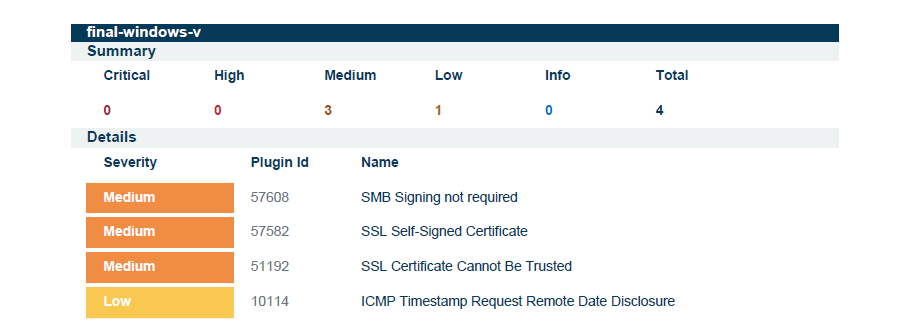
After Scan


Outcome

  • Removed High severity CVE-2013-3900 finding
  • Reduced overall vulnerability count
  • Automated remediation with verification logic
  • Fully compatible with Windows PowerShell 5.1

Notes

  • Reboot is typically not required.
  • If the scanner still reports the finding, ensure a credentialed scan is used and rescan after reboot.
Download Tool