 sclbd/deepfakebench-mm
Modular PyTorch benchmark for multimodal audio-visual deepfake detection, with dataset preprocessing, detector implementations, training, evaluation, and analysis pipelines.







Kangran Zhao*, Xiaoyu Zhang*, Yupeng Chen*, Yize Chen, Weinan Guan, Bo Zheng, Yufan Liao, Chengzhe Sun, Soumyya Kanti Datta, Qingshan Liu, Siwei Lyu, and Baoyuan Wu†
* Equal contribution. † Corresponding author.
Mega-MMDF contains 100,000 real and 1.2 million forged audiovisual clips, constructed using 30 forgery methods across 22 forgery pipelines. See our paper for the dataset design and experiments, and visit Hugging Face to access the dataset.
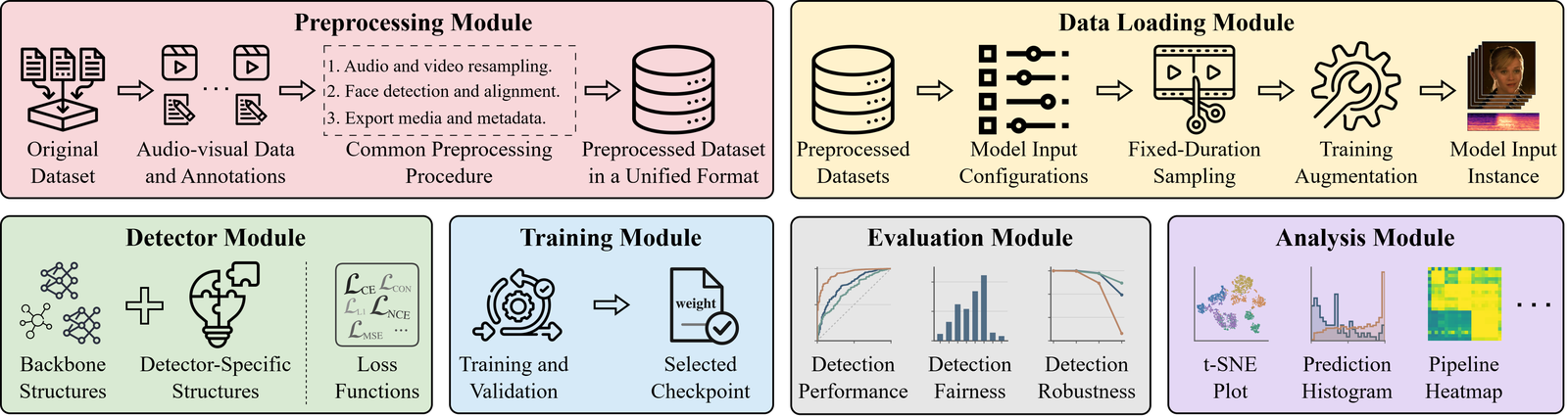
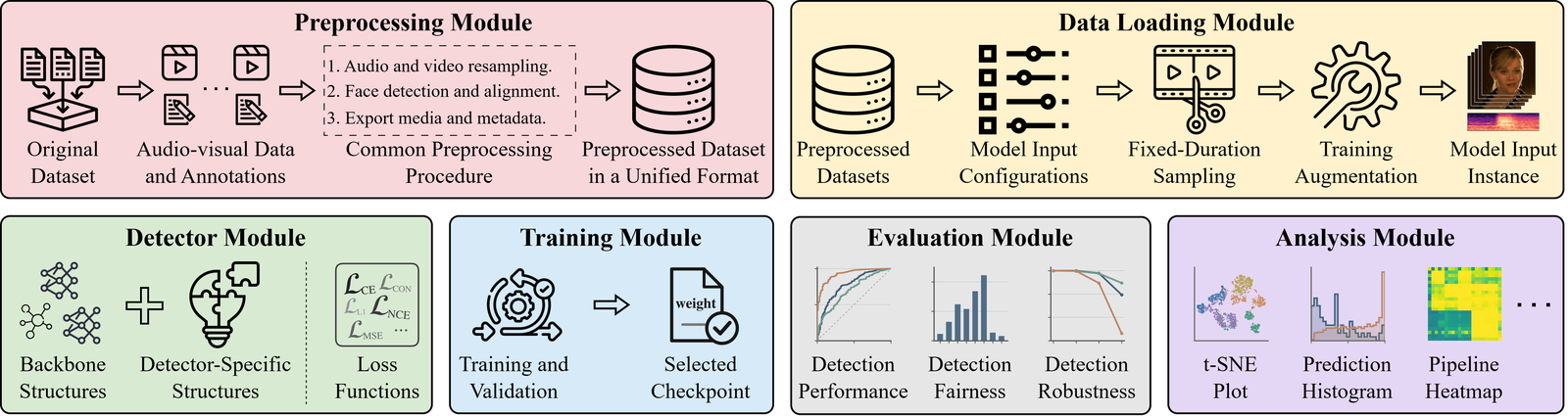
DeepfakeBench-MM is a modular benchmark for multimodal deepfake detection. Its shared interfaces and configurable components support data preprocessing, loading, detector implementation, training, evaluation, and analysis, making the framework highly extensible. We will continue tracking advances in the field and expanding its datasets, detectors, and evaluation tools.
Run the commands from the repository root. The examples below use Bash on Linux and the Baseline detector, which can train from scratch without external initialization weights.
Create the environment following install.sh:
conda create -n DeepfakeBench-MM python=3.10.19 -y
conda activate DeepfakeBench-MM

pip install torch==2.2.0 torchvision==0.17.0 torchaudio==2.2.0 --index-url https://download.pytorch.org/whl/cu118
pip install -r requirements.txt
The recipe uses CUDA 11.8 PyTorch wheels. Our reference environment uses
FFmpeg and FFprobe 4.4.2 on Ubuntu 22.04. Install these executables
separately and make both available on PATH.
Edit configs/path.yaml for your filesystem:
original_dir: ./data/original
preprocessed_dir: ./data/preprocessed
json_dir: ./data/json
log_dir: ./logs
| Setting | Contents |
|---|---|
original_dir | Downloaded source datasets |
preprocessed_dir/audio-video/ | Prepared video, audio, and landmarks |
json_dir/audio-video/ | Assembled dataset manifests consumed by the loaders |
log_dir | Root for automatically named training runs and default test outputs |
Keep each dataset in its expected directory under original_dir, for example:
original_dir/
├── Mega-MMDF/
├── FakeAVCeleb_v1.2/
├── LAV-DF/
├── PolyGlotFake/
├── IDForge_v1/
├── TalkingHeadBench/
├── DigiFakeAV/
└── ...
The audio-video preprocessing guide describes the internal layout and split files required by each dataset preprocessor.
Follow the preprocessing overview and audio-video quick start to prepare the alignment resources, run a preprocessor, and assemble its dataset manifest. For example:
python preprocess/audio_video/mega_mmdf_preprocessor.py --split all --num_proc 8
This prepares the media under preprocessed_dir/audio-video/ and writes
json_dir/audio-video/Mega-MMDF.json. The dataset loaders read this assembled
manifest. FakeAVCeleb, PolyGlotFake, and DigiFakeAV use the bundled split files
described in the preprocessing guide.
We are reviewing the redistribution permissions for preprocessed datasets to reduce duplicated preprocessing effort in the community. We will provide all preprocessed versions that we are permitted to redistribute.
Choose a detector configuration and prepare the training and validation datasets listed in it. For example, train Baseline on Mega-MMDF with:
python train.py \
  --detector_path configs/detectors/audio_video/standard/baseline_train_on_megammdf.yaml \
  --log_dir ./logs/train/baseline_megammdf \
  --seed 1024
This configuration uses Mega-MMDF for training and the validation splits of FakeAVCeleb, LAV-DF, PolyGlotFake, IDForge, and Mega-MMDF for model selection. Prepare those manifests before running the command. For other detectors, obtain their required backbone or method-pretraining weights following pretrained/README.md.
--log_dir is the exact training run directory. Without --resume, the
selected directory is cleared before training starts, including existing logs
and checkpoints. Choose a dedicated run directory. When --log_dir is omitted,
the entrypoint creates log_dir/train/<model_name>_<timestamp>/ under the root
configured in configs/path.yaml.
Outputs are organized as:
logs/train/baseline_megammdf/
├── log.txt            # Training configuration, losses, and validation results
├── checkpoints/       # Model-only weights for testing
└── training_states/   # Full states for resuming training
To preserve that directory and resume from its latest full training state, add
the boolean --resume flag and use the same --log_dir:
python train.py \
  --detector_path configs/detectors/audio_video/standard/baseline_train_on_megammdf.yaml \
  --log_dir ./logs/train/baseline_megammdf \
  --resume
Resume with the same training configuration. If no resumable full state is found, the trainer reports this and starts from scratch without clearing the directory. See the configuration guide to write your own configuration and connect the data, optimizer, scheduler, and trainer settings.
Use a model-only checkpoint from a run's checkpoints/ directory, or a released
detector checkpoint, with its corresponding detector configuration:
python test.py \
  --detector_path configs/detectors/audio_video/standard/baseline_train_on_megammdf.yaml \
  --weight_path /path/to/model_only_checkpoint.pth \
  --test_datasets Mega-MMDF FakeAVCeleb LAV-DF \
  --log_dir ./logs/test/baseline_megammdf \
  --metrics 'sample-level AUC' 'video-level AUC'








