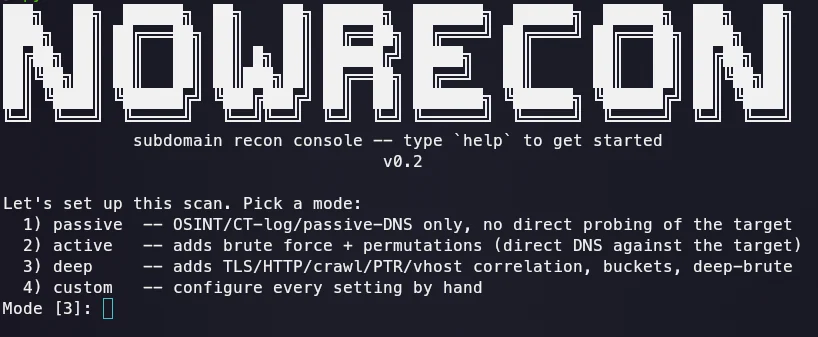


Subdomain enumeration and recon console for red team work. Passive + active collection, deep correlation, bucket discovery, msfconsole-style interactive shell.
A subdomain enumeration and recon tool for red team work. No API keys required for the core features, runs either as a one-shot CLI or as a persistent, msfconsole-style interactive console.
Only run this against domains you are authorized to test. See "Legal" below for details.
setcap), with
automatic fallback to plain TCP connect and a retry pass for ports
that didn't answer the first time.set, show options, run, setup) and a
one-shot flag-driven CLI, both built on the same engine.git clone https://github.com/Rebellionxkid/NoWRecon
cd NoWRecon
pip install -r requirements.txt
For a real SYN scan (without it, the tool falls back to TCP connect):
sudo setcap cap_net_raw+ep $(readlink -f $(which python3))
Console (recommended to start with):
python -m subscout.cli
Shows the banner, walks you through a guided setup (pick a mode: passive / active / deep / custom), offers a default preset or manual configuration of every setting, then drops into a prompt:
nowrecon (example.com) > show options
nowrecon (example.com) > set MODE deep
nowrecon (example.com) > set EXPAND_ORG true
nowrecon (example.com) > run
...
nowrecon (example.com) > set DOMAIN other-target.com
nowrecon (other-target.com) > run
nowrecon (other-target.com) > exit
The console doesn't exit after one scan. Commands:
set OPTION VALUE: change a setting, e.g. set MODE deep.unset OPTION: reset a setting back to its default.show options: table of every setting and its current value.show banner / banner: reprint the startup banner.setup: re-run the guided configuration flow.run (or scan): start a scan with the current settings.help: list every command.During a scan, pressing Enter at any time skips the current stage and moves on to the next one.
Flags, one-shot run:
python -m subscout.cli example.com --mode deep --buckets --expand-org
| CLI flag | Console option | Description |
|---|---|---|
--mode | MODE | passive / active / deep |
--out-dir | OUT_DIR | where to write json/csv/txt |
--wordlist | WORDLIST | custom brute-force wordlist |
--db | DB | path to the SQLite history/diff database |
--ptr-prefix | PTR_PREFIX | CIDR radius for deep-mode PTR sweeps |
--no-vhost | NO_VHOST | disable deep-mode vhost probing |
--dns-rate | DNS_RATE | max DNS queries per second per resolver |
--ip-rate | IP_RATE | max HTTP requests per second against one target IP |
--connect-timeout | CONNECT_TIMEOUT | per-attempt timeout in the TCP-connect port scan |
--expand-org | EXPAND_ORG | also scan sibling org domains, not just list them |
--expand-mode | EXPAND_MODE | mode used for sibling-domain sub-scans |
--buckets | BUCKETS | guess cloud storage bucket names from the brand |
--deep-brute | DEEP_BRUTE | extra pattern-mutation round on names already found |
--github-token | GITHUB_TOKEN | token for GitHub code-search recon |
--nsec-walk | NSEC_WALK | attempt a full NSEC zone walk (plain NSEC only) |
--user-agent | USER_AGENT | custom User-Agent for every request |
--random-user-agent | RANDOM_USER_AGENT | random real-browser User-Agent for the whole run |
-v / --verbose | VERBOSE | show per-stage log lines |
--debug | DEBUG | show which source found each name |
Notes:
DEAD, raise CONNECT_TIMEOUT
(default 3 seconds). Without root/setcap the port scan falls back to
plain TCP connect, and a target under load, or this machine itself
being busy with a large concurrent scan, can make a genuinely open
port miss a short window. Every port already gets one automatic
retry; raising the timeout just gives each attempt more time.--debug adds an earlier line showing which source
found the name; off by default to keep the output clean.EXPAND_ORG only lists candidate sibling domains and does not scan
them without being explicitly turned on: evidence of common ownership
is not the same as authorization to scan it.deep mode avoids pulling in unrelated domainsThis was a deliberate design constraint:
core/resolver.py: is_wildcard_answer), not just the root: a
catch-all on *.dev.example.com is caught even if the root zone has
none./24 (Scope.ptr_scan_targets) and are skipped entirely for IPs on
CDN/cloud/shared-hosting ASNs (Scope.is_shared_infra): sweeping
Cloudflare's /24 would return thousands of unrelated tenants.Scope.accept_ptr_result): the name must be in scope, and the
forward resolve must land back in the same /24 the reverse lookup
came from. An unconfirmed PTR record alone proves nothing.sources (passive, no key) ┐
sources (active: brute, AXFR) ├→ candidates → resolver (wildcard-aware)
dns_extra (SPF/DMARC/SRV) ┘ │
▼
permutation round (dnsgen-style)
│
▼ (deep mode only)
TLS SAN · HTTP probe + crawl · PTR sweep (FCrDNS) · vhost
│
▼
SQLite (history/diff) + JSON/CSV/TXT export
