

Skip to content
KitploitKITPLOIT
ToolsBlog
Submit
ToolsBlog
Submit

Hacking, PenTest, and Cybersecurity Tools for Your Security Arsenal!

Kitploit is a directory of hacking, cybersecurity, and pentesting tools. Discover the latest project updates to find vulnerabilities, analyze systems, automate testing, and strengthen your security.

··Feeds·Contact·Privacy·© 2026 Kitploit

Tool Directory

Categories

View all categories
Loading categories
ephemera — Zero-Trust SSH CA | Kitploit
Tools/GitHubGitHub/qarait/ephemera
Authentication & AuthorizationCloud Infrastructure SecurityEncryption/Decryption ToolsConfiguration AuditingNetwork SecurityCryptographyDevSecOpsIdentity & Access Management (IAM)Incident Response
GitHubqarait/ephemera

ephemera

Zero-Trust SSH CA

2916 months agoReviewed by Kitploit

Most Popular

View all →

Discover the most used tools by our community.

Explore all tools

Browse our collection of tools

View all tools →
Share
View Repository

Ephemera : Zero-Trust SSH Certificate Authority

CI Status OpenSSF Best Practices Codacy Badge Release License: Apache-2.0 Platform Docker Python Fuzz Soak

Ephemera is a lightweight, self-hosted SSH Certificate Authority designed to enforce Zero-Trust access for infrastructure. It replaces static SSH keys with short-lived certificates, integrates hardware-backed WebAuthn MFA, and maintains cryptographically verifiable audit trails.

[!NOTE] Canonical Source: Codeberg
GitHub Mirror: GitHub (for availability and hosting)

High-Level Architecture

root@kitploit:~
graph LR
    subgraph Client["User (Operator)"]
        SSH["SSH Client"]
        HW["Hardware Key<br/>WebAuthn / YubiKey"]
    end

    subgraph Auth["Authentication Boundary"]
        MFA["WebAuthn MFA<br/><i>Human presence required</i>"]
        OIDC["OIDC<br/><i>Optional</i>"]
    end

    subgraph CA["Ephemera SSH Certificate Authority"]
        CORE["Self-hosted CA<br/>Air-gap capable"]
        POLICY["Policy Engine<br/><i>Governance at issuance</i>"]
        BUDGET["Trust Budgeting<br/><i>Optional</i>"]
    end

    subgraph Targets["Target Servers"]
        NATIVE["Native OpenSSH<br/>TrustedUserCAKeys"]
        NOAGENT["No agents<br/>No SSH proxy"]
    end

    subgraph Audit["Audit & Recovery"]
        LOG["Tamper-Evident<br/>Audit Log"]
        BACKUP["Encrypted Backups<br/>Shamir Recovery"]
    end

    Client --> Auth
    Auth -->|"Short-lived cert"| CA
    CA -->|"Certificate expires<br/>automatically"| Targets
    CA -.->|"Post-fact integrity"| Audit

    style Auth fill:#e8f5e9,stroke:#2e7d32
    style CA fill:#e3f2fd,stroke:#1565c0
    style Audit fill:#fff3e0,stroke:#ef6c00

What Ephemera does: Governs who may receive access and for how long.
What Ephemera does NOT do: Runtime monitoring, MITM proxying, command inspection.
Enforcement: Entirely within native OpenSSH — no Ephemera agent on target servers.
Key rotation: Not needed — certificates expire automatically.

What Ephemera Is

Ephemera is a self-hosted SSH Certificate Authority built on native OpenSSH features. It replaces long-lived SSH keys with short-lived certificates issued just-in-time, with explicit physical presence and auditable privilege escalation.

It is designed for teams that want centralized SSH governance without MITM proxies, custom protocols, or cloud dependencies.

What Ephemera Is Not

  • Not an SSH proxy or MITM gateway
  • Not a PAM replacement
  • Not a runtime monitoring or behavior analysis tool
  • Not a cloud service
  • Not a SIEM or detection platform

Project Status

Core SSH CA functionality: Production-ready
Trust Budgeting: Experimental (opt-in, subject to change)

The experimental features are clearly isolated and disabled by default.

Why Ephemera?

Traditional SSH relies on long-lived private keys spread across laptops and servers. Once a key leaks, access persists until you discover it and rotate keys everywhere. Ephemera replaces static keys with short-lived certificates that expire automatically, shrinking the window of misuse from months to minutes.

Positioning

Best For

  • Sovereign Deployments: Teams requiring full ownership of their CA without external cloud dependencies.
  • Air-Gapped Environments: Designed to operate without outbound internet access once deployed.
  • Minimal Overhead: Organizations that need strong SSH security without the complexity of managing a full secrets platform.

Not For

  • Enterprise IAM Consolidation: If you require deep integration with complex AD/LDAP hierarchies, Teleport or HashiCorp Vault are better suited.
  • Managed Service Preference: Ephemera is self-hosted and does not offer a SaaS variant.

Key Capabilities

Just-in-Time Access : Certificates expire in minutes (default 5m), reducing the window of opportunity for stolen credentials.

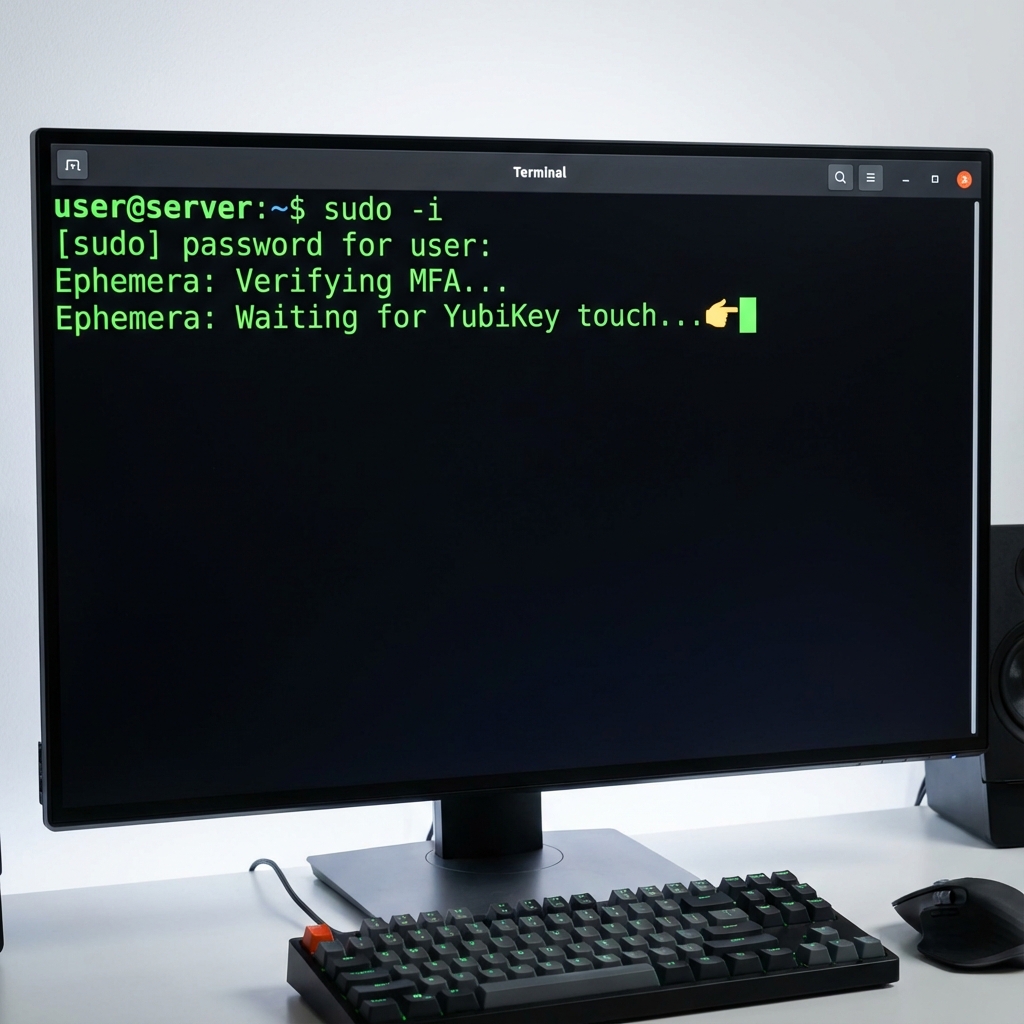
WebAuthn Enforcement : Certificate issuance requires physical MFA (FIDO2) interaction via YubiKey or TouchID.

Sovereign Recovery : Encrypted backups are protected via Shamir's Secret Sharing, requiring a quorum to restore.

Verifiable Audit : All CA actions are logged to a Merkle-chained ledger for tamper-evident history.

Granular RBAC : A YAML-based policy engine defines access based on roles, resources, and conditions.
Sudo Hang

Experimental: Trust Budgeting (Opt-in)

Ephemera includes an experimental, opt-in governance primitive called Trust Budgeting.

Trust Budgeting limits cumulative privileged authority at certificate issuance time by treating access as a finite, visible resource. Each certificate issuance consumes an explicit budget. When the budget is exhausted, normal issuance stops until the budget resets or a separate emergency (break-glass) path is used.

This mechanism:

  • operates only at certificate issuance time
  • introduces no runtime monitoring or agents
  • is disabled by default
  • is not a security guarantee

Trust Budgeting is experimental and may change or be removed.

Documentation: docs/trust_budgeting.md

GateBridge: Shadow Policy Evaluation

Ephemera includes GateBridge, a shadow evaluation system that validates policy decisions against an alternate engine (Gate0) without affecting production behavior.

Shadow Mode Guarantees

  • Fail-Open: If Gate0 fails, crashes, or times out, production issuance continues unaffected.
  • No Retries: Single attempt per evaluation — no retry loops.
  • No Fallbacks: YAML policy engine is always authoritative.
  • Observational Only: Gate0 never blocks or modifies certificate issuance.

Log Schema (policy-shadow.log)

Each entry contains:

Health Endpoint

root@kitploit:~
GET /api/admin/gate0/status

Returns:

root@kitploit:~
{
  "bridge_version": "1.0.0",
  "gate0_version": "v0.2.1",
  "policy_hash": "sha256:8f4b...",
  "status": "healthy",
  "last_mismatch": null,
  "telemetry": {
    "latency_p50_ms": 2.3,
    "latency_p95_ms": 5.1,
    "latency_p99_ms": 8.7
  }
}

Rollback

GateBridge can be disabled via configuration flag. Shadow mode is fail-open and does not affect authorization decisions.

Compatibility

No breaking changes to Gate0 CLI interface. Shadow logs gain new fields but remain backward parseable.


Quick Start

Goal: Issue your first SSH certificate in under 5 minutes.

1. Start Ephemera

root@kitploit:~
# Clone and start
git clone https://github.com/Qarait/ephemera.git
cd ephemera
docker compose up -d

Note: CA master password is auto-generated and persisted on first run.
For production, set CA_MASTER_PASSWORD in a .env file before starting.

[!IMPORTANT] Production Deployments: Use the SoftHSM backend for hardware-backed key isolation. The CA private key never touches disk. See PKCS#11 Setup Guide.

2. Access the Dashboard

Open http://localhost:3000 in your browser.

Default credentials:

  • Username: admin
  • Password: Check Docker logs:
    root@kitploit:~
    docker compose logs ephemera | grep "Password:"
    

3. Issue Your First Certificate

  1. Complete WebAuthn MFA setup (requires hardware key or TouchID)
  2. Click "Request Certificate"
  3. Your certificate is valid for 5 minutes

Alternative Compose Files:

  • docker-compose.dev.yml — Development with local builds and syslog
  • docker-compose.test.yml — Includes SSH target for end-to-end testing

2. Client Setup (The Magic)

root@kitploit:~
# Install the CLI from source
git clone https://github.com/Qarait/ephemera.git
cd ephemera
pip install .

# Initialize your SSH config
ephemera init

# Login to the CA
ephemera login

# Issue your first certificate
ephemera renew

# Check your status
ephemera status

# Connect securely!
ssh user@your-server

Disaster Recovery (Encrypted Backup)

Ephemera provides a secure backup mechanism that encrypts your critical data (CA keys, database) with a random password, and then splits that password into Shamir shards. This ensures that no single person can restore the backup, but a quorum can.

Create Backup

root@kitploit:~
# Create encrypted backup and split password into 5 shards (threshold 3)
ephemera backup-create --k 3 --n 5 --out-dir ./backup

This produces:

  • ephemera_backup.enc (The encrypted archive)
  • backup_shard_1_of_5.json, etc. (The password shards)

Note: Store the shards in separate, secure locations. Store the encrypted backup file safely (it is useless without the shards).

Restore Backup

root@kitploit:~
# Restore using the encrypted file and any 3 shards
ephemera backup-restore --backup ./backup/ephemera_backup.enc --shards ./backup/backup_shard_1_of_5.json ./backup/backup_shard_2_of_5.json ./backup/backup_shard_4_of_5.json --out-dir ./restored

Configuration Example (policy.yaml)

Ephemera uses a powerful YAML-based policy engine for Role-Based Access Control (RBAC).

root@kitploit:~
# Define Roles
roles:
  developer:
    can_request_cert: true
    max_cert_duration: 300  # 5 minutes
    allowed_principals: ["dev-user"]
    
  admin:
    can_request_cert: true
    max_cert_duration: 3600 # 1 hour
    allowed_principals: ["root", "admin"]
    can_approve_sudo: true

# Define Rules
rules:
  # Developers can only access dev servers
  - role: developer
    resource: "dev-*"
    action: "ssh"
    effect: allow

  # Admins can access everything with MFA
  - role: admin
    resource: "*"
    action: "ssh"
    effect: allow
    conditions:
      mfa_required: true

Documentation

  • Live Documentation Overview
  • See ARCHITECTURE.md for design details.
  • See SECURITY_MODEL.md for threat assumptions and trust boundaries.
  • See SECURITY_SPECIFICATIONS.md for deep-dive technical specs.
  • See PRODUCTION_READY.md for hardening and operations checklists.
  • See docs/ for additional guides.

Security

Please see SECURITY.md for responsible disclosure information.

Looking to contribute? Check out our Small Tasks for New Contributors.

[!TIP] Threat model and security assumptions are documented here. Feedback and critique are welcome.

Download Tool
FieldDescription
timestampISO 8601 UTC timestamp
matchBoolean — did both engines agree?
versions.bridgeGateBridge Python version
versions.gate0Gate0 CLI version
versions.policy_hashSHA256 hash of policy.yaml
context_hashSHA256 hash of canonicalized input
yaml_decisionYAML engine result
gate0_decisionGate0 engine result
snapshotFull context (only on mismatch, size-capped)
