 pinperepette/macpersistencechecker
macOS persistence mechanism scanner with code signature verification and timeline tracking.

See EVERYTHING that runs on your Mac. Understand WHY it runs. Decide WHAT stays.
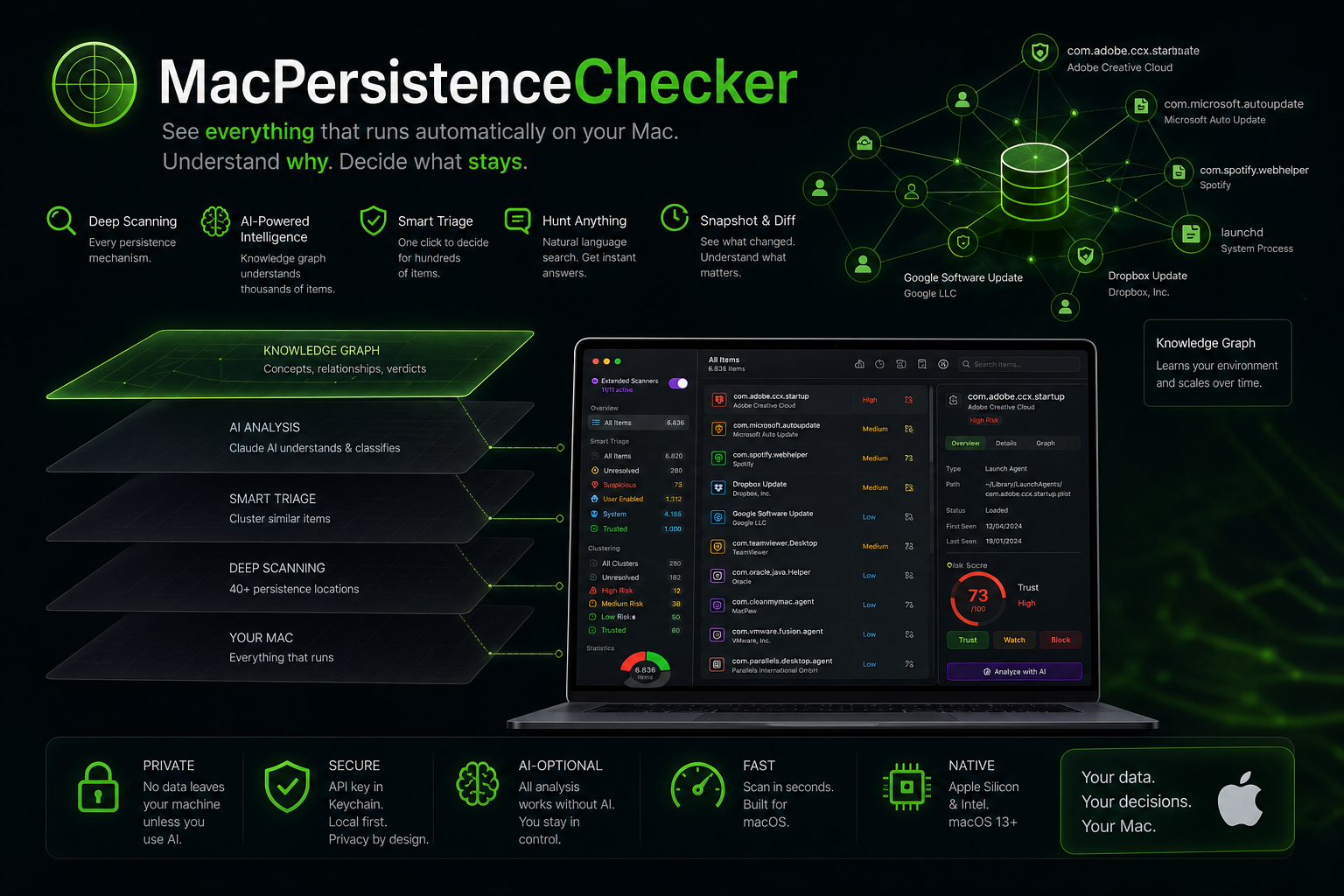
MacPersistenceChecker shows you everything that runs automatically on your Mac, explains why it matters, and helps you decide what to keep or remove.
→ Find malware → Detect hidden persistence → Understand your system in minutes
Download MacPersistenceChecker v2.0.0 (DMG)
→ Scan your Mac in under 30 seconds → No install wizard, just open and run → Native macOS, universal (Apple Silicon & Intel), macOS 13+
If macOS says the app is damaged:
xattr -cr /Applications/MacPersistenceChecker.app
The app learns your system and classifies thousands of items automatically.
Quick start:
Realistic cost: <$1/month for active use, $0 for steady state.
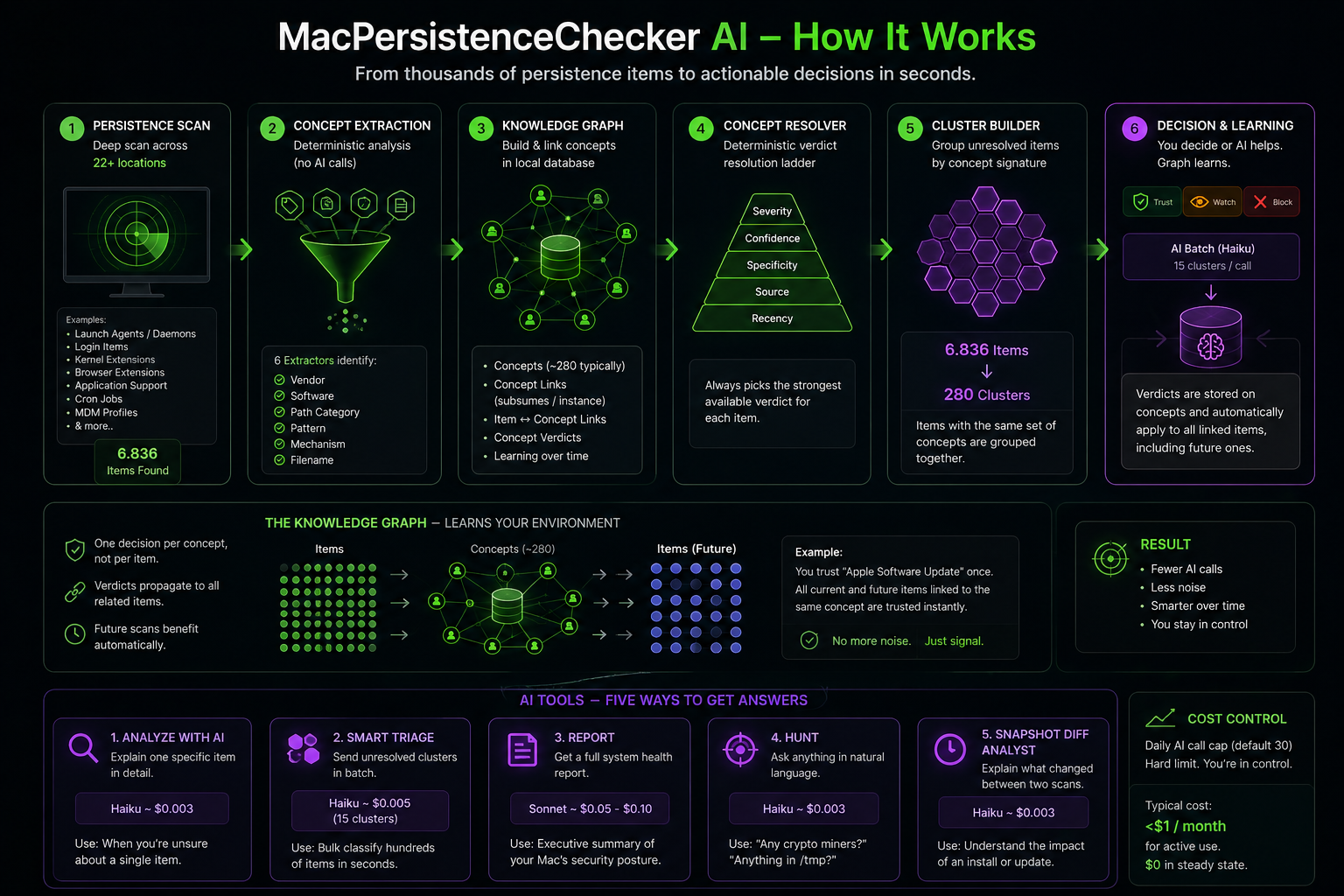
The app builds a knowledge graph of every persistence item on your Mac and uses Claude (Anthropic) to reason over it. Classify thousands of items quickly, escalate only what really matters, and learn your system so it answers most questions without further AI calls.
                 ┌──────────────────────────┐
                 │   Persistence scan       │
                 │   (e.g. 6800 items)      │
                 └─────────────┬────────────┘
                               ▼
            ┌────────────────────────────────────────┐
            │  Concept Extraction (deterministic)    │
            │  6 extractors → vendor / software /    │
            │  pathCategory / pattern / mechanism /  │
            │  filename. No AI calls here.           │
            └─────────────┬──────────────────────────┘
                          ▼
            ┌────────────────────────────────────────┐
            │  Knowledge Graph (SQLite)              │
            │  • concepts (~280 typically)           │
            │  • concept_links (subsumes / instance) │
            │  • item_concepts (m:n)                 │
            │  • concept_verdicts                    │
            └─────────────┬──────────────────────────┘
                          ▼
            ┌────────────────────────────────────────┐
            │  Concept Resolver                      │
            │  for every item, picks the strongest   │
            │  verdict via a deterministic ladder:   │
            │  severity → confidence → specificity   │
            │  → source → recency.                   │
            └─────────────┬──────────────────────────┘
                          │
              ┌───────────┴────────────┐
              ▼                        ▼
   ┌──────────────────┐      ┌──────────────────────┐
   │ Item is already  │      │ Item is unresolved   │
   │ classified.      │      │ → goes to a cluster. │
   │ Filter hides it  │      └──────────┬───────────┘
   │ from "Suspicious"│                 ▼
   └──────────────────┘      ┌──────────────────────┐
                             │ Cluster Builder      │
                             │ groups items by      │
                             │ identical concept    │
                             │ signature (sorted    │
                             │ ids). 6800 items →   │
                             │ ~280 clusters.       │
                             └──────────┬───────────┘
                                        ▼
                ┌──────────────────────────────────────────┐
                │ User decides per cluster (one click =    │
                │ N items decided), OR sends batch to AI:  │
                │                                          │
                │   • Trust / Watch / Block (manual)       │
                │   • Send unresolved clusters to AI       │
                │     → Haiku batch (15 cluster per call)  │
                │     → AI returns verdicts attached to    │
                │       concepts (not items) — propagate   │
                │       to ALL items linked to those       │
                │       concepts, including future ones.   │
                └──────────────────────────────────────────┘
| Tool | Where | Model | Cost / call |
|---|---|---|---|
| Analyze with AI (single item) | Item detail → Knowledge Graph | Haiku | ~$0.003 |
| Smart Triage batch | Toolbar → Triage | Haiku batch | ~$0.005 (15 clusters) |
| System Report | Toolbar → Report | Sonnet | ~$0.05-0.10 |
| Threat Hunt | Toolbar → Hunt | Haiku | ~$0.003 |
| Snapshot Diff | History → Compare → Analyze with AI | Haiku | ~$0.003 |
Daily call cap (default 30) configurable in Settings → AI. Hard ceiling, AI auto-disables when reached.
User-defined rules always win over AI-extracted ones:
