 onekey-sec/firmware-workshop
In this workshop session, we will extract firmware from an EV charger, dig into the firmware, and eventually emulate it so we can interact with the services in real-time.

Join us for this hands-on demo of Unblob, the flexible firmware extractor. During this workshop session, we will extract firmware from an EV charger, dig into the firmware, and eventually emulate it so we can interact with the services in real-time. Unblob works on both hardware and downloadable versions of firmware so we have a target rich environment. No prior experience needed, this session is appropriate for all skillsets and we are looking forward to see you there.
Our target is an electric vehicle charging station controller from Phoenix Contact. You can find more details about it here.
CHARX control modular, AC charging controller, with Embedded Linux system, IEC 61851-1, operating mode: Stand-Alone, Client, Server,
Interfaces:
- Ethernet (2x)
- Cellular communication (4G/2G)
- CHARX control modular system bus
- MICRO-USB type C
Communication protocols:
- OCPP 1.6J
- Modbus/TCP
- MQTT
Connectable peripheral devices:
- Energy meter
- RFID
- DC residual current detection
- DIN rail mounting
There's a few tools that we need in this workshop. You can install them by
running the install-prerequisites script like this:
./install-prerequisites
The firmware can be obtained from the vendor website. There is a script named
download-firmware in this repository that you use to pull the firmware
without the need to open a browser.
Our focus today is on the vendor provided firmware since it contains everything we need. But a similar workflow can be applied to a memory dump extracted from a live device. The interesting thing here is that we can extract, explore, and emulate without even needing a real device.
Let's start by making sure all the dependencies are available:
unblob --show-external-dependencies
The following executables found installed, which are needed by unblob:
    7z                          ✓
    debugfs                     ✓
    jefferson                   ✓
    lz4                         ✓
    lziprecover                 ✓
    lzop                        ✓
    sasquatch                   ✓
    sasquatch-v4be              ✓
    simg2img                    ✓
    ubireader_extract_files     ✓
    ubireader_extract_images    ✓
    unar                        ✓
    zstd                        ✓
Now we can extract the firmware with unblob:
unblob CHARXSEC3XXXSoftwareBundleV190.raucb
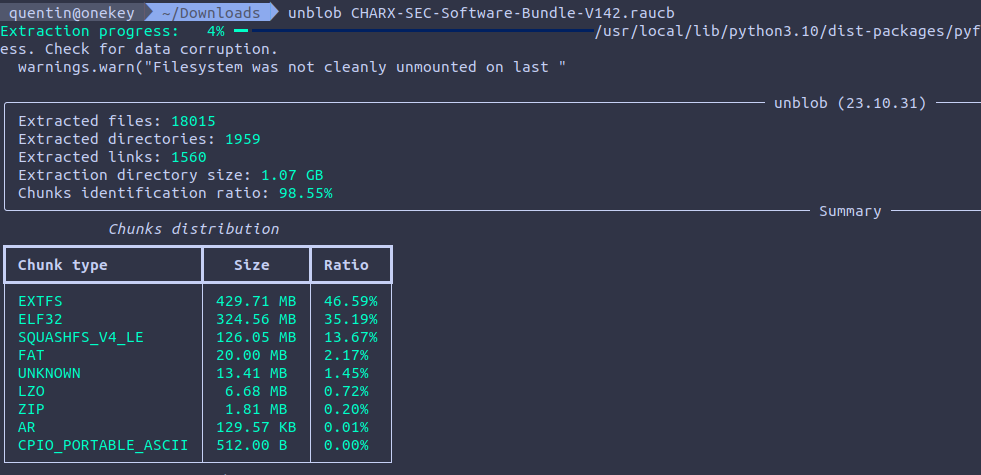
Extraction takes around 3 minutes on a decent laptop. You should see a progress bar moving up:
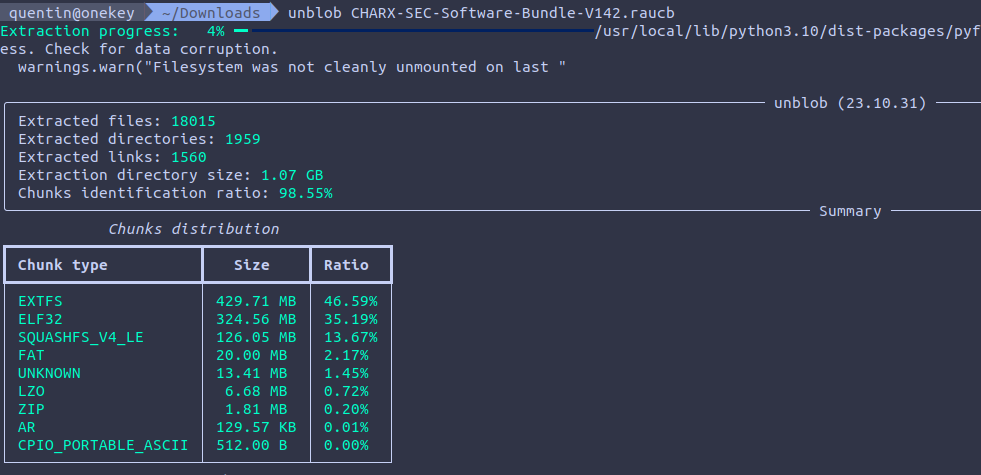
Once extraction is done, a directory named
CHARXSEC3XXXSoftwareBundleV190.raucb_extract should be visible. You can head
into it and list the content.
Unblob works by identifying chunks of data within files. If a chunk is a compressed stream, it gets decompressed. If it's a filesystem or an archive it gets extracted. If the extraction or decompression was successful, the chunk that was carved to disk is deleted to regain space.
Here, a SquashFS version 4 little-endian chunk was carved to disk, extracted,
and deleted. Files (and therefore extraction directories) are named with
{start_offset}-{end_offset}.{type} nomenclature.
We can see that 11KB of "unknown" chunk appears after the squashfs filesystem.
./0-132173824.squashfs_v4_le_extract
./132173824-132184833.unknown
You can run binwalk on it to see what it contains:
binwalk 132173824-132184833.unknown

DECIMAL       HEXADECIMAL     DESCRIPTION
--------------------------------------------------------------------------------
0             0x0             Object signature in DER format (PKCS header length: 4, sequence length: 10997
58            0x3A            Certificate in DER format (x509 v3), header length: 4, sequence length: 4372
4434          0x1152          Certificate in DER format (x509 v3), header length: 4, sequence length: 4387
You can check the certificates with openssl:
dd if=132173824-132184833.unknown bs=1 skip=58 | openssl x509 -in /dev/stdin -inform der -noout -text
dd if=132173824-132184833.unknown bs=1 skip=4434 | openssl x509 -in /dev/stdin -inform der -noout -text
This means firmwares are probably signed with the vendor private key so devices can make sure firmwares are authentic.
That's one of the advantage of unblob, turning unknown unknowns into known unknowns that can be investigated.
Let's look at the content of our squashfs filesystem:
ls -al 0-132173824.squashfs_v4_le_extract
total 460532
drwxrwxr-x  4 kali kali      4096 dec  5 09:51 .
drwxrwxr-x  3 kali kali      4096 dec  5 09:51 ..
-rw-rw-r--  1 kali kali  20971520 sep  8 09:59 bootimg.vfat
drwxrwxr-x  3 kali kali      4096 dec  5 09:51 bootimg.vfat_extract
-rwxrwxr-x  1 kali kali      2654 sep 19  2022 hook
-rw-rw-r--  1 kali kali       442 sep  8 09:59 manifest.raucm
-rw-rw-r--  1 kali kali 450584576 sep  8 09:59 root.ext4
drwxrwxr-x 22 kali kali      4096 sep  8 09:57 root.ext4_extract
We can see a plaintext manifest, a shell script, one MBR and an EXT4 filesystem:
find -maxdepth 1 -type f -exec file {} \;
./manifest.raucm: ASCII text
./hook: a /usr/bin/env sh script, ASCII text executable
./bootimg.vfat: DOS/MBR boot sector, code offset 0x3c+2, OEM-ID "mkfs.fat", sectors/cluster 4, reserved sectors 4, root entries 512, sectors 40960 (volumes <=32 MB), Media descriptor 0xf8, sectors/FAT 40, sectors/track 63, heads 255, hidden sectors 163158016, reserved 0x1, serial number 0xd09aad9c, label: "KERNEL     ", FAT (16 bit)
./root.ext4: Linux rev 1.0 ext4 filesystem data, UUID=8ed19606-02c4-42e7-9cfb-1a2839f93ec4 (extents) (large files) (huge files)
Both bootimg.vfat and root.ext4 were handled and extracted by unblob. The
VFAT partition contains everything related to boot and OS (Linux kernel, DTB,
TEE):
oftree:                    Device Tree Blob version 17, size=27469, boot CPU=0, string block size=1657, DT structure block size=25756
tee.bin:                   data
zImage:                    Linux kernel ARM boot executable zImage (little-endian)
zImage-imx6ul-ksp0632.dtb: Device Tree Blob version 17, size=27469, boot CPU=0, string block size=1657, DT structure block size=25756
You'll see that unblob is a bit greedy and will extract an ELF file and a CPIO
archive from the Linux kernel (zImage), these corresponds to the minimal
kernel and ramdisk.
The EXT4 filesystem contains the root filesystem that's mounted by the Linux kernel at boot:
ls -alh root.ext4_extract
total 88K
drwxrwxr-x 22 kali kali 4,0K sep  8 09:57 .
drwxrwxr-x  4 kali kali 4,0K dec  5 09:51 ..
drwxrwxr-x  2 kali kali 4,0K dec  5 09:51 bin
drwxrwxr-x  3 kali kali 4,0K dec  5 09:51 boot
drwxrwxr-x 16 kali kali 4,0K sep  8 09:56 data
drwxrwxr-x  2 kali kali 4,0K jul 18 00:09 dev
drwxrwxr-x 53 kali kali 4,0K dec  5 09:51 etc
drwxrwxr-x 18 kali kali 4,0K sep  8 09:56 home
drwxrwxr-x  2 kali kali 4,0K jul 18 03:13 identity
drwxrwxr-x  9 kali kali 4,0K dec  5 09:51 lib
drwxrwxr-x  2 kali kali 4,0K jul 18 03:14 log
drwxrwxr-x  2 kali kali 4,0K sep  8 09:57 lost+found
drwxrwxr-x  2 kali kali 4,0K jul 18 00:09 media
drwxrwxr-x  2 kali kali 4,0K jul 18 00:09 mnt
drwxrwxr-x  2 kali kali 4,0K jul 18 00:09 proc
drwxrwxr-x  2 kali kali 4,0K sep  8 09:57 run
drwxrwxr-x  2 kali kali 4,0K dec  5 09:51 sbin
drwxrwxr-x  2 kali kali 4,0K jul 18 03:14 sdcard
drwxrwxr-x  2 kali kali 4,0K jul 18 00:09 sys
drwxrwxrwx  2 kali kali 4,0K jul 18 00:09 tmp
drwxrwxr-x 11 kali kali 4,0K sep  8 09:56 usr
drwxrwxr-x 11 kali kali 4,0K dec  5 09:51 var
