
Skip to content
KitploitKITPLOIT
ToolsBlog
Log in
Submit
ToolsBlog
Submit

Hacking, PenTest, and Cybersecurity Tools for Your Security Arsenal!

Kitploit is a directory of hacking, cybersecurity, and pentesting tools. Discover the latest project updates to find vulnerabilities, analyze systems, automate testing, and strengthen your security.

··Feeds·Contact·Privacy·© 2026 Kitploit

Tool Directory

Categories

View all categories
Loading categories
Raccine — A Simple Ransomware Vaccine | Kitploit
Tools/GitHubGitHub/neo23x0/raccine
Defensive ToolsThreat IntelligenceIntrusion DetectionIncident ResponseAnomaly DetectionLog Analysis
GitHubneo23x0/raccine

Raccine

A Simple Ransomware Vaccine

View Repository
982126162 years agoReviewed by Kitploit

Most Popular

View all →

Discover the most used tools by our community.

Explore all tools

Browse our collection of tools

View all tools →
Share

Inactively Maintained

Raccine

Raccine

A Simple Ransomware Protection

Why

We see ransomware delete all shadow copies using vssadmin pretty often. What if we could just intercept that request and kill the invoking process? Let's try to create a simple vaccine.
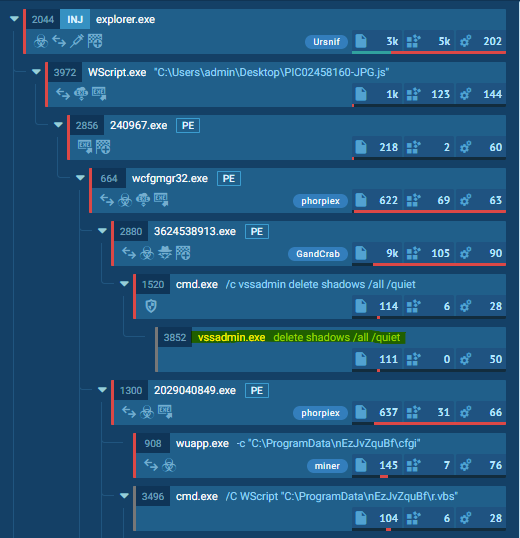
Ransomware Process Tree

How it works

We register a debugger for vssadmin.exe (and wmic.exe), which is our compiled raccine.exe. Raccine is a binary, that first collects all PIDs of the parent processes and then tries to kill all parent processes.

Advantages:

  • The method is rather generic
  • We don't have to replace a system file (vssadmin.exe or wmic.exe), which could lead to integrity problems and could break our raccination on each patch day
  • Flexible YARA rule scanning of command line params for malicious activity
  • The changes are easy to undo
  • Runs on Windows 7 / Windows 2008 R2 or higher
  • No running executable or additional service required (agent-less)

Disadvantages / Blind Spots:

  • The legitimate use of vssadmin.exe delete shadows (or any other blacklisted combination) isn't possible anymore
  • It even kills the processes that tried to invoke vssadmin.exe delete shadows, which could be a backup process
  • This won't catch methods in which the malicious process isn't one of the processes in the tree that has invoked vssadmin.exe (e.g. via schtasks)

The Process

  1. Invocation of vssadmin.exe (and wmic.exe) gets intercepted and passed to raccine.exe as debugger (vssadmin.exe delete shadows becomes raccine.exe vssadmin.exe delete shadows)
  2. We then process the command line arguments and look for malicious combinations using Yara rules.
  3. If no malicious combination could be found, we create a new process with the original command line parameters.
  4. If a malicious combination could be found, we collect all PIDs of parent processes and the start killing them (this should be the malware processes as shown in the screenshots above). Raccine shows a command line window with the killed PIDs for 5 seconds, logs it to the Windows Eventlog and then exits itself.

Malicious combinations:

  • delete and shadows (vssadmin, diskshadow)
  • resize and shadowstorage (vssadmin)
  • delete and shadowstorage (vssadmin)
  • delete and shadowcopy (wmic)
  • delete and catalog and -quiet (wbadmin)
  • win32_shadowcopy or element from a list of encoded commands (powershell)
  • recoveryenabled (bcedit)
  • ignoreallfailures (bcedit)

^ outdated list: check the corresponding YARA rule

Powershell list of encoded commands: JAB, SQBFAF, SQBuAH, SUVYI, cwBhA, aWV4I, aQBlAHgA and many more

Example

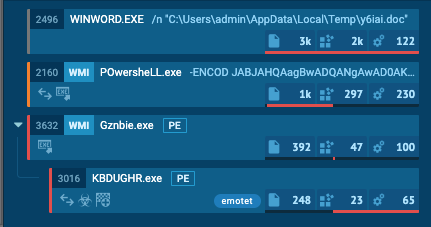
Emotet without Raccine - Link

Emotet without Raccine

Emotet with Raccine - Link (ignore the process activity that is related to the Raccine installation)
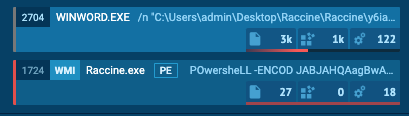
Emotet with Raccine

The infection gets nipped in the bud.

Warning !!!

USE IT AT YOUR OWN RISK!

You won't be able to run commands that use the blacklisted commands on a raccinated machine anymore until you apply the uninstall patch raccine-reg-patch-uninstall.reg. This could break various backup solutions that run that specific command during their work. It will not only block that request but kill all processes in that tree including the backup solution and its invoking process.

If you have a solid security monitoring that logs all process executions, you could check your logs to see if vssadmin.exe delete shadows, vssadmin.exe resize shadowstorage ... or the other blocked command lines are frequently or sporadically used for legitimate purposes in which case you should refrain from using Raccine.

Version History

  • 0.1.0 - Initial version that intercepted & blocked all vssadmin.exe executions
  • 0.2.0 - Version that blocks only vssadmin.exe executions that contain delete and shadows in their command line and otherwise pass all parameters to a new process that invokes vssadmin with its original parameters
  • 0.2.1 - Removed explorer.exe from the whitelist
  • 0.3.0 - Supports the wmic method calling delete shadowcopy, no outputs for whitelisted process starts (avoids problems with wmic output processing)
  • 0.4.0 - Supports logging to the Windows Eventlog for each blocked attempt, looks for more malicious parameter combinations
  • 0.4.1 - Statically linked binaries
  • 0.4.2 - Bugfixes provided by John Lambert
  • 0.5.0 - Removed Eventlog logging (basic info was unnecessary; cuased higher complexity; can be achieved by process creation logging as well), support for wbadmin filtering
  • 0.5.1 - Improvements by @JohnLaTwC
  • 0.5.2 - Additional check for delete shadowstorage by @JohnLaTwC, code review by @_hillu, application icon
  • 0.5.3 - Batch installer
  • 0.6.0 - Additional checks for bcdedit.exe /set {default} bootstatuspolicy ignoreallfailures and bcdedit.exe /set {default} recoveryenabled no
  • 0.7.0 - Additional checks for powershell.exe and win32_shadowcopy or a list of encoded commands
  • 0.7.1 - Improvements by @JohnLaTwC
  • 0.7.2 - Using absolute paths in registry patches
  • 0.8.0 - Creates a log file with all intercepted requests and actions performed C:\ProgramData\Raccine_log.txt
  • 0.9.0 - Logs to Windows Eventlog by @JohnLaTwC
  • 0.10.0 - Simulation mode only
  • 0.10.1 - Fix for Simulation mode
  • 0.10.2 - Includes diskshadow.exe delete shadows command
  • 0.10.3-5 - Minor fixes and additions
  • 1.0 BETA - GUI elements and YARA rule scanning of command line params
  • 1.1 BETA - YARA rule matching with external variables, troubleshooting functions
  • 1.2 BETA - Signature Updater
  • 1.3 BETA - In-Memory YARA Scanning of invoking parent process
  • 1.4 BETA - Full x86 support, moved static strings to YARA rules to avoid AV detections, Log of accepted executions, .NET Framework setup in installer
  • 1.4.2 BETA - Exit code fix (pass through of exit code returned by the intercepted program), intercept taskkill.exe

Installation

Requirements

  • VC++ Runtime for YARA scanning (Installer contains the setup package from https://aka.ms/vs/16/release/VC_redist.x64.exe)
  • .NET Framework 4.5
  • Internet access for the YARA rule updates
  • Windows 7 / Windows 2008 R2 or higher

Both the Visual C++ Redistributable package and the .NET Framework will be automatically installed running install-raccine.bat.

Automatic Installation

  1. Download Raccine.zip from the Release section
  2. Extract it
  3. Run raccine-installer.bat as administrator

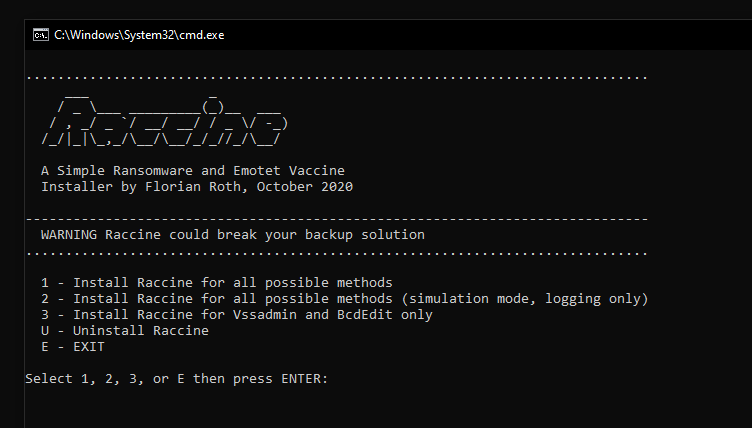
Windows Batch Installer

The batch installer includes an "uninstall" option.

Manual Uninstall

As Administrator do:

Download Tool