
 neo23x0/process-watcher
A process monitoring tool that tries to detect exploitation


A process monitoring tool that tries to detect exploitation
[!IMPORTANT] Emerging threat: critical PHP security release on 21 October 2026, 14:00 UTC. The PHP project announced it on 20 October (announcement): two critical vulnerabilities, both rated CVSS v4.0 9.2. Details, affected versions and fixes come with the release, which may come earlier if details become public or exploitation starts. Prepare to update PHP now.
The announcement does not say what kind of flaws these are. If an attack makes PHP start programs, process-watcher shows each one with its command line and can optionally kill the ones you name. It does not look for these flaws: it prevents nothing and misses code that runs inside PHP without starting a process, so it adds a detection layer and does not replace the patch.
Start here: watching PHP with process-watcher, or read the full PHP guide.
See what a service starts. process-watcher follows a service (a web server, an application server, ...) and every
process it creates, in real time, and logs each start, program change and exit as JSON, optionally with the command
line. When your web server suddenly runs a shell or curl, you see what was started, by which process and from which
service. It is one static binary for Linux (amd64, arm64): download, unpack, run.
It makes the activity visible; it does not judge it. Building a baseline or deciding what is an attack is left to you
or to the system that receives the events (log file, SIEM, webhook). Optionally it can react to specific child
processes with a targeted SIGKILL (Kill rules).
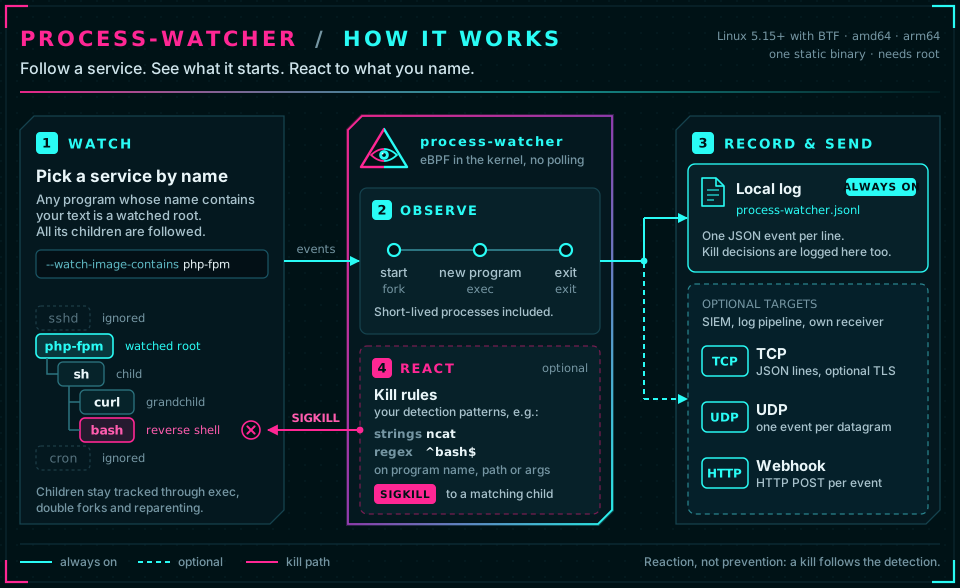
1. Download and unpack the latest release (amd64 or
arm64, detected from your machine; the archive names contain the version, so the second line looks up the latest tag):
ARCH=$(uname -m | sed 's/x86_64/amd64/; s/aarch64/arm64/')
VERSION=$(curl -fsSLI -o /dev/null -w '%{url_effective}' https://github.com/Neo23x0/process-watcher/releases/latest | sed 's#.*/##')
curl -fsSLO https://github.com/Neo23x0/process-watcher/releases/download/$VERSION/process-watcher_${VERSION}_linux_${ARCH}.tar.gz
tar xzf process-watcher_${VERSION}_linux_${ARCH}.tar.gz && cd process-watcher_${VERSION}_linux_${ARCH}
2. Run it against the service you want to watch. It needs root and Linux 5.15 or newer with BTF;
sudo ./process-watcher doctor tells you whether your host qualifies.
sudo ./process-watcher --watch-image-contains nginx --capture-argv=true
nginx is a substring of the executable name of your service (apache2, php-fpm, java, ...). Stop the agent with
Ctrl-C; it writes the events to ./process-watcher.jsonl. --capture-argv=true records command lines, which can
contain secrets (Argument capture). Prefer a file? Edit process-watcher.yaml next to the binary
(it is found automatically) and run sudo ./process-watcher.
3. Watch what the service starts (second terminal, same directory; jq makes the JSON readable):
sudo tail -f process-watcher.jsonl | jq -r '
  select(.event_type=="process.exec" and .lineage.role=="descendant")
  | "\(.timestamp[:19])Z  \(.root.image) > \(.process.image)  \(.process.argv // [] | join(" "))" | gsub("[[:cntrl:]]"; "?")'
Example: a service called nginx is made to run a shell and a few programs (simulated with a stand-in program):
2026-10-17T19:15:16Z  nginx > dash  sh -c id; uname -s
2026-10-17T19:15:16Z  nginx > id  id
2026-10-17T19:15:16Z  nginx > uname  uname -s
2026-10-17T19:15:16Z  nginx > curl  curl --version
2026-10-17T19:15:16Z  nginx > sleep  sleep 1
A web or application server that starts shells, download tools or interpreters (sh, curl, wget, nc, python,
...) is a classic trace of a web shell or remote code execution. All generations are followed, also after the parent
has ended. (jq only joins the arguments for display; the event keeps them as an array. sh shows up as dash
because the image is the program that actually ran.)
Next: keep it running as a systemd service · send the events to your SIEM or log pipeline
with --tcp-address, --udp-address or --webhook-url (Outputs) · terminate suspicious child processes
automatically (Kill rules).
| Requirement | Value |
|---|---|
| Operating system | Linux, amd64 or arm64 |
| Kernel | 5.15 or newer with BTF (/sys/kernel/btf/vmlinux). The version number alone is no guarantee: at start the agent checks the functions and kernel structure fields it needs. |
| Privileges | root, or CAP_BPF + CAP_PERFMON (+ CAP_SYS_PTRACE for /proc/<pid>/exe of other users' processes, CAP_KILL for the kill feature, CAP_SYS_RESOURCE before kernel 5.11). Kernel lockdown confidentiality prevents operation. |
| PID namespace | the initial PID namespace of the host (all PIDs are host PIDs); running inside a container is refused. |
If a requirement is missing, the agent stops with a concrete diagnosis and exit code 3; it never falls back to
polling /proc, which would miss short-lived processes. sudo ./process-watcher doctor checks everything, loads the
programs and runs a probe process of its own. Tested kernels: docs/compatibility.md.
# in the directory the archive was downloaded to, with $VERSION and $ARCH from step 1
curl -fsSLO https://github.com/Neo23x0/process-watcher/releases/download/$VERSION/SHA256SUMS
sha256sum --check --ignore-missing SHA256SUMS
gh attestation verify process-watcher_${VERSION}_linux_${ARCH}.tar.gz --repo Neo23x0/process-watcher   # build provenance
Every archive holds the single static binary (eBPF programs embedded; nothing else is needed at run time), the
commented example configuration process-watcher.yaml, the LICENSE, below php/ the two configurations of the PHP
kit in emerging-threats/, usable right away (process-watcher --config php/php-observe.yaml), and
in packaging/ the systemd unit with the script that installs it. Only amd64 and arm64 are provided: the eBPF
collector assumes 64-bit kernel pointers, so 32-bit kernels (x86, ARM) are not supported.
From the unpacked archive:
sudo ./packaging/install.sh ./process-watcher    # binary, configuration and unit; starts nothing
sudoedit /etc/process-watcher/config.yaml        # adjust the watch list
sudo process-watcher doctor
sudo systemctl enable --now process-watcher
