 mukendi/kratosminifilter
Kratos Minifilter is a Windows kernel driver (FLTMGR.SYS) built for real-time ransomware detection and file I/O mitigation. It intercepts low-level IRPs to instantly block unauthorized mass encryption and canary triggers.

Kratos Minifilter is a Windows kernel driver (FLTMGR.SYS) built for real-time ransomware detection and file I/O mitigation. It intercepts low-level IRPs to instantly block unauthorized mass encryption and canary triggers.



Kratos is a research Windows File System Minifilter built on top of Microsoft's Filter Manager (fltmgr.sys).
Instead of relying on malware signatures, Kratos explores how ransomware can be detected by observing file-system behavior directly inside the Windows kernel.
The project demonstrates how a security driver can:
Kratos is not intended to become a commercial antivirus.
Its primary objective is to understand how modern Endpoint Detection and Response (EDR) products implement behavioral ransomware detection inside the Windows kernel.
Kratos combines three independent detection layers.
Each write operation is sampled.
Instead of calling floating-point functions unavailable inside the kernel, Kratos uses a precomputed lookup table.
The detector identifies:
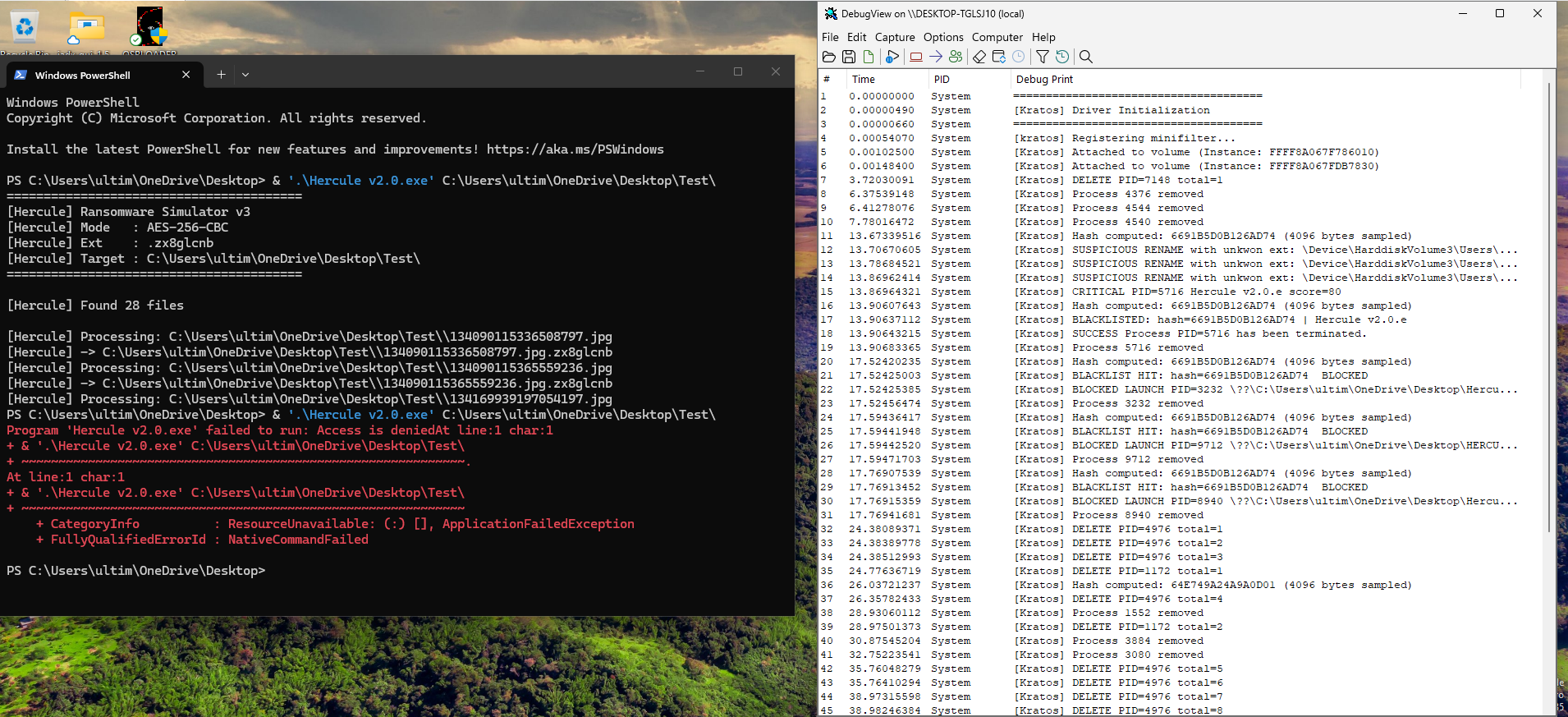
Once ransomware is confirmed, Kratos computes a 64-bit FNV-1a fingerprint from the executable.
The fingerprint is stored inside:
HKLM\SOFTWARE\Kratos\Blacklist
Future executions are blocked before the ransomware starts encrypting files.
Unlike filename-based blacklists, fingerprinting survives:
Here is the exact chronology of this Ring 0 neutralization by Kratos (the anti-ransomware minifilter driver I am developing), reconstructed from kernel logs—featuring an unexpected twist on hypervisor shared folders:
1. Note Drop (Silent Pass) DarkSide begins by generating its .txt ransom note. Because text files generate low entropy and standard I/O patterns, Kratos triggers no alerts. Intentional architectural choice: zero false positives on legitimate text editors and office software.
2. Behavioral Breach (Guest VM) The malware shifts to its destructive phase, targeting desktop files with the .27efa0d1 extension. After 3 suspicious renames (a ZIP archive and 2 PNG images), syntax analysis combined with high entropy pushes the Threat Score past the critical threshold (\ge 80). Action: Kratos denies I/O (STATUS_ACCESS_DENIED), terminates the process (PID 6412), samples the first 4096 bytes of the PE header, and registers its FNV-1a hash (07BACD78B04E01D9) in the kernel blacklist.
3. Cross-Boundary Attack: Saving the HOST System! A second thread (PID 5236) rushes into the blog-security-main directory on HarddiskVolume5. The Twist: This volume mapped directly to the hypervisor's shared folder connected to the HOST physical drive. DarkSide was attempting a Guest-to-Host lateral infection. Outcome: Attached to all volumes, Kratos intercepts the renaming after just 2 files (about.html and a web page). The process is killed instantly, preserving the host-based project in its entirety.
4. The Final Blow: O(1) Immunization A third launch attempt of the binary is initiated (PID 704). Right at the PreCreate callback, Kratos hashes the PE header, matches the blacklisted fingerprint, and smothers execution at the source: 0 files touched.
User files impacted: 5 total (3 on Guest, 2 on Host via Shared Folder).
Guest-to-Host Guest-to-Host lateral infection: Completely blocked from Ring 0 inside the VM.
Ressponse time: Microseconds (fixed-point LUT entropy calculation, zero flooperationst operations)
Proactive defense: 100% FNV-1a fingerprinting efficacy upon re-execution.
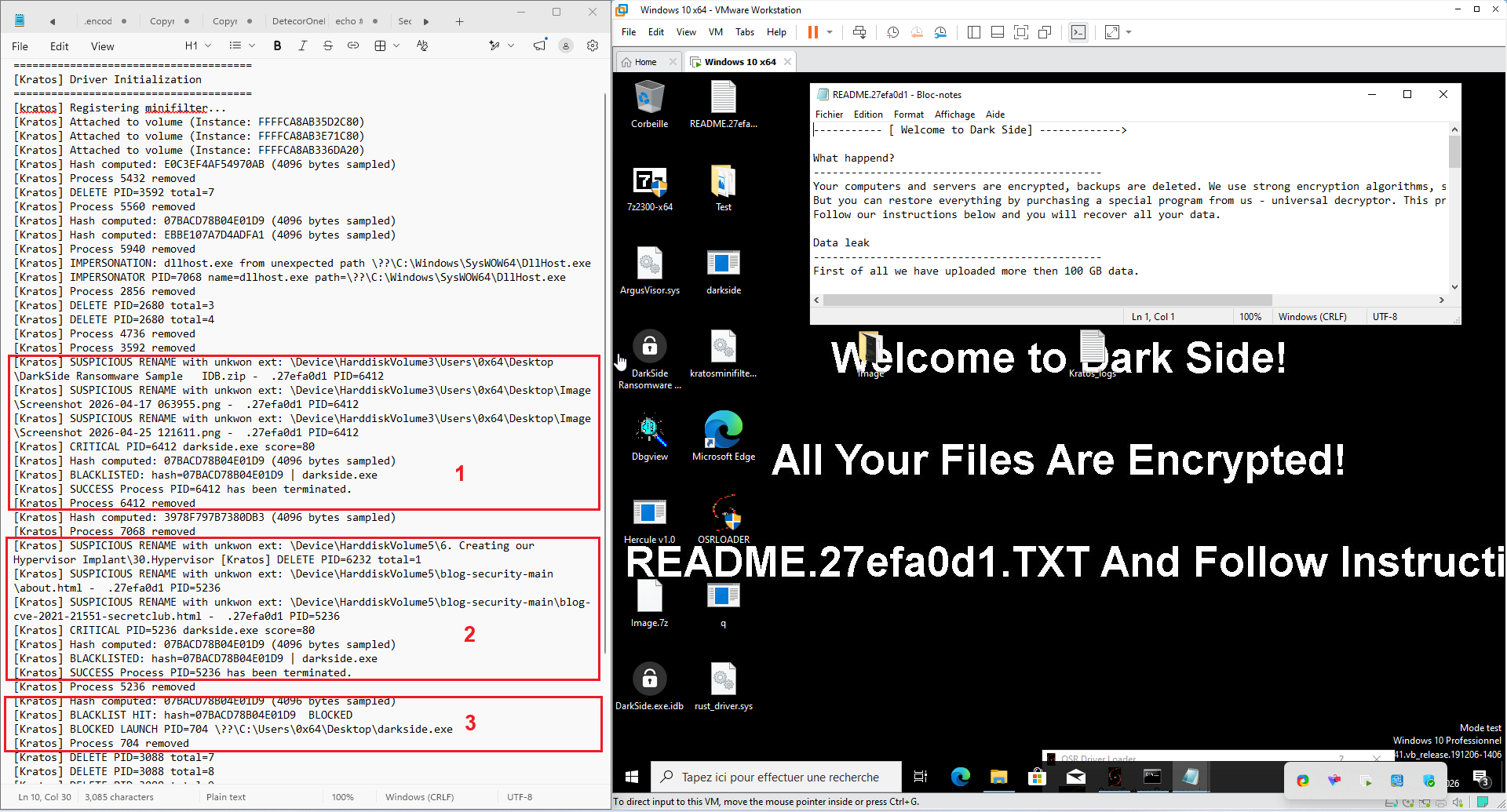
Figure : Kratos vs DarkSide

