 mozillazg/ptcpdump
eBPF-based packet analyzer that captures network traffic with automatic process, container, and Kubernetes pod metadata annotation, supporting tcpdump-compatible filtering and PcapNG output.

%20e2e)
%20e2e)


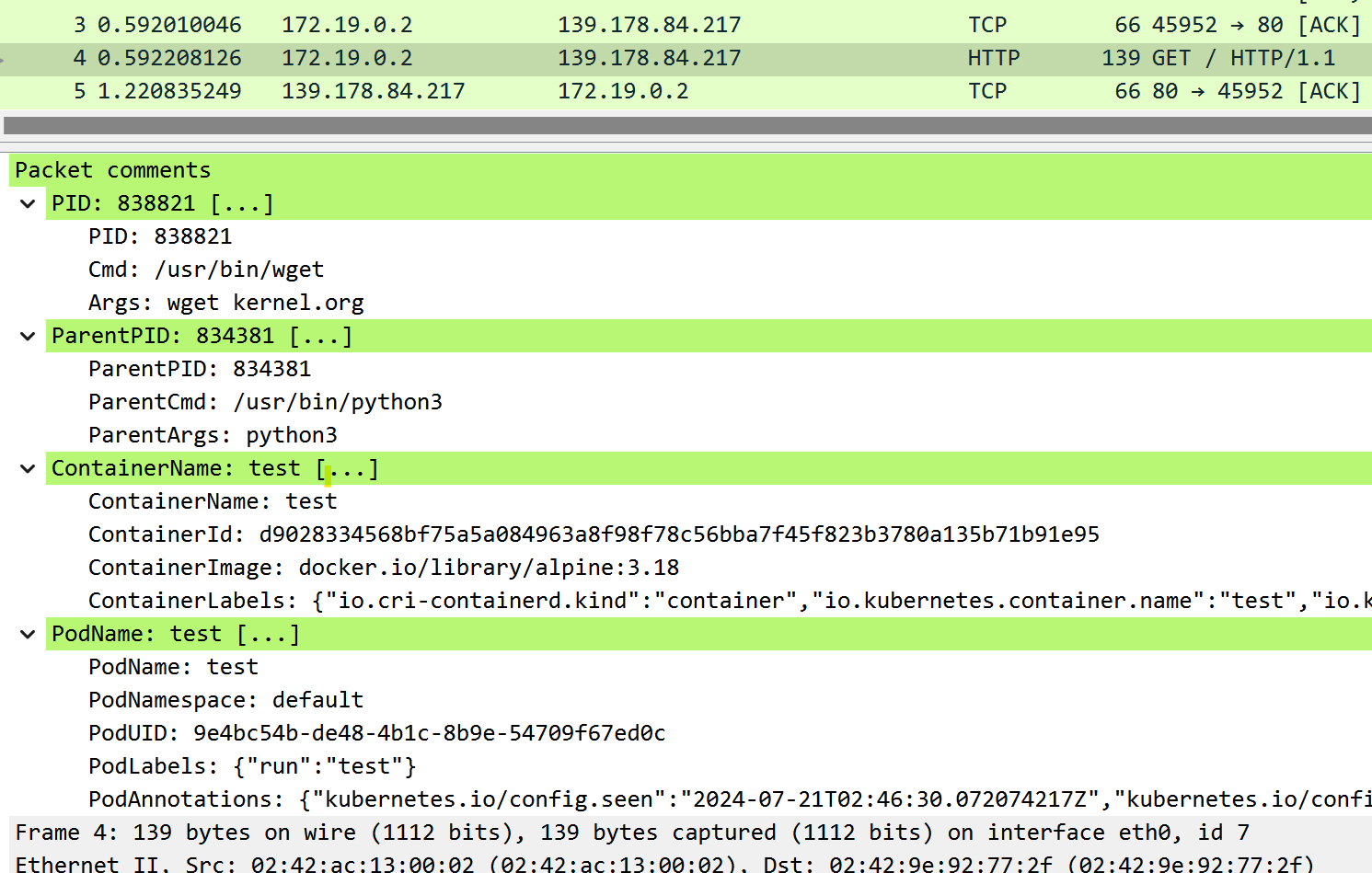
ptcpdump is a tcpdump-compatible packet analyzer powered by eBPF, automatically annotating packets with process/container/pod metadata when detectable. Inspired by jschwinger233/skbdump.
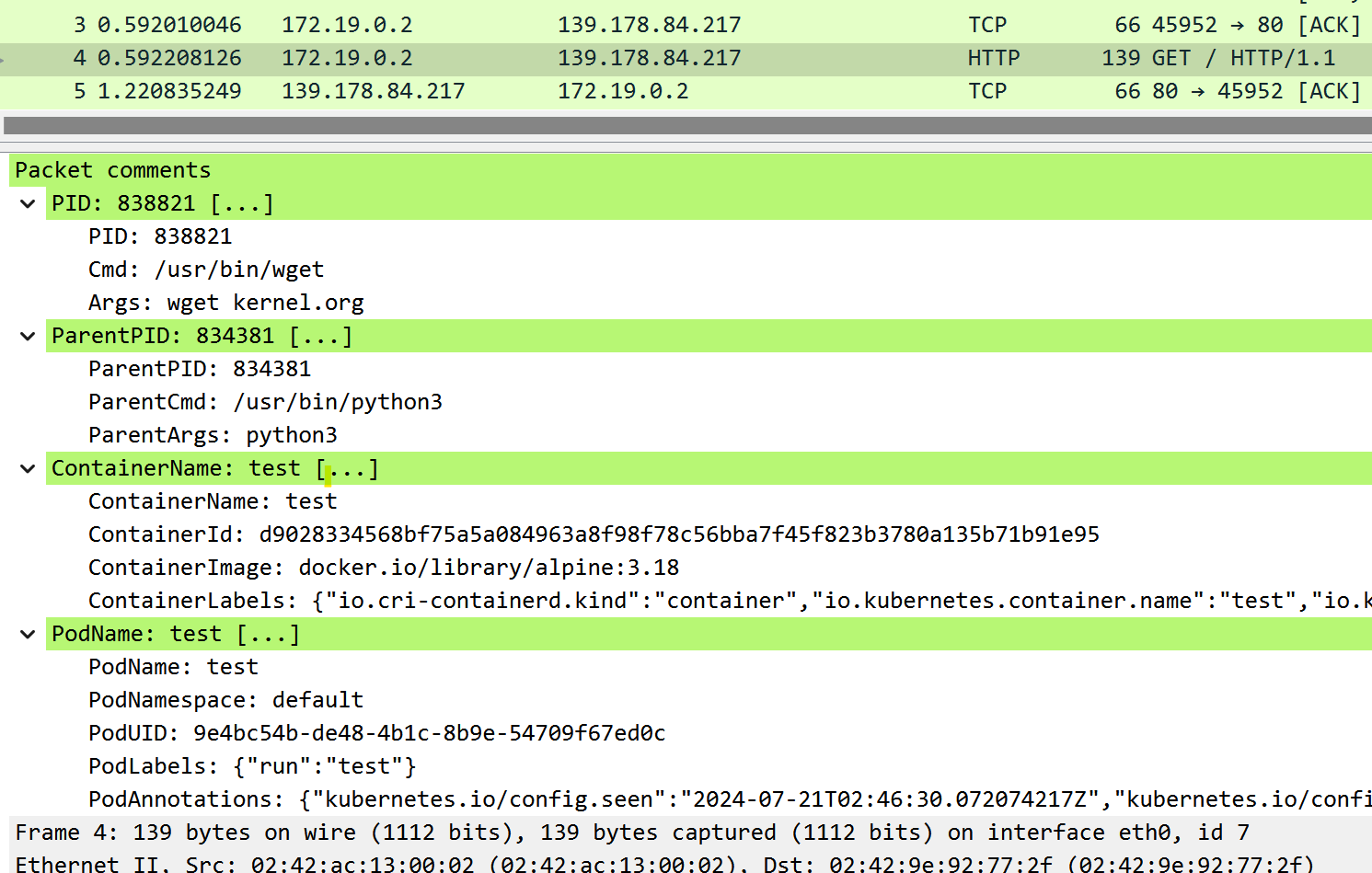
--pid (process), --pname (process name), --container-id (container), --pod-name (pod).-i, -w, -c, -s, -n, -C, -W, -A, and more).pcap-filter(7) syntax like tcpdump.--netns).You can download the statically linked executable for x86_64 and arm64 from the releases page.
Linux kernel >= 5.2 (compiled with BPF and BTF support).
ptcpdump optionally requires debugfs. It has to be mounted in /sys/kernel/debug.
In case the folder is empty, it can be mounted with:
mount -t debugfs none /sys/kernel/debug
The following kernel configuration is required. Building as Modules is also possible.
| Option | Backend | Note |
|---|---|---|
| CONFIG_BPF=y | both | Required |
| CONFIG_BPF_SYSCALL=y | both | Required |
| CONFIG_DEBUG_INFO=y | both | Required |
| CONFIG_DEBUG_INFO_BTF=y | both | Required |
| CONFIG_KPROBES=y | both | Required |
| CONFIG_KPROBE_EVENTS=y | both | Required |
| CONFIG_TRACEPOINTS=y | both | Required |
| CONFIG_PERF_EVENTS=y | both | Required |
| CONFIG_NET=y | both | Required |
| CONFIG_NET_SCHED=y | tc | Required |
| CONFIG_NET_CLS_BPF=y | tc | Required |
| CONFIG_NET_ACT_BPF=y | tc | Required |
| CONFIG_NET_SCH_INGRESS=y | tc | Required |
| CONFIG_CGROUPS=y | cgroup-skb | Required |
| CONFIG_CGROUP_BPF=y | cgroup-skb | Required |
| CONFIG_FILTER=y | socket-filter | Required |
| CONFIG_BPF_TRAMPOLINE=y | tp-btf | Required |
| CONFIG_SECURITY=y | both | Optional (Recommended) |
| CONFIG_BPF_TRAMPOLINE=y | both | Optional (Recommended) |
| CONFIG_SOCK_CGROUP_DATA=y | both | Optional (Recommended) |
| CONFIG_BPF_JIT=y | both | Optional (Recommended) |
| CONFIG_CGROUP_BPF=y | tc, tp-btf, socket-filter | Optional (Recommended) |
| CONFIG_CGROUPS=y | tc, tp-btf, socket-filter | Optional (Recommended) |
You can use zgrep $OPTION /proc/config.gz to validate whether an option is enabled.
Filter like tcpdump:
sudo ptcpdump -i eth0 tcp
sudo ptcpdump -i eth0 -A -s 0 -n -v tcp and port 80 and host 10.10.1.1
sudo ptcpdump -i any -s 0 -n -v -C 100MB -W 3 -w test.pcapng 'tcp and port 80 and host 10.10.1.1'
sudo ptcpdump -i eth0 'tcp[tcpflags] & (tcp-syn|tcp-fin) != 0'
Multiple interfaces:
sudo ptcpdump -i eth0 -i lo
Filter by process or user:
sudo ptcpdump -i any --pid 1234 --pid 233 -f
sudo ptcpdump -i any --pname curl
sudo ptcpdump -i any --uid 1000
Capture by process via run target program:
sudo ptcpdump -i any -- curl ubuntu.com
Filter by container or pod:
sudo ptcpdump -i any --container-id 36f0310403b1
sudo ptcpdump -i any --container-name test
sudo ptcpdump -i any --pod-name test.default
Save data in PcapNG format:
sudo ptcpdump -i any -w demo.pcapng
sudo ptcpdump -i any -w - port 80 | tcpdump -n -r -
sudo ptcpdump -i any -w - port 80 | tshark -r -
Capturing interfaces in other network namespaces:
sudo ptcpdump -i lo --netns /run/netns/foo --netns /run/netns/bar
sudo ptcpdump -i any --netns /run/netns/foobar
sudo ptcpdump -i any --netns /proc/26/ns/net
Default:
09:32:09.718892 vethee2a302f wget.3553008 In IP 10.244.0.2.33426 > 139.178.84.217.80: Flags [S], seq 4113492822, win 64240, length 0, ParentProc [python3.834381], Container [test], Pod [test.default]
09:32:09.718941 eth0 wget.3553008 Out IP 172.19.0.2.33426 > 139.178.84.217.80: Flags [S], seq 4113492822, win 64240, length 0, ParentProc [python3.834381], Container [test], Pod [test.default]
With -q:
09:32:09.718892 vethee2a302f wget.3553008 In IP 10.244.0.2.33426 > 139.178.84.217.80: tcp 0, ParentProc [python3.834381], Container [test], Pod [test.default]
09:32:09.718941 eth0 wget.3553008 Out IP 172.19.0.2.33426 > 139.178.84.217.80: tcp 0, ParentProc [python3.834381], Container [test], Pod [test.default]
With -v:
