 microsoft/ics-forensics-tools
Open-source forensics framework for analyzing Industrial PLC metadata and project files. Scans for suspicious artifacts in ICS environments to support incident response and manual investigation.



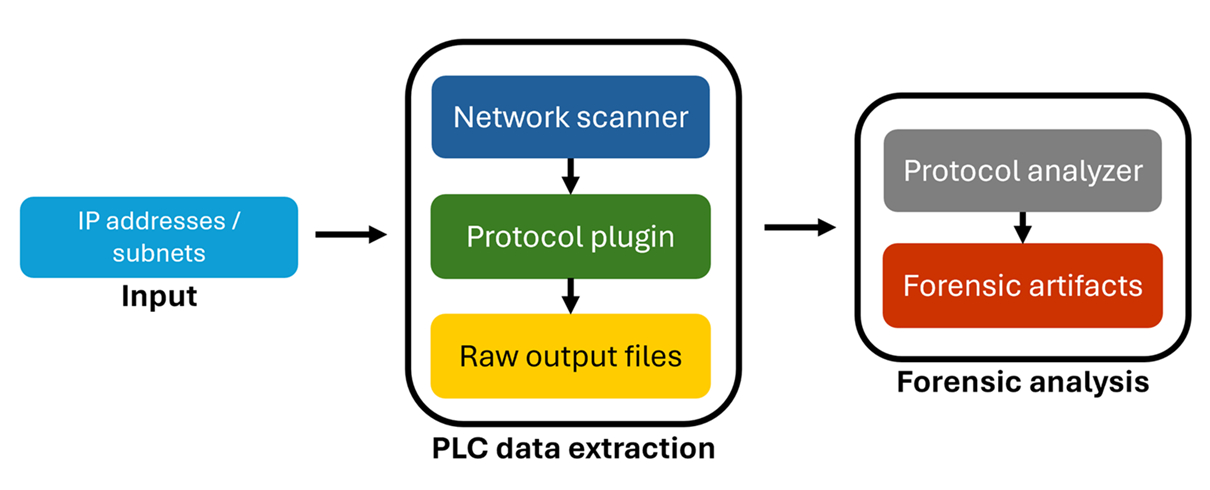
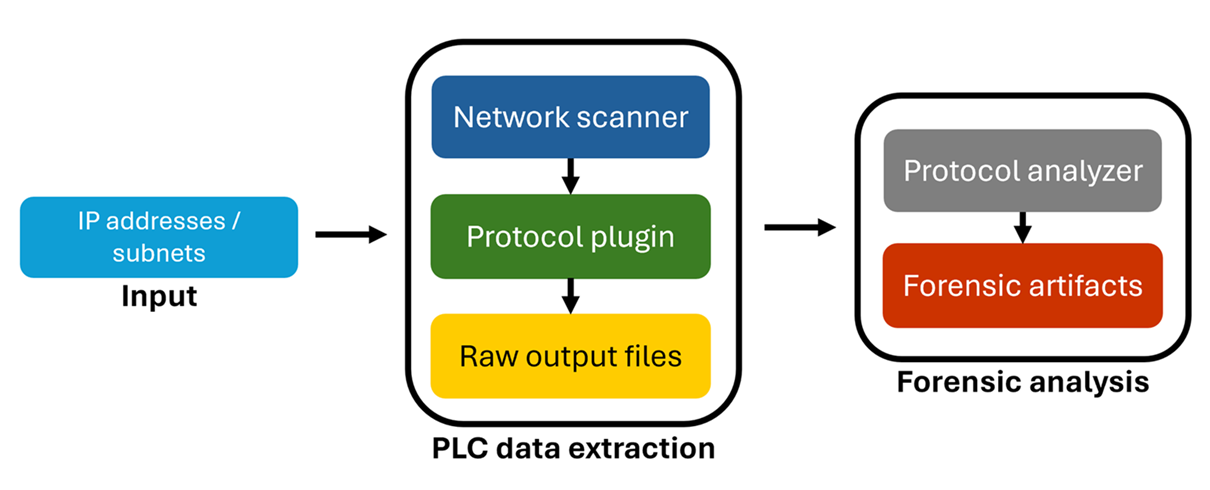
Microsoft ICS Forensics Tools framework is an open-source forensics framework that enables the analysis of Industrial PLC metadata and project files.
The framework provides investigators with a convenient way to scan for PLCs and identify any suspicious artifacts within ICS environments, which can be used for manual checking, automated monitoring tasks, or incident response operations to detect compromised devices.
By being an open-source tool, ICS Forensics Tools allows investigators to review the output and customize it to their specific requirements.
These instructions will get you a copy of the project up and running on your local machine for development and testing purposes.
git clone https://github.com/microsoft/ics-forensics-tools.git
Install python requirements
pip install -r requirements.txt
| Args | Description | Required / Optional |
|---|---|---|
-h, --help | show this help message and exit | Optional |
-s, --save-config | Save config file for easy future usage | Optional |
-c, --config | Config file path, default is config.json | Optional |
-o, --output-dir | Directory in which to output any generated files, default is output | Optional |
-v, --verbose | Log output to a file as well as the console | Optional |
-p, --multiprocess | Run in multiprocess mode by number of plugins/analyzers | Optional |
| Args | Description | Required / Optional |
|---|---|---|
-h, --help | show this help message and exit | Optional |
--ip | Addresses file path, CIDR or IP addresses csv (ip column required). add more columns for additional info about each ip (username, pass, etc...) | Required |
--port | Port number | Optional |
--transport | tcp/udp | Optional |
--analyzer | Analyzer name to run | Optional |
 python driver.py -s -v PluginName --ip ips.csv
 python driver.py -s -v PluginName --ip ips.csv --analyzer AnalyzerName
 python driver.py -s -v -c config.json --multiprocess
from forensic.client.forensic_client import ForensicClient
from forensic.interfaces.plugin import PluginConfig
forensic = ForensicClient()
plugin = PluginConfig.from_json({
    "name": "PluginName",
    "port": 123,
    "transport": "tcp",
    "addresses": [{"ip": "192.168.1.0/24"}, {"ip": "10.10.10.10"}],
    "parameters": {
    },
    "analyzers": []
})
forensic.scan([plugin])
When developing locally make sure to mark src folder as "Sources root"
from pathlib import Path
from forensic.interfaces.plugin import PluginInterface, PluginConfig, PluginCLI
from forensic.common.constants.constants import Transport


class GeneralCLI(PluginCLI):
    def __init__(self, folder_name):
        super().__init__(folder_name)
        self.name = "General"
        self.description = "General Plugin Description"
        self.port = 123
        self.transport = Transport.TCP

    def flags(self, parser):
        self.base_flags(parser, self.port, self.transport)
        parser.add_argument('--general', help='General additional argument', metavar="")


class General(PluginInterface):
    def __init__(self, config: PluginConfig, output_dir: Path, verbose: bool):
        super().__init__(config, output_dir, verbose)

    def connect(self, address):
        self.logger.info(f"{self.config.name} connect")

    def export(self, extracted):
        self.logger.info(f"{self.config.name} export")
__init__.py file under the plugins folderfrom pathlib import Path
from forensic.interfaces.analyzer import AnalyzerInterface, AnalyzerConfig
class General(AnalyzerInterface):
def __init__(self, config: AnalyzerConfig, output_dir: Path, verbose: bool):
super().__init__(config, output_dir, verbose)
self.plugin_name = 'General'
self.create_output_dir(self.plugin_name)
def analyze(self):
pass
__init__.py file under the analyzers folder