 megamansec/ldap-monitoring-watchdog
LDAP Watchdog: A real-time linux-compatible LDAP monitoring tool for detecting directory changes, providing visibility into additions, modifications, and deletions for administrators and security researchers.

LDAP Watchdog is a tool designed to monitor record changes in an LDAP directory in real-time. It provides a mechanism to track and visualize modifications, additions, and removals to user and group entries, allowing users to correlate expected changes with actual changes and identify potential security incidents. It was created with OpenLDAP and Linux in mind, however it may work in other implementations of LDAP. It is written in Python and only requires the ldap3 library.
This software was written by Joshua Rogers.
If you're interesting in any of the following, then LDAP Watchdog is for you:
In addition to monitoring for modifications, additions, and removals in an LDAP directory, it can be configured to ignore specific attributes, or even fine-tuned to ignore fine-grained attributes depending on their old/new values.
The changes that are monitored can either be forwarded to a slack webhook or output to the terminal (or both). Optional colored output is also supported.
Previously named LDAP-Stalker (because monitoring changes of an LDAP directory is an excellent way to stalk changes in a company: learn about promotions before they're announced, new hires, leavers, etc.), a blog post about the details and history of this project can be found here.
Note: in the below examples, entryCSN and modifyTimestamp can be completely ignored by setting LDAP_WATCHDOG_IGNORED_ATTRIBUTES=entryCSN,modifyTimestamp.
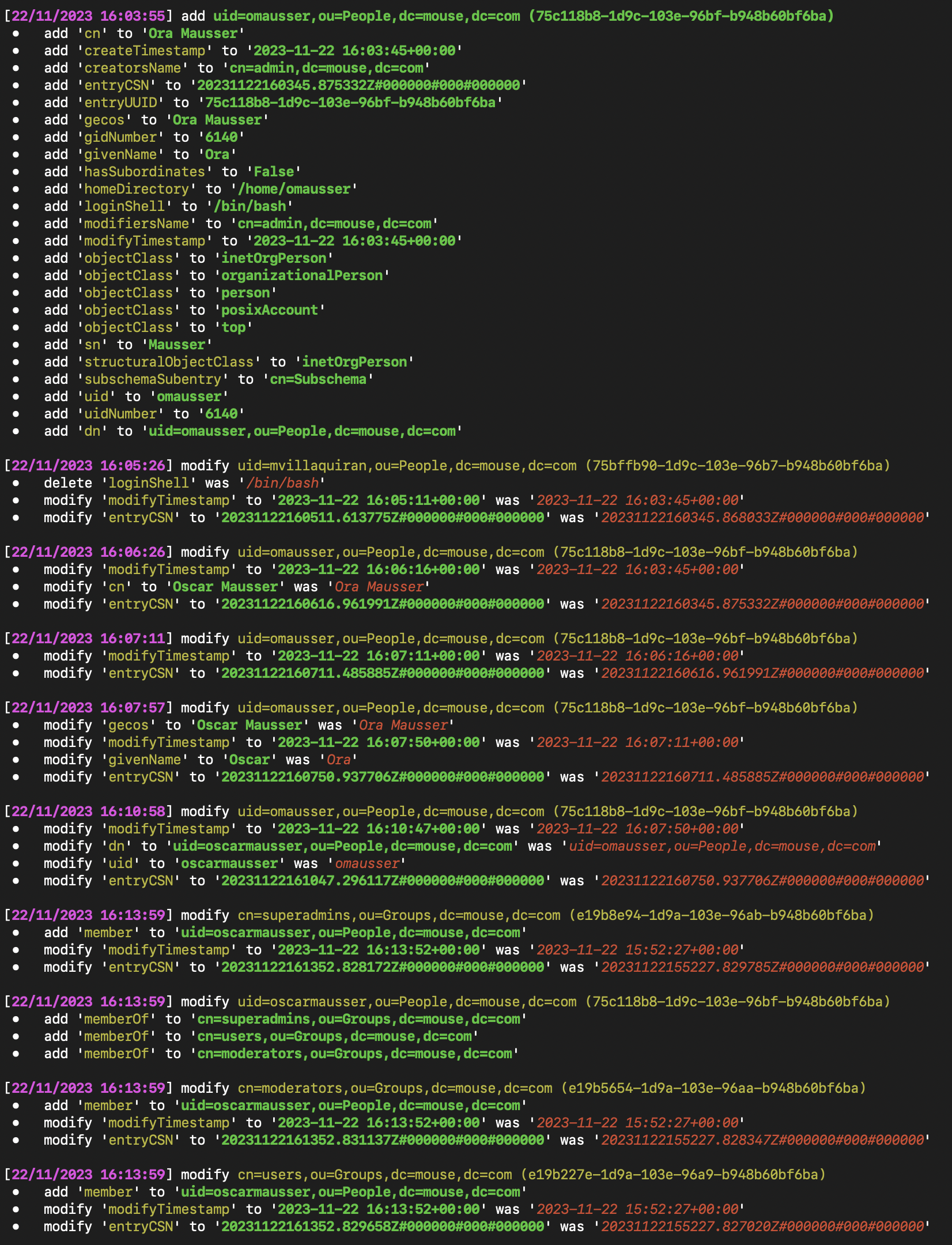
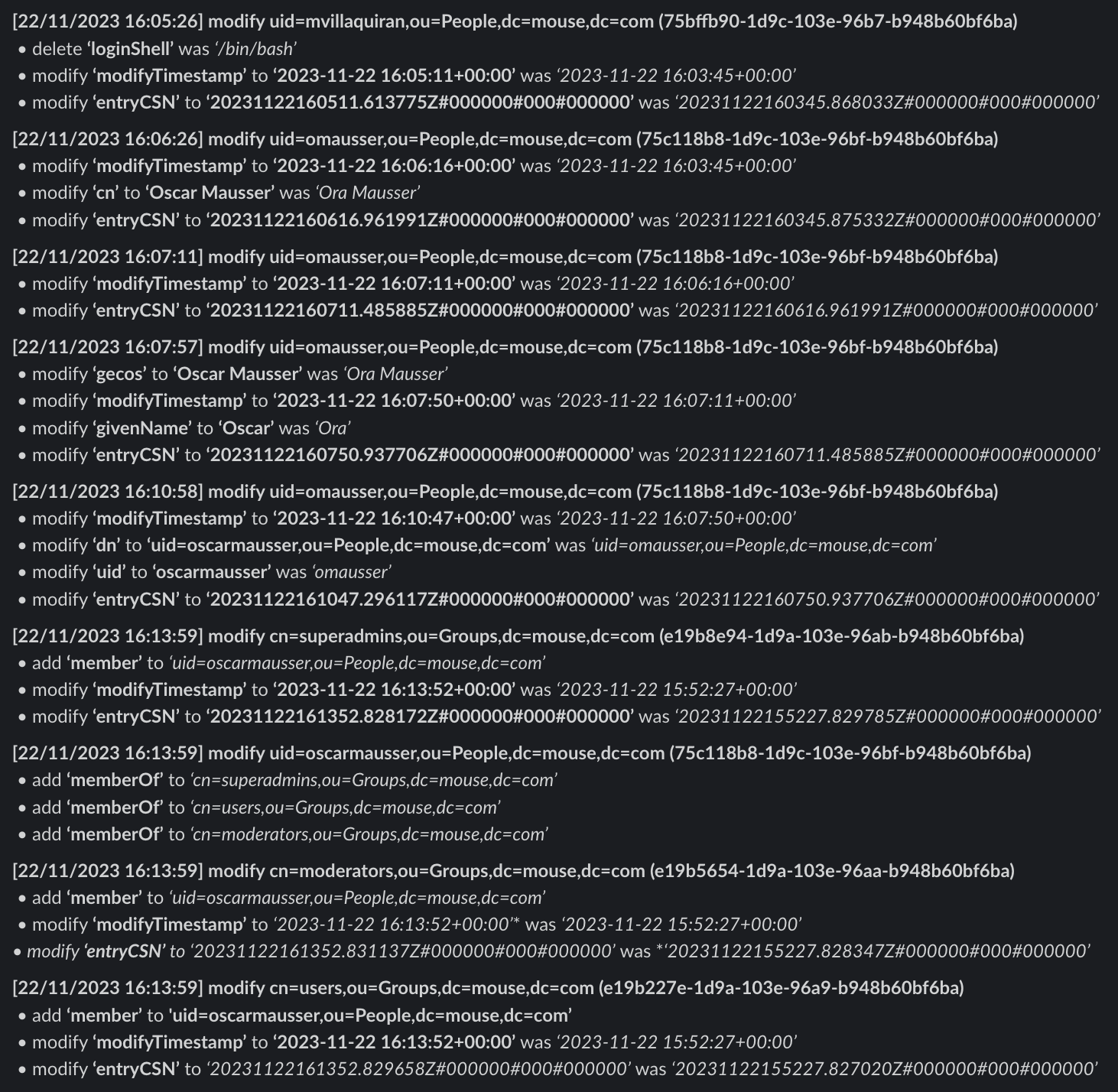
Real-time Monitoring: LDAP Watchdog continuously monitors an LDAP directory for changes in user and group entries.
Change Comparison: The tool compares changes between consecutive LDAP searches, highlighting additions, modifications, and deletions.
Control User Verification: LDAP Watchdog supports a control user mechanism, triggering an error if the control user's changes are not found.
Flexible LDAP Filtering: Users can customize LDAP filtering using the LDAP_WATCHDOG_SEARCH_FILTER environment variable to focus on specific object classes or attributes.
Slack Integration: Receive real-time notifications on Slack for added, modified, or deleted LDAP entries.
Customizable Output: Console output provides clear and colored indications of additions, modifications, and deletions for easy visibility.
Ignored Entries and Attributes: Users can specify UUIDs and attributes to be ignored during the comparison process.
Conditional Ignored Attributes: Conditional filtering allows users to ignore specific attributes based on change type (additions, modifications, deletions).
ldap3 package. If using a Slack webhook, the requests package is also required.pip install LDAP-Monitor
To include Slack webhook support:
pip install LDAP-Monitor[slack]
docker pull megamansec/ldap-monitor
Or from GitHub Container Registry:
docker pull ghcr.io/megamansec/ldap-monitoring-watchdog
git clone https://github.com/MegaManSec/LDAP-Monitoring-Watchdog.git
cd LDAP-Monitoring-Watchdog
pip install ".[slack]"
export LDAP_WATCHDOG_SERVER='ldaps://ldaps.intra.lan'
export LDAP_WATCHDOG_BASE_DN='dc=mouse,dc=com'
export LDAP_WATCHDOG_USERNAME='Emily'
export LDAP_WATCHDOG_PASSWORD='qwerty123'
ldap-watchdog
Or using python -m:
python -m ldap_watchdog
docker run -d \
  -e LDAP_WATCHDOG_SERVER='ldaps://ldaps.intra.lan' \
  -e LDAP_WATCHDOG_BASE_DN='dc=mouse,dc=com' \
  -e LDAP_WATCHDOG_USERNAME='Emily' \
  -e LDAP_WATCHDOG_PASSWORD='qwerty123' \
  -e SLACK_WEBHOOK_URL='https://hooks.slack.com/services/[...]' \
  -e LDAP_WATCHDOG_IGNORED_ATTRIBUTES='modifyTimestamp,phoneNumber,officeLocation,gecos' \
  megamansec/ldap-monitor
A Debian-based installation script, install.sh, is provided. When run as root, this script:
/opt/ldap-watchdog./etc/ldap-watchdog.env for configuration./etc/systemd/system/ldap-watchdog.service) that runs ldap-watchdog in the background./var/log/ldap-watchdog.log and /var/log/ldap-watchdog-error.log./etc/logrotate.d/ldap-watchdog.You may optionally pass a single argument to install.sh to set the SLACK_WEBHOOK_URL:
sudo ./install.sh "https://hooks.slack.com/services/[...]"
After installation, edit /etc/ldap-watchdog.env to configure the LDAP connection settings, then restart the service:
sudo systemctl restart ldap-watchdog
All configuration is done via environment variables. The following variables are supported:
| Environment Variable | Description | Default |
|---|---|---|
LDAP_WATCHDOG_SERVER | LDAP server URL (e.g. ldaps://ldaps.intra.lan) | "" |
LDAP_WATCHDOG_BASE_DN | Base Distinguished Name for LDAP searches | "" |
LDAP_WATCHDOG_USERNAME | LDAP username for authentication. Leave empty for anonymous bind. | "" |
LDAP_WATCHDOG_PASSWORD | LDAP password for authentication. Leave empty for anonymous bind. | "" |
LDAP_WATCHDOG_USE_SSL | Set to true to use SSL, false otherwise | true |
LDAP_WATCHDOG_SEARCH_FILTER | LDAP filter for user and group entries | (&(|(objectClass=inetOrgPerson)(objectClass=groupOfNames))) |
LDAP_WATCHDOG_SEARCH_ATTRIBUTE | Comma-separated list of attributes to retrieve. *,+ is used by default to include operational attributes. | *,+ |
LDAP_WATCHDOG_REFRESH_RATE | Time interval in seconds between consecutive LDAP searches | 60 |
LDAP_WATCHDOG_DISABLE_COLOR_OUTPUT | Set to true to disable colored terminal output | false |
| Environment Variable | Description | Default |
|---|---|---|
LDAP_WATCHDOG_CONTROL_UUID | UUID of a control user whose changes trigger an error if not found. If set, this user should always have some type of change when the LDAP directory is retrieved. | "" |
LDAP_WATCHDOG_CONTROL_USER_ATTRIBUTE | Specific attribute to check for changes in the control user. If set, this attribute must have changed for the control UUID user. | "" |
| Environment Variable | Description | Default |
|---|---|---|
SLACK_WEBHOOK_URL | Slack Webhook URL for notifications. Requires the slack extra (pip install LDAP-Monitor[slack]). | None |
LDAP_WATCHDOG_SLACK_BULLETPOINT | Bullet point character used in Slack and console output | \u2022 |
