
 mafifrizi/tanuki
Tactical Identity Operator for Linux & Hybrid Active Directory


Linux Active Directory triage for AI coding agents. Protocol-first, zero noise.






Quick Start • Dual-Engine Architecture • Live Lab Validation • Demo Video • Decision Ladder • Before & After • Tooling & Usage • Agent Setup • Lineage & Credits
Tanuki is 100% plug-and-play. One command installs the unified CLI and configures AI Agent Skills for Claude Code, Cursor, and Google Antigravity:
curl -sSL https://raw.githubusercontent.com/Mafifrizi/tanuki/main/install.sh | bash
irm https://raw.githubusercontent.com/Mafifrizi/tanuki/main/install.ps1 | iex
# Pipx (Isolated CLI environment)
pipx install git+https://github.com/Mafifrizi/tanuki.git

# Local repository install
pip install .

# Note for Linux (Kali, Debian, Ubuntu): If ~/.local/bin is not in your PATH:
export PATH="$HOME/.local/bin:$PATH"

# Rust binary install
cargo install --path crates/tanuki-cli
Verify your installation:
# Direct CLI binary or universal Python module
tanuki --version
python3 -m tanuki --version

tanuki doctor
tanuki ladder
tanuki triage KRB_AP_ERR_SKEW
Tanuki ships two complementary implementations:
crates/tanuki-cli): The primary high-performance engine for operator workstations, CI/CD security validation pipelines, and standalone deployment. It compiles into a single static binary with #![forbid(unsafe_code)], zero external dependencies, and execution times under 2 milliseconds.scripts/): A zero-dependency script suite using only the Python standard library (struct, io, sys). It operates directly on remote target systems where dropping compiled binaries is prohibited or monitored by endpoint detection.Both engines share an identical JSON schema and parsing specification.
All protocol parsers, diagnostics, and CLI workflows are empirically validated across live virtualized lab environments:
DC01.lab.local, IP: 192.168.56.106)kraii@kraiiandreyy, IP: 192.168.56.105)📺 Watch Demo Video: youtu.be/wqZRYmEn0eY - Full-stack operational walkthrough across live domain infrastructure.
Visual verification of the complete 3-act operational lifecycle across live domain infrastructure:
| Act | Environment | Objectives & Validated Primitives |
|---|---|---|
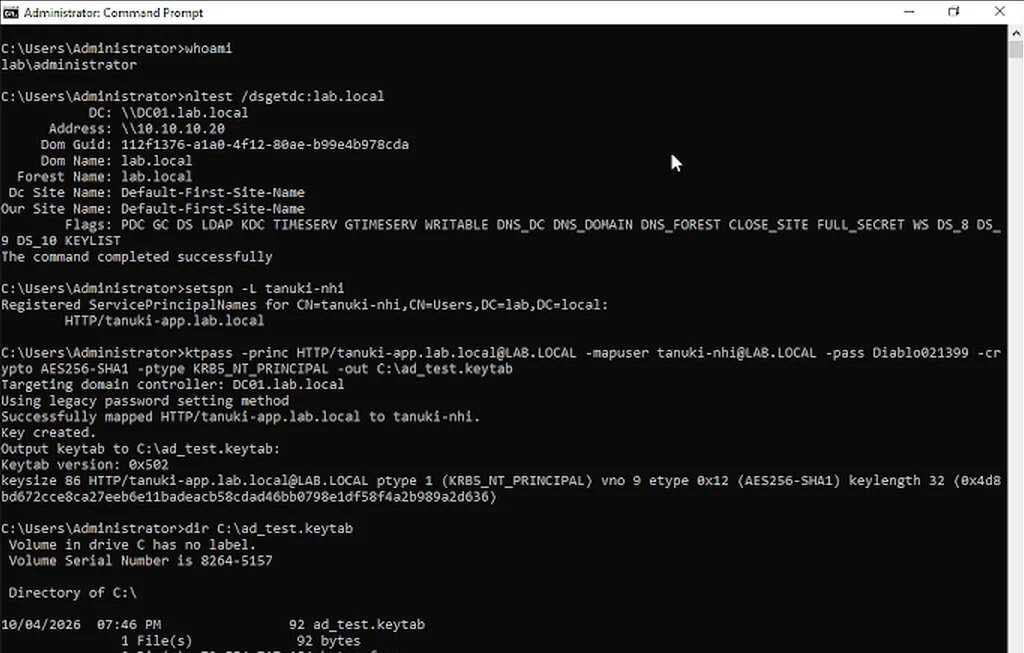
| Act 1: Domain Controller Setup | Windows Server 2022 (DC01) | Domain discovery (nltest), SPN audit (setspn), and RFC 4120 AES-256 binary keytab export (ktpass, KVNO 9). |
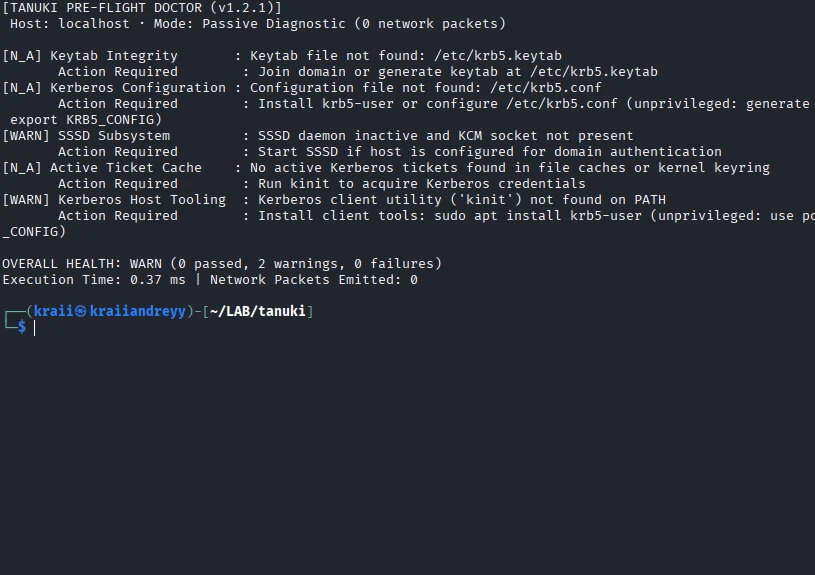
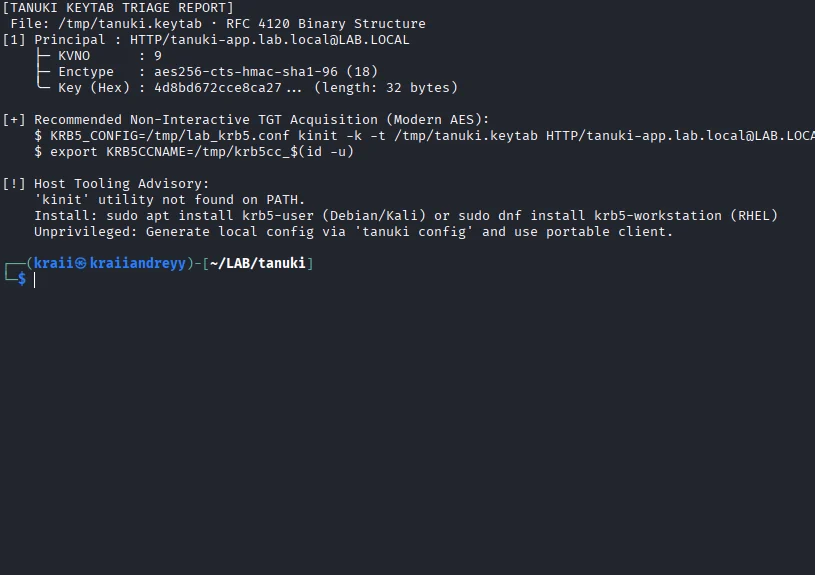
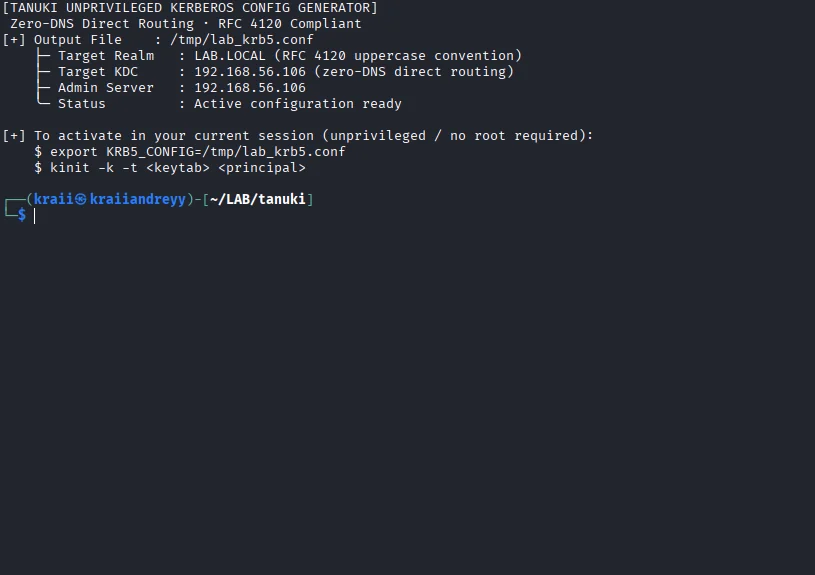
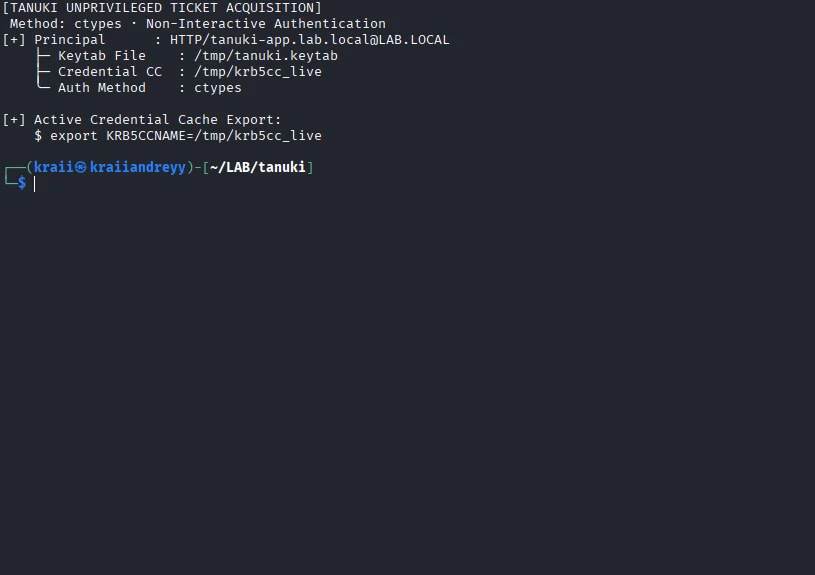
| Act 2: Unprivileged Linux Operator | Kali Linux 2024 (Naga) | Passive diagnostic (tanuki doctor), RFC 4120 tree audit (tanuki keytab), zero-root config synthesis (tanuki config), native ctypes TGT acquisition (tanuki auth), ticket health pass (tanuki doctor), and protocol triage (tanuki triage). |
| Act 3: Closed-Loop Verification | Windows Server 2022 (DC01) | Domain Controller Security Event ID 4768 Audit Success for tanuki-nhi originating from client IP 192.168.56.105. |
DC01)Official RFC 4120 binary keytab export on the Domain Controller for service account LAB\tanuki-nhi with modern AES-256 (aes256-cts-hmac-sha1-96, KVNO 9):
Naga)tanuki doctor)Passive, zero-packet pre-flight health diagnostic executing in 0.96 ms, accurately detecting unconfigured state, missing keytabs, and inactive ticket caches:
tanuki keytab)Parses binary keytab structures, extracts AES-256 principals, displays hierarchical principal trees, verifies KVNO 9, and provides automated kinit guidance:
tanuki config)Generates a local Kerberos configuration file (/tmp/lab_krb5.conf) enforcing RFC 4120 § 6.1 uppercase realm conventions, zero-DNS direct KDC IP routing, and hypervisor clock-skew tolerance:
tanuki auth)Acquires a Kerberos Ticket Granting Ticket (TGT) directly from the Domain Controller using Python standard library ctypes (libkrb5.so.3) without requiring root privileges, kinit binary on PATH, or external dependencies:
tanuki doctor)