Skip to content
KitploitKITPLOIT
ToolsBlog
Submit
ToolsBlog
Submit

Hacking, PenTest, and Cybersecurity Tools for Your Security Arsenal!

Kitploit is a directory of hacking, cybersecurity, and pentesting tools. Discover the latest project updates to find vulnerabilities, analyze systems, automate testing, and strengthen your security.

··Feeds·Contact·Privacy·© 2026 Kitploit

Tool Directory

Categories

View all categories
Loading categories
BlockGuard — BlockGuard is a Windows Data Loss Prevention (DLP) agent that intercepts and controls file access at the process level. It ensures that only authorized processes — identified by executable path, cryptographic hash, Authenticode signature, and integrity level — can read protected files. | Kitploit
Tools/GitHubGitHub/m2l33k/blockguard
Authentication & AuthorizationDefensive ToolsEncryption/Decryption ToolsConfiguration AuditingData ExfiltrationIncident ResponseLog Analysis
GitHubm2l33k/blockguard

BlockGuard

View Repository
26 months agoNot yet reviewed

Most Popular

View all →

Discover the most used tools by our community.

Explore all tools

Browse our collection of tools

View all tools →

About

BlockGuard is a Windows Data Loss Prevention (DLP) agent that intercepts and controls file access at the process level. It ensures that only authorized processes — identified by executable path, cryptographic hash, Authenticode signature, and integrity level — can read protected files.


Share

BlockGuard — Trusty

.NET 9 Windows License DLP

🛡️ BlockGuard — Process-Based File Access Security Agent

BlockGuard is a Windows Data Loss Prevention (DLP) agent that intercepts and controls file access at the process level. It ensures that only authorized processes — identified by executable path, cryptographic hash, Authenticode signature, and integrity level — can read protected files. All other processes are denied by default at the OS kernel level via NTFS ACLs.


📑 Table of Contents

  • Features
  • Architecture
  • UI Management Interface
  • Prerequisites
  • Quick Start
  • Configuration
  • Running the Agent
  • Verifying It Works
  • Project Structure
  • How It Works
  • Troubleshooting
  • Security Considerations
  • Contributing

✨ Features


🏗️ Architecture

BlockGuard uses a three-layer modular architecture:

root@kitploit:~
┌─────────────────────────────────────────────────────────────────┐
│                    BlockGuard.Agent (Windows Service)            │
│                    Orchestrates all layers                       │
├───────────────────┬─────────────────────┬───────────────────────┤
│  Layer 1          │  Layer 2            │  Layer 3              │
│  MONITORING       │  POLICY & IDENTITY  │  PROTECTION           │
│                   │                     │                       │
│  • ETW Kernel     │  • Process Identity │  • DPAPI Encryption   │
│    File Trace     │    Validator (6     │  • Structured Audit   │
│  • ACL Enforcer   │    checks)          │    Logger (JSON)      │
│    (deny-by-      │  • Policy Evaluator │                       │
│    default)       │    (AND-logic       │                       │
│                   │    rules)           │                       │
│                   │  • Identity Cache   │                       │
│                   │    (LRU + TTL)      │                       │
└───────────────────┴─────────────────────┴───────────────────────┘

🖥️ UI Management Interface

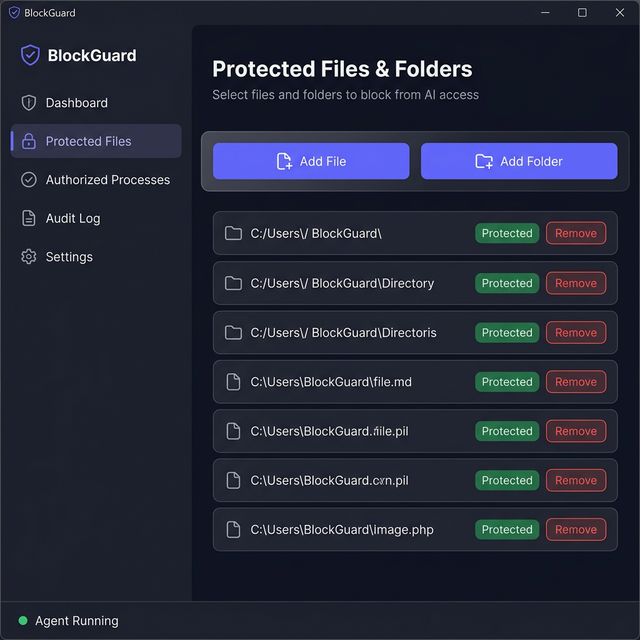
BlockGuard includes a WPF desktop application for managing protected files and folders through a visual interface — no need to edit appsettings.json manually.

BlockGuard UI

Features

  • Dashboard — Overview of protection status (total files, folders, encryption state)
  • Protected Files — Add/remove files and folders to protect from AI access via file browser dialogs
  • Activity Log — Real-time log of all configuration changes
  • Settings — View configuration file path and agent information
  • Agent Status — Live indicator showing if the BlockGuard agent service is running

How to Launch the UI

root@kitploit:~
# From the project root
dotnet run --project src/BlockGuard.UI

Note: The UI reads and writes appsettings.json from the Agent project. After saving changes, restart the BlockGuard Agent service for them to take effect.


📋 Prerequisites

Before running BlockGuard, ensure the following are installed on your Windows machine:

RequirementMinimum Version

Install .NET 9 SDK (if not installed)

root@kitploit:~
# Download from https://dotnet.microsoft.com/download/dotnet/9.0
# Or use winget:
winget install Microsoft.DotNet.SDK.9

🚀 Quick Start

1. Clone the Repository

root@kitploit:~
git clone [email protected]:m2l33k/BlockGuard.git
cd BlockGuard

2. Restore Dependencies

root@kitploit:~
dotnet restore BlockGuard.sln

3. Build the Solution

root@kitploit:~
dotnet build BlockGuard.sln --configuration Release

You should see:

root@kitploit:~
Build succeeded.
    0 Warning(s)
    0 Error(s)

4. Configure Protected Paths and Rules

Edit src/BlockGuard.Agent/appsettings.json to define what files to protect and which processes are authorized:

root@kitploit:~
{
  "BlockGuard": {
    "ProtectedPaths": [
      "C:\\Secrets\\ai-model-keys",
      "C:\\Secrets\\api-credentials.json"
    ],
    "AuthorizedProcesses": [
      {
        "RuleName": "AI-Model-Inference-Engine",
        "ExecutablePath": "C:\\Program Files\\MyAI\\inference.exe",
        "MinimumIntegrityLevel": "Medium",
        "RequireSignature": false
      }
    ]
  }
}

5. Run (Development Mode)

root@kitploit:~
# Run as Administrator (required for ETW + ACL operations)
dotnet run --project src/BlockGuard.Agent

⚙️ Configuration

All configuration lives in src/BlockGuard.Agent/appsettings.json under the "BlockGuard" section.

Protected Paths

An array of files or directories to guard. Directories protect all files recursively.

root@kitploit:~
"ProtectedPaths": [
  "C:\\Secrets\\ai-model-keys",
  "C:\\Secrets\\api-credentials.json",
  "D:\\Confidential\\reports"
]

Authorized Process Rules

Each rule defines the criteria a process must match to be granted access. All non-null fields must match (AND-logic):

Example: Path-based rule (for an AI model process)

root@kitploit:~
{
  "RuleName": "AI-Model-Inference-Engine",
  "ExecutablePath": "C:\\Program Files\\MyAI\\inference.exe",
  "ExpectedFileHash": null,
  "ExpectedSignerSubject": null,
  "MinimumIntegrityLevel": "Medium",
  "RequireSignature": false
}


Example: Signature-based rule (for any signed management tool)

root@kitploit:~
{
  "RuleName": "Signed-Management-Tool",
  "ExecutablePath": null,
  "ExpectedFileHash": null,
  "ExpectedSignerSubject": "CN=Contoso Security",
  "MinimumIntegrityLevel": "High",
  "RequireSignature": true
}

Example: Hash-pinned rule (for maximum tamper protection)

root@kitploit:~
{
  "RuleName": "Pinned-Data-Processor",
  "ExecutablePath": "C:\\Tools\\processor.exe",
  "ExpectedFileHash": "a1b2c3d4e5f67890abcdef1234567890abcdef1234567890abcdef1234567890",
  "ExpectedSignerSubject": null,
  "MinimumIntegrityLevel": "Medium",
  "RequireSignature": false
}

Other Options


🏃 Running the Agent

Option A: Development Mode (Console)

Best for testing and debugging. Run from an elevated (Administrator) PowerShell:

root@kitploit:~
dotnet run --project src/BlockGuard.Agent --configuration Release

You'll see console output like:

root@kitploit:~
[03:15:22 INF] [BlockGuard.Agent.BlockGuardService] ========================================
 BlockGuard Security Agent Starting
 Protected Paths: 2
 Authorized Rules: 2
 PID: 12345
========================================
[03:15:22 INF] [BlockGuard.Monitoring.AclEnforcer] Locked down file 'C:\Secrets\api-credentials.json'
[03:15:22 INF] [BlockGuard.Protection.DpapiWrapper] Encrypted file 'C:\Secrets\api-credentials.json'
[03:15:22 INF] [BlockGuard.Monitoring.EtwFileTraceSession] ETW file trace session started successfully.
[03:15:22 INF] [BlockGuard.Agent.BlockGuardService] BlockGuard is now actively protecting 2 path(s).

Press Ctrl+C to stop.

Option B: Install as a Windows Service (Production)

root@kitploit:~
# 1. Publish a self-contained build
dotnet publish src/BlockGuard.Agent -c Release -r win-x64 --self-contained -o C:\BlockGuard

# 2. Create the Windows Service
sc.exe create BlockGuard binPath= "C:\BlockGuard\BlockGuard.Agent.exe" start= auto obj= "NT AUTHORITY\SYSTEM" DisplayName= "BlockGuard Security Agent"

# 3. Set the service description
sc.exe description BlockGuard "Process-based file access security agent (DLP)"

# 4. Start the service
sc.exe start BlockGuard

Manage the service:

root@kitploit:~
# Check status
sc.exe query BlockGuard

# Stop
sc.exe stop BlockGuard

# Remove (uninstall)
sc.exe delete BlockGuard

✅ Verifying It Works

Follow these steps to confirm BlockGuard is protecting files correctly.

Test 1: Build Verification

root@kitploit:~
# From the project root directory
dotnet build BlockGuard.sln

# Expected: Build succeeded with 0 Error(s)

Test 2: Check the Agent Starts

root@kitploit:~
# Open an elevated (Administrator) PowerShell
dotnet run --project src/BlockGuard.Agent

✅ Expected output:

  • BlockGuard Security Agent Starting message
  • No CRITICAL or FATAL errors
  • ETW file trace session started successfully
  • BlockGuard is now actively protecting X path(s)

❌ If you see ETW session — insufficient privileges:

  • You are NOT running as Administrator. Right-click PowerShell → "Run as Administrator"

Test 3: ACL Lockdown Verification

After the agent starts, verify that protected files are locked down:

root@kitploit:~
# Create a test protected file
New-Item -Path "C:\Secrets" -ItemType Directory -Force
Set-Content -Path "C:\Secrets\api-credentials.json" -Value '{"api_key": "secret123"}'

# Start the agent (it will lock down the file)
dotnet run --project src/BlockGuard.Agent

# In ANOTHER non-admin terminal, try to read the file:
Get-Content "C:\Secrets\api-credentials.json"
# Expected: Access Denied error

Test 4: Verify ACL State with icacls

root@kitploit:~
icacls "C:\Secrets\api-credentials.json"

# Expected output (only SYSTEM and Administrators):
# C:\Secrets\api-credentials.json NT AUTHORITY\SYSTEM:(F)
#                                  BUILTIN\Administrators:(F)
# No other users/groups should be listed

Test 5: Audit Log Inspection

After the agent runs for a while, check the audit log:

root@kitploit:~
# View the last 10 audit entries
Get-Content "C:\ProgramData\BlockGuard\Logs\audit.json" | Select-Object -Last 10

Expected output (JSON lines):

root@kitploit:~
{"type":"operational","timestamp":"2026-03-05T02:30:00Z","eventType":"AgentStart","message":"BlockGuard security agent starting."}
{"type":"access_decision","timestamp":"2026-03-05T02:30:05Z","verdict":"deny","reason":"No authorization rule matched this process identity.","file":"C:\\Secrets\\api-credentials.json","processId":5678}

Test 6: Verify ETW Event Capture

Open a second terminal and attempt to access a protected file while the agent is running:

root@kitploit:~
# Terminal 1: Agent is running with console output
dotnet run --project src/BlockGuard.Agent

# Terminal 2: Try reading a protected file with notepad
notepad.exe "C:\Secrets\api-credentials.json"

In Terminal 1, you should see a log entry like:

root@kitploit:~
[03:20:15 WRN] [AUDIT] DENIED access to 'C:\Secrets\api-credentials.json' by PID 9876 (C:\Windows\System32\notepad.exe). Reason: No authorization rule matched

Test 7: Verify Unauthorized Access Blocked (AI Model)

When a process (like an unauthorized AI model) attempts to read a protected folder or file, the agent immediately denies the access. The AI will receive a strict Access Denied error, and the attempt is logged:

Unauthorized Access Denied

Test 8: Verify DPAPI Encryption

root@kitploit:~
# Check that the .enc file was created
Test-Path "C:\Secrets\api-credentials.json.enc"
# Expected: True

# Check that the original plaintext file was securely deleted
Test-Path "C:\Secrets\api-credentials.json"
# Expected: False (if EnableDpapiEncryption is true)

Test 9: Tamper Detection

While the agent is running, manually add an unauthorized ACL entry:

root@kitploit:~
# In an elevated terminal, add a rogue permission
icacls "C:\Secrets\api-credentials.json.enc" /grant Users:R

# Wait up to 60 seconds...
# The agent should detect the tampering and log:
# [CRT] ACL TAMPERING DETECTED on 'C:\Secrets\api-credentials.json.enc'! Re-applying lockdown.

Test 10: Verify Logs Directory

root@kitploit:~
# Check both log locations
Get-ChildItem "C:\ProgramData\BlockGuard\Logs\"

# Expected files:
# audit.json              (structured JSON audit log)
# blockguard-20260305.log (daily rolling application log)

Quick Verification Checklist


📁 Project Structure

root@kitploit:~
BlockGuard/
├── BlockGuard.sln                        # Solution file
├── README.md                             # This file
├── architecture_overview.md              # Detailed architecture documentation
├── assets/
│   ├── Untitled.jpg                      # Project logo (Trusty mascot)
│   └── blockguard_ui_mockup_*.png        # UI mockup screenshot
│
├── src/
│   ├── BlockGuard.Core/                  # Shared models, interfaces, configuration
│   │   ├── Configuration/
│   │   │   └── BlockGuardOptions.cs      # Strongly-typed config (paths, rules, timeouts)
│   │   ├── Interfaces/
│   │   │   ├── IAclEnforcer.cs           # ACL management contract
│   │   │   ├── IAuditLogger.cs           # Audit logging contract
│   │   │   ├── IDpapiWrapper.cs          # DPAPI encryption contract
│   │   │   ├── IFileAccessMonitor.cs     # ETW monitoring contract
│   │   │   ├── IPolicyEvaluator.cs       # Policy evaluation contract
│   │   │   └── IProcessIdentityValidator.cs  # Process identity contract
│   │   └── Models/
│   │       ├── AccessDecision.cs         # Verdict + reason + matched rule
│   │       ├── FileAccessEvent.cs        # ETW event: file, PID, operation
│   │       └── ProcessIdentity.cs        # Hash, signature, SID, integrity
│   │
│   ├── BlockGuard.Monitoring/            # Layer 1: Monitoring & Interception
│   │   ├── EtwFileTraceSession.cs        # Real-time kernel file ETW consumer
│   │   └── AclEnforcer.cs                # NTFS ACL lockdown + temp grants
│   │
│   ├── BlockGuard.Policy/                # Layer 2: Policy & Identity Engine
│   │   ├── ProcessIdentityValidator.cs   # 6-layer P/Invoke validation
│   │   ├── PolicyEvaluator.cs            # AND-logic rule matching
│   │   └── IdentityCache.cs             # Thread-safe LRU cache (TTL)
│   │
│   ├── BlockGuard.Protection/            # Layer 3: Decryption & Handle Manager
│   │   ├── DpapiWrapper.cs               # DPAPI encrypt/decrypt + secure delete
│   │   └── AuditLogger.cs                # Structured JSON audit logging
│   │
│   ├── BlockGuard.Agent/                 # Windows Service entry point
│   │   ├── Program.cs                    # DI container, Serilog, hosting
│   │   ├── BlockGuardService.cs          # Main orchestrator (5-phase startup)
│   │   └── appsettings.json              # Configuration file
│   │
│   └── BlockGuard.UI/                    # WPF Desktop Management Interface
│       ├── App.xaml / App.xaml.cs         # Application resources & dark theme
│       ├── MainWindow.xaml / .cs          # Main window with sidebar navigation
│       ├── ViewModels/
│       │   └── MainViewModel.cs          # MVVM ViewModel (commands, config I/O)
│       └── Services/
│           └── ConfigurationService.cs   # Reads/writes appsettings.json

🔬 How It Works

Startup Sequence (5 Phases)

root@kitploit:~
Phase 1: ACL Lockdown
  └─ Strip all permissions from protected files
  └─ Grant access only to SYSTEM + Administrators
  └─ Disable ACL inheritance

Phase 2: DPAPI Encryption (optional)
  └─ Encrypt each protected file at rest
  └─ Securely delete plaintext (overwrite with random data)
  └─ Store ciphertext as .enc files

Phase 3: Event Subscription
  └─ Register handler for file access events

Phase 4: ETW Monitoring
  └─ Start kernel-level file trace session
  └─ Filter events by protected paths
  └─ Emit FileAccessEvent for each match

Phase 5: Integrity Check Loop
  └─ Every 60 seconds, verify ACLs are intact
  └─ Auto-remediate if tampering detected

Access Request Flow

root@kitploit:~
┌─────────────┐     ┌───────────────┐     ┌──────────────────┐
│ Process      │     │ ETW Kernel    │     │ Policy           │
│ reads file   │────▶│ File Provider │────▶│ Evaluator        │
└─────────────┘     └───────────────┘     └──────────────────┘
                                                   │
                                          ┌────────┴────────┐
                                          ▼                 ▼
                                    ┌──────────┐     ┌──────────┐
                                    │ ALLOW    │     │ DENY     │
                                    │          │     │          │
                                    │ Grant    │     │ ACL is   │
                                    │ temp ACL │     │ already  │
                                    │ (60s)    │     │ blocking │
                                    └──────────┘     └──────────┘
                                          │                 │
                                          ▼                 ▼
                                    ┌────────────────────────────┐
                                    │     Audit Logger (JSON)    │
                                    └────────────────────────────┘

Process Validation (6 Checks)

When a process accesses a protected file, BlockGuard validates it through:

  1. Executable Path — Resolves and canonicalizes the full path (prevents path traversal)
  2. SHA-256 Hash — Computes the hash of the on-disk binary (detects file replacement)
  3. Authenticode Signature — Validates the digital signature chain (detects unsigned/tampered binaries)
  4. Process Owner SID — Queries the token to identify the running account
  5. Integrity Level — Reads the mandatory label (Untrusted/Low/Medium/High/System)
  6. Parent Process ID — Traces the process creation chain (detects injection)

All checks fail-closed: if any validation step fails, access is DENIED.


🛠️ Troubleshooting

"ETW session — insufficient privileges"

Cause: The agent is not running with Administrator/SYSTEM privileges.

Fix:

root@kitploit:~
# Right-click PowerShell → "Run as Administrator"
dotnet run --project src/BlockGuard.Agent

"Cannot modify ACL — agent lacks required privileges"

Cause: The agent cannot change file permissions without elevated privileges.

Fix: Same as above — run as Administrator.

"Protected path does not exist. Skipping."

Cause: The paths in appsettings.json don't exist on your machine.

Fix: Create the directories and files first:

root@kitploit:~
New-Item -Path "C:\Secrets\ai-model-keys" -ItemType Directory -Force
Set-Content -Path "C:\Secrets\api-credentials.json" -Value '{"key":"value"}'

Build errors after cloning

Fix: Restore NuGet packages:

root@kitploit:~
dotnet restore BlockGuard.sln
dotnet build BlockGuard.sln

"Disposed orphaned ETW session"

Cause: A previous agent instance crashed and left a zombie ETW session. This is automatically cleaned up — it's a WARNING, not an error.

Agent stops immediately after starting

Cause: Likely a configuration error. Check the log file:

root@kitploit:~
Get-Content "C:\ProgramData\BlockGuard\Logs\blockguard-*.log" | Select-Object -Last 50

🔒 Security Considerations

What This Agent Can Do

  • ✅ Prevent unauthorized processes from reading protected files via ACL enforcement
  • ✅ Detect and audit all file access attempts in real-time via ETW
  • ✅ Encrypt files at rest using DPAPI
  • ✅ Detect and auto-remediate ACL tampering

What This Agent Cannot Do

  • ❌ Block file reads in-flight — This is a user-mode agent; true in-flight blocking requires a kernel minifilter driver
  • ❌ Stop kernel-level attacks — A malicious kernel driver can bypass NTFS ACLs
  • ❌ Prevent Administrators from overriding — Admin accounts can remove ACLs (mitigated by tamper detection)

Recommendations for Production

  1. Run as NT AUTHORITY\SYSTEM — Use a Windows Service, not a console app
  2. Sign the agent binary with an Authenticode certificate to prevent self-tampering
  3. Enable BitLocker on the volume for full-disk encryption (complements DPAPI)
  4. Forward audit logs to a SIEM for centralized monitoring
  5. Enable Secure Boot + Driver Signature Enforcement to prevent kernel-level bypass

🤝 Contributing

  1. Fork the repository
  2. Create a feature branch: git checkout -b feature/my-feature
  3. Commit your changes: git commit -m "Add my feature"
  4. Push to the branch: git push origin feature/my-feature
  5. Open a Pull Request

Code Style

  • Follow C# naming conventions (PascalCase for public members)
  • Add XML documentation comments to all public APIs
  • Every validation must fail-closed (deny on error)
  • Explicitly dispose all native handles in finally blocks
  • Zero sensitive memory buffers after use

📄 License

This project is licensed under the MIT License. See LICENSE for details.


Built with security-first principles for Windows file protection.
BlockGuard — because your data deserves a guard, not just a lock.

Download Tool
FeatureDescription
Deny-by-Default ACLsProtected files are locked down at agent startup — only SYSTEM and Administrators retain access
Real-Time ETW MonitoringKernel-level file I/O events captured via Event Tracing for Windows
6-Layer Process ValidationExecutable path, SHA-256 hash, Authenticode signature, owner SID, integrity level, parent process chain
DPAPI File EncryptionProtected files encrypted at rest using Windows Data Protection API
Auto-Revoking Temporary AccessAuthorized processes receive time-limited ACL grants that auto-expire
Tamper DetectionPeriodic integrity checks detect and auto-remediate ACL modifications
Structured Audit LoggingJSON audit trail of all access attempts (SIEM-ready)
Windows ServiceRuns as a background Windows Service under NT AUTHORITY\SYSTEM
Check Command
Windows OSWindows 10 / Server 2019winver
.NET SDK9.0dotnet --version
Administrator PrivilegesRequiredRun terminal as Admin
FieldTypeDescription
RuleNamestringHuman-readable name for this rule (used in audit logs)
ExecutablePathstring?Full path to the authorized executable (case-insensitive)
ExpectedFileHashstring?SHA-256 hash of the executable (tamper detection)
ExpectedSignerSubjectstring?Authenticode certificate subject (e.g., "CN=Contoso")
MinimumIntegrityLevelstringMinimum Windows integrity level: Untrusted, Low, Medium, High, System
RequireSignatureboolIf true, the executable must have a valid Authenticode signature
OptionDefaultDescription
IdentityCacheTtlSeconds30How long (seconds) a validated process identity stays cached
HandleTimeoutSeconds60Max duration (seconds) of a temporary ACL grant
AuditLogPathC:\ProgramData\BlockGuard\Logs\audit.jsonPath for the JSON audit log file
EnableDpapiEncryptiontrueEncrypt protected files at rest with DPAPI
DpapiScopeLocalMachineDPAPI scope: LocalMachine or CurrentUser
#TestHow to CheckExpected Result
1Builddotnet build BlockGuard.sln0 errors
2Agent startsdotnet run --project src/BlockGuard.Agent (as Admin)Startup banner, no CRITICAL errors
3ACL lockdownicacls <protected-file>Only SYSTEM + Administrators
4Unauthorized access blockedRead protected file from non-admin terminalAccess Denied
5ETW captureRead protected file while agent runsDENIED log entry in console
6Audit logGet-Content C:\ProgramData\BlockGuard\Logs\audit.jsonJSON entries with verdict
7DPAPI encryptionTest-Path <file>.enc.enc file exists
8Tamper detectionicacls <file> /grant Users:R then wait 60sAuto-remediation logged