 ko0ler/homelab
GNS3 home lab documenting a segmented network with Cisco ASAv firewall, L3 core, DMZ, and an Active Directory domain for practicing networking, sysadmin, and offensive security.

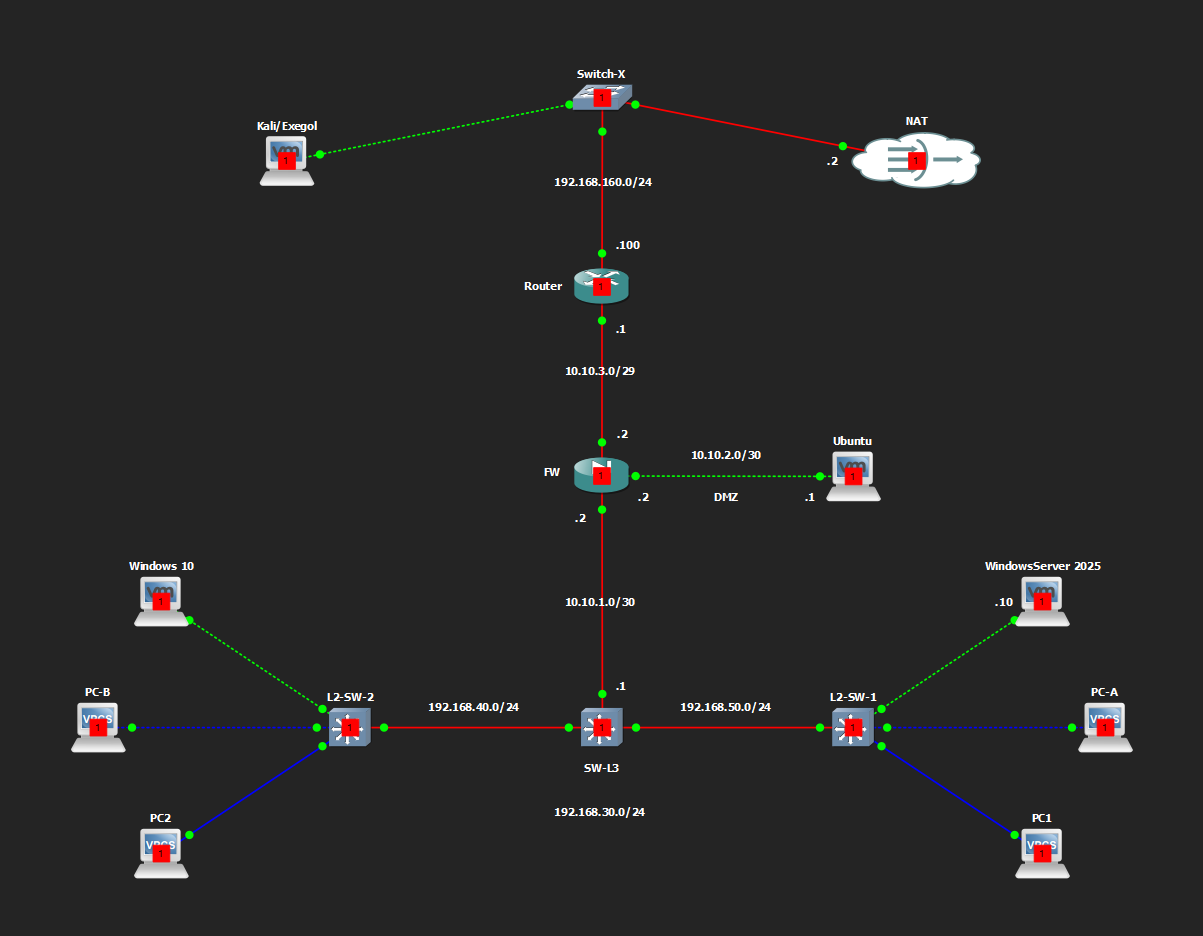
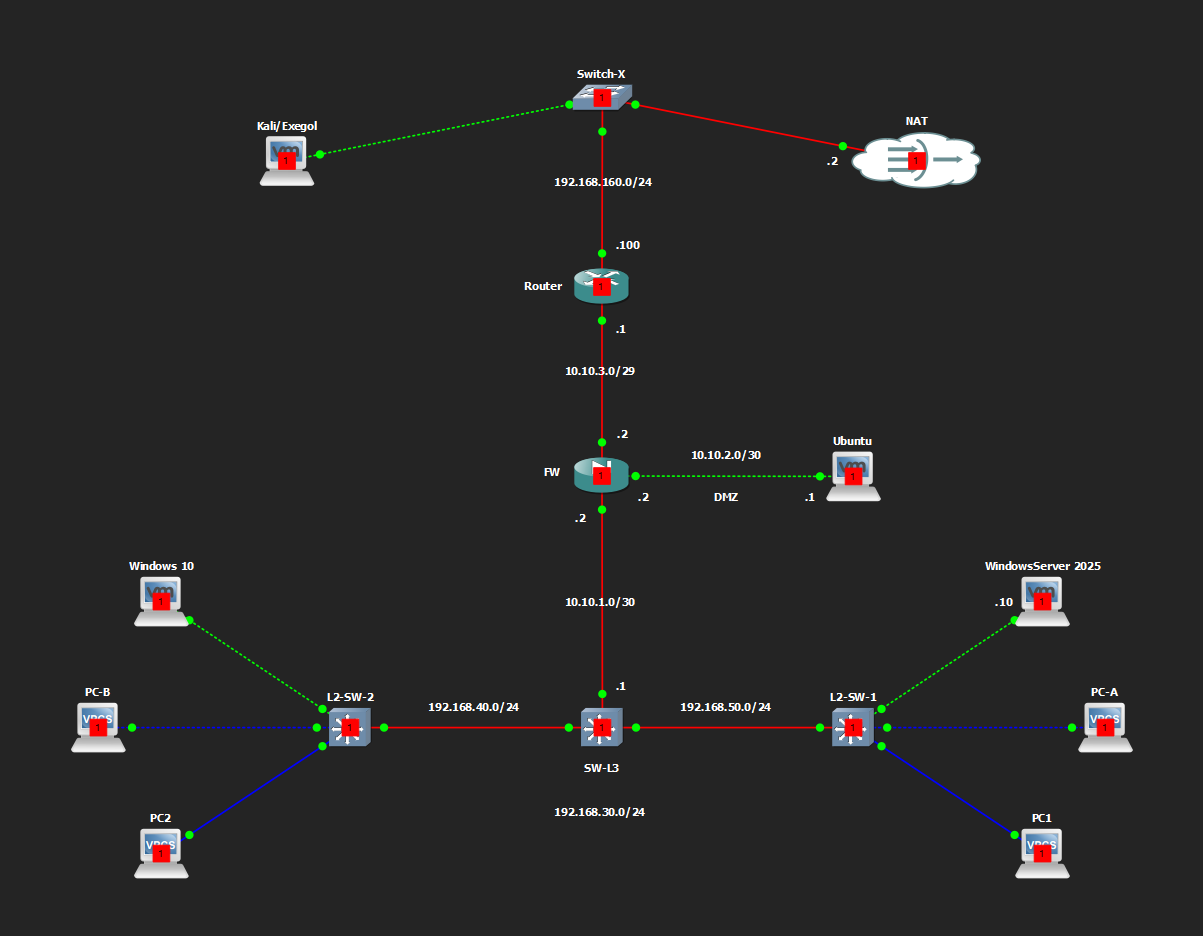
HomeLab is a GNS3 lab built on a single laptop (OMEN 16, i7-14650HX, 32 GB RAM, RTX 4060 8 GB) to practice networking, systems administration, and offensive security in one environment. It models a perimeter with a firewall (Cisco ASAv), a DMZ (Ubuntu Server), a routed core (SW-L3 + two access switches), and an Active Directory domain kooler.local running on Windows Server 2025. Attacker platforms (Kali, Exegol) sit on the untrusted outside segment alongside a NAT gateway to the internet. The number of assets, host types, and configured services are based on my host specs to allow running the entire environment simultaneously without the PC sweating too much, and for the VMs to have decent resources allocated.
Note: This is a baseline setup to get started with, so customize as needed. Tools and concepts like server hardening, SIEM, EDR, C2 server, and LAN pivoting for further test have to be implemented and done by yourself depending on what you want to train on. Only the global architecture will be documented over time for usability and eventually be tracked in CHANGELOG.md. In addition, as the firewall is not actually under licensing (evaluation mode), the bandwidth involved is throttled and heavily affects network performance (external source → DMZ, inside → Internet). So I temporarily use an additional network adapter on the VMs (VMware NAT) for demanding network traffic like system updates or big softwares downloads. Take snapshots of components as you test and break stuff. Enjoy and grow!
Chain: Kali/Exegol + NAT (Switch-X) → Router → ASAv Firewall (with DMZ leg) → SW-L3 → L2-SW-1 / L2-SW-2 (VLANs).
| Segment | Subnet | Notes |
|---|---|---|
| Outside / untrusted | 192.168.160.0/24 | Switch-X: Kali/Exegol, NAT cloud; Router at .100 |
| Router ↔ FW outside | 10.10.3.0/29 | Router .1, ASA outside .2, DMZ NAT .3 |
| FW ↔ DMZ | 10.10.2.0/30 | ASA dmz .2, Ubuntu .1 |
| FW ↔ SW-L3 (inside) | 10.10.1.0/30 | ASA inside .2, SW-L3 .1 |
| VLAN 30 (VPCS) | 192.168.30.0/24 | PC-C, PC-D |
| VLAN 40 (Workstations) | 192.168.40.0/24 | behind L2-SW-2 — Windows 10, PC-B |
| VLAN 50 (Servers) | 192.168.50.0/24 | behind L2-SW-1 — Windows Server 2025 (DC01), PC-A |
| VLAN 100 (Mngmt) | 192.168.100.0/24 | SVI present on SW-L3; trunked, not yet in ASA object group |
Trunk links SW-L3 ↔ L2-SW-1/L2-SW-2 carry VLANs 30, 40, 50, 100 (native VLAN 999, dot1q).
| Device | Role | Platform | Key interfaces |
|---|---|---|---|
| Router | Edge router, NAT-side gateway | Cisco IOSv 15.9 | Gi0/0 10.10.3.1/29 (to FW); Gi0/1 192.168.160.100/24 (to Switch-X) |
| FW | Perimeter firewall, DMZ | Cisco ASAv 9.22(1)1 | outside 10.10.3.2/29; dmz 10.10.2.2/30; inside 10.10.1.2/30 |
| SW-L3 | Core L3 switch, inter-VLAN routing | Cisco IOSv L2 15.2 | Gi0/0 10.10.1.1/30 (to FW); Gi0/1-0/2 trunks to L2-SW-1/2; SVIs for VLAN 30/40/50/100; VTP server mode |
| L2-SW-1 | Access switch | Cisco IOSv L2 15.2 | VLAN 50 access ports (WinServer2025, PC-A); VTP client mode |
| L2-SW-2 | Access switch | Cisco IOSv L2 15.2 | VLAN 40 access ports (Windows 10, PC-B); VLAN 30 (PC-D); VTP client mode |
ASAv is licensed under Smart Licensing Using Policy, running in Evaluation Mode with feature tier standard and throughput level 1G declared locally (no CSSM registration).
| Host / Resources | OS / Build | Hostname | IP / VLAN | Services |
|---|---|---|---|---|
| Kali (1 CPU, 8 Cores, 4/80GB) | Kali Linux 2026.2 (VMware amd64) | Kali | 192.168.160.130 (outside segment) | Attacker platform |
| Ubuntu (1 CPU, 2 Cores, 3/60GB) | Ubuntu Desktop 26.04 | ko0ler-VMware-Virtual-Platform | 10.10.2.1 (DMZ) | DVWA, bWAPP, httpbin, FTP, Samba, MySQL |
| WindowsServer 2025 (1 CPU, 4 Cores, 4/60GB) | Windows Server 2025 | DC01 | 192.168.50.10 (VLAN 50) | ADCS, ADDS, DHCP, DNS, MSSQL — domain controller for kooler.local |
| Windows 10 (1 CPU, 2 Cores, 4/60GB) | Windows 10 | PC1 | DHCP (VLAN 40) | Domain-joined workstation |
| PC-A | VPCS | — | VLAN 50 (.15) | — |
| PC-B | VPCS | — | VLAN 40 (.15) | — |
| PC-C | VPCS | — | VLAN 30 (.1) | — |
| PC-D | VPCS | — | VLAN 30 (.2) | — |
VPCS are mainly used for connectivity testing.
Domain controller: DC01 (Windows Server 2025, 192.168.50.10), running ADCS, ADDS, DHCP, DNS and MSSQL side by side — a deliberately over-provisioned DC for attack-surface practice (service account exposure, ADCS template misconfig, SQL on a DC, etc.).
| Account | Scope | Notes |
|---|---|---|
| Administrator | Local (DC01) | Built-in local admin |
| Ko0ler | Domain user | — |
| user1 | Domain user | — |
Windows 10 (PC1) is joined to kooler.local; local login ko0ler also exists on that machine separate from the domain account.
| Zone pair | Direction | Allowed |
|---|---|---|
| outside → DMZ | inbound | HTTP(80), HTTPS(443), 8080, 8070, 8060 to Ubuntu (10.10.2.1); ICMP |
| DMZ → outside | outbound | HTTP, HTTPS, DNS(53) |
| DMZ → inside | — | denied |
| inside → DMZ | outbound | full IP to Ubuntu |
| inside → outside | outbound | full IP, PAT via ASA outside interface |
NAT: PAT for inside subnets (192.168.30/40/50.0/24, dynamic, via ASA outside) and static NAT for the DMZ host (10.10.2.1 → 10.10.3.3, DMZ_MAPPED). Note: inter-VLAN traffic between VLANs 30/40/50 never crosses the ASA — SW-L3 routes it locally, so the firewall only sees north-south (DMZ/outside) traffic.
Tracked in CHANGELOG.md.
Lab credentials are intentionally not committed to this repository.
| Scope | Account | Hostname |
|---|---|---|
| Local | kali | ko0ler-VMware-Virtual-Platform (Kali) |
| Local | ko0ler | Ubuntu |
| Local | ko0ler | PC1 (Windows 10) |
| Local | Administrator | DC01 (WindowsServer 2025) |
| Domain (kooler.local) | Ko0ler | — |
| Domain (kooler.local) | user1 | — |
