 knudsenmorten/clientinspectorv2
Azure-based client inventory and drift detection tool that collects Windows configuration data (antivirus, patching, Bitlocker) into LogAnalytics for KQL-driven dashboards and Sentinel alerting.


Are you in control? - or are some of your core infrastructure processes like patching, antivirus, bitlocker enablement drifting? Or would you like to do advanced inventory, where you can lookup your warranty state against Lenovo or Dell warranty, then keep reading.
Check out ClientInspector, which can help you get great insight to your complete client environment.
ClientInspector is free to the community - built to be a cool showcase of how you can bring back data from your clients using Azure Log Ingestion Pipeline, Azure Data Collection Rules, Azure LogAnalytics; view them with Azure Monitor & Azure Dashboards - and get "drift-alerts" using Microsoft Sentinel.
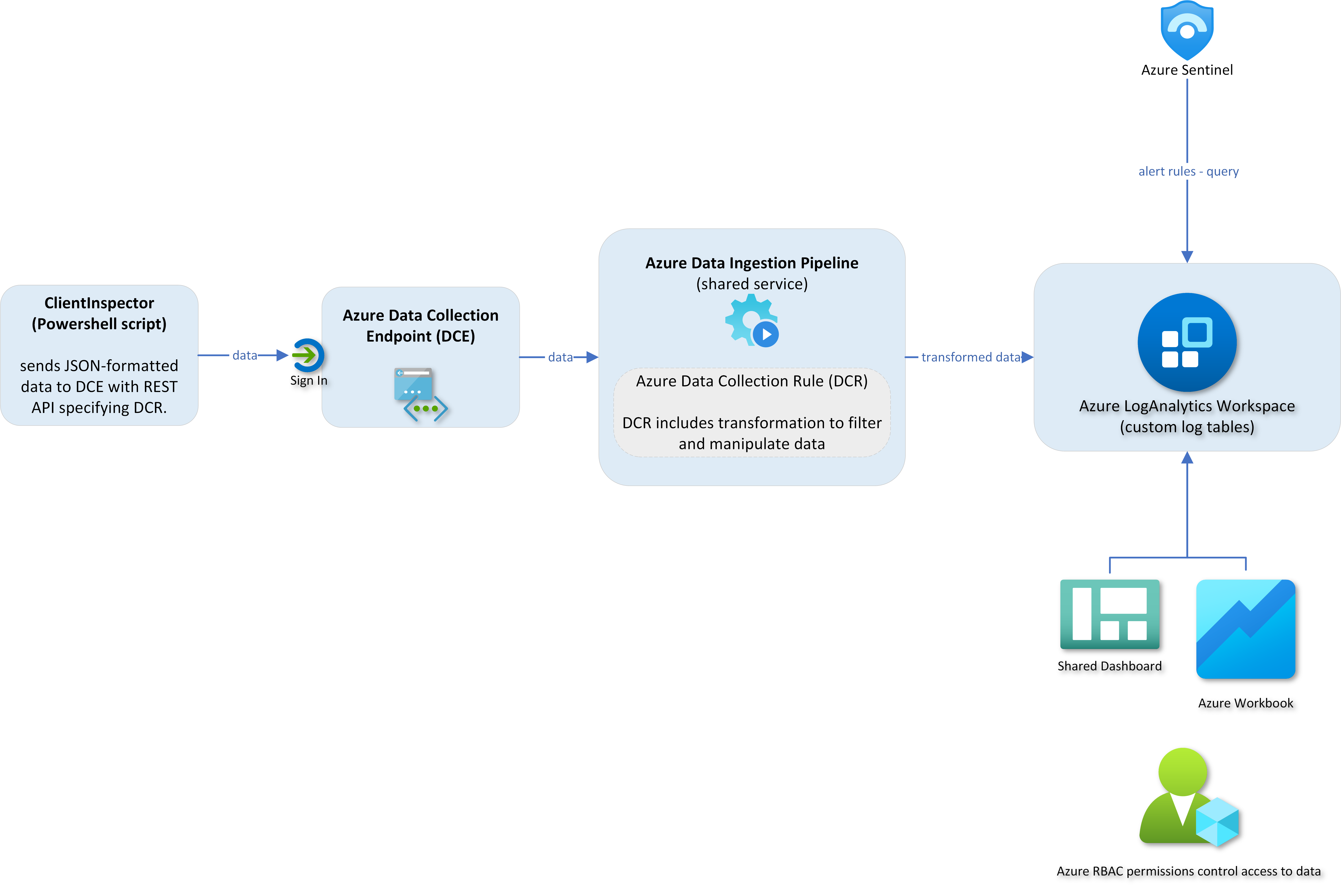
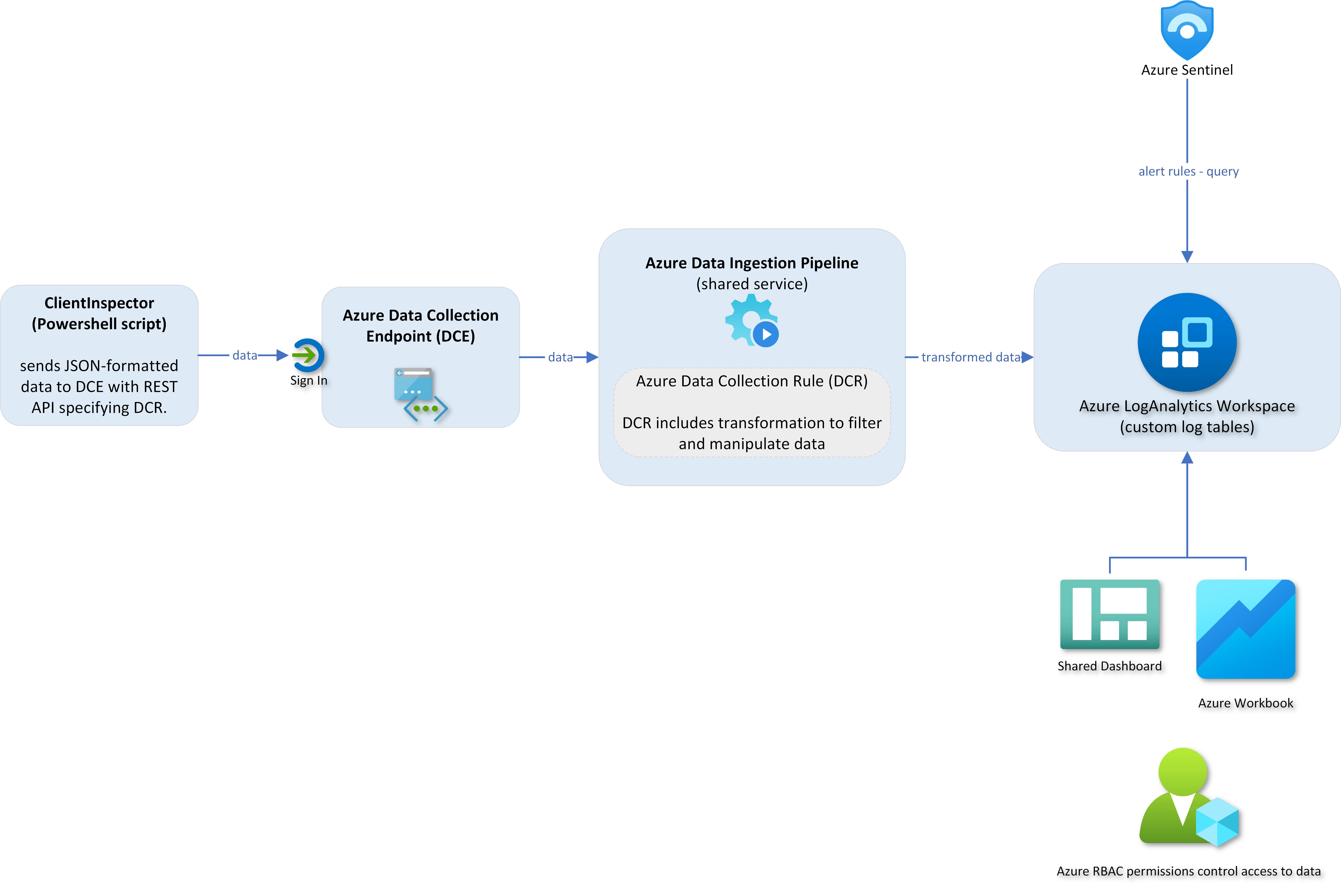
ClientInspector (v2) is uploading the collected data into custom logs in Azure LogAnalytics workspace - using Log ingestion API, Azure Data Collection Rules (DCR) and Azure Data Collection Endpoints (DCE).


It is important for me to state that I'm not trying to build a separate management tool, which will compete with Microsoft security and management stack.
Nothing beats Microsoft Azure/M365 management and security stack. They are rock star solutions.
But I'm really passioned about the logging capabilities and the power to bring data back from clients, servers, cloud and 3rd party systems - and getting cool valueable information out of the data.
I have a similar solution for servers - ServerInspector. Unfortunately, it is not public.
Big Thanks to the great people in Microsoft product teams - you are rock stars 😄
Happy hunting 😄
What data is being collected ?
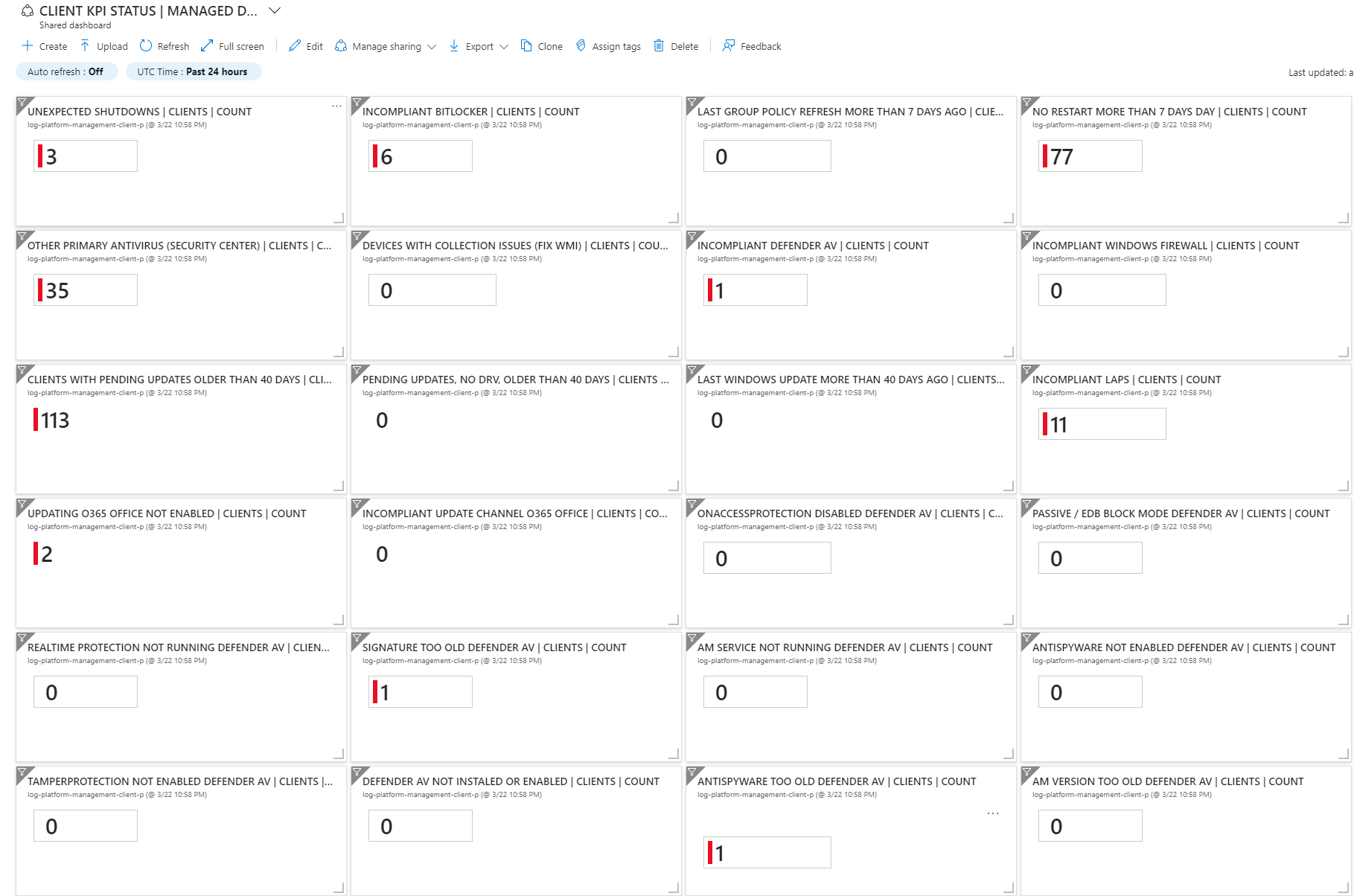
Desired State Dashboards - How to get insight of my environment from the data ?
How do I query the data? - Kusto (KQL) is the answer
Architecture, Schema & Networking
Implementation
Dependencies
Running ClientInspector.ps1 - 3 modes
Sample output of ClientInspector
Security
Layout of ClientInspector data-set
Verbose-mode & More help
Cost - How much does it cost to store these data ?
Bug findings, please inform me
Contact
Video 3m 19s - Running ClientInspector using commandline (normal mode)
Video 1m 40s - Automatic creation of 2 tables & DCRs (verbose mode)
Video 1m 37s - Automatic creation of 2 tables & DCRs (normal mode)
Video 1m 34s - See schema of DCR and table)
Video 2m 19s - Data manipulation
Video 1m 58s - Kusto queries against data
Video 3m 01s - Dashboards
Video 0m 48s - Sample usage of data - lookup against Lenovo warranty db
Video 7m 25s - Deployment via ClientInspector DeploymentKit
ClientInspector can be used to collect lots of great information of from your Windows clients - and send the data to Azure LogAnalytics Custom Tables.
The script collects the following information (settings, information, configuration, state):
Feel free to add more cool data-collections to suit your needs. If you want to take part in the community, please send me an email with your collections, if you think they can be of benefit of the whole community.
You can use any source data which can be retrieved into Powershell (wmi, cim, external data, rest api, xml-format, json-format, csv-format, etc.)
It is very important to understand, that the data typically needs to be manipulated before sending them - to ensure they are valid and any irrelevant data has been removed.
ClientInspector uses all of the 24 functions within the Powershell module, AzLogDcIngestPS, to handle source data manipulation to remove "noice" in data, to rename prohibited colums in tables/DCR - and support needs for transparency with extra insight like UserLoggedOn, CollectionTime, Computer:
#-------------------------------------------------------------------------------------------
# Collecting data (in)
#-------------------------------------------------------------------------------------------

Write-Output ""
Write-Output "Collecting Bios information ... Please Wait !"

$DataVariable = Get-CimInstance -ClassName Win32_BIOS

#-------------------------------------------------------------------------------------------
# Preparing data structure
#-------------------------------------------------------------------------------------------

# convert CIM array to PSCustomObject and remove CIM class information
$DataVariable = Convert-CimArrayToObjectFixStructure -data $DataVariable -Verbose:$Verbose

# add CollectionTime to existing array
$DataVariable = Add-CollectionTimeToAllEntriesInArray -Data $DataVariable -Verbose:$Verbose
