Sanitised Windows security lab demonstrating Active Directory administration, host and network detection, and layered mitigation of CVE-2021-34527.

A sanitised academic case study demonstrating how a Windows domain lab was designed, monitored and hardened while investigating CVE-2021-34527 (PrintNightmare) in a controlled virtual environment.
Safety note: This repository focuses on systems administration, defensive monitoring, evidence analysis and mitigation testing. It intentionally excludes operational exploit code, payloads, credentials, raw packet captures, virtual-machine images and the original university submission.
The project followed three academic phases: vulnerability proposal, detection-and-mitigation design, and implementation with a live demonstration. The final lab reproduced the vulnerability in an isolated network, correlated host and network telemetry, tested multiple controls, and documented both successful and unsuccessful mitigations.
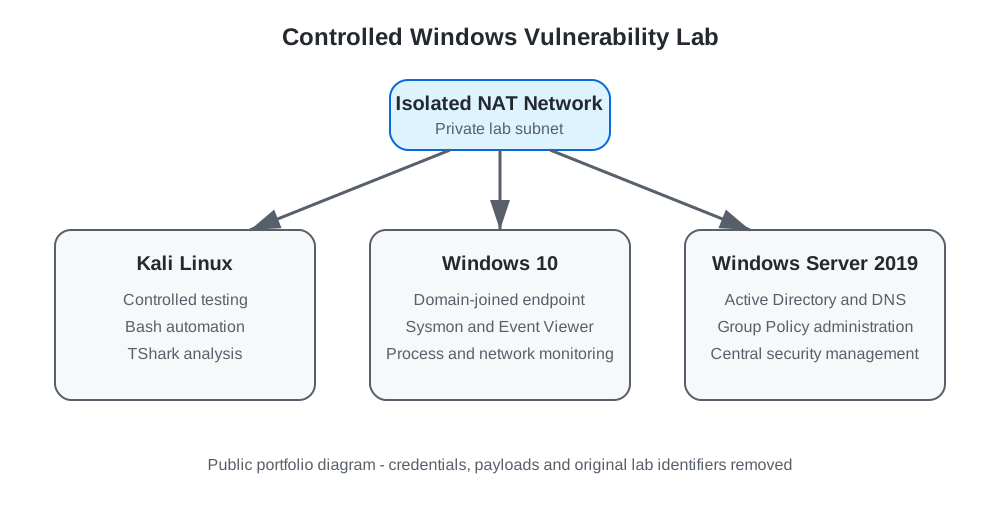
The isolated topology separated the testing workstation from the domain controller and domain-joined endpoint while allowing the team to observe authentication, SMB/RPC communication, service activity and endpoint changes.
The investigation correlated several evidence sources rather than relying on a single security product:
| Source | Evidence reviewed | Defensive value |
|---|---|---|
| PrintService log | Event ID 316 and printer-driver activity | Identified suspicious driver installation and associated files |
| Sysmon | Event IDs 7, 11 and 13 | Tracked image loads, file creation and Registry modifications |
| Security log | Event IDs 4624, 4720, 4722, 4724, 4732 and 4738 | Revealed logons and account or group changes associated with privilege and persistence activity |
| System log | Event ID 7031 | Flagged unexpected Print Spooler termination |
| Wireshark/TShark | TCP endpoints, conversations, NTLM, SMB2 and transferred objects | Connected host events with network communication and file-transfer evidence |
| Process Monitor | Process, file and Registry activity | Supported reconstruction of the activity sequence |
See Detection Analysis and the Defensive TShark Checklist.
| Control tested | Result | Operational consideration |
|---|---|---|
| Disable inbound remote printing | Prevented the remote attack path | Remote print-server functionality was affected |
| Deny writes to the driver directory | Blocked unauthorised file placement | Could prevent legitimate print-queue or driver changes |
| Block RPC/SMB ports at the firewall | Prevented remote communication required by the test | Could interrupt services that depend on those ports |
| Disable the Print Spooler by Group Policy | Removed the vulnerable service path | Disabled local and remote printing |
| Restrict Point and Print / require signed drivers | Did not stop the tested path in this lab | Demonstrated that one control should not be trusted in isolation |
The main conclusion was that layered controls must be selected according to business requirements. A technically effective control can still be unsuitable if it disrupts a required service.
See Mitigation Results.
This was completed as a two-person university project. My documented contribution focused on:
.
├── README.md
├── NOTICE.md
├── assets/
│   └── lab-architecture.svg
├── data/
│   ├── detection-indicators.csv
│   └── mitigation-results.csv
├── docs/
│   ├── architecture-and-administration.md
│   ├── detection-analysis.md
│   ├── mitigation-results.md
│   ├── project-lifecycle.md
│   └── lessons-learned.md
├── queries/
│   ├── tshark-defensive-checklist.md
│   └── windows-event-checklist.md
└── scripts/
    ├── README.md
    └── cleanup_lab_artifacts.sh
The repository is a concise case study rather than a copy of the assessment. Raw PCAP data, demonstration recordings, hardcoded laboratory credentials, payload-generation commands, third-party exploit code, copyrighted reference books, original reports and VM images are deliberately excluded.