 itwizardo/dcs932l-emulation-cve-2024-37606-attack
Simplifies D-Link DCS-932L firmware emulation with pre-patched components and includes a Proof-of-Concept exploit for CVE-2024-37606."

Welcome! This repository provides tools and an environment to emulate the D-Link DCS-932L firmware and demonstrate the CVE-2024-37606 vulnerability. It includes pre-patched binaries and necessary libraries, simplifying the emulation setup so you don't need to perform manual patching with tools like Ghidra.
This project includes a proof-of-concept exploit (CVE-2024-37606-DCS932L.py) for CVE-2024-37606. This vulnerability involves a buffer overflow in the alphapd service. Please use this responsibly and for educational purposes only.
Click on the photo to see the video
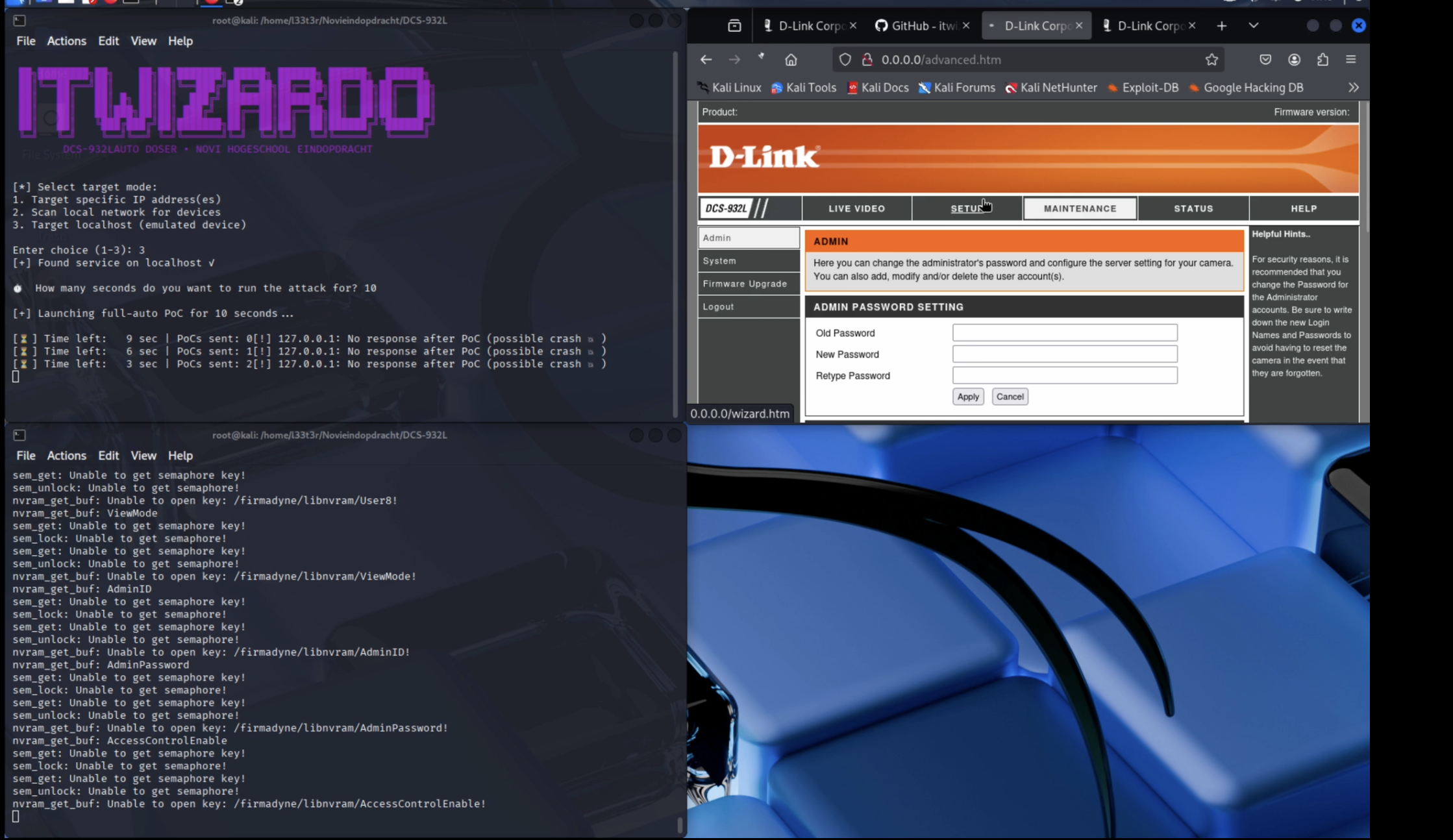
Several modifications have been made to enhance the functionality and usability of the firmware emulation environment:
startup.sh) to simplify emulation.libnvram.so to ensure proper functioning of the NVRAM emulator. The modified file (firmadyne/libnvram.so) is included.alphapd binary using Ghidra to resolve an error preventing IP retrieval from sysinfo during emulation.qemu-mipsel-static for MIPS Little Endian emulation.Follow these steps to set up the emulation environment and run the exploit.
gitqemu-user-staticpython3 and pipgit clone https://github.com/itwizardo/DCS932L-Emulation-CVE-2024-37606-Attack DCS932L-CVE
cd DCS932L-CVE
sudo apt update
sudo apt install qemu-user-static
brew install qemu
# QEMU installation via Homebrew includes user-mode static binaries.
choco install qemu
Copy the QEMU static binary into the firmware's filesystem:
sudo cp /usr/bin/qemu-mipsel-static ./usr/bin/
Set the immutable attribute on the web directory. This prevents modification of critical web server files needed for the emulation and exploit to function correctly:
sudo chattr +i etc_ro/web/
Set-ItemProperty -Path ./etc_ro/web -Name IsReadOnly -Value $true
# Note: This sets the directory as Read-Only, preventing accidental changes.
# To make contents read-only too, add -Recurse to Get-ChildItem:
# Get-ChildItem -Path ./etc_ro/web -Recurse | Set-ItemProperty -Name IsReadOnly -Value $true
sudo chflags schg etc_ro/web/
Enter the chroot environment using the MIPS Little Endian QEMU binary:
sudo chroot . /usr/bin/qemu-mipsel-static /bin/sh
Inside the chroot shell, run the startup script and start the web server:
# Execute startup tasks (network setup, etc.)
./startup.sh

# Set environment variables for nvram emulation
export LD_PRELOAD=/firmadyne/libnvram.so
export HOME=.
export RANDFILE=$HOME/.rnd

# Start the vulnerable web server (binds to 0.0.0.0, may take 1-2 mins to fully initialize)
alphapd
Leave this terminal running. The emulated device's services will be accessible via the host machine using the IP address configured by startup.sh (often 192.168.0.1).
Open a new terminal window on your host machine (outside the chroot environment).
Open in new terminal:
cd /path/to/DCS932L # Adjust path if necessary
(Optional) Install required Python packages if the script needs them (e.g., requests):
# pip3 install requests # Uncomment if needed
Execute the exploit script. It automatically targets the local emulated environment (192.168.0.1 set up by startup.sh):
python3 CVE-2024-37606-DCS932L.py
To target a different IP address, use the --ip argument:
# Example: python3 CVE-2024-37606-DCS932L.py --ip <target_ip>
Follow the output of the script to see the exploit in action.
qemu-mipsel-static.qemu-mips-static (Big Endian) will result in Invalid ELF image errors.alphapd service binds to 0.0.0.0 inside the chroot environment and may take 1-2 minutes to become fully responsive after execution.startup.sh script likely sets up a network interface (e.g., tap0) with IP 192.168.0.1. Verify this if the exploit fails to connect./lib/ld-uClibc.so.0) are present in the chroot environment's /lib directory.This project is for educational and research purposes only. It demonstrates a known vulnerability (CVE-2024-37606). The authors are not responsible for any misuse of this information or code. Use this environment and exploit responsibly and ethically.
This was developed as part of a school project for Novi Hogeschool.
Georgio T. - itwizardo
Feel free to contribute to this project and improve the tools for firmware reverse engineering and security analysis!
