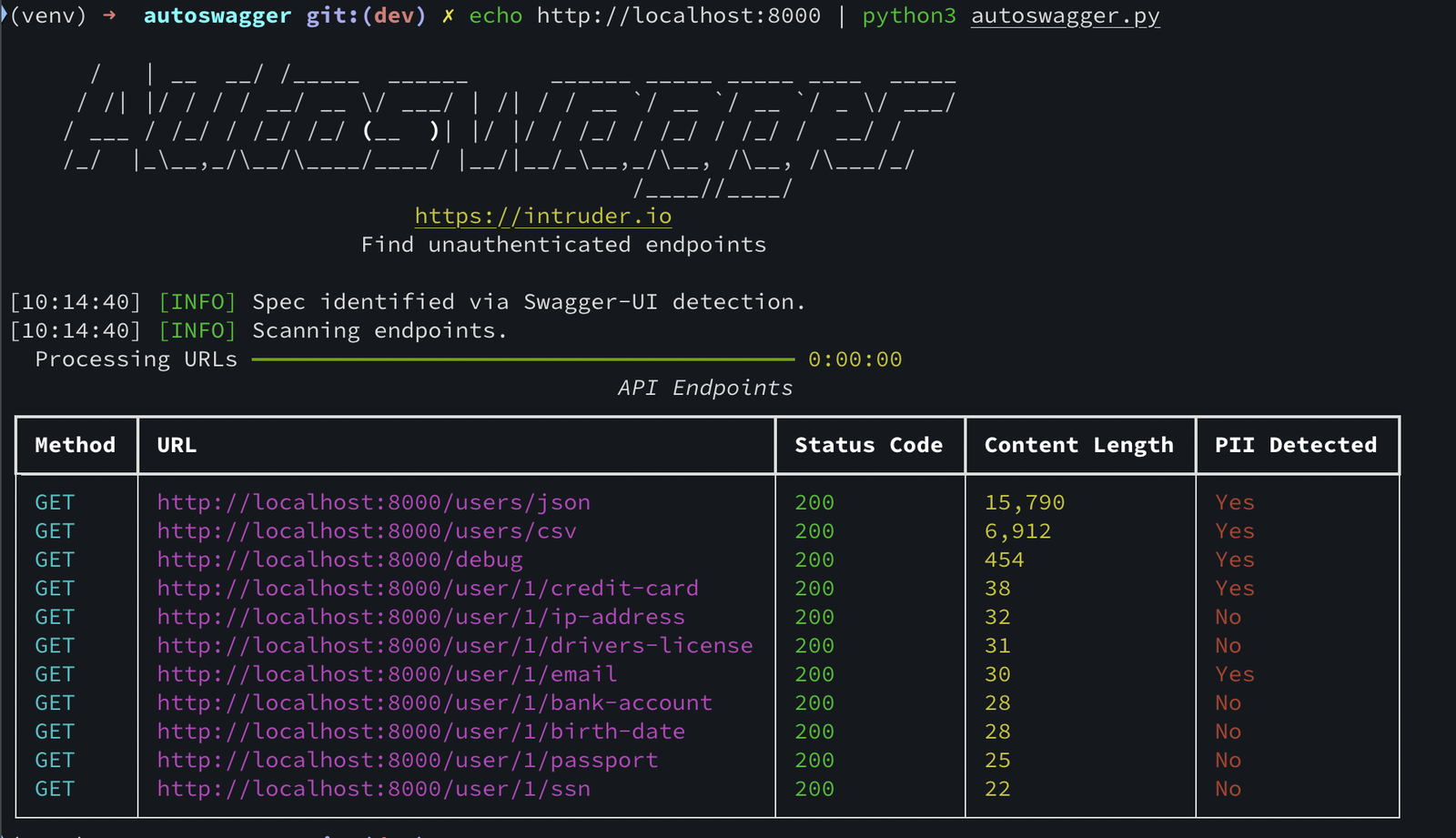
Command-line tool that discovers Swagger/OpenAPI specs, enumerates endpoints, and tests for unauthenticated access, PII exposure, and leaked secrets in API responses.
Autoswagger is a command-line tool designed to discover, parse, and test for unauthenticated endpoints using Swagger/OpenAPI documentation. It helps identify potential security issues in unprotected endpoints of APIs, such as PII leaks and common secret exposures.
Please note that this initial release of Autoswagger is by no means complete, and there are some types of specification which the tool does not currently handle. Please feel free to use it as you wish, and extend its detection capabilities or add detection regexes to cover your specific use-case!
Autoswagger automates the process of finding OpenAPI/Swagger specifications, extracting API endpoints, and systematically testing them for PII exposure, secrets, and large or interesting responses. It leverages Presidio for PII recognition and regex for sensitive key/token detection.
Multiple Discovery Phases
Discovers OpenAPI specs in three ways:
.json, .yaml, or .yml is provided, parse that file directly./swagger-ui.html), and extract spec from HTML or JavaScript./swagger.json, /openapi.json, etc.). Only attempt this if 1. and 2. did not yield a result.Parallel Endpoint Testing
Multi-threaded concurrent testing of many endpoints, respecting a configurable rate limit (-rate).
Brute-Force of Parameter Values
If -b or --brute is used, try using various data types with a few example values in an attempt to bypass parameter-specific validations.
Presidio PII Detection
Check output for phone numbers, emails, addresses, and names (with context validation to reduce false positives). Also parse CSV rows and naive “key: value” lines.
Secrets Detection
Leverages a set of regex patterns to detect tokens, keys, and debugging artifacts (like environment variables).
Command Line or JSON Output
In default mode, displays results in a table. With -json, output a JSON structure. -product mode filters output to only show those that contain PII, secrets, or large responses.
Clone or download the repository containing Autoswagger.
git clone [email protected]:intruder-io/autoswagger.git
Install dependencies (e.g., using Python 3.7+):
pip install -r requirements.txt
(It's recommended to use a virtual environment for this: python3 -m venv venv;source venv/bin/activate)
Check installation, show help:
python3 autoswagger.py -h
| Flag | Description |
|---|---|
urls | List of base URLs or direct spec URLs. |
-v, --verbose | Enables verbose logging. Creates a log file under ~/.autoswagger/logs. |
-risk | Includes non-GET methods (POST, PUT, PATCH, DELETE) in testing. |
-all | Includes 200 and 404 endpoints in output (excludes 401/403). |
-product | Outputs only endpoints with PII or large responses, in JSON format. |
-stats | Displays scan statistics (e.g. requests, RPS, hosts with PII). |
-rate <N> | Throttles requests to N requests per second. Default is 30. Use 0 to disable rate limiting. |
-b, --brute | Enables brute-forcing of parameter values (multiple test combos). |
-json | Outputs results in JSON format instead of a Rich table in default mode. |
      /   | __  __/ /_____  ______      ______ _____ _____ ____  _____
     / /| |/ / / / __/ __ \/ ___/ | /| / / __ `/ __ `/ __ `/ _ \/ ___/
    / ___ / /_/ / /_/ /_/ (__  )| |/ |/ / /_/ / /_/ / /_/ /  __/ /
    /_/  |_\__,_/\__/\____/____/ |__/|__/_\__,_/\__, /\__, /\___/_/
                                              /____//____/
                              https://intruder.io
                          Find unauthenticated endpoints

usage: autoswagger.py [-h] [-v] [-risk] [-all] [-product] [-stats] [-rate RATE] [-b] [-json] [urls ...]

Autoswagger: Detect unauthenticated access control issues via Swagger/OpenAPI documentation.

positional arguments:
  urls           Base URL(s) or spec URL(s) of the target API(s)

options:
  -h, --help     show this help message and exit
  -v, --verbose  Enable verbose output
  -risk          Include non-GET requests in testing
  -all           Include all HTTP status codes in the results, excluding 401 and 403
  -product       Output all endpoints in JSON, flagging those that contain PII or have large responses.
  -stats         Display scan statistics. Included in JSON if -product or -json is used.
  -rate RATE     Set the rate limit in requests per second (default: 30). Use 0 to disable rate limiting.
  -b, --brute    Enable exhaustive testing of parameter values.
  -json          Output results in JSON format in default mode.

Example usage:
  python autoswagger.py https://api.example.com -v
Direct Spec
If a provided URL ends with .json/.yaml/.yml, Autoswagger directly attempts to parse the OpenAPI schema.
Swagger-UI Detection
/swagger-ui.html).swagger.json or openapi.json.window.swashbuckleConfig.Direct Spec by Bruteforce
/swagger.json, /openapi.json, etc.Collect Endpoints
After loading a spec, Autoswagger extracts each path and method under the paths key.
HTTP Methods
GET only.-risk to include other methods (POST, PUT, PATCH, DELETE).Parameter Values
requestBody (OpenAPI 3) or body parameters (Swagger 2).Rate Limiting & Concurrency
-rate).Response Analysis