 hotstartlabs/sift
Credential and sensitive-data exposure triage for file shares


Credential and sensitive-data exposure triage for file shares.
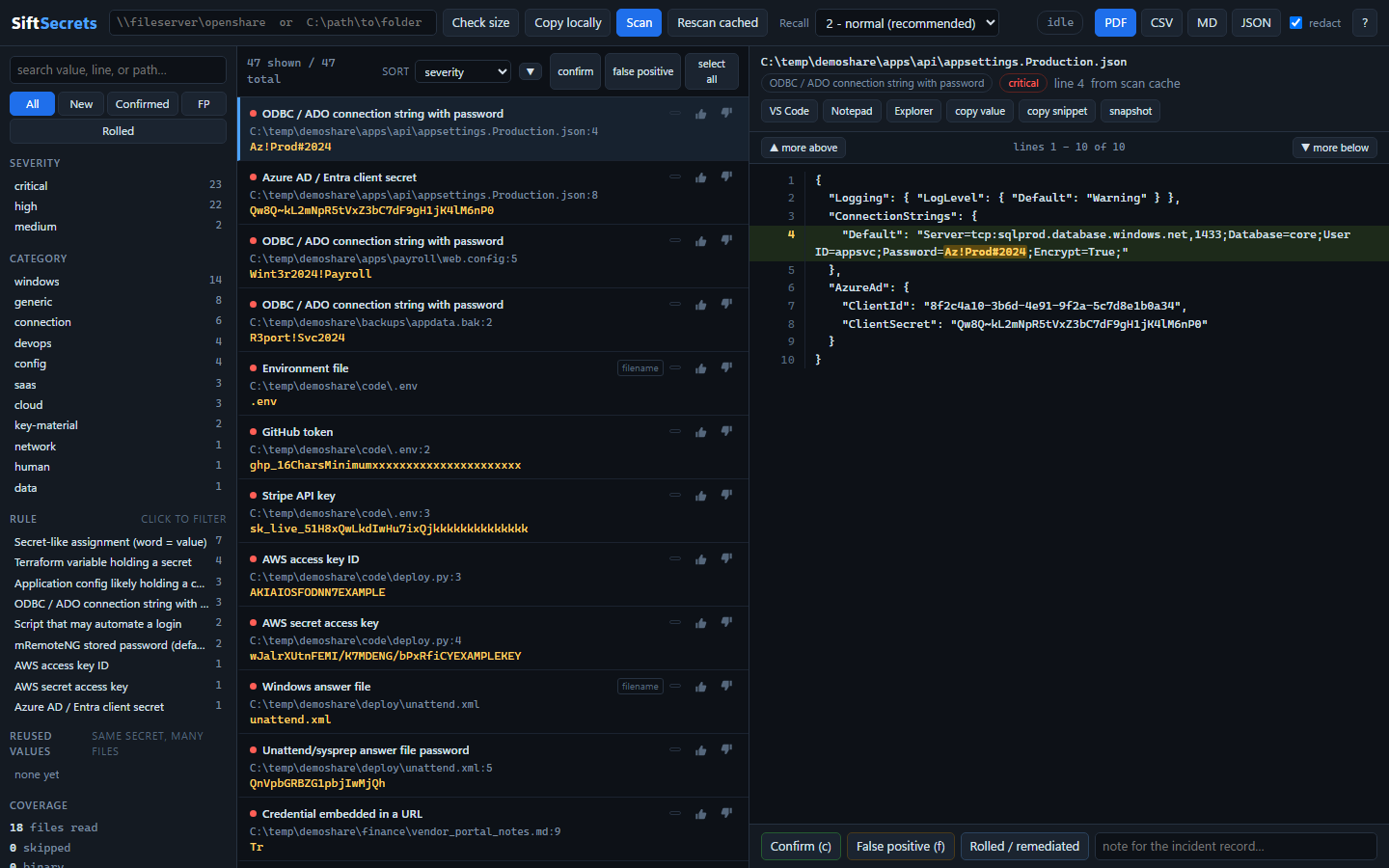
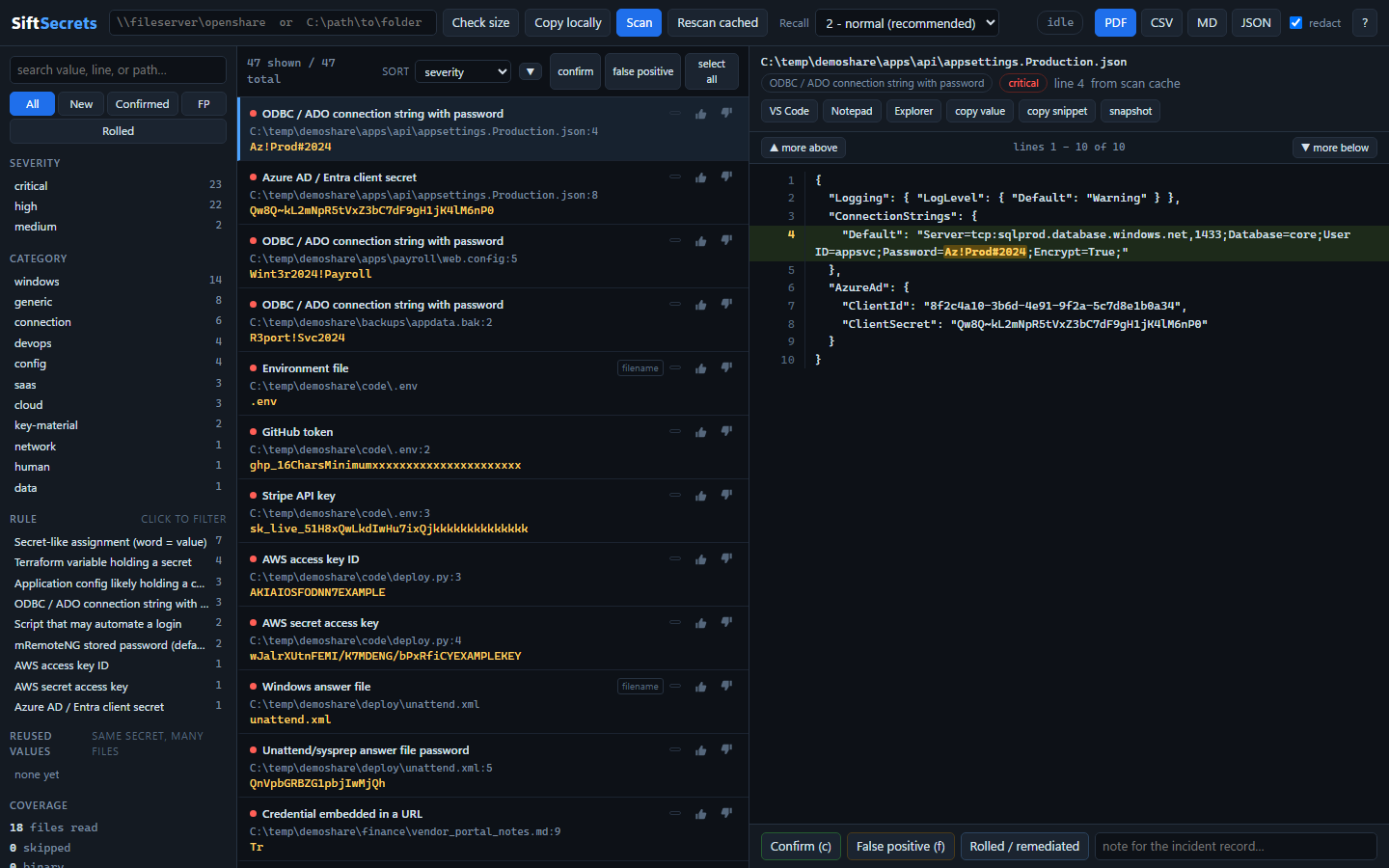
When an open share turns up, the question is never "does this repo have a leaked key". It is "what just got exposed, and what do I have to roll before close of business." sift is built for that question: high recall, a fast review queue, and a feedback loop so that anything you spot by eye becomes a rule that finds the other two hundred copies.
Python 3.11+, standard library only. No pip install, no internet, no build step. It runs on a locked-down IR laptop, which is where you need it.
sift survey \\fileserver\openshare     # how big is this thing
sift copy   \\fileserver\openshare C:\IR\case-4471    # take a throttled copy
sift scan   C:\IR\case-4471            # scan it, opens the triage UI
Scanning in place works too. Try it on a share of fabricated credentials first:
sift demo C:\temp\demoshare
sift.cmd is a launcher that works from any directory. To type sift instead
of the full path, add C:\Dev\sift to PATH:
setx PATH "%PATH%;C:\Dev\sift"
For a machine with no Python at all, python build_portable.py builds
dist/sift-secrets-<version>-portable-win64.zip: the official python.org
embeddable runtime plus this source tree, unzip-and-run via the bundled
sift.cmd. ~11 MB, no install, no admin rights, and nothing in it is
compiled or repacked — see the docstring in build_portable.py for why
that beats a frozen .exe on a locked-down IR laptop.
Both are good tools solving a different problem.
They are precision tools built for CI, where a false positive costs a developer their afternoon, so they fire mainly on things shaped like a known vendor API key. trufflehog goes further and prefers secrets it can verify by calling the vendor's API, which is a genuinely excellent signal that regex cannot reproduce.
Share triage inverts the economics. A human is already reading every hit, so a false positive costs three seconds. What costs you is a miss.
Vendor API keys absolutely do leak on shares - a web-root backup, a deployment
script, someone's project folder copied to the departmental drive, and there is
an .env with a live Stripe key in it. Those are worth catching, and sift
catches them. But they are also the part gitleaks and trufflehog already handle
well. The gap is everything else, and on a file share it is most of it:
| What the CI scanners miss | Why they walk past it |
|---|---|
web.config with a SQL connection string | Not a known key format, no vendor to verify against |
Map-Drives.ps1 with net use ... /user: | Just a shell command with a word after it |
New Hire Setup Guide.docx | Office file, read as binary, skipped entirely |
unattend.xml, GPP Groups.xml | Windows deployment artefacts nobody wrote a detector for |
confCons.xml, .rdg, WinSCP.ini | Reversible stored passwords, but not a "secret format" |
passwords.xlsx | It is a ZIP. Plain-text scanners see binary and move on |
.kdbx, .pfx, id_rsa | Opaque bytes - the filename is the finding |
A .bak with a connection string inside | Binary, so never read |
sift covers those, ships its own vendor-key rules, and imports other tools' rule packs and findings - gitleaks TOML, Kingfisher/Titus YAML, and trufflehog JSON - so you are not choosing between tools.
Closest prior art is Snaffler, which is excellent at the filename-and-classification half of this and is the direct inspiration for the filename rules. What it does not have - and what turns out to be the actual bottleneck once you have 400 hits - is a review loop.
r.Step 5 is the part that makes the rest worth doing. Findings are keyed on
(path, rule, line, value-hash), so a rescan re-inserts the same rows and your
status, notes, and owner ride along. Without that you would re-review the same
300 hits on every iteration and give up on the third one.
# size it up first: file count, total bytes, biggest folders, transfer estimates
sift survey \\fileserver\share

# take a rate-limited local copy (resumable; gentle = 5 MB/s by default)
sift copy \\fileserver\share C:\IR\case-4471 --speed gentle

# scan a share and open the triage UI
sift scan \\fileserver\share

# maximum recall: more noise, but a human is reading anyway
sift scan D:\dfs\dept --tier 3

# re-open the UI over the most recent scan
sift ui

# build a share of fabricated credentials, scan it, open the UI
sift demo C:\temp\demoshare

# inherit other tools' vendor-key rules, then use them in the live rescan loop
sift import-rules gitleaks.toml                    # gitleaks TOML
sift import-rules path/to/kingfisher/data/rules    # a directory of YAML

# pull in what the other scanners found, into the same queue
trufflehog filesystem \\fileserver\share --json > th.json
sift import-findings th.json

# hand off to the incident record (redacted unless you say otherwise)
sift export --fmt pdf --status confirmed --out ir-4471.pdf
sift export --fmt csv --out ir-4471.csv
sift export --fmt pdf --no-redact       # plaintext; handle as evidence

sift rules                              # what is loaded
sift selftest                           # detection tests against a synthetic share

# ask vendors whether confirmed findings are still live. NETWORK. Opt-in.
sift validate --status confirmed
Anywhere sift appears you can use python -m sift instead, from the
C:\Dev\sift directory.
| Flag | Effect |
|---|---|
--tier 1|2|3 | Recall dial. 1 = high signal, 2 = default, 3 = miss nothing |
--redact | Mask values in the store and exports. Use if the DB leaves the incident boundary |
--no-ui | Populate the store and exit, for scripted runs |
--no-browser | Start the UI server but do not open a browser (useful over RDP) |
--include/--exclude GLOB | Narrow the walk |
--no-archives | Do not open docx/xlsx/zip containers |
--no-strings | Do not run a strings pass over binaries |
--no-large | Skip files over --max-size instead of reading them in blocks |
--jobs N | Worker processes (default: auto) |
--max-size MB | Skip files above this (default 25) |
--port N | UI port (default 8973) |
Findings go to a per-target folder under %LOCALAPPDATA%\sift\, never the
working directory - the database holds plaintext credentials, and running the
tool from your home directory should not silently drop one there. Each share
gets its own store, so two engagements never share a triage queue. sift ui
with no arguments reopens the most recent one; --data DIR overrides.
Custom rules are global, at %LOCALAPPDATA%\sift\user-rules.json, so a
pattern you write during one engagement helps on the next share you look at.
Both are in the header of the UI, next to the path box, and on the CLI.
